

So, my good friend Rob was inspired by a line from my last article “Go forth an route”. He came up with several puns of nightmarish perportions…I wanted to share them:
“May all your packets arrive at their destination”
Not too bad:)
“ACK’s not what your router can do for you….”
Waaa waaaa waaaaahhhhhh
“All your SYN’s are forgiven”
I think a clown somewhere just died for that pun.
hehehehehe…Rob, I LOVE these…even though I died a little on the inside from reading them. You guys care to add your worst puns? No pressure Jimmy…hehehe
Super Consultant Powers Activate! I’m going to have a booth at the Phoenix MUM and I’ve got vouchers to hand out ($50 value). I’ll also have your standard marketing propaganda. My favorite will be Tshirts. I’m designing and printing a number of shirts to hand out, which I will also be selling online after the MUM 😛 hehehe.
Anyway, back to the point. If you are attending MUM and would like a free voucher then email me via the contact form, or if you already have my email via that, and I’ll shoot you the magic registration # to get you in!
So working for a datacenter, I hear plenty of buzz words…what good sales guy doesn’t work one in every other sentence? One of those phrases you hear is “concurrently maintainable”. What does this mean? It means you can sustain loss in your infrastructure and still be up. We are talking about hardware redundancy.
In our DC if you aren’t doing BGP with us, you would do well to use VRRP…what is VRRP? Here’s wikipedia’s definition. In essence it works like such. You have two of your routers connected to the same layer 2 segment. You have a subnet configured that is /29 or larger. You configure a physical IP on the interfaces, then you create a VRRP interface on each router associated with those connected interfaces. You then assign the same VRRP IP address on both routers to the VRRP interface.
The VRRP router that has the higher priority(default is 100) is the master. The master responds to ARP requests for the VRRP IP. If the master router fails, then the backup router takes over and owns the VRRP IP. Soooo, your default gateway points towards the VRRP IP so that if the master fails and the backup takes over your default route is still valid! There is also a concept of premption. By default preemption will migrate the VRRP IP over to the router with the highest priority.
Here are some examples:
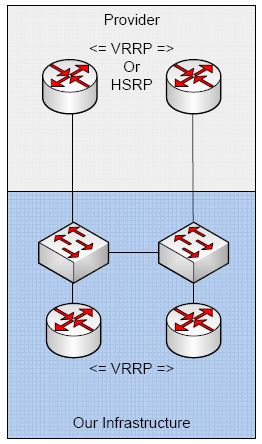
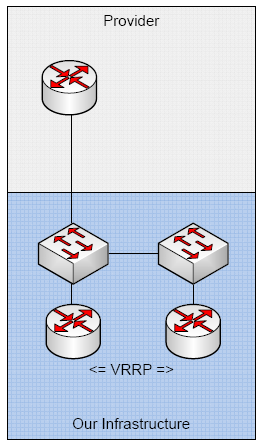
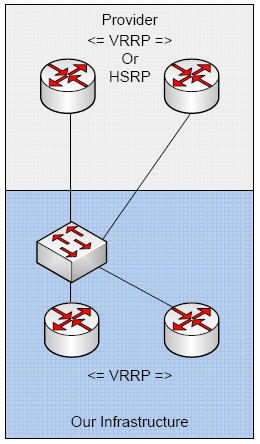
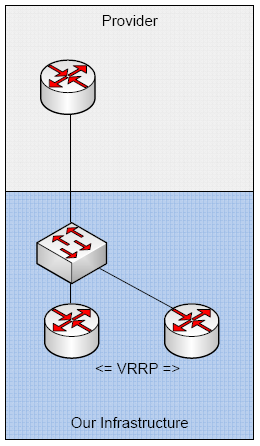
So here’s our demo config:
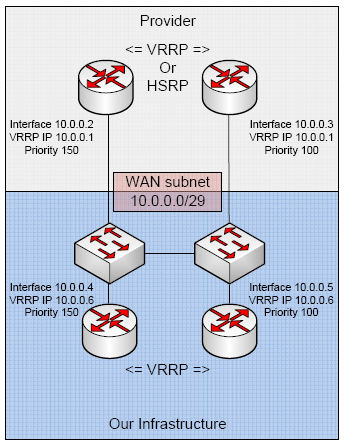
So what happens when one of our providers fail?
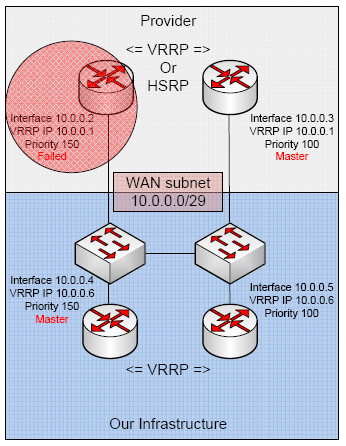
Provider fails on one link. The backup guy takes over the VRRP IP. Our default route points to 10.0.0.1 so we still route out!
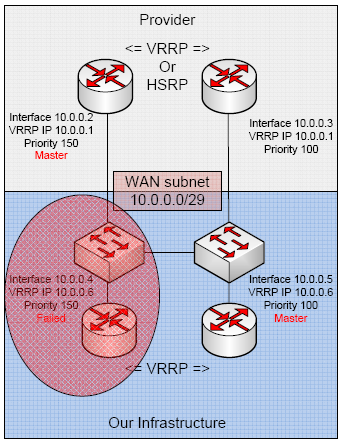
We drop half of our network gear, but have no fear. The ISP was pointing towards 10.0.0.6 to route to me, so all is good in the hood.
Router 10.0.0.4
Create the VRRP interface *assign it higher priority – default is 100*:
1 2 3 4 | /interface vrrp
add arp=enabled authentication=none comment="" disabled=no interface=ether1 \
interval=1 mtu=1500 name=vrrp1 on-backup="" on-master="" password="" \
preemption-mode=yes priority=150 vrid=1 |
Configure our IPs:
1 2 3 4 5 | /ip address
add address=10.0.0.4/29 broadcast=10.0.0.7 comment="" disabled=no interface=\
ether1 network=10.0.0.0
add address=10.0.0.6/32 broadcast=10.0.0.6 comment="" disabled=no interface=\
vrrp1 network=10.0.0.6 |
Our default route:
1 2 3 | /ip route
add comment="" disabled=no distance=1 dst-address=0.0.0.0/0 gateway=10.0.0.1 \
scope=30 target-scope=10 |
Router 10.0.0.5
Create the VRRP interface:
1 2 3 4 | /interface vrrp
add arp=enabled authentication=none comment="" disabled=no interface=ether1 \
interval=1 mtu=1500 name=vrrp1 on-backup="" on-master="" password="" \
preemption-mode=yes priority=100 vrid=1 |
Configure our IPs:
1 2 3 4 5 | /ip address
add address=10.0.0.5/29 broadcast=10.0.0.7 comment="" disabled=no interface=\
ether1 network=10.0.0.0
add address=10.0.0.6/32 broadcast=10.0.0.6 comment="" disabled=no interface=\
vrrp1 network=10.0.0.6 |
Our default route:
1 2 3 | /ip route
add comment="" disabled=no distance=1 dst-address=0.0.0.0/0 gateway=10.0.0.1 \
scope=30 target-scope=10 |
This is great for the WAN side, but is quite often used for the LAN also!
You can also run two separate VRRP groups on a single interface which will allow you to load balance with redundancy.
Go forth and route my peoples!
I’ll name no names, nor will I allow them to comment their guilt on this article. 😛
Here’s the setup:
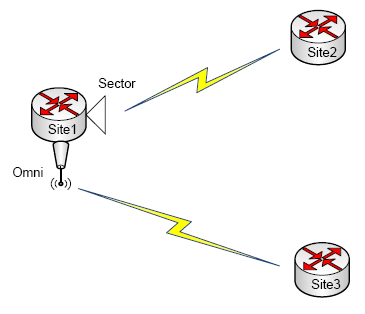
Original Config.
As you can see he has a point to point from site 2 to a sector over on site 1. He then has a point to point on site 3 pointing to an omni on site 1. He’s doing OSPF on everything and all is good. He’s not getting the signal strength he wants from the omni, so he decides to move site 3 over to site 1’s sector (as seen below).
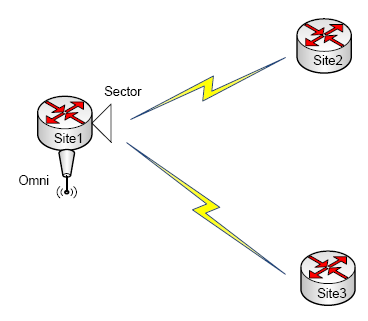
Ahhh the after.
So the problem comes in when he connects to the sector with site 3…the instant he does, everything goes to pooh. He puts all 3 in the same /27 subnet and he still has issues. He tries doing two separate /28 subnets and still has issues. He researches his radios and studies his configs, but still has no love. What does one do?
He calls in his hail marry. So he and I are logged into his gear. I double check some of his settings and we adjust, then he makes the change. Just as described, everything goes plop. We start looking at the hosts and they are connected. Looking at the ARP table, all the IPs are there, but wait! Both of the remote devices are showing up as if sourced from the same MAC! I’m logged into site 3 and ask my friend to tell me what site 2’s MAC is and I’ll add a static entry on site 1 to fix this. He pastes the MAC, and it is the same MAC on site 3…I quickly change site 3’s MAC and low and behold…everything works. It turns out friend had copied and pasted the configs including the ethernet section…big mistake. Hehehehehe. This would never have been a problem unless you try and put these guys on the same layer 2 segment.
So folks, when you do your export, be sure NOT NOT NOT to paste the MAC addresses…it’s also a good idea to remove the router board section. Juuuuust in case you switch platforms 😉
Thanks to JJ for the reset command:
1 | /interface ethernet reset-mac-address |
I received a question via email that was roughly as follows: “I currently use Vonage VOIP to provide voice and fax lines to remote construction sites via VSAT satellites. The problem is that each port requires a lot of bandwidth (90 kbps). Is there a solution that would require much less bandwidth (@20 kbps) per voice line?”
To which I responded by explaining what codecs are. Codec stands for coder and decoder. It is a method to take your audio or video stream and encode it in a specific format…avi, mp3, etc. When talking about our VoIP codecs there really are only a handful to choose from.
In the above case, a lot of devices run on G.711, which is the default standard for many VoIP systems (Cisco, Vonage). My suggestion was to run a codec that is leaner, like G.729 which will get you around the 20Kb mark. I then found a handy forum post that shows you how change Vonage between it’s 3 available codecs…one of which is G.729 😉
Cisco has a concept of locations. You can specify what protocol is used between locations. For example, you can use 711 inside the company and if you want to go to the remote location, you will use the 729 codec. Pretty nifty. If you need to transcode between one codec and another, be sure you have some available DSP resources, though 🙂
So it has finally been posted. The MUM will be Sept 30th – Oct 1st in Phoenix, Arizona. I plan to attend, and I’m going to try and get an exhibitor’s booth! I really just want to meet and greet, but I also plan to have tshirts to hand out. Hopefully I’ll have some other goods to talk about while I’m there 🙂
How many of you guys are going? I know you are all dieing to meet me in person hehehe 😛
My boy JJ turned me on to some issues he’s been having with the UBNT radios. It seems they are pac-manning some of the multicast traffic traversing them. As you all know OSPF communicates using multicast by default. If you set your interfaces to non broadcast multi access(NBMA), then it uses unicast packets to communicate. If you fit into this criteria, have a look at the thread. It seems only certain revisions of firmware are affected and also depending on what version you are on, you should try different things.