

I’ve got a construction site that that has an omni AP running hotspot and they needed some gear “up” in the MDF ASAP. My wifi had good connectivity in the building until they put up a thousand steel studs and the accompanying materials. I have a wawa(my name for generic Chinese equipment) multi-client bridge hooked to a rootenna that in turn connects to an RB750. The 750 creates an IPSec tunnel back home to get my temporary access up and functioning…and zip ties hold the whole thing together 🙂 This is far from the ugliest thing I’ve ever done, but still not the prettiest.
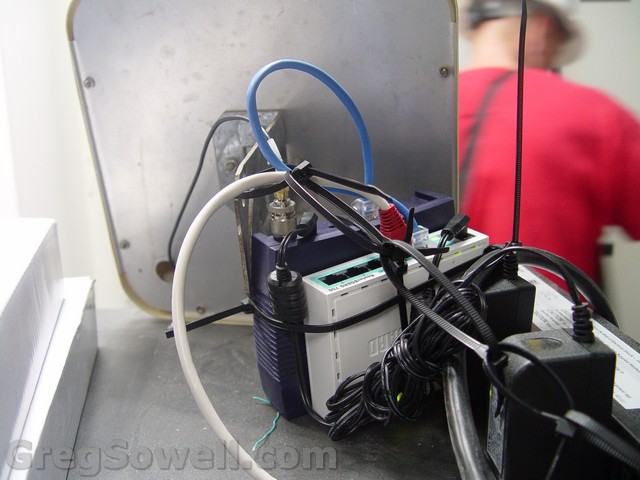
I get good signal strength even through construction workers 😛
BTW, thanks in a big way to Ricky for hooking me up with the antenna in my time of need 🙂
So what happens when your coworker has a DVR at home that can stream video, but it can stream it only to the local subnet? Well, if like us, you need to watch the world cup, then you get creative. Mikrotik to the rescue! We are going to use Ethernet over IP tunnels to connect two Mikrotiks, then bridge our inside interfaces so that we have an extension to our L2 segment!
Here’s our current configuration:
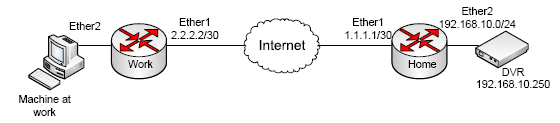
Weeeeeeeee
To configure the “work” side, do the following:
First go to interface and hit the +. Add an EoIP tunnel. Set the “remote address” as the public IP of the home router:
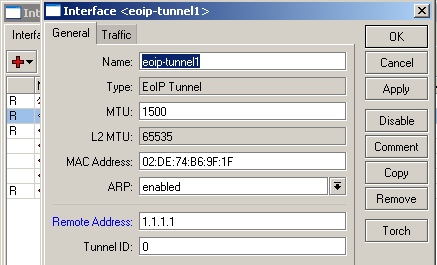
Then go to bridge and hit the +. Leave bridge1 at its default and hit ok:
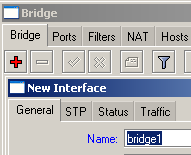
Now, add the EoIP tunnel interface and the Ether2 interface into bridge 1:
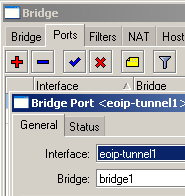
Repeat your actions for the home side identically save for the IP address the EoIP tunnel is pointing towards.
Here’s a rough diagram of how it looks when done:
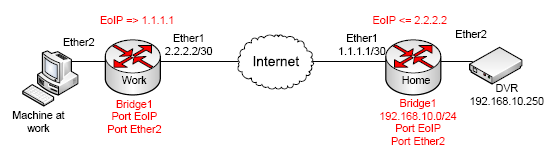
Red is the new stuff.
Here’s a look at how it logically is configured once it is all said and done. Notice it is like we just have a switch in between the devices:

Super complicated diagram
Happy bridging…welcome to 1991 hehehehe 🙂
GO USA!!!!!!!!!!!
I stumbled upon this just a couple days ago, but I’m going to start looking at integrating a system. If I get something working I’ll be sure to get it out there and available for you guys 🙂
These are the key features as described by them:
BILLING
TICKETING
CUSTOMER SERVICE
RESELLERS
They have a demo page that shows some of their pages. On the demo page they also have a vmware appliance you can download and see how the system works.
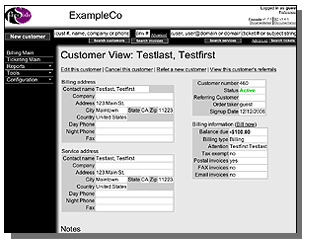
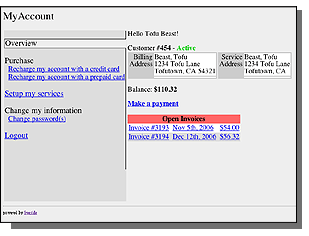
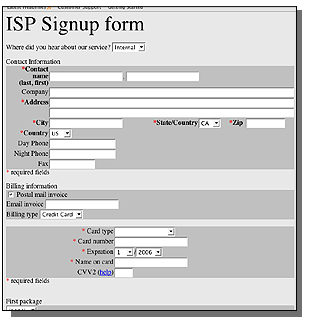
As with most open source software, it’s not the prettiest, though it seems extremely configurable. The fact that it ties ticketing in with provisioning and automated billing is terrific!
If you guys use freeside or any other system, let me know!
I caught wind of this opening and offered to post it up to assist in the search…I do get the best engineers visiting my site after all 😛
”
We are a small systems integrator in Costa Rica providing internet services (and network management) for small hotels/condominiums.
We have about 10 clients that we provide voice/data services. Each client site has a RouterOS installation 3.3-4.10 either x86 or routerboard routers.
Each site has one or more WAN connection with load balancing and failover.
Each customer site has 3 primary private segments that share the WAN connection(s).
1) Operations Segment for accounting, operational computers; Very secure as it has sensitive data.
2) Guest Hotspot Services for public internet access (firewalled with Queu management and Hotspot/Userman/Radius)
3) Security segment for video surveillance/alarms/etc…
Our company has been working with Mikrotik RouterOS for about 7 years now and are somewhat proficient. However we are not networking engineers and so we often need help with more difficult routing changes.
We are looking for a reliable engineer to provide 3rd level support for our installations.
This is about 3-5 hours per week; assuming you are proficient/strong with Mikrotik.
We are not a rich US company, and cannot afford to pay US rates. Our budget for this remote support requirement is $200/mo (this equates to about 15$/hour)
We pay via Paypal, and even though we are a small Company we are reliable and trustworthy.
If you are interested in working with us remotely please let us know.
”
Contact Sean at smilligan(at)khsys.com if you are interested.
Softwarehouse is great for actuating doors and scheduling one off events. Generally you can just right click an item and schedule an event. Once you schedule an event, how do you view them? What you do is create a custom query like the below:
Click on dataviews, and choose query from the dropdown. Click new.
Query target is “Manual action”.
Click add on Query Criteria and choose field type as “operator name”.
Click save and close
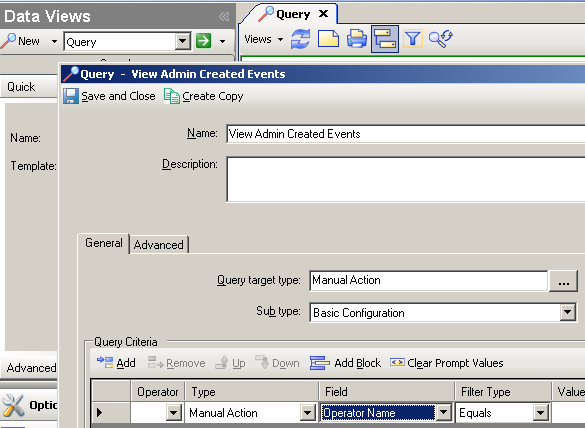
Once you are ready to run the query, open the query list and double click the newly created query. Click the run button.
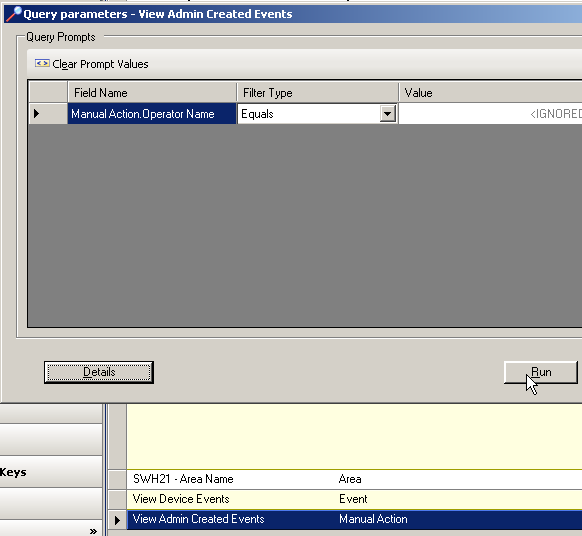
The results will be all administrator created events. You can right click on them and get details about what object is effected as well as what time schedule it is effected in. You can also right click and choose to “cancel” an event!
My boy JJ passed this on to me: WNDW.net. These guys write a multi lingual book on designing and implementing networks for the developing world. What does this really mean? They give you practical application on developing networks on a shoe string budget…which is basically everyone I know in the WISP industry…hehehe.
Here’s the download page.
Did I mention that the book is free…:)

So there’s a buddy of mine that lives in North Carolina that has started a blog. Though he is from NC, he does have all his teeth and is not married to a family member…that I know of…hehehe 😛 This kid, and I do mean kid, grew up eating and breathing radio. His pops ran the ground station that linked the Apollo missions back to Earth! He is a Ham opperator and now he’s a WISP owner.
If you are in need of a nap, ask JJ about backfiring radios and tell him to spare no details…hehehe. I’m just saying, this kid knows his stuff and I glaze over relatively quickly!
Since JJ is my go-to-guy for all things wireless, I have great expectations for his new blog. I believe he consults in solar deployments and radio instillation as well.
BTW, no pressure JJ 😉