

This little Mikrotik has the same form factor as the 750/750G. It is a 5 porter that I was able to get your standard gigabit speeds through…nothing remarkable there. So why should I buy one?
First, they are shipped to your door for around $40. Not a bad price for a small managed gig switch.
Second it has some interesting features 😉 It runs a new OS called Switch OS, SwOS(here’s the wiki on it). SwOS is only accessible via a web browser. My switch came shipped with OS v1.0. I went ahead and installed 1.1. When upgrading from 1.0 you upload the new OS, then hard reboot the switch. When it comes back up it will be running the new version.
On the system setting there is no entry for subnet mask or default gateway. The switch will simply respond to whatever IP contacts it. What this tells me is that the switch can’t dump any messages out…I really wanted syslog messages out of this guy. It is, however, accessible via SNMP.
Link Screen:
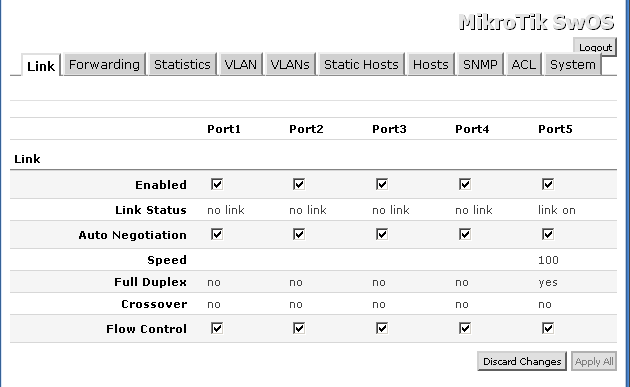
Enable/disable, interface settings etc.
It doesn’t appear as if you can manipulate the MTU on the switch, which probably means no jumbo frame support(*This will be added in version 1.2 with MTU up to 9000*)…which is something I’ve come to expect from a managable gig switch. As a side note, when pinging the switch a max MTU into the CPU of the switch is 1272…not important, but interesting.
Statistics Screen:
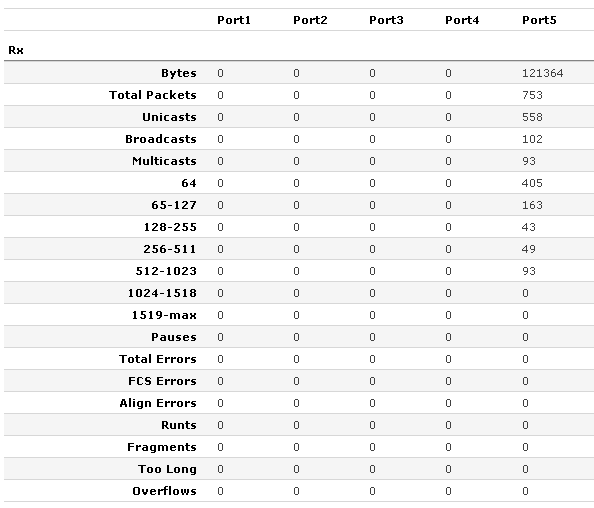
Very decent status section
The status screen covers standard errors, counters on broadcast and unicast, but has some additional entries not commonly seen. It keeps counters on packets of varying sizes as well as fragments.
Forwarding Screen:
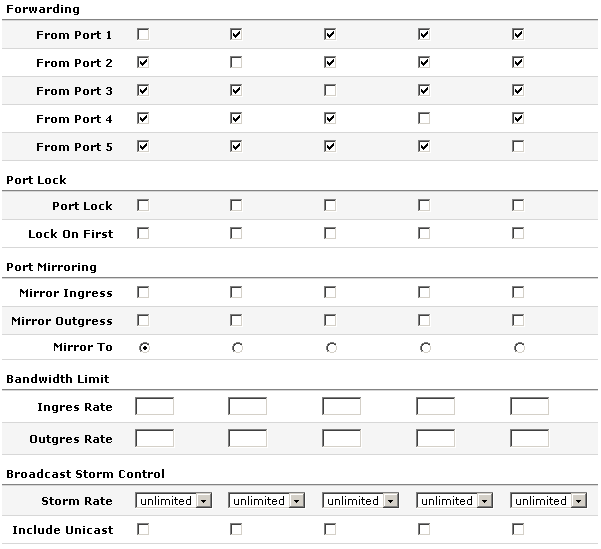
The forwarding section allows you to limit which ports can communicate with other ports. Somewhat like Cisco’s private VLANs.
Port lock prevents MACs from being learned on a port (you would need to do manual entries). Lock on first option allows the switch to only learn the first mac that shows up on the port. This would only be useful for users without IP phones.
Standard mirroring.
Bandwidth limit…I LIKE THIS FEATURE! Hardware rate limiting is missing from a lot of low end manageable switches. The values are expressed in bps.
Storm control, both broadcast and unicast. This is represented as about 20 options ranging from 1k to 1 million.
VLANs Screen:
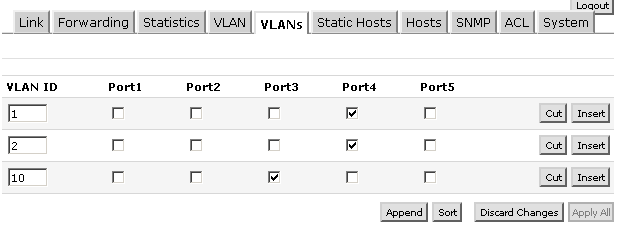
Setting what vlans are on the trunk ports
This screen basically creates the vlan database. The ports you check on this screen send the tagged packets down these ports…you are telling the switch which ports are trunked and what vlans traverse these trunks. These are tagged ports. You don’t need to set a tag on ports that will only be access.
VLAN Screen:
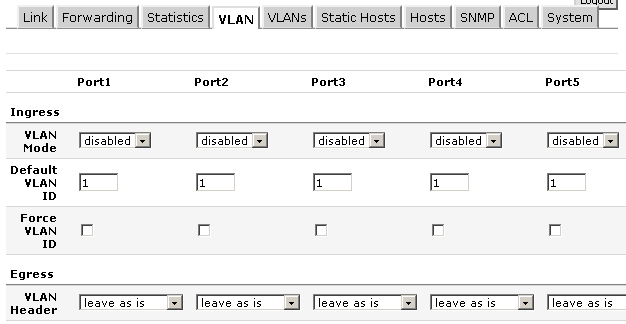
vlan powers activate!
This page is where you configure ports to trunk or be access.
Vlan modes vary. You can accept tagged packets. You can drop untagged packets. You can remark all packets with different vlan tag. You can accept untagged packets into the native vlan. Pretty robust feature set.
To have a trunk port first define the vlans in the vlans section, then here on the vlan screen set the port to enable or some derivative.
If you want a standard access port set the default vlan to the vlan you want the traffic to head to, set the mode to strict, then set the vlan header to “add if missing”.
Hosts Screen:
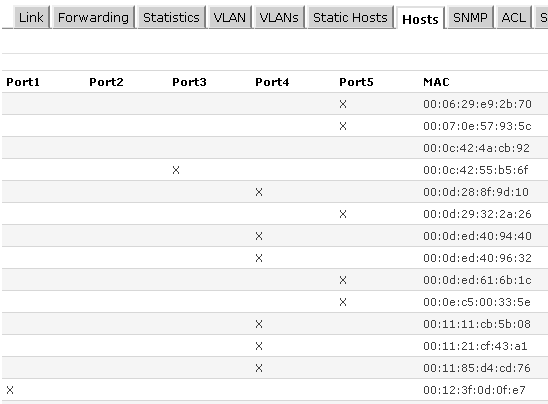
Your standard mac address table
ACL Screen:
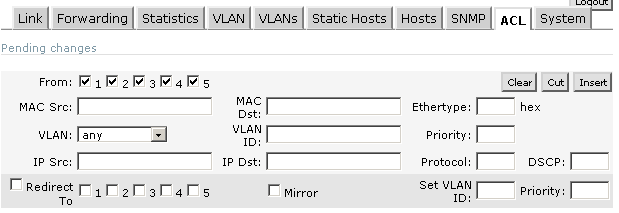
This is a filter table. You can get pretty crazy with this thing. You set specific ports that macs/ip addresses are allowed to be sourced from or travel to. If you want to drop a source mac, specify the mac address, then hit the redirect check box, but don’t specify an interface. Another interesting thing to note is the fact that there is the option to on the fly set or reset the VLAN ID of a frame to whatever you want…pretty wacky. If you could also specify a port you could do some DHCP filtering…which would be NICE. Some DHCP rogue mitigation would be nice.
This would make for a decent little switch with gig speeds. It has some interesting features, though I would like to see some spanning tree and syslog exporting. I also like how it shows up in Mikrotik neighbors.
What features would you guys like to see/what would you guys like to use this for?
Thanks to Balticnetworks for supplying the review sample.
My boy JJ tipped me off to this. It looks like UBNT has finally announced their 900Mhz Airmax line. They’ve got a locostation and a 120 degree sector to go along with it. Since this is MIMO, they are saying that you can get between 20Mb and 100Mb through these guys. I think most people would be happy to get 3Mb hehe.

900/3.65
Looks like they also are doing some 3.65 stuff and an indoor AP.

So I will be doing a presentation at this year’s MUM 🙂 I know you guys will all be spellbound and dumb struck with amazement…or possibly brain damaged from long term exposure to me…hehehe. But, I want to add some audience participation in a different kind of way.
There was a movie that came out in 1992 called Leap Of Faith. This was a great Steve Martin (who spent some of his youth in my home town) movie about a traveling band of evangelists. The hook was that they were a bunch of crooks…it was all fake. In the movie they would make bets before they performed a show. These bets would be strange words or phrases that Steve Martin would have to work into his sermon. If he was able to work them in, he got the cash, if he couldn’t, the phrase submitter would get to keep all of the money. That’s what we are going to do in this post.
In the comments section, leave the word or phrase you want me to work into my MUM presentation. It obviously must be obscenity free, but can be completely unrelated to IT. You can say sheep dog or Bob Barker…whatever you want. After we collect a few suggestions, I’ll setup a survey and we will choose the top few phrases.
Alright kids…lets see what you can come up with 😉
Nothing that will blow your skirt up, but here it is the log:
*) changed “wireless registration table entry count” snmp oid to 1.3.6.1.4.1.14988.1.1.1.4.0
*) fix 5&10MHz channel support for 11n cards
I figured they would debut the new wireless RB750 at this years MUM, and perhaps I have additional evidence to support this. A new 750 arrived this week sporting an interesting knock out on the side…is that for airflow or an antenna 🙂
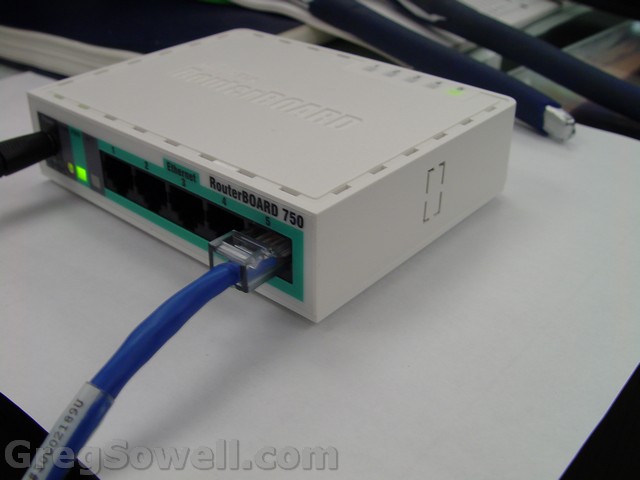
See it over there on the right
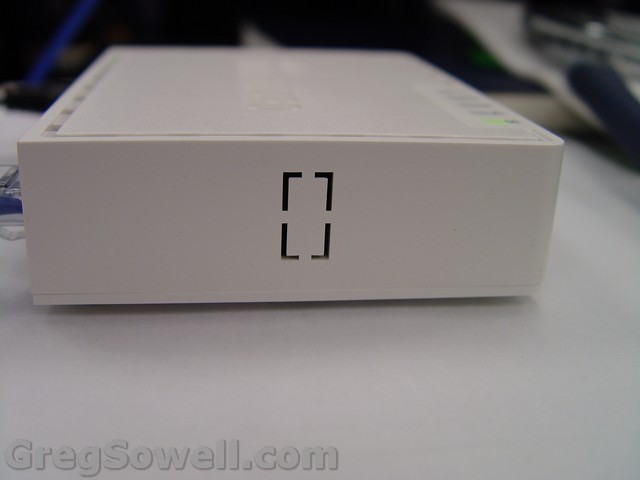
Ahhh, yes. There it is 🙂
Perhaps this is for a USB port?
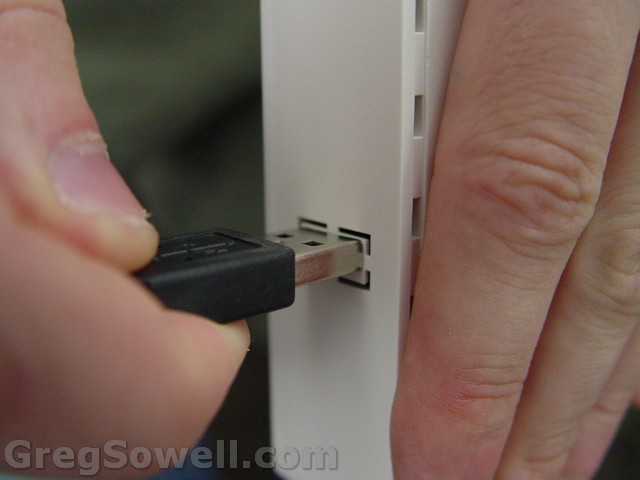
USB?
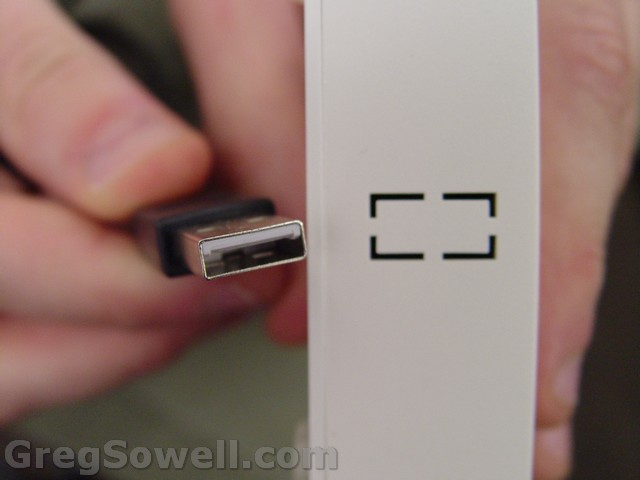
Perhaps for hooking up a hard drive for an instant NAS? (Thanks for the possible clue James :P) Perhaps it will also accept a 3G USB connection?
Is that closer Normands?
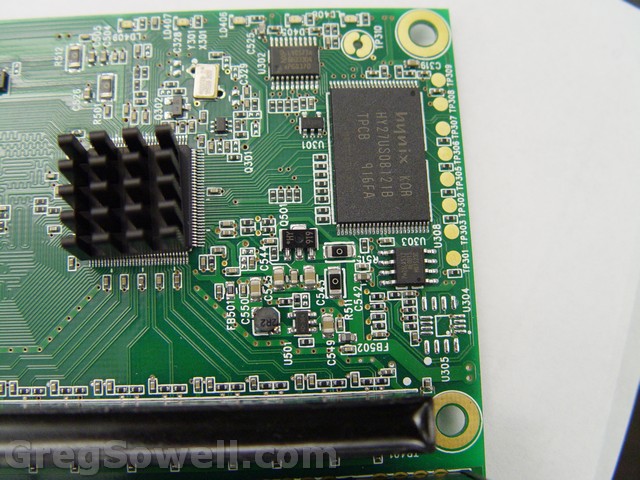
Here’s some shots of the PCB:
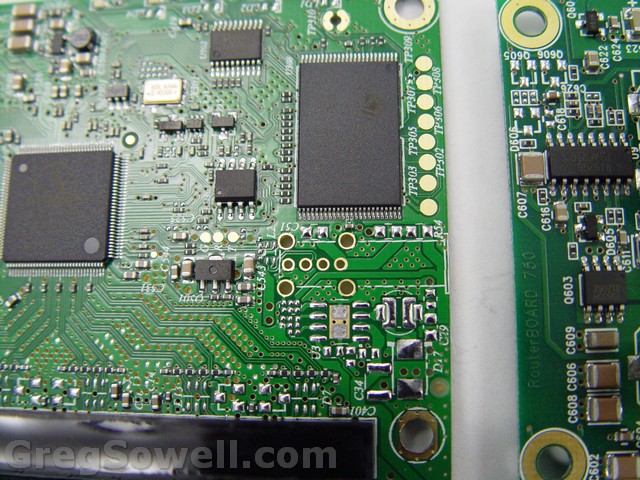
New PCB
Old PCB
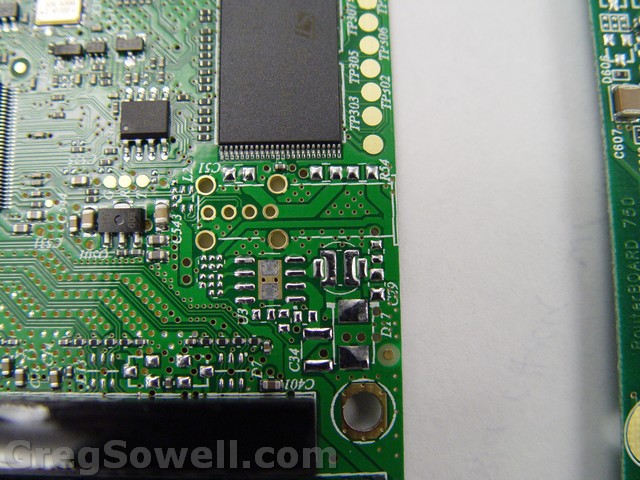
Closer...you can see where the, probable, USB header is and some missing SMDs.
Something looks familiar on there…can you spot it?

My site is on there...hope you caught that...
****The application now accepts DNS names and will correctly resolve them when knocking…rejoice!****
I’ve been getting a lot of false positives from virus scanners: IE Virustotal
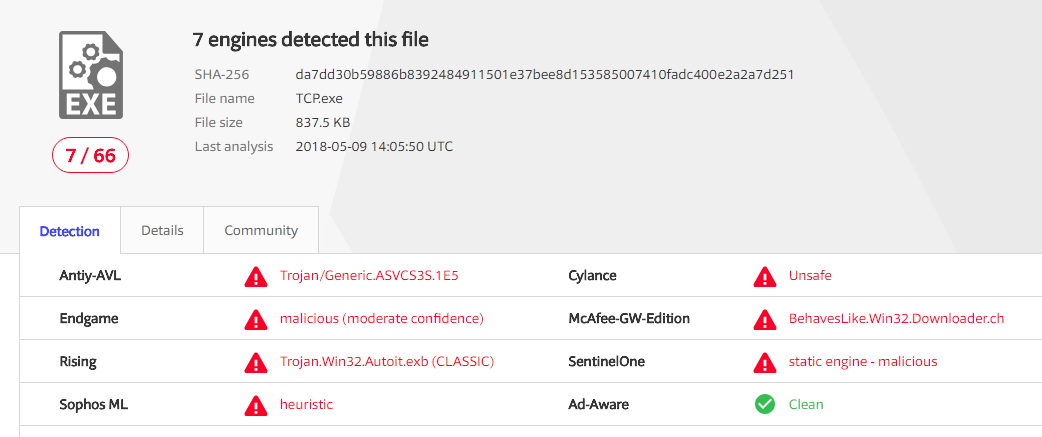
This is a known issue with all autoit compiled scripts. They are NOT infected, it’s just that Autoit code has been picked up by virus scanners at one point, and now are forever flagged *sigh*. If you prefer, just simply compile the code below for yourself. If google sees me as having malicious code I may have to pull the compiled EXE and switch to just having the code(sorry about that).
It seems to be becoming more popular to use port knocking applications these days. Port knocking is sending connection attempts to a device in a specific pattern to unlock a specific service.
An example would be to send 3 UDP connection attempts to a Mikrotik router all on different port numbers in a specific order. It will then add your IP address to a specific address list so you can winbox in.
I found an application out there for windows that does it, but it only did UDP…I wanted one that would do both. I also wanted the ability to send text with the UDP connections to do L7 matches on it.
So, I wrote my own:

There is no charge for awesomeness...or attractiveness.
Basically what you do is fill out the entries, IP address, description and at least one knock port.
Fill out protocol type, the port you want to knock on and if it is UDP, you can optionally add some text to send with the message!
Here’s the program compiled and ready to go *password on zip is “portknock”*: PortKnock.zip (404695 downloads)
Here’s the code:
1 2 3 4 5 6 7 8 9 10 11 12 13 14 15 16 17 18 19 20 21 22 23 24 25 26 27 28 29 30 31 32 33 34 35 36 37 38 39 40 41 42 43 44 45 46 47 48 49 50 51 52 53 54 55 56 57 58 59 60 61 62 63 64 65 66 67 68 69 70 71 72 73 74 75 76 77 78 79 80 81 82 83 84 85 86 87 88 89 90 91 92 93 94 95 96 97 98 99 100 101 102 103 104 105 106 107 108 109 110 111 112 113 114 115 116 117 118 119 120 121 122 123 124 125 126 127 128 129 130 131 132 133 134 135 136 137 138 139 140 141 142 143 144 145 146 147 148 149 150 151 152 153 154 155 156 157 158 159 160 161 162 163 164 165 166 167 168 169 170 171 172 173 174 175 176 177 178 179 180 181 182 183 184 185 186 187 188 189 190 191 192 193 194 195 196 197 198 199 200 201 202 203 204 205 206 207 208 209 210 211 212 213 214 215 216 217 218 219 220 221 222 223 224 225 226 227 228 229 230 231 232 233 234 235 236 237 238 239 240 241 242 243 244 245 246 247 248 249 250 251 252 253 254 255 256 257 258 259 260 261 262 263 264 265 266 267 268 269 270 271 272 273 274 275 276 277 278 279 280 281 282 283 284 285 286 287 288 289 290 291 292 293 | #Region ;**** Directives created by AutoIt3Wrapper_GUI ****
#AutoIt3Wrapper_outfile=portknock.exe
#EndRegion ;**** Directives created by AutoIt3Wrapper_GUI ****
#include <ButtonConstants.au3>
#include <ComboConstants.au3>
#include <EditConstants.au3>
#include <GUIConstantsEx.au3>
#include <GUIListBox.au3>
#include <StaticConstants.au3>
#include <WindowsConstants.au3>
#include <file.au3>
#include <Array.au3>
FileInstall("C:\Documents and Settings\greg\Desktop\autoit\portknock\TCP.exe", @ScriptDir & "\TCP.exe",0)
;knock it like it's hot
$g_IP = ""
$g_port = ""
$ListLocation = 1
;check config file
if not FileExists(@ScriptDir & "\config.txt") Then
;create it with dummy info
$file = FileOpen(@ScriptDir & "\config.txt", 1)
If $file = -1 Then
MsgBox(0, "Error", "Unable to open file.")
Exit
EndIf
FileWriteLine($file, "Description;IPAddress;UDP;Port;GregRocks")
FileClose($file)
EndIf
ReadConfig ()
; Start The Services
;==============================================
TCPStartUp()
UDPStartup()
;###########################################
#Region ### START Koda GUI section ### Form=C:\Documents and Settings\greg\Desktop\autoit\portknock\Form1.kxf
$Form1_1 = GUICreate("GregSowell.com Port Knock", 441, 434, 192, 114)
$List1 = GUICtrlCreateList("", 24, 16, 393, 201)
$CBO1 = GUICtrlCreateCombo("None", 33, 280, 65, 25)
GUICtrlSetData(-1, "TCP|UDP")
$In1Port = GUICtrlCreateInput("", 121, 280, 105, 21)
$In1Text = GUICtrlCreateInput("", 233, 280, 177, 21)
$Label1 = GUICtrlCreateLabel("1", 9, 280, 10, 17)
$BTNKnock = GUICtrlCreateButton("Knock", 96, 400, 73, 25, $WS_GROUP)
$BTNAdd = GUICtrlCreateButton("Add/Update", 182, 400, 73, 25, $WS_GROUP)
$BTNDelete = GUICtrlCreateButton("Delete", 272, 400, 73, 25, $WS_GROUP)
$InIP = GUICtrlCreateInput("", 40, 234, 161, 21)
$Label2 = GUICtrlCreateLabel("IP", 8, 234, 14, 17)
$Label3 = GUICtrlCreateLabel("Type", 44, 259, 28, 17)
$Label4 = GUICtrlCreateLabel("Port", 124, 259, 23, 17)
$Label5 = GUICtrlCreateLabel("Text", 238, 259, 25, 17)
$CBO2 = GUICtrlCreateCombo("None", 33, 309, 65, 25)
GUICtrlSetData(-1, "TCP|UDP")
$In2Port = GUICtrlCreateInput("", 121, 309, 105, 21)
$In2Text = GUICtrlCreateInput("", 233, 309, 177, 21)
$Label6 = GUICtrlCreateLabel("2", 9, 309, 10, 17)
$CBO3 = GUICtrlCreateCombo("None", 33, 341, 65, 25)
GUICtrlSetData(-1, "TCP|UDP")
$In3Port = GUICtrlCreateInput("", 121, 341, 105, 21)
$In3Text = GUICtrlCreateInput("", 233, 341, 177, 21)
$Label7 = GUICtrlCreateLabel("3", 9, 341, 10, 17)
$CBO4 = GUICtrlCreateCombo("None", 33, 367, 65, 25)
GUICtrlSetData(-1, "TCP|UDP")
$In4Port = GUICtrlCreateInput("", 121, 367, 105, 21)
$In4Text = GUICtrlCreateInput("", 233, 367, 177, 21)
$Label8 = GUICtrlCreateLabel("4", 9, 367, 10, 17)
$InDesc = GUICtrlCreateInput("", 253, 234, 161, 21)
$Label9 = GUICtrlCreateLabel("Desc", 221, 234, 29, 17)
GUISetState(@SW_SHOW)
#EndRegion ### END Koda GUI section ###
PopList()
While 1
$nMsg = GUIGetMsg()
Switch $nMsg
Case $BTNAdd
;
$foundOne = 0
for $y = 1 to $aConfig
;loop through until we find the correct line
if StringLeft($aConfig[$y], StringInStr($aConfig[$y], ";") - 1) == GUICtrlRead($InDesc) Then
; we have our match, update
$foundOne = $y
EndIf
Next
if $foundOne == 0 Then
;we didn't find a match above, so write it to file, then reload listbox
$tempNewEntry = GUICtrlRead($InDesc) & ";" & GUICtrlRead($InIP) & ";" & GUICtrlRead($CBO1) & ";" & GUICtrlRead($In1Port) & ";" & GUICtrlRead($In1Text)
if GUICtrlRead($CBO2) <> "None" Then
;add 2
$tempNewEntry = $tempNewEntry & ";" & GUICtrlRead($CBO2) & ";" & GUICtrlRead($In2Port) & ";" & GUICtrlRead($In2Text)
if GUICtrlRead($CBO3) <> "None" Then
;add 3
$tempNewEntry = $tempNewEntry & ";" & GUICtrlRead($CBO3) & ";" & GUICtrlRead($In3Port) & ";" & GUICtrlRead($In3Text)
if GUICtrlRead($CBO4) <> "None" Then
;add 4
$tempNewEntry = $tempNewEntry & ";" & GUICtrlRead($CBO4) & ";" & GUICtrlRead($In4Port) & ";" & GUICtrlRead($In4Text)
EndIf
EndIf
EndIf
_ArrayAdd($aConfig, $tempNewEntry)
Else
;does exist, and write over line $y
$aConfig[$foundOne] = GUICtrlRead($InDesc) & ";" & GUICtrlRead($InIP) & ";" & GUICtrlRead($CBO1) & ";" & GUICtrlRead($In1Port) & ";" & GUICtrlRead($In1Text)
if GUICtrlRead($CBO2) <> "None" Then
;add 2
$aConfig[$foundOne] = $aConfig[$foundOne] & ";" & GUICtrlRead($CBO2) & ";" & GUICtrlRead($In2Port) & ";" & GUICtrlRead($In2Text)
if GUICtrlRead($CBO3) <> "None" Then
;add 3
$aConfig[$foundOne] = $aConfig[$foundOne] & ";" & GUICtrlRead($CBO3) & ";" & GUICtrlRead($In3Port) & ";" & GUICtrlRead($In3Text)
if GUICtrlRead($CBO4) <> "None" Then
;add 4
$aConfig[$foundOne] = $aConfig[$foundOne] & ";" & GUICtrlRead($CBO4) & ";" & GUICtrlRead($In4Port) & ";" & GUICtrlRead($In4Text)
EndIf
EndIf
EndIf
EndIf
;write array to file
_FileWriteFromArray(@ScriptDir & "\config.txt", $aConfig,1)
ReadConfig()
PopList()
Case $BTNDelete
;
for $y = 1 to $aConfig[0]
;loop through until we find the correct line
if StringLeft($aConfig[$y], StringInStr($aConfig[$y], ";") - 1) == GUICtrlRead($InDesc) Then
; we have our match, update
_ArrayDelete($aConfig, $y)
_FileWriteFromArray(@ScriptDir & "\config.txt", $aConfig,1)
ReadConfig()
PopList()
EndIf
Next
Case $BTNKnock
;
$g_IP = GUICtrlRead($InIP)
$g_port = GUICtrlRead($In1Port)
$g_text = ""
$g_text = GUICtrlRead($In1Text)
if GUICtrlRead($CBO1) == "TCP" Then
TCPKnock()
Else
UDPKnock()
EndIf
sleep(300)
if GUICtrlRead($CBO2) <> "None" Then
$g_port = GUICtrlRead($In2Port)
$g_text = ""
$g_text = GUICtrlRead($In2Text)
EndIf
if GUICtrlRead($CBO2) == "TCP" Then
TCPKnock()
Elseif GUICtrlRead($CBO2) == "UDP" Then
UDPKnock()
EndIf
sleep(300)
if GUICtrlRead($CBO3) <> "None" Then
$g_port = GUICtrlRead($In3Port)
$g_text = ""
$g_text = GUICtrlRead($In3Text)
EndIf
if GUICtrlRead($CBO3) == "TCP" Then
TCPKnock()
Elseif GUICtrlRead($CBO3) == "UDP" Then
UDPKnock()
EndIf
sleep(300)
if GUICtrlRead($CBO4) <> "None" Then
$g_port = GUICtrlRead($In4Port)
$g_text = ""
$g_text = GUICtrlRead($In4Text)
EndIf
if GUICtrlRead($CBO4) == "TCP" Then
TCPKnock()
Elseif GUICtrlRead($CBO4) == "UDP" Then
UDPKnock()
EndIf
ToolTip("knock complete")
sleep(5000)
ToolTip("")
case $GUI_EVENT_PRIMARYUP
;mouse was pressed, lets check to see if they choose a new item in list
;check which list item is highlighted
$tempList = GUICtrlRead($List1)
;see if this is new item chosen or just a click somewhere on the prog
if $tempList <> $ListLocation and $tempList <> "" Then
;change, update everything
;set list location to the temp value
$ListLocation = $tempList
;clear the entries
GUICtrlSetData($InDesc,"")
GUICtrlSetData($InIP,"")
GUICtrlSetData($CBO1,"None")
GUICtrlSetData($In1Port,"")
GUICtrlSetData($In1Text,"")
GUICtrlSetData($CBO2,"None")
GUICtrlSetData($In2Port,"")
GUICtrlSetData($In2Text,"")
GUICtrlSetData($CBO3,"None")
GUICtrlSetData($In3Port,"")
GUICtrlSetData($In3Text,"")
GUICtrlSetData($CBO4,"None")
GUICtrlSetData($In4Port,"")
GUICtrlSetData($In4Text,"")
;set the entries
for $y = 1 to $aConfig[0]
;loop through until we find the correct line
if StringLeft($aConfig[$y], StringInStr($aConfig[$y], ";") - 1) == $ListLocation Then
; we have our match
$ConfigLine = $aConfig[$y]
EndIf
Next
;fill in all the boxes
GUICtrlSetData($InDesc, $ListLocation)
GUICtrlSetData($InIP, StringMid($ConfigLine,StringInStr($ConfigLine,";") + 1, StringInStr($ConfigLine,";",0,2) - StringInStr($ConfigLine,";") - 1))
GUICtrlSetData($CBO1, StringMid($ConfigLine,StringInStr($ConfigLine,";",0,2) + 1, StringInStr($ConfigLine,";",0,3) - StringInStr($ConfigLine,";",0,2) - 1))
GUICtrlSetData($In1Port, StringMid($ConfigLine,StringInStr($ConfigLine,";",0,3) + 1, StringInStr($ConfigLine,";",0,4) - StringInStr($ConfigLine,";",0,3) - 1))
GUICtrlSetData($In1Text, StringMid($ConfigLine,StringInStr($ConfigLine,";",0,4) + 1, StringInStr($ConfigLine,";",0,5) - StringInStr($ConfigLine,";",0,4) - 1))
$tempstring = StringReplace($ConfigLine, ";", ";")
$tempCount = @extended
if $tempCount > 4 Then
;we have a second set
GUICtrlSetData($CBO2, StringMid($ConfigLine,StringInStr($ConfigLine,";",0,5) + 1, StringInStr($ConfigLine,";",0,6) - StringInStr($ConfigLine,";",0,5) - 1))
GUICtrlSetData($In2Port, StringMid($ConfigLine,StringInStr($ConfigLine,";",0,6) + 1, StringInStr($ConfigLine,";",0,7) - StringInStr($ConfigLine,";",0,6) - 1))
GUICtrlSetData($In2Text, StringMid($ConfigLine,StringInStr($ConfigLine,";",0,7) + 1, StringInStr($ConfigLine,";",0,8) - StringInStr($ConfigLine,";",0,7) - 1))
EndIf
if $tempCount > 7 Then
;we have a third set
GUICtrlSetData($CBO3, StringMid($ConfigLine,StringInStr($ConfigLine,";",0,8) + 1, StringInStr($ConfigLine,";",0,9) - StringInStr($ConfigLine,";",0,8) - 1))
GUICtrlSetData($In3Port, StringMid($ConfigLine,StringInStr($ConfigLine,";",0,9) + 1, StringInStr($ConfigLine,";",0,10) - StringInStr($ConfigLine,";",0,9) - 1))
GUICtrlSetData($In3Text, StringMid($ConfigLine,StringInStr($ConfigLine,";",0,10) + 1, StringInStr($ConfigLine,";",0,11) - StringInStr($ConfigLine,";",0,10) - 1))
EndIf
if $tempCount > 10 Then
;we have a fourth set
GUICtrlSetData($CBO4, StringMid($ConfigLine,StringInStr($ConfigLine,";",0,11) + 1, StringInStr($ConfigLine,";",0,12) - StringInStr($ConfigLine,";",0,11) - 1))
GUICtrlSetData($In4Port, StringMid($ConfigLine,StringInStr($ConfigLine,";",0,12) + 1, StringInStr($ConfigLine,";",0,13) - StringInStr($ConfigLine,";",0,12) - 1))
GUICtrlSetData($In4Text, StringMid($ConfigLine,StringInStr($ConfigLine,";",0,4) + 1))
EndIf
EndIf
Case $GUI_EVENT_CLOSE
TCPShutdown()
UDPShutdown()
Exit
EndSwitch
WEnd
;###########################################
Func PopList ()
;populate list box
GUICtrlSetData($List1, "")
for $x = 1 to $aConfig[0]
GUICtrlSetData($List1, StringLeft($aConfig[$x], StringInStr($aConfig[$x], ";") - 1))
Next
EndFunc
Func ReadConfig ()
Global $aConfig
If Not _FileReadToArray(@ScriptDir & "\config.txt",$aConfig) Then
MsgBox(4096,"Error", " Error reading log to Array error:" & @error)
Exit
EndIf
EndFunc
;knock functions
Func TCPKnock ()
ToolTip("knocking " & $g_IP & " " & $g_port)
run("""" & @ScriptDir & "\TCP.exe"" " & $g_IP & " " & $g_port)
ToolTip("")
EndFunc
Func UDPKnock ()
ToolTip("knocking " & $g_IP & " " & $g_port)
$socket = UDPOpen($g_IP, $g_port)
$status = UDPSend($socket, $g_text)
UDPCloseSocket($socket)
ToolTip("")
EndFunc |
TCP.exe code:
1 2 3 4 5 6 7 8 9 10 11 12 13 14 15 16 17 18 19 20 21 22 23 24 25 | #NoTrayIcon
;include <GUIConstantsEx.au3>
Opt('MustDeclareVars', 1)
; Set Some reusable info
;--------------------------
Local $ConnectedSocket, $szData
; Set $szIPADDRESS to wherever the SERVER is. We will change a PC name into an IP Address
; Local $szServerPC = @ComputerName
; Local $szIPADDRESS = TCPNameToIP($szServerPC)
Local $szIPADDRESS = $CmdLine[1]
Local $nPORT = $CmdLine[2]
; Start The TCP Services
;==============================================
TCPStartup()
; Initialize a variable to represent a connection
;==============================================
$ConnectedSocket = -1
;Attempt to connect to SERVER at its IP and PORT 33891
;=======================================================
$ConnectedSocket = TCPConnect($szIPADDRESS, $nPORT)
TCPCloseSocket($ConnectedSocket) |
Be sure to check out Jimmys lil write up on UDP port knocking with text 🙂
BTW, I just threw this together and haven’t properly tested, so let me know how it goes 😛