

My buddy from Virginia has started a blog called dynstatic.net. So far he is posting some Mikrotik stuff, but who knows where he’ll end up going with it 🙂 The kid is pretty sharp and works on some interesting stuff…now all he has to do is convince the boss to let him write about it 😛
What’s new in 5.21 (2012-Oct-12 08:25):
*) route – fix dst-prefix filtering did not return routes when routes with
different routing-mark were present;
*) wireless – improved nv2 stability; I’m sure this is greatly appreciated.
*) winbox & webfig – added simple new version downloading & upgrading panel;
*) dhcp server – immediately store to disk changes for lease configuration;
*) lcd – improve graphs screen
*) lcd – improve touch screen (must /lcd reset-calibration)
*) smb – fix smb share mounting on linux systems
*) ovpn – fixed memory leak on disconnects;
*) userman – fix unpaid profile activation while authenticating;
*) sstp – fix high CPU usage on SSL handshake;
*) winbox – added ability to add time & date to dashboard;
*) metarouter – fixed lockups on RB110AH;
*) metarouter – fixed occasional lockups on RB450G;
*) ups – fixed problem connecting to USB device, introduced in 5.20; I’ve heard grumbles about this.
*) quickset – added Wireless PTP Bridge mode;
*) fix MPLS MTU configuration usage;
*) dns – fix empty response;
Lots of bug fixes…I assume this will be the last release for 5.X. So sad.
I’ve gotten questions about this forever and I’m just now addressing it…sorry 🙂
Anyway, the issue occurs when you have two hosts on the same subnet inside your infrastructure. One of the hosts has a service like a webserver. When another host on your subnet attempts to browse via the public NAT’d IP it fails…here’s why it does this as well as how to fix it.

Starting configuration.
Router Config
1 2 3 4 5 6 7 8 | /ip address add address=1.1.1.1/29 disabled=no interface=ether1 add address=192.168.1.1/24 disabled=no interface=ether2 /ip firewall nat add action=dst-nat chain=dstnat disabled=no dst-addresses=1.1.1.2 to-addresses=192.168.1.10 add action=src-nat chain=src-nat disabled=no src-addresses=192.168.1.10 to-addresses=1.1.1.2 add action=masquerade chain=srcnat disabled=no out-interface=ether1 |
As you can see in our starting configuration we have two hosts on the inside of our network that sit on the same subnet.
The webserver has 1.1.1.2 NAT’d over to him.
Step 1
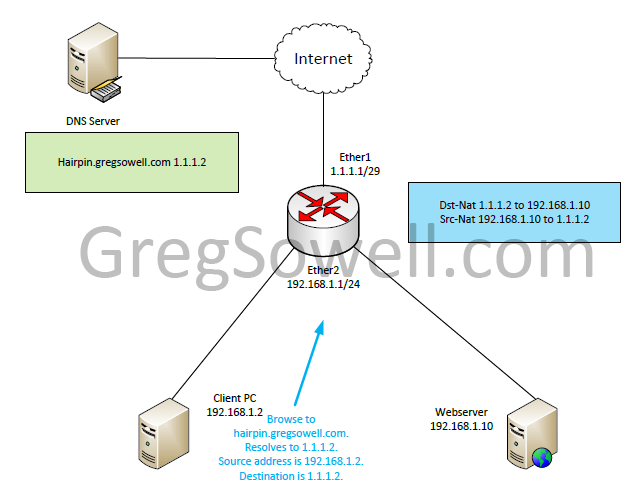
Our client at IP 192.168.1.2 browses to hairpin.gregsowell.com. This resolves to public IP 1.1.1.2. This should be fine, right? Our host send the traffic to his default gateway.
As you can see from the graphic we have a src-nat rule and a dst-nat rule that will translate the public to the private and the private over to the public.
Step 2

The router NATs 1.1.1.2 over to the webserver’s internal IP of 192.168.1.10. The Client PC is still sourced from his 192.168.1.2 address.
Step 3
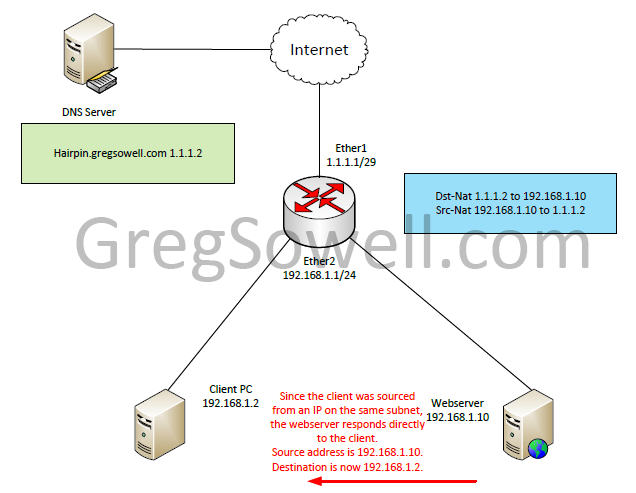
So the webserver sees the request and responds. Since the packet was sourced from 192.168.1.2 and it is on the same subnet as his IP, he will simply send the response directly to 192.168.1.2.
Step 4
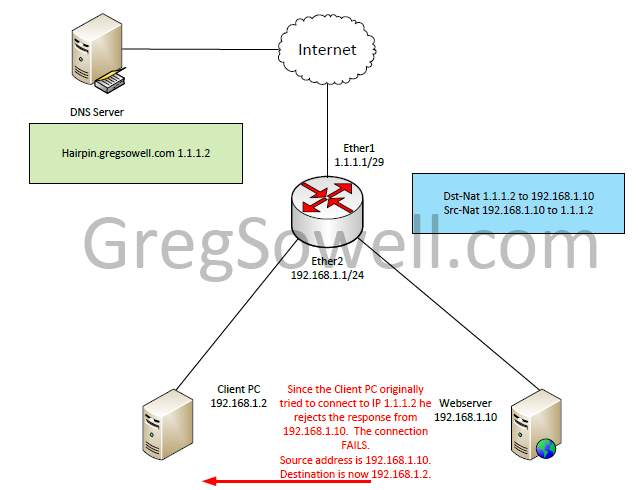
So the PC sees a response from the webserver, but he will drop this response. Remember that the Clinet PC originally made the request to 1.1.1.2. When he sees response traffic sourced from 192.168.1.10 he will drop this as unknown traffic. Our exchange fails.
Step 5
Config Adjustment
1 2 3 4 5 | /ip firewall nat add action=dst-nat chain=dstnat disabled=no dst-addresses=1.1.1.2 to-addresses=192.168.1.10 add action=src-nat chain=srcnat disabled=no src-addresses=192.168.1.10 to-addresses=1.1.1.2 add action=masquerade chain=srcnat disabled=no dst-addresses=192.168.1.0/24 src-addresses=192.168.1.0/24 add action=masquerade chain=srcnat disabled=no out-interface=ether1 |
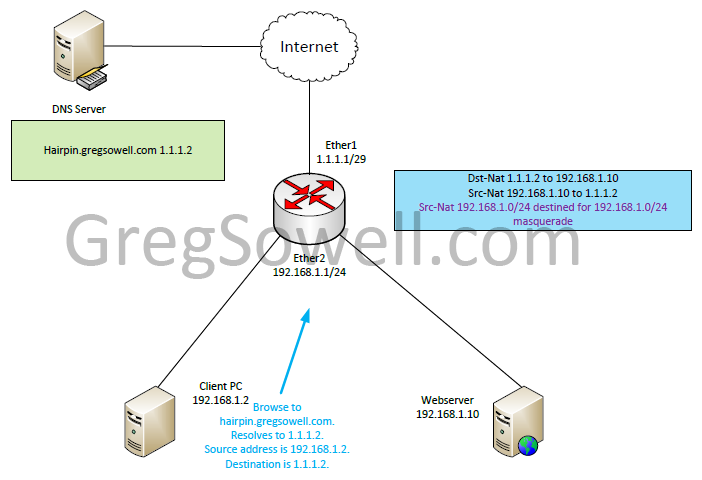
To correct the issue we add a single src-nat rule to masquerade any traffic sourced from 192.168.1.0/24 destined to 192.168.1.0/24.
The new request starts the same as before.
Step 6

The traffic destination NATs again from 1.1.1.2 to 192.168.1.10. Something new you will notice is that 192.168.1.2 is now masqueraded to 192.168.1.1.
Step 7
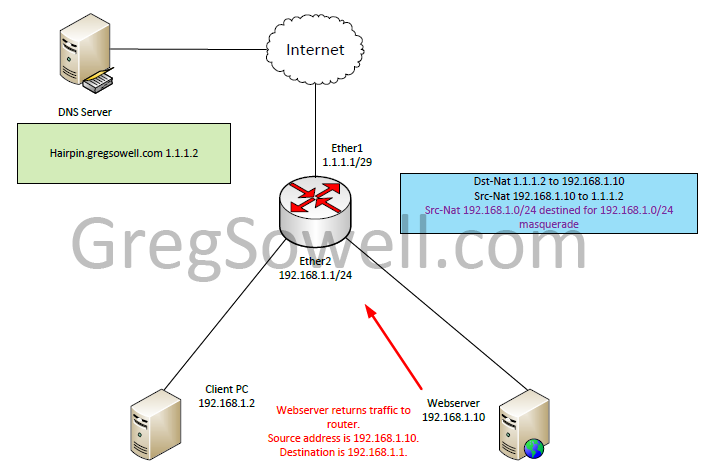
The webserver responds to 192.168.1.1 since that is where the traffic was sourced from. The traffic heads back to the router.
Step 8
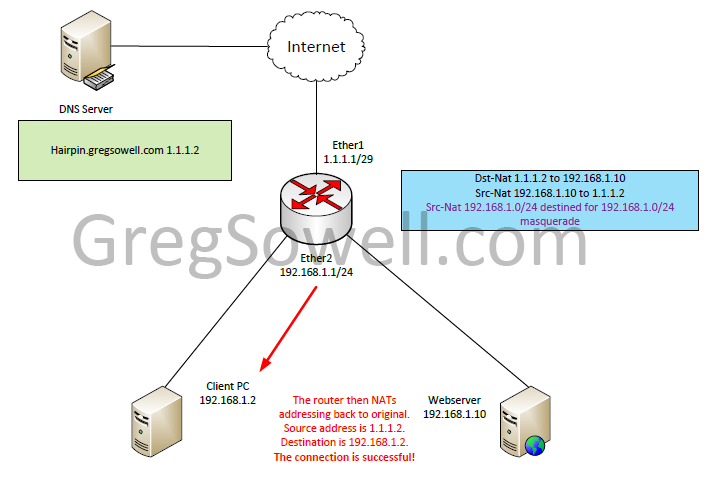
The router then translates the destination address back to 192.168.1.2 and translates the webservers 192.168.1.10 address back to 1.1.1.2. Last the traffic is sent back to our client PC.
If you guys have any questions or comments, please let me know!
On one of my Zimbra servers I’ve got a customer with about 8 domains. They are going to be migrating two of their domains elsewhere. While they do this, they want their old email still accessible on the old server. The problem is that if the old domains still exist on the old server and they send mail using any of the remaining domains, it will attempt to be delivered on the local old server. What we need to do is forward the domains.
I found some documentation that said you simply need to add this forwarder:
1 2 3 4 | zmprov md example.com zimbraMailCatchAllAddress @example.com md example.com zimbraMailCatchAllForwardingAddress @example.com md example.com zimbraMailTransport smtp:other-mta.domain.com |
This adds the forwarder to the domain itself…which should work great, right?…wrong. What this does is make adjustments to LDAP. So after applying this and testing without success I checked LDAP. The entry was there for the domain, but I found that each mailbox had its own “zimbraMailTransport” entry pointing to the local server. This user attribute was overriding my domain setting. To repair this I did the following:
First connect to your Zimbra server via LDAP. Highlight the domain you need to make the adjustment for and click on tools and export. This will spit out an LDIF file that we will be parsing.
I then used this autoit script to parse the file grabbing user accounts and editing their names into email addresses:
1 2 3 4 5 6 7 8 9 10 11 12 13 14 15 16 17 18 19 20 21 22 23 24 25 26 27 28 29 30 31 32 33 34 35 36 37 38 39 40 41 42 43 | #include <file.au3>
$WriteMe = ""
Dim $aLDIF
If Not _FileReadToArray("C:\Users\Greg\Desktop\Customers\lifeagape\whatever.ldif",$aLDIF) Then
MsgBox(4096,"Error", " Error reading log to Array error:" & @error)
Exit
EndIf
For $x = 1 to $aLDIF[0]
if StringInStr("111" & $aLDIF[$x],"dn:") > 0 Then
;found user
$ChangeToEmail = StringReplace($aLDIF[$x],"dn: uid=", "")
$ChangeToEmail = StringReplace($ChangeToEmail, ",ou=people,dc=", '@')
$ChangeToEmail = StringReplace($ChangeToEmail, ",dc=", ".")
$WriteMe = $WriteMe & @CRLF & $ChangeToEmail
EndIf
if StringInStr("111" & $aLDIF[$x],"mail:") > 0 Then
$WriteMe = $WriteMe & "," & StringReplace($aLDIF[$x], "mail: ", "")
EndIf
if StringInStr("111" & $aLDIF[$x],"zimbraMailAlias:") > 0 Then
$WriteMe = $WriteMe & "," & StringReplace($aLDIF[$x], "zimbraMailAlias: ", "")
EndIf
if StringInStr("111" & $aLDIF[$x],"zimbraMailTransport:") > 0 Then
$WriteMe = $WriteMe & "," & StringReplace($aLDIF[$x], "zimbraMailTransport: ", "")
EndIf
Next
$fTheFile = FileOpen("C:\Users\Greg\Desktop\Customers\lifeagape\whatever.csv", 1)
; Check if file opened for writing OK
If $fTheFile = -1 Then
MsgBox(0, "Error", "Unable to open file.")
Exit
EndIf
FileWriteLine($fTheFile, $WriteMe)
FileClose($fTheFile) |
Last I used notepad++ to modify the desired records to look like this:
1 | zmprov ma [email protected] zimbraMailTransport smtp:newlocation.mxrecord.net |
These are completely unfounded and unsubstantiated, so take them with a grain of salt.
So the name of the device is the “Cloud Core Router”. When I hear cloud I first want to vomit and next I think of virtualization.
I heard someone say that the CCR boots the Mikrotik ROS into a virtual machine. They said that “it would even have the ability to boot 3 separate 12 core routers on a single box.” Not that the 3 VMs is likely, just that it was possible.
I first thought that each interface would have a dedicated in and out CPU. I was told this is wrong and not to think of this the same way I do an X86 box.
Again, this is just my puny brain putting a few things together…what say you guys?
##EDIT##
Andrew Thrift was kind enough to confirm this. He pointed me towards Andrew Cox’s post here.


JJ, Justin and myself talk about:
The CCR
– Additional MUM info on the CCR:
– – Winbox and config
– – ROS V6 info related to CCR
New hardware RB2011UAS-RM, RB2011UAS-2HnD-IN, 2.4Ghz Metal AP/CPE, 2.4Ghz miniPCI, and SXT G-5HnD:
– Greg’s list
– Justin’s list
ROS V6 notes:
– Greg’s list
– Justin’s list
Greg’s Multi-homed BGP presentation
Justin’s Cookie Cutter WISP presentation
Some of my random pics of the show.
Hot Lava NICs
Presentation list is here
And thank you to the lovely Mike Hammett for closing us out…hehehe

Two phones, one for each of ya.
Click here to view the post!
V6 features
CCR only for V6. This is the big push.
There are announced and unannounced CCR products. This means their are more CCRs on the way.
5.21 is kernel 2.6.35
6.X is kernel 3.3.5+
New Kernel Features
New interface driver support. “If you have X86, try V6 to ensure your drivers are included.”
Improved interface management – scales up to thousands of interfaces.
Requires less storage space.
RB interface driver performance up to 30%.
RB package is now merged into system package.
Slave flag now shows up for bridge/bonding/switch group interfaces.
Export compact is now the default. /export verbose is required for old way.
No x86 64 bit. “Maybe in version 7.”
New CPU architecture
CCR is 64 bit
Dual memory channel
RAM up to 1TB
Hardware accelerated multi-threading(no need for RPS and IRQ management).
Lifted 16 CPU limit. New limit is 64 core.
Multi-core improvement up to 20%.
QoS reworked
No more “global-in”, “global-out”, or “global-total”. Replaced with “global”. They are shifting around where it sits in the packet flow.
Simple queue is now at end of post routing and input.

Normal global-in, global-out, and global total are going away.
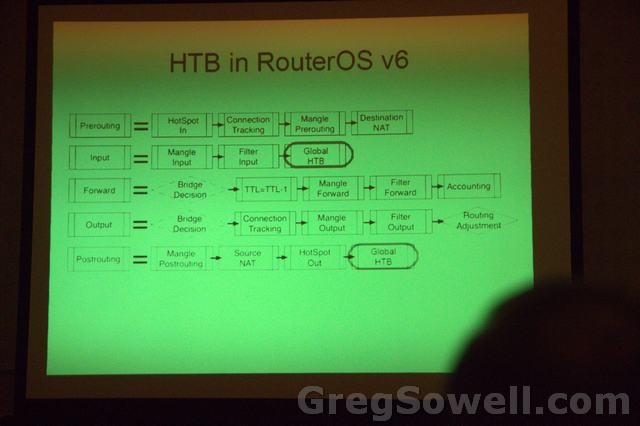
The prerouting version now moves to the end of input and the postrouting version now moves to the very end of postrouting.
PCQ is now NAT aware
Simple queues in version 5 were built on queue trees. By creating a simple queue multiple dynamic queue tree entries were invisibly created(sometimes up to 3). SQs in V6 are now independent of queue trees. *Thanks for the correction Janis*
SQ can now handle tens of thousands of rules.
SQ improved by around 600%.
SQ “target” is the main option now
SQ “dst” parameter now supports dst interface too
Seperate “priority” for download/upload/total.
If you don’t have thousands of SQ entries, you will see no improvement over your queue trees.
SCEP protocol support
Simple cert enrolment protocol
Process is now easier.
Wireless advanced channels
Works only between atheros AR92XX and only between MTK
-centery freq range:
– -2192-2734mhz
– -4800-6100mhz
Choose precise center freq .5mhz step
choose channel width 2.5-30mhz, .5mhz step
Not in winbox yet.
Name each advanced channel.
Add named to scan list.