

I grabbed three 836s for $4.80 each!
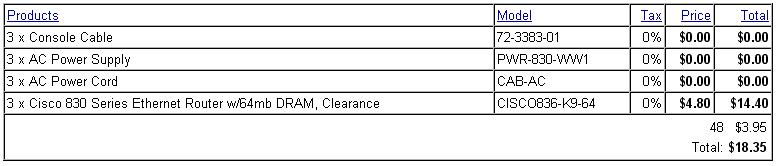
These dudes are technically DSL modems, so as far as that goes, they are dead to me. On the inside, it has a 4 port switch that you can assign VLANs. These guys will make great IPSLA nodes for line quality testing…and for $4.80 each…forget about it!
CNK 836, looks like they have a handful left.
Clearance bin! <---I can't resist a good deal..."I might need this one day."
[caption id="" align="alignnone" width="575" caption="Super Fancy"]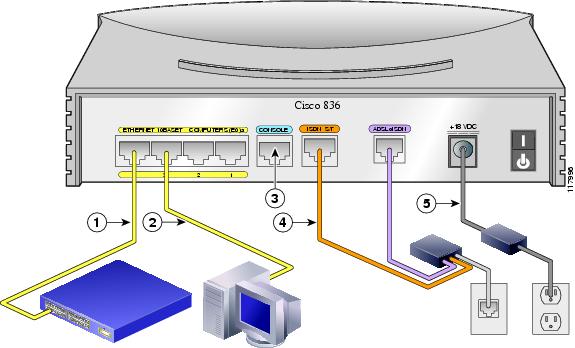 [/caption]
I know not too many of you will need this, but I’ll have to look this back up at some point 😉
1 2 3 4 5 6 7 8 9 10 11 12 13 14 15 16 | USE databasename
SET NOCOUNT ON
SELECT
ROUTINE_NAME
FROM
INFORMATION_SCHEMA.ROUTINES
WHERE
ROUTINE_TYPE = 'PROCEDURE'
AND OBJECTPROPERTY
(
OBJECT_ID(ROUTINE_NAME),
'IsMsShipped'
) = 0
ORDER BY
ROUTINE_NAME |
Before your access lists or firewall rules comes layer 2(L2). This is the Data link layer where your MAC addressing lives. Why do we need to protect L2…?
Lets hit these guys one at a time:
Man in the middle attack
What is a man in the middle attack? Here’s what wikipedia says about it. In a nutshell I tell the router that I am you, and I tell you that I am the router. What happens is that all your traffic passes through me…while I intercept everything possible about what you are doing. I wait for you to attempt a bank transaction and hand you a bunk site certificate and steal your monies 🙂 I do this by sending gratuitous ARPs. These are unprovoked ARP announcements. I send ARPs over and over to the router saying I’m you. I then send you ARPs over and over saying that I am the router.

Man in the middle...you are Bob and all your base are belong to us
So as you can imagine, if you manage a hotel or apartment complex, this could be a HUGE problem. This could be a problem for enterprises also, but for more or less shared public infrastructure, this is scary.
Rogue DHCP on a segment
What is a rouge DHCP server? This is when you have an unauthorized DHCP server handing out IP addresses on your network. Why is this a problem? A DHCP request fulfillment is really a foot race. You can have many DHCP servers on a single LAN segment, but whichever gets it’s answer back to the requesting host, wins. So, if your legitimate DHCP server is 20 milliseconds away and the rogue is 5 milliseconds away, guess who will win the race? This is a problem because rogues will generally give you a false path to the internet. They could create a man in the middle attack as above. They can hand you an IP address and say that they are the router to the internet. You will pass all your traffic to them and they will relay it on. Most often we see rogues in apartment complex networks. This is due to the fact that users will plug their wireless routers in backwards and start handing out IP addresses. There is no malicious intent in this second scenario, but they can take out large portions of your apartment users!
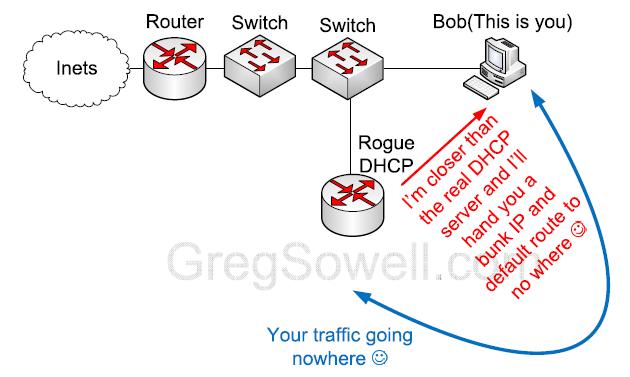
Improperly connected wireless router is closer, and responds faster...so now you are getting a junk IP and Default Route
DHCP starvation attack
A starvation attack is when a user spoofs tons of MAC addresses and requests a DHCP address from each MAC. This means that a single attacker can accept and hold all of your DHCP addresses, thus not allowing your legitimate users to pull an address.
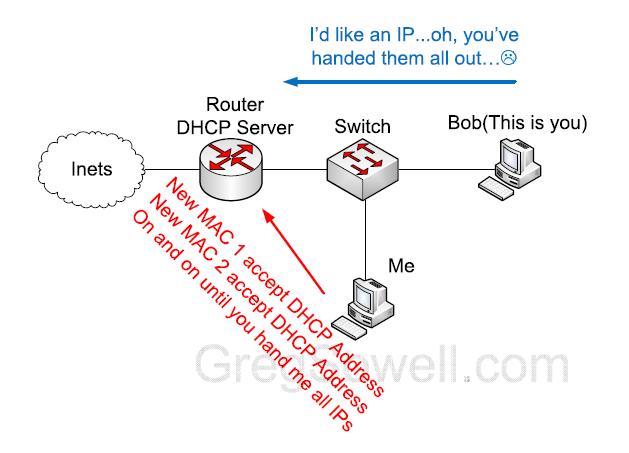
I've taken all the DHCP IPs...now you can't pull an IP
ARP attacks against our switches
I’ve got a 6509, why should I bother with one little guy ARP attacking me? Because even a Cisco 6500 will only hold about 120K MAC addresses in its MAC-Address table(per VLAN) before it gets overrun. Once your fancy switch is overrun and the MAC table is full, it turns into a fancy hub! So, all of your super secret traffic you don’t want anyone else to see is now getting broadcast out every port configured for that access VLAN or untagged for that VLAN. I just got you again. You know what’s even better is that my ARP will propagate through your fancy 6500 and down to your not so fancy edge switches that can handle even less traffic…snap…I just got you again. You also realize that this attack can reach maturity in around 10-20 seconds?
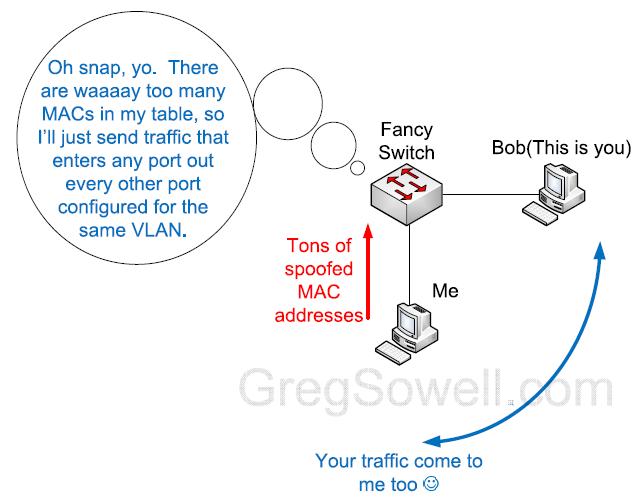
ARP attacking a switch to overrun the MAC Address table - again, all your traffic are come to me
Configuration
So, now we have a few compelling reasons why we need L2 security, how do we do it? The first thing you do is get yourself some Cisco switches…:) I have no idea how to do it with anything else. I know Juniper/Procurve will do it, but exactly how is a mystery to me. So now that I’ve told you get Cisco, I must tell you which models support our features. As far as the 1U switching line, you will need at least a 3550 or above. This covers 3560s and 3750s. If you are going with say a 6500 series switch, you will need at minimum a Sup32. A 3550 24 port will run you around $150. A 3550 48 port will run you around $190.
Port security
Time to get to the real configuration. What we are going to kick on 1st is port security. This sets a limit on the number of MAC addresses that can be learned via a single switch port. Setting port security will help to protect our DHCP server from a starvation attack. I generally like to set the number of allowed MAC addresses to 10. You have to remember that if you are using Cisco phones and you are piggy backing your PC off of it, you will be required to allow at least 2 MAC addresses. Some switches will see the initial CDP message come from the phone and consider this a separate MAC, so on these switches you would need 3 MAC allowances. The easiest thing I have found is to simply allow 10 MACs. Port security is configured on a per port basis.
1 2 3 4 5 6 | interface FastEthernet0/1 switchport port-security maximum 10 !sets max MACs to 10 switchport port-security !enables port security switchport port-security aging time 30 ! sets the time in minutes that MAC addresses will timeout switchport port-security violation restrict !sets the violate action to restrict - default is err disable port switchport port-security aging type inactivity !sets the aging type to only start when there is no activity on the port |
Here’s the Cisco docs on it.
Another quick note is that we don’t enable port security on trunk ports. Now that we have that covered, lets move on.
DHCP Snooping
We are next going to enable DHCP snooping(DS). DS will prevent our rogue DHCP servers. It only allows DHCP servers to respond on interfaces marked as trusted. Everything past this point builds off of DHCP snooping, so it’s quite a critical step. How DS works is to monitor DHCP requests coming from a port and to record the responses into a table on the switch called the…get ready for it, deep breath…DHCP snooping binding table(DSBT). I know what you are thinking…”We don’t have everything set for DHCP, like some printers and machines.” To this I say, almost anything can be set for DHCP. If you use dynamic DNS like Microsoft Active Directory(AD), you can simply reference the DNS name of the device. Or, if you setup reservation in your DHCP server for these devices, they will technically make the DHCP request, but they will pull the same IP every time.
DS is configured globally on a VLAN and not locally per interface.
1 2 3 4 5 | ip dhcp snooping vlan 10 !set your VLANs that should be snooped ip dhcp snooping database tftp://10.1.1.1/the-file !this will offload your DSBT to an TFTP server - We generally use Mikrotik's TFTP server ip dhcp snooping database write-delay 60 !setup a write delay if an entry changes in the DSBT ip dhcp snooping verify mac-address !ensures that the MAC learned on the port matches that in the DHCP request ip dhcp snooping !enable DS on the switch |
In the above example you see that I upload the DSBT to an TFTP server. I do this so that when a switch looses power it will repopulate its DSBT. This doesn’t seem like that big a deal because windows hosts and Mac hosts will pull DHCP when an interfaces loses connectivity, so they will be ok. A lot of Linux hosts, however, won’t reDHCP when their interfaces lose connectivity.
By default, when you turn on DS all ports are considered untrusted. You will need to mark the to specify trusted interface. A trusted interface is an interface where the DHCP server should be coming from. If you are on an edge switch and you don’t physically have the DHCP server plugged into it, you will need to set the trunk ports as trusted ports!
1 2 3 4 5 | interface GigabitEthernet0/1 switchport trunk encapsulation dot1q switchport trunk allowed vlan 10 switchport mode trunk ip dhcp snooping trust !set this trunk port as a trusted port |
You can also set a packet per second rate limit per port.
1 2 | interface FastEthernet0/1 ip dhcp snooping limit rate 50 !50 PPS |
Here’s what Cisco says about DS.
Dynamic ARP inspection
Now we will turn on some dynamic ARP inspection(DAI). So, what does our friend DAI do? He inspects every ARP packet that flows on untrusted ports and makes sure they conform to the DHCP snooping binding table. So this kills the man in the middle attacks that leverage false gratuitous ARPs.
DIA configures globally also:
1 2 3 4 | ip arp inspection vlan 10 !specify which VLANs to scan ip arp inspection validate src-mac ip !checks for bad IPs and ensures that it is sourced from interface MAC ip arp inspection log-buffer entries 1024 !by default 32 entries max will be held non violates ip arp inspection log-buffer logs 1024 interval 10 !by default will only hold them for 5 seconds, this ups to 10 |
We also have to mark which ports are trusted ports. These are ports we don’t inspect on. Your trunk ports will always need to be trusted…unless you want to black hole your traffic?
1 2 3 4 5 | interface GigabitEthernet0/1 switchport trunk encapsulation dot1q switchport trunk allowed vlan 10 switchport mode trunk ip arp inspection trust !marked as trusted |
Also, by default he does an ARP packet per second limiting. The default is 15 PPS, I generally up this to 50.
1 2 | interface FastEthernet0/1 ip arp inspection limit rate 50 |
When the PPS rate limit is violated, the switch port will err disable. I recommend doing error recovery for this reason:
1 2 | errdisable recovery cause arp-inspection !enables recovery for arp-inspection PPS events errdisable recovery interval 14400 ! this value is in seconds. I have this set to 4 hours |
Cisco’s docs can be found here on DAI.
So this will protect you from attacks on L2, but it won’t provide any authentication. If you want to do some L2 authentication, you need to check out 802.1X. Is 802.1X a replacement for L2 security, NO! Just because someone can authenticate doesn’t mean they don’t have a virus on their machine that will attack your network in some way…trust no one 😉
If you enjoyed this article and wouldn’t mind seeing more, drop me a line and tell me about it.

This is the new gig version of the RB750. The upgraded model has 5 gig ports and a 680Mhz processor.
Lets first take a look at this guy.
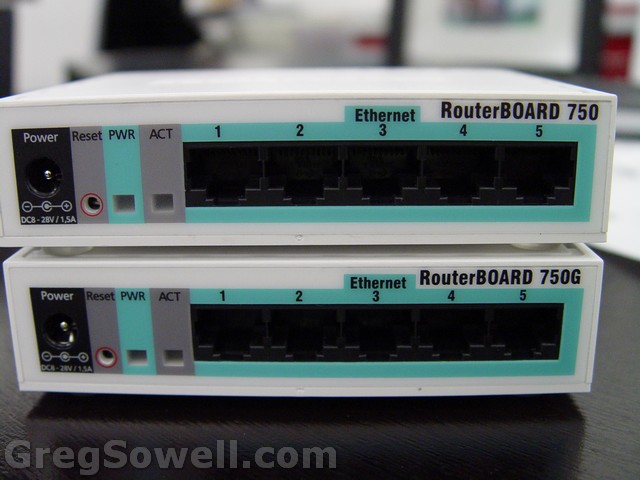
Nothing different on the outside...except the sticker
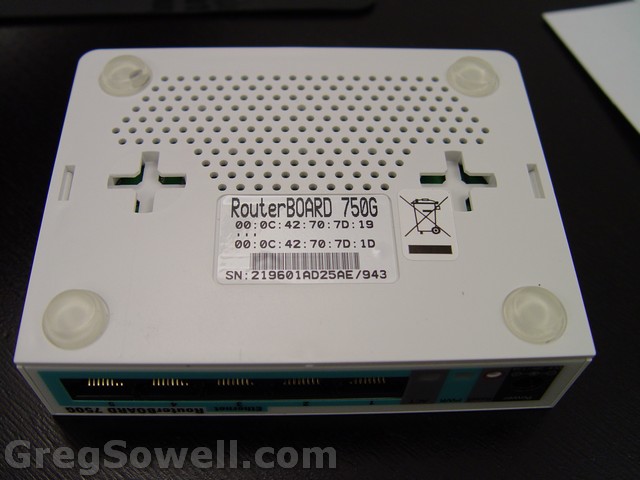
Bottoms up!
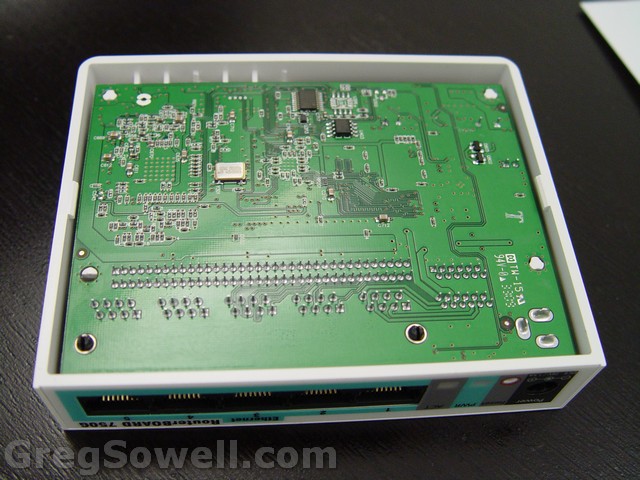
Bottom off
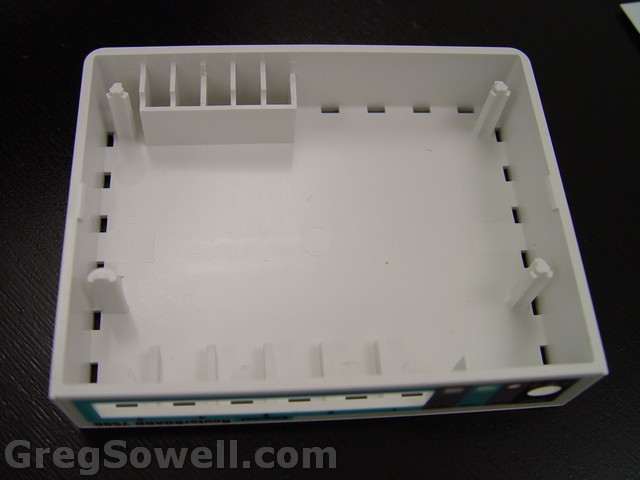
Just the shell
You can see that the new, bigger, proc has a heatsink. Orientation of the RAM moved
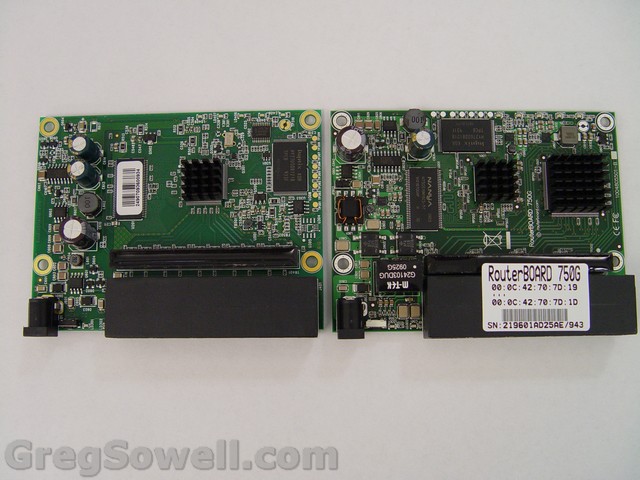
750 on the left - 750G on the right
Some additional SMDs on the bottom.
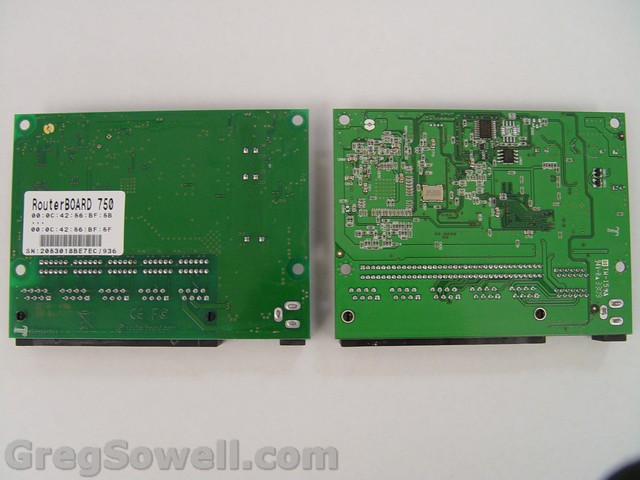
750 on the left - 750G on the right
In the product lineup it looks like the 750G fits well as the head end device in a hub-and-spoke IPSec VPN environment. Due to this fact, I setup a test scenario of two remote sites connecting back via IPSec tunnels. One remote site is an RB750, the other remote is an RB150. My bandwidth test devices are servers loaded with Mikrotik ROS. The MTK servers in the diagram are my speed testing devices. All code versions are 3.30 other than the RB750G, which comes preloaded with 3.31. All my tests use TCP since most real world traffic is TCP. I also did some testing adding a layer 7(L7) firewall rule.
Here’s the diagram I used for the initial testing:
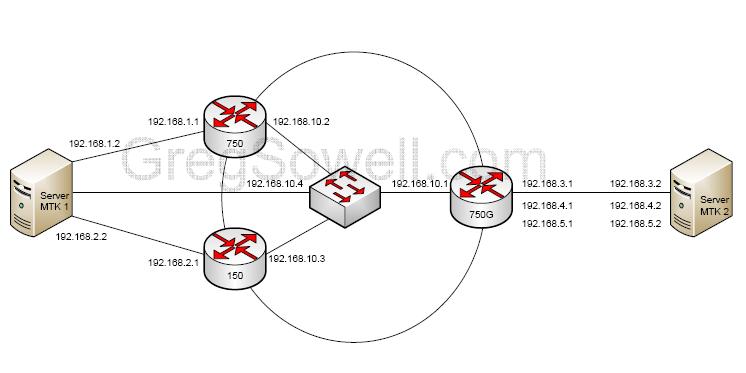
Diagram1

IPSec tests
For test number 2 I hooked the gig NICs on the servers straight to port 1 and 2 on the RB750G. I wanted to test routed gig throughput.
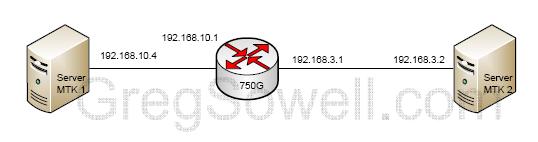
Nice and simple
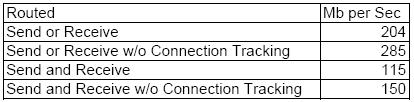
Gig to gig routed
For the final test, I wanted to just do a quick test enabling the switch chips on the ports.
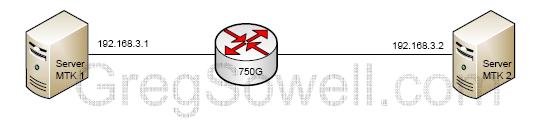
Even more simplerer 😉

Switch chip test
*NOTE* This is the max throughput my servers can push. If someone wants to send me a pair of RB1000s to speed test with, I won’t argue 😉 Since my hardware wasn’t capable up pushing full line rate gig, I wasn’t able to fully test the switch chip throughput, though it looks like it can handle line rate, or very near it.
So as you can see from the tests with the remote VPNs, this device is more than capable. In most situations I’ve seen you will have a hub site and 2 to 3 remote sites. The remote sites will generally be accessing files and RDP traffic, so throughput requirements are generally low. This is the new head-end device I’ll be deploying…in conjunction with RB750s that is. Also, doing a 100Mb test routed with connection tracking yields about 45% utilization on the router.
This review sample was sent to me by my friends over at BalticNetworks…the guys with the Mikrotik low price guarantee.
This class video includes some best practices along with firewalling. This class is about 50 minutes long and you will be a genius and beloved by all by the end.
Slides can be found here: Mikrotik Security (21985 downloads)
*****Here’s a Border Router Firewall Script that is a great start.*****
As always, questions and comments are very welcome! Thanks for viewing.
I'm glad someone finally noticed.