Here is the letter in PDF format.
They talk about the:
There is a new command that allows you to kill jobs other admins have left running:
1 2 | /System script job print /System script job remove numbers=1 |
There is also the addition of BFD:
BFD protocol for routing
Starting from RouterOS version v4.4, BFD is
supported.
BFD is a protocol intended to detect faults in the
bidirectional path between two forwarding engines,
including physical interfaces, subinterfaces, data
link(s), and to the extent possible the forwarding
engines themselves, with potentially very low latency.
It operates independently of media, data protocols,
and routing protocols.
Bidirectional Forwarding Detection (BFD):
* hello protocol for checking bidirectional neighbor
reachability;
* provides sub-second link failure detection support;
* not routing protocol specific, unlike protocol hello
timers or such
Features supported:
* asynchronous mode (draft-ietf-bfd-base-09.txt)
* BFD timer and detection multiplier configuration per
interface;
* enabling BFD for OSPF interfaces
* enabling BFD for BGP peers
* single hop IPv4 and IPv6 transport (draft-ietf-bfdv4v6-
1hop-10.txt)
* multihop IPv4 and IPv6 transport (draft-ietf-bfdmultihop-
08.txt)
Using it:
OSPF:
/routing ospf interface add interface=all use-bfd=yes
BGP:
/routing bgp peer add remote-address=x.x.x.x remoteas=
xxxxx use-bfd=yes
BFD timer configuration:
/routing bfd interface
BFD neighbor status:
/routing bfd neighbor
Wikipedia has more on it here.
It appears to be a standalone mechanism that establishes a connection after a 3way handshake. So, if you have two pieces of gear connected, this little protocol will connect between the gear and ensure the link is still up.
The external phone number mask is a method to present whatever caller id (CID) info you want to the outside world. As in, when I call you from my Cisco phone my number shows up as 555-5555, because my phone number mask is set to 555-5555.
There are multiple places you can affect the number mask. As you move through the callmanager towards your destination, you have the ability to override the mask previously applied. The mask is generally applied on the extension.
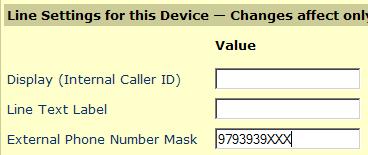
Extension external mask
You can also apply it to a route pattern, translation pattern, route group or on the outgoing gateway. If you leave these guys set to “use calling party external mask”, then it will just pass through the calling info.
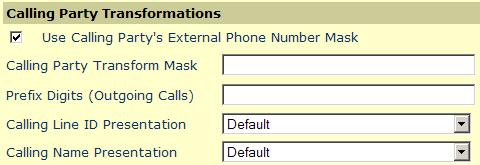
Use external phone number
If when you call an external number the CID doesn’t show what you want, the first thing to check is if you are sending the telco what you think you are. Issue the following debug command on the gateway: debug q931
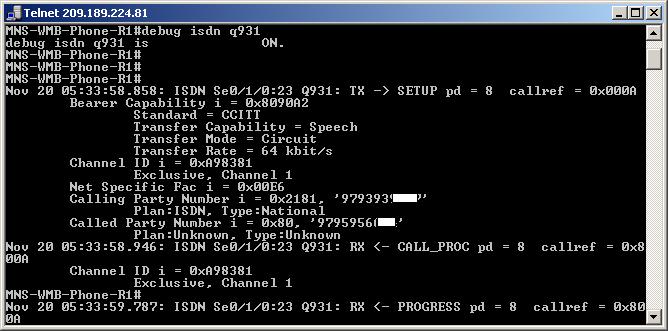
In the picture above you will see that I am presenting the full 10 digits to the telco(calling party number)...I blocked out the last 3 digits...I don't want you fools drunk calling me 😉 At this point, if you aren't handing the telco what you expect, look at the callmanager external masks. If it does match then you need to look at your "calling numbering plan" on the gateway.
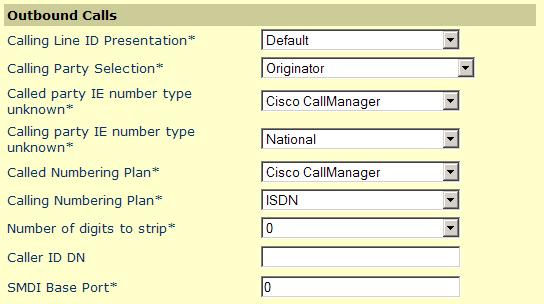
Gateway outbound presentation
What we need to manipulate is the calling numbering plan. As you can see my telco needed my "calling number plan" set to ISDN. After you make the gateway change, be sure to reset your gateway, and you should be ready to rock.