

What would it look like if you were to squeeze yourself under 8″ raised flooring…hmmmm. Well, I come back from lunch and find this pictorial evidence of just such an occurrence on my camera.
We’ve obviously never heard of a gofer pole 😉
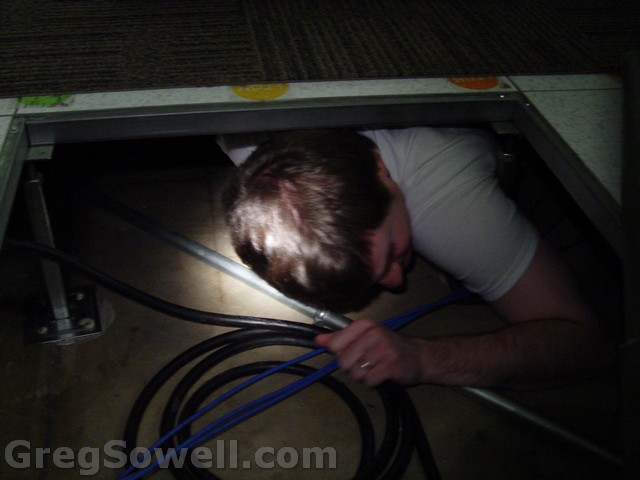

This kid has problems...hehe
And I’m not talking about Will Smith. I finally got into the office today and found a present from one of our security guards. Turpin( I love to call him officer Drebben) is this, obviously, crazy older gentleman with a sense of humor as dry as the Sahara…heh. So I opened the xmas card and it said something about having to go to space to get the present. I unwrapped it and it is a copy of Buzz Aldrin’s book Magnificent Desolation. I then flipped open to the first page and guess what was there…


A signed copy!
Turpin is also an air traffic controller, so he is a flight/space nut. It’s beyond me what convinced him to give me something this cool…I did fix a slot machine for him…hehe, but that was 5 minutes worth of work. 🙂
A little about Buzz from wikipedia.
Buzz has a pretty good right hook too.

This Cisco article describes the problem exactly!
The scenario:
I set my desk phone’s call forward all to forward to my cell phone. Someone from the outside calls my desk and it forwards to my cell. The number ringing on my cell phone looks like the generic PRI, and not the caller or my desk phone. For some people, the call won’t forward at all. My first step is to do a debug isdn q931 on my gateway to see what I’m presenting to the PSTN.
Debug isdn q931 with “Calling Party Selection” set to Originator:
1 2 3 4 5 6 7 8 9 10 11 12 13 14 15 16 17 18 19 20 21 22 23 24 25 26 27 28 29 30 31 32 33 34 35 36 37 38 39 40 41 42 43 44 45 46 47 48 49 | ZZZ-XXX-Phone-R1#
Dec 4 08:08:50.656: ISDN Se0/1/0:23 Q931: RX <- SETUP pd = 8 callref = 0x0D93
Bearer Capability i = 0x8090A2
Standard = CCITT
Transfer Capability = Speech
Transfer Mode = Circuit
Transfer Rate = 64 kbit/s
Channel ID i = 0xA98381
Exclusive, Channel 1
Calling Party Number i = 0x2183, '2543663555'
Plan:ISDN, Type:National
Called Party Number i = 0xC1, '9793939444'
Plan:ISDN, Type:Subscriber(local)
Dec 4 08:08:50.692: ISDN Se0/1/0:23 Q931: TX -> CALL_PROC pd = 8 callref = 0x8
D93
Channel ID i = 0xA98381
Exclusive, Channel 1
Dec 4 08:08:50.708: ISDN Se0/1/0:23 Q931: TX -> SETUP pd = 8 callref = 0x0001
Bearer Capability i = 0x8090A2
Standard = CCITT
Transfer Capability = Speech
Transfer Mode = Circuit
Transfer Rate = 64 kbit/s
Channel ID i = 0xA98382
Exclusive, Channel 2
Net Specific Fac i = 0x00E6
Calling Party Number i = 0x2183, '2543663555'
Plan:ISDN, Type:National
Called Party Number i = 0x80, '9795956333'
Plan:Unknown, Type:Unknown
Redirecting Number i = 0x00008F, '4444'
Plan:Unknown, Type:Unknown
ZZZ-XXX-Phone-R1#
Dec 4 08:08:50.796: ISDN Se0/1/0:23 Q931: RX <- STATUS pd = 8 callref = 0x8001
Cause i = 0x82E46C74 - Invalid information element contents
Cause i = 0x82AB6C74 - Access information discarded
Call State i = 0x01
Dec 4 08:08:50.800: ISDN Se0/1/0:23 Q931: RX <- CALL_PROC pd = 8 callref = 0x8
001
Channel ID i = 0xA98382
Exclusive, Channel 2
ZZZ-XXX-Phone-R1#debug isdn q931
Dec 4 08:08:51.950: ISDN Se0/1/0:23 Q931: RX <- PROGRESS pd = 8 callref = 0x80
01
Progress Ind i = 0x8488 - In-band info or appropriate now available
Dec 4 08:08:51.954: ISDN Se0/1/0:23 Q931: TX -> PROGRESS pd = 8 callref = 0x8D
93
Progress Ind i = 0x8488 - In-band info or appropriate now available |
As you can see in the debug above, the call heading back out the gateway is set to the outside caller’s phone number. Generally the Calling Party Selection(CPS) is set to Originator. What this means is that when a call is forwarded, it will appear to be coming from the calling party’s number. This is where our problem lies. When someone calls my desk from outside and the call is then forwarded back out the PSTN, the phone number will appear to come from a number that shouldn’t be sourced from my PRI. What I can do is set the CPS so that it will change the source number to be the first forwarded device.
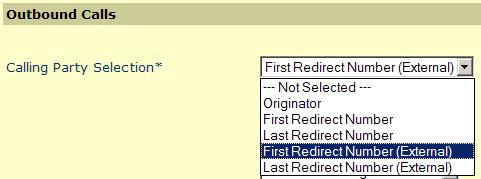
Now, have a look at our debug.
Debug isdn q931 with “Calling Party Selection” set to First Redirect Number (External):
1 2 3 4 5 6 7 8 9 10 11 12 13 14 15 16 17 18 19 20 21 22 23 24 25 26 27 28 29 30 31 32 33 34 35 36 37 38 39 40 41 42 43 44 45 46 47 48 | ZZZ-XXX-Phone-R1#
Dec 4 08:10:47.143: ISDN Se0/1/0:23 Q931: RX <- SETUP pd = 8 callref = 0x0D94
Bearer Capability i = 0x8090A2
Standard = CCITT
Transfer Capability = Speech
Transfer Mode = Circuit
Transfer Rate = 64 kbit/s
Channel ID i = 0xA98381
Exclusive, Channel 1
Calling Party Number i = 0x2183, '2543663555'
Plan:ISDN, Type:National
Called Party Number i = 0xC1, '9793939444'
Plan:ISDN, Type:Subscriber(local)
Dec 4 08:10:47.179: ISDN Se0/1/0:23 Q931: TX -> CALL_PROC pd = 8 callref = 0x8
D94
Channel ID i = 0xA98381
Exclusive, Channel 1
Dec 4 08:10:47.195: ISDN Se0/1/0:23 Q931: TX -> SETUP pd = 8 callref = 0x0001
Bearer Capability i = 0x8090A2
Standard = CCITT
Transfer Capability = Speech
Transfer Mode = Circuit
Transfer Rate = 64 kbit/s
Channel ID i = 0xA98382
ZZZ-XXX-Phone-R1#
Exclusive, Channel 2
Net Specific Fac i = 0x00E6
Calling Party Number i = 0x2180, '9793939444'
Plan:ISDN, Type:National
Called Party Number i = 0x80, '9795956333'
Plan:Unknown, Type:Unknown
Redirecting Number i = 0x00008F, '4444'
Plan:Unknown, Type:Unknown
Dec 4 08:10:47.279: ISDN Se0/1/0:23 Q931: RX <- STATUS pd = 8 callref = 0x8001
Cause i = 0x82E474 - Invalid information element contents
Cause i = 0x82AB74 - Access information discarded
Call State i = 0x01
Dec 4 08:10:47.287: ISDN Se0/1/0:23 Q931: RX <- CALL_PROC pd = 8 callref = 0x8
001
Channel ID i = 0xA98382
Exclusive, Channel 2
Dec 4 08:10:48.140: ISDN Se0/1/0:23 Q931: RX <- PROGRESS pd = 8 callref = 0x80
01
Progress Ind i = 0x8488 - In-band info or appropriate now available
Dec 4 08:10:48.148: ISDN Se0/1/0:23 Q931: TX -> PROGRESS pd = 8 callref = 0x8D
94
Progress Ind i = 0x8488 - In-band info or appropriate now available |
When the call heads out to the PSTN now, it looks like it is sourced from my desk phone. Now the call will go through and I will be able to see that it is coming from my desk.
If you are having CDR issues you should check this Cisco CDR Troubleshooting guide.
CDR generally:
We have a custom set of files that crunches the info from the Art DB table to produce bills.
Soooo we get a call from a customer that their link dropped. Upon further investigation, their fiber runs back to a local university and then jumps to their location. A little more digging shows that the city was installing a fire hydrant along that line. A quick call to the city yields us the information that “We hit the conduit, but you should be ok.” Once we get it dug up, the conduit is busted and our fiber is CRUSHED.
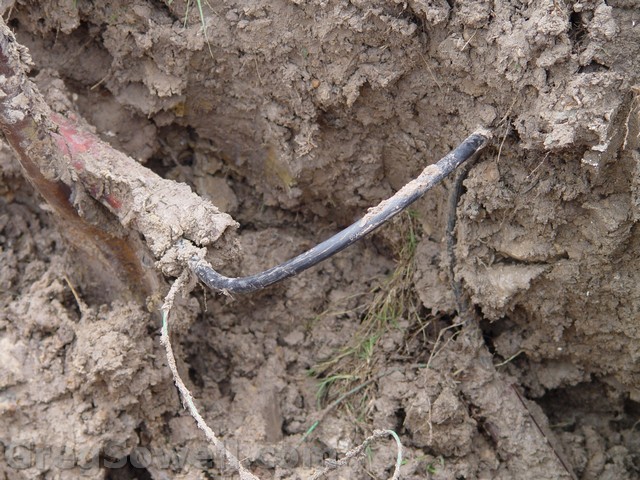
Ouchies
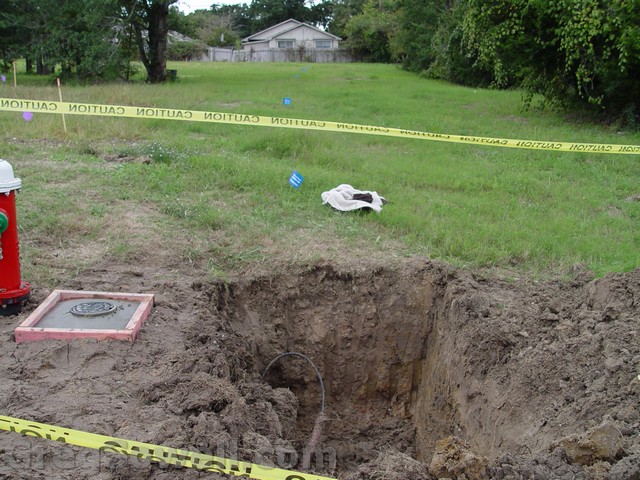
itz ze hole

I don't think it's supposed to do that...

Why not make the hole a little bigger

We never learned how to use shovels

Like a monkey at the zoo
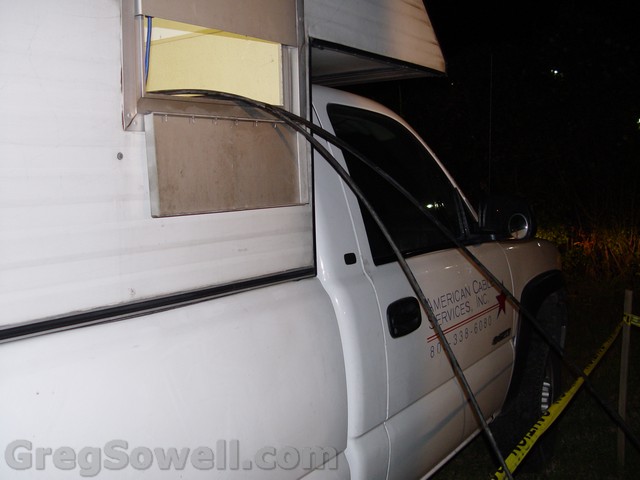
Splice truck out of H-town

The fire hydrant that caused the heartache

You have to have the requisite number of guys supervising...hehehe

Closer to James than is comfortable

I snuck in there for one shot 😉
It can be found here.
Looks like a small round of bug fixes.
Notable are
*) removed support for xen;
Interesting drop.
*) routing – added support for BFD protocol;
Looks like they are starting to roll it out. Still nothing in the wiki on it, though.
*) fixed problem – MetaROUTER sometimes froze on RB4xx;
All you 450/metarouter users need to upgrade.
So what this little autoit script does is SSH(using plink) into your Mikrotiks and issue the export command. It has a GUI to add all of your routers, and you use the windows scheduler to run the program to do automated backups.
It creates a sub folder in the script directory. It then creates a text file in the format
SCRIPT-DIRECTORY\YEAR\DESCRIPTION-IP ADDRESS-MONTH-DAY.TXT
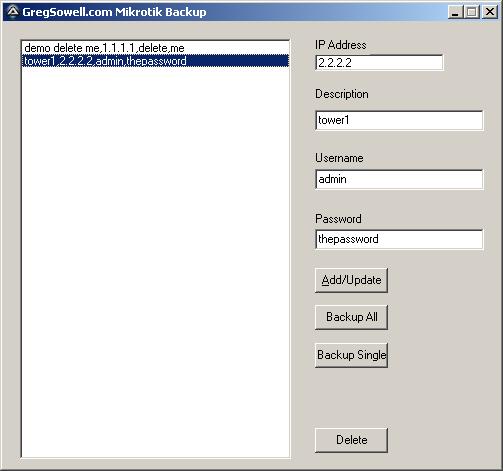
The program in all it's glory...;)
Everything is pretty straight forward. IP/Description/Username/Password. If you want to add a new device, just fill in the blanks and hit add/update. If you click a device over in the list, it will populate the text fields with its information. If you want to update the entry, make any changes and then click the add/update button.
To back them all up, click the backup all button. To backup a single entry, highlight it in the list, and then click the backup single button.
If you want to delete an entry, highlight it and click delete.
There is a caveat with plink. When hitting a device via ssh for the first time it requires you to accept the host key…and this has to be done manually. So, when you add a new device for the first time, it will connect and ask you to accept the key. After you accept and close, everything will be automatic.
Schedule it to run automatically
*NOTE* Whatever user account on the windows machine you accept the host keys with, is the account you need to run the scheduled task as!
Schedule a windows task to run the MikrotikBackup.exe program, and then add anything after the program name like the following:
c:\scripts\MikrotikBackup.exe -GregRocks
Adding anything after the executable makes it run silently and backup all routers.
You can download the executable from here: MikrotikBackup (4610 downloads) .
Here’s the autoit code:
1 2 3 4 5 6 7 8 9 10 11 12 13 14 15 16 17 18 19 20 21 22 23 24 25 26 27 28 29 30 31 32 33 34 35 36 37 38 39 40 41 42 43 44 45 46 47 48 49 50 51 52 53 54 55 56 57 58 59 60 61 62 63 64 65 66 67 68 69 70 71 72 73 74 75 76 77 78 79 80 81 82 83 84 85 86 87 88 89 90 91 92 93 94 95 96 97 98 99 100 101 102 103 104 105 106 107 108 109 110 111 112 113 114 115 116 117 118 119 120 121 122 123 124 125 126 127 128 129 130 131 132 133 134 135 136 137 138 139 140 141 142 143 144 145 146 147 148 149 150 151 152 153 154 155 156 157 158 159 160 161 162 163 164 165 166 167 168 169 170 171 172 173 174 175 176 177 178 179 180 181 182 183 184 185 186 187 188 189 190 191 192 193 194 195 196 197 198 199 200 201 202 203 | #include <ButtonConstants.au3>
#include <EditConstants.au3>
#include <GUIConstantsEx.au3>
#include <GuiIPAddress.au3>
#include <GUIListBox.au3>
#include <StaticConstants.au3>
#include <WindowsConstants.au3>
#include <File.au3>
#include <Array.au3>
FileInstall("C:\Documents and Settings\greg\Desktop\autoit\mikrotikBackup\plink.exe", @ScriptDir & "\plink.exe")
Dim $aConfig
;check if they are running backup version
if $CmdLine[0] > 0 Then
;they are running it from the command line
;pull config file
_BackupAll()
;exit once done
Exit
EndIf
;gui goodness
#Region ### START Koda GUI section ### Form=C:\Documents and Settings\greg\Desktop\autoit\mikrotikBackup\MikrotikBackup.kxf
$Form1 = GUICreate("GregSowell.com Mikrotik Backup", 497, 446, 192, 114)
$List1 = GUICtrlCreateList("", 16, 16, 273, 422)
$BtnDelete = GUICtrlCreateButton("Delete", 312, 406, 73, 25, $WS_GROUP)
$BtnAll = GUICtrlCreateButton("Backup All", 312, 283, 73, 25, $WS_GROUP)
$BtnSingle = GUICtrlCreateButton("Backup Single", 312, 321, 73, 25, $WS_GROUP)
$IPAddress1 = GUICtrlCreateInput("0.0.0.0", 312, 32, 129, 17)
$InDescription = GUICtrlCreateInput("", 312, 88, 169, 21)
$Label1 = GUICtrlCreateLabel("IP Address", 312, 16, 55, 17)
$Label2 = GUICtrlCreateLabel("Description", 312, 65, 57, 17)
$Label3 = GUICtrlCreateLabel("Username", 312, 129, 52, 17)
$Label4 = GUICtrlCreateLabel("Password", 312, 190, 50, 17)
$InUsername = GUICtrlCreateInput("admin", 312, 147, 169, 21)
$InPassword = GUICtrlCreateInput("", 312, 207, 169, 21);, BitOR($ES_PASSWORD,$ES_AUTOHSCROLL))
$BtnUpdate = GUICtrlCreateButton("&Add/Update", 312, 246, 73, 25, $WS_GROUP)
GUISetState(@SW_SHOW)
#EndRegion ### END Koda GUI section ###
$ListLocation = 1
;check for config file
if not FileExists(@ScriptDir & "\backupconfig.txt") Then
;doesn't exist, so create our dummy file
$fConfig = FileOpen(@ScriptDir & "\backupconfig.txt", 1)
FileWriteLine($fConfig, "demo delete me,1.1.1.1,delete,me" & @CRLF)
FileClose($fConfig)
EndIf
$fCommand = FileOpen(@ScriptDir & "\commands.txt", 2)
FileWriteLine($fCommand, "export" & @CRLF)
FileClose($fCommand)
;load in the config file
_LoadConfig()
;main running loop
While 1
$nMsg = GUIGetMsg()
Switch $nMsg
Case $BtnAll
;backup all of them
_BackupAll()
Case $BtnSingle
;backup single guy
_BackupSingle()
case $GUI_EVENT_PRIMARYUP
;mouse was pressed, lets check to see if they choose a new item in list
;check which list item is highlighted
$tempList = GUICtrlRead($List1)
;see if this is new item chosen or just a click somewhere on the prog
if $tempList <> $ListLocation Then
;change, update everything
;set list location to the temp value
$ListLocation = $tempList
;set all our gui values
GUICtrlSetData($InDescription,stringleft($ListLocation,StringInStr($ListLocation,",") - 1))
GUICtrlSetData($IPAddress1, StringMid($ListLocation, StringInStr($ListLocation,",") + 1, StringInStr($ListLocation,",", 0, 2) - StringInStr($ListLocation,",") - 1))
GUICtrlSetData($InUsername, StringMid($ListLocation, StringInStr($ListLocation,",", 0, 2) + 1, StringInStr($ListLocation,",", 0, 3) - StringInStr($ListLocation,",", 0, 2) - 1))
GUICtrlSetData($InPassword, StringMid($ListLocation, StringInStr($ListLocation,",", 0, 3) + 1))
EndIf
Case $GUI_EVENT_CLOSE
Exit
Case $BtnUpdate
;update existing or commit the new one
if $IPAddress1 == "0.0.0.0" Then
MsgBox(0,"nope", "Must enter an IP address")
elseif $InUsername == "" Then
MsgBox(0,"nope", "Must enter a username")
Else
;lets rock it
$new = 1
;where in the loop are we
$updateNum = 0
;check to see if it exists
for $y = 1 to $aConfig[0]
;check if the IP exists
if StringInStr($aConfig[$y], GUICtrlRead($IPAddress1)) > 0 Then
;we have a match
$new = 0
$updateNum = $y
EndIf
Next
;ready to rock, save it
if $new = 1 Then
;new one
;add to end of the array
_ArrayAdd($aConfig, GUICtrlRead($InDescription) & "," & GUICtrlRead($IPAddress1) & "," & GUICtrlRead($InUsername) & "," & GUICtrlRead($InPassword))
;sort our array
_ArraySort($aConfig,0,1)
;write the file
_FileWriteFromArray(@ScriptDir & "\backupconfig.txt",$aConfig,1)
;run plink to accept cert
Run(@ComSpec & " /c " & FileGetShortName(@ScriptDir) & '\plink.exe -ssh ' & GUICtrlRead($IPAddress1))
;load the list again
_LoadConfig()
Else
;update
;set existing value
$aConfig[$updateNum] = GUICtrlRead($InDescription) & "," & GUICtrlRead($IPAddress1) & "," & GUICtrlRead($InUsername) & "," & GUICtrlRead($InPassword)
;sort array
_ArraySort($aConfig,0,1)
;write the array to file
_FileWriteFromArray(@ScriptDir & "\backupconfig.txt",$aConfig,1)
;reload list
_LoadConfig()
EndIf
EndIf
Case $BtnDelete
;delete an existing entry
$sure = MsgBox(4, "Delete Record?", "Are you sure you want to delete " & GUICtrlRead($InDescription) & "?")
if $sure == 6 Then
;delete it
$updateNum = 0
;find the array #
for $y = 1 to $aConfig[0]
;check if the IP exists
if StringInStr($aConfig[$y], GUICtrlRead($IPAddress1)) > 0 Then
;we have a match
$updateNum = $y
EndIf
Next
;delete the entry
_ArrayDelete($aConfig,$updateNum)
;write it to file
_FileWriteFromArray(@ScriptDir & "\backupconfig.txt",$aConfig,1)
;reload list
_LoadConfig()
EndIf
Case $Form1
EndSwitch
;little sleep to lower CPU
sleep(30)
WEnd
Func _LoadConfig()
GUICtrlSetData($List1, "")
If Not _FileReadToArray(@ScriptDir & "\backupconfig.txt",$aConfig) Then
Else
;sorty array
_ArraySort($aConfig,0,1)
;load list
For $x = 1 to $aConfig[0]
GUICtrlSetData($List1, $aConfig[$x])
Next
EndIf
EndFunc
Func _BackupAll()
;pull config file
If Not _FileReadToArray(@ScriptDir & "\backupconfig.txt",$aConfig) Then
Exit
EndIf
;create store folder
DirCreate(@ScriptDir & "\" & @YEAR)
DirCreate(@ScriptDir & "\" & @YEAR & "\" & @MON)
;walk the list and call plink
for $x = 1 to $aConfig[0]
;backup the config
$CLIusername = StringMid($aConfig[$x], StringInStr($aConfig[$x],",", 0, 2) + 1, StringInStr($aConfig[$x],",", 0, 3) - StringInStr($aConfig[$x],",", 0, 2) - 1)
$CLIpassword = StringMid($aConfig[$x], StringInStr($aConfig[$x],",", 0, 3) + 1)
$CLIip = StringMid($aConfig[$x], StringInStr($aConfig[$x],",") + 1, StringInStr($aConfig[$x],",", 0, 2) - StringInStr($aConfig[$x],",") - 1)
$CLIfile = FileGetShortName(@ScriptDir) & "\" & @YEAR & "\" & @MON & "\" & StringReplace(stringleft($aConfig[$x],StringInStr($aConfig[$x],",") - 1), " ", "-") & "-" & StringReplace($CLIip, ".", "-") & "-" & @MON & "-" & @MDAY & ".txt"
;call plink
Run(@ComSpec & " /c " & FileGetShortName(@ScriptDir) & '\plink.exe -ssh -l ' & $CLIusername & ' -pw ' & $CLIpassword & ' -m ' & FileGetShortName(@ScriptDir) & '\commands.txt ' & $CLIip & ' > ' & $CLIfile, "", @SW_HIDE)
Next
EndFunc
Func _BackupSingle()
;create backup dir
DirCreate(@ScriptDir & "\" & @YEAR)
DirCreate(@ScriptDir & "\" & @YEAR & "\" & @MON)
$CLIusername = GUICtrlRead($InUsername)
$CLIpassword = GUICtrlRead($InPassword)
$CLIip = GUICtrlRead($IPAddress1)
$CLIfile = FileGetShortName(@ScriptDir) & "\" & @YEAR & "\" & @MON & "\" & StringReplace(GUICtrlRead($InDescription), " ", "-") & "-" & StringReplace($CLIip, ".", "-") & "-" & @MON & "-" & @MDAY & ".txt"
;run plink
Run(@ComSpec & " /c " & FileGetShortName(@ScriptDir) & '\plink.exe -ssh -l ' & $CLIusername & ' -pw ' & $CLIpassword & ' -m ' & FileGetShortName(@ScriptDir) & '\commands.txt ' & $CLIip & ' > ' & $CLIfile, "", @SW_HIDE)
EndFunc |
Another note, the config file is in plain text. The config files are pulled in plain text, so it is a bit of a moot point 😉
This was written and tested on Windows XP, and I’m working on testing other versions. I’ve also tested on 64 bit Windows Vista, and it works a treat. Be sure you make an allowance in your firewall for plink to access TCP 22 outbound.
Anyway, I just finished this guy, so give it a go and let me know of any bugs or updates you guys want.
**I just updated the code to create a YEARFOLDER/MONTHFOLDER, so the backups will be separated by months.**
If you like the program, let me know in the comments section!