

I CAN’T belive how easy this was…Just crazy.
Basically, you enter vSphere and expand the HD.
Enter the server’s disk management and refresh.
Click expand on the drive you want to expand, click next a couple of times…and you are DONE!
Just follow these quick and easy steps here on petri.co.il.
First things first, enable SSH access on your device.
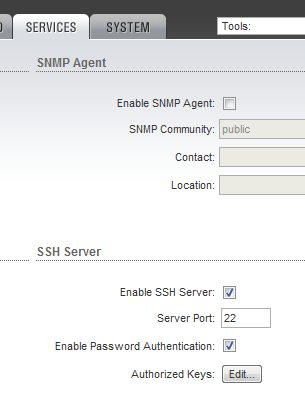
Some of the basic configs are easy to understand like the bridge connection and hostname…others not so much. The best thing to do is that if you can only gain SSH access to a remote device and aren’t able to connect via the web, then:
The config file is located at “/tmp/system.cfg”. To edit the file, use VI.
vi /tmp/system.cfg |
Once you have edited your config file, you must save it to flash:
cfgmtd -f /tmp/system.cfg -w |
Once you have saved it you can reboot by issuing the “reboot” command or you can do a soft apply:
/usr/etc/rc.d/rc.softrestart save |
You know it was inevitable…I can’t help myself.
I already had a ck1610 serial relay controller…as well as an old junk laptop…so I married the two together for Christmas this year.


This is a serially controlled 8 relay 2 opto-isolated input device. You throw a serial command at it and it will kick on a relay. Throw another and it will turn the relay off…pretty simple.
What I did was wire a common 120V cord into the relays and ran each relay to a separate electrical outlet. This way I can selectably power on 8 different strings of Christmas lights. These relays are rated for 120V 15A, which is FAR more amperage than I need for my LED Christmas lights.
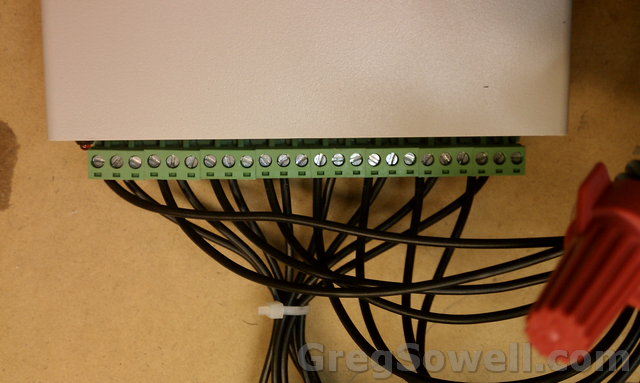
Each leg wired into a relay
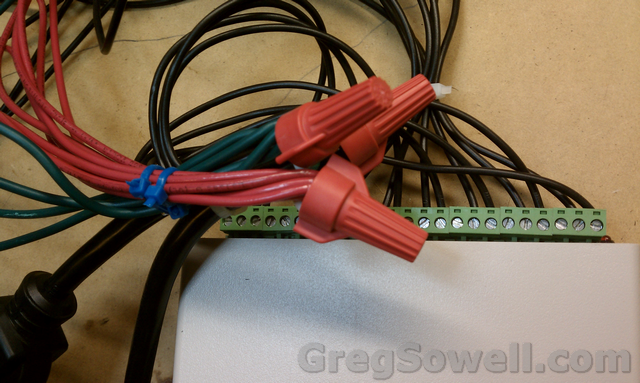
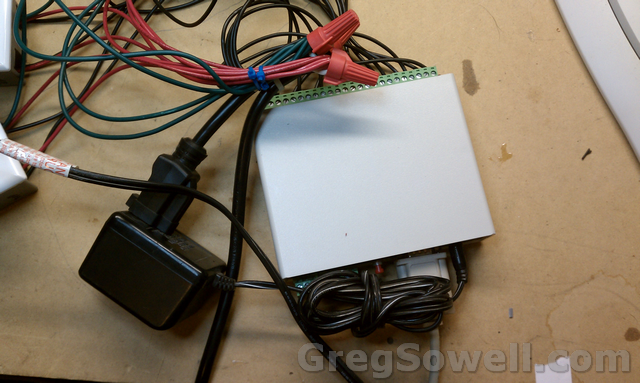
You can see that I wirenutted the original cord end back on. I plug the wall wart for the relay module into this port...I'm oh so crafty.
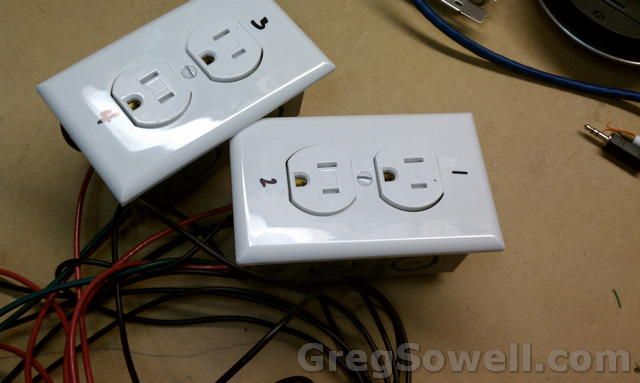
Individually labeled outlets wired in.
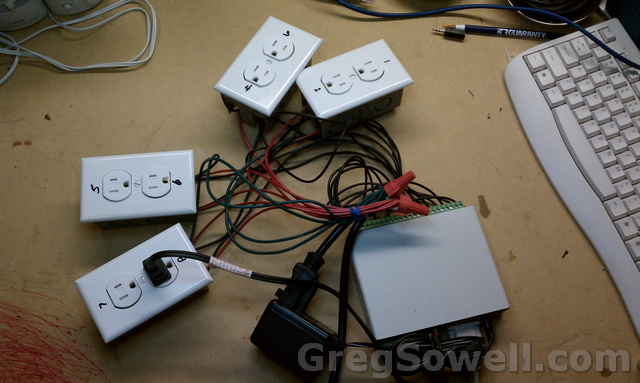
All of the outlets hooked up.
IF THE VIDEOS DON’T SHOW UP, HIT REFRESH.
Here’s a video of me testing the unit:
Once I got done testing I put the serial device into a NEMA enclosure to keep little fingers out of it. I then dropped the whole thing plus the laptop into a rubbermaid tub in my garage. And awaaaaay it goes.
Here’s a video of my “Random Lights” program running:
I wrote a program to do some random control. What it does is randomly pick a number of strings to turn on: 1 to 8.
It then randomly choose which strings will be the ones to turn on.
RandomRelays Code:
1 2 3 4 5 6 7 8 9 10 11 12 13 14 15 16 17 18 19 20 21 22 23 24 25 26 27 28 29 30 31 32 33 34 35 36 37 38 39 40 41 42 43 44 45 46 47 48 49 50 51 52 53 54 55 56 57 58 59 60 61 62 63 64 65 66 67 68 69 70 71 72 73 74 75 | #Region ;**** Directives created by AutoIt3Wrapper_GUI ****
#AutoIt3Wrapper_UseX64=n
#EndRegion ;**** Directives created by AutoIt3Wrapper_GUI ****
$RelayNumber = 0
dim $NumberOfRelays[9]
$NumberOfRelays[0] = 0
$com = ObjCreate ("NETCommOCX.NETComm")
_OpenCom()
while 1
;turn all relays off
$NumberOfRelays[0] = Random(1,8, 1)
$NumberOfRelays[1] = 0
for $x = 1 to $NumberOfRelays[0]
;this creates a random number of relays to enable
if $NumberOfRelays[0] == 8 Then
$CheckIt = 1
Else
$CheckIt = 0
EndIf
while $CheckIt = 0
$tRelay = Random(1,8,1)
$foundMatch = 0
for $y = 1 to $x
;make sure the same relay wasn't selected
if $tRelay == $NumberOfRelays[$y] then
; match so we have to do it again
$foundMatch = 1
EndIf
Next
if $foundMatch == 0 Then
;we have a new value
$CheckIt = 1
EndIf
WEnd
$NumberOfRelays[$x] = $tRelay
Next
_RelayOff()
_RelayOn()
;random number generate, then kick on those relays
sleep(2000) ;sleep for 1 second
WEnd
func _OpenCom ()
$com.CommPort = 1
$com.PortOpen = True
$com.Settings = "9600,N,8,1"
$com.InBufferCount = 0
endFunc
func _RelayOn ()
if $NumberOfRelays[0] == 8 Then
$com.Output = "N0" & @CRLF
ToolTip($NumberOfRelays[0],0,0)
Else
$justatemp = $NumberOfRelays[0]
for $x = 1 to $NumberOfRelays[0]
$justatemp = $justatemp & "-" & $NumberOfRelays[$x]
$com.Output = "N" & $NumberOfRelays[$x] & @CRLF
sleep(5)
Next
ToolTip($justatemp,0,0)
EndIf
EndFunc
Func _RelayOff ()
$com.Output = "F0" & @CRLF
sleep(5)
EndFunc |
RandomRelays Binary – RandomRelays (1251 downloads)
The RandomRelays program also requires the NetCommOCX program from here.
I ran short on time this year, but I have some interesting plans for this next year, so until then, enjoy the randomness 😉
Affected versions:
802.11 Products – AirOS v3.6.1/v4.0 (previous versions not affected)
AirMax Products – AirOS v5.x (all versions)
Updated versions are
v4.0.1 – 802.11 ISP Products
v5.3.5 – AirMax ISP Products
v5.4.5 – AirSync Firmware
Apparently there is a confirmed exploit that is installing botnet software on affected devices. If your devices are publicly accessible and have the versions listed installed, UPDATE NOW!
Link to the official forum post.
Link to the update site.
In the meantime, here are some firewall rules that will protect your radios until you can get them updated. These are designed for Mikrotik routers…because what else would you be using as your border router(this is designed to run at your internet border)? The exploit appears to be a flaw in the admin.cgi file(CORRECTION…IT IS ALL PAGES SO WE WILL BLOCK ALL CGI). This is a layer 7 with accompanying firewall rule to drop access to this file.
Layer7 Inspection:
1 2 | /ip firewall layer7-protocol add name=ubnt-fix regexp="^.*\\.cgi.*\$" |
Firewall Rule: (change in-interface to whatever you ISP interface is)
1 2 3 | /ip firewall filter
add action=drop chain=forward disabled=no src-address-list=!ubnt-admin-allow \
dst-port=80 in-interface=ether1 layer7-protocol=ubnt-fix protocol=tcp |
Optional Bypass from specific addresses:
1 2 | /ip firewall address-list add address=1.1.1.1 disabled=no list=ubnt-admin-allow |
Thanks for the heads up JJ.
***Fix from the UBNT Forum***
Originally Posted by UBNT-Matt
If the devices already have the worm, you can also mass fix them with AirControl:
http://ubnt.com/wiki/AirControl#Exec…ice_Operations
1) In AirControl, select multiple devices
2) Right click, and select Tasks/Operations
3) Choose Execute Command
4) In command field, type “rm /etc/persistent/rc.poststart; rm -rf /etc/persistent/.skynet; cfgmtd -w -p /etc/; reboot;” — no quotes
5) Click Done
*******************************
This is a good option for WISPs that use Cacti. It basically gives you the ability to use google maps to place your devices. You can use the GPS coordinates to specify location information. Link is here.
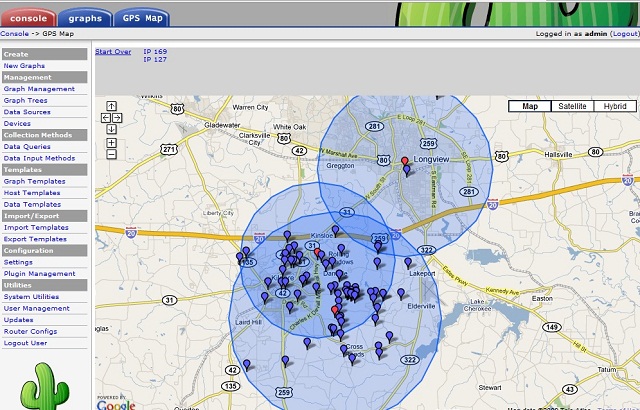
What’s new in 5.11 (2011-Dec-12 11:05):
*) hotspot – fixed https login (broken in v5.9);
*) eoip: swap tunnel id bytes to be compatible with previous versions;
*) eoip,gre: fix setting config
What’s new in 5.10 (2011-Dec-09 11:49):
*) snmp – provide extended interface statistics when availabe;
*) dhcpv6 client – use link-scoped multicast address;
*) dhcp client – renew dhcp lease on ethernet link up event; Great feature
*) ipv6 gre tunnel added (/interface gre6) supports ip and ipv6 encapsulation;
*) ip gre tunnel supports ipv6 encapsulation;
*) allow setting bigger trafflow cache;
*) improved RB1200 stability when using ether9,ether10;
*) fixed RB1200 stability issues when using crypto hardware acceleration;
Branch Circuit Monitoring(BCM) is basically monitoring how much amperage is flowing through your electrical circuits. Every major electrical PDU/RPP vendor sells these. They have small current transformer(CT) rings that you run the hot side of your power through and then into the breaker.

These BCMs generally have a Modbus interface. It is generally Modbus RTU, which is the original serial implementation of Modbus. The RTU standard while running RS485 has the ability to address 256 hosts on a network, but they recommend no more than 32 devices on a single ring. Since you have more than one device in a single serial ring, each must be uniquely addressed.
Since I have far flung BCMs that stretch beyond the physical distance and also beyond the device number limitations I also use a gateway. The gateway of choice is the Babel Buster SP.

This guy isn’t cheap at $550, but it works and it works well. What this device allows you to do is to wire it into an Modbus RTU RS485 ring and to seamlessly convert that to Modbus TCP. Modbus TCP is a TCP/IP method of querying for Modbus values. The only configuration one has to do on the device is to set an IP address, then set your serial port settings(in my case tell the serial port to use even parity). Wire in your RS485, plug in your ethernet cable and away you gooooo!
Modbus TCP is somewhat similar to SNMP in the fact that you query a device at a specific register(similar to an OID in SNMP) and it will return a value. You can also write to Modbus. Modbus TCP differs because you hit an IP address and also specify a slave ID. Each device that is on the serial ring has a serial address assigned to it…which is also known as the slave ID. In the Modbus world you can have many slaves, but only one master. This being the case, you can only have a single device on a Modbus ring that queries other devices. This is another great bonus of using a gateway. You can have multiple systems query the gateway(Master device on the ring) and the slaves will answer.
So, how do we collect the data? There are serveral different ways. One way is to create an Human Machine Interface(HMI). One that I found and have used is Aggregate. To get an HMI to be a BCM interface can be pretty tedious. We could also use a commercial product like power logic. This will only cost you several thousand dollars. Orrrr, you can write your own…or use mine 😉
There is a windows based app called Modpoll. Modpoll is a free windows app that allows you to poll or write Modbus RTU/TCP registers/coils from any device. Using this I wrote a basic program that polls Modbus TCP BCMs and saves them to file. The program is designed to be run every 15 minutes as a scheduled windows task. The program uses a file named config.txt. The config file lists the BCMs to poll in the form of:
#IP,SlaveID,Desc
Then I wrote a BCM program that mirrors the look of an actual breaker panel. It loads up the captured files and shows you the amperage pulled from each circuit. It also gives you the ability to set a description/configured amperage/and power phase(120/208/208 3 phase) for each circuit.
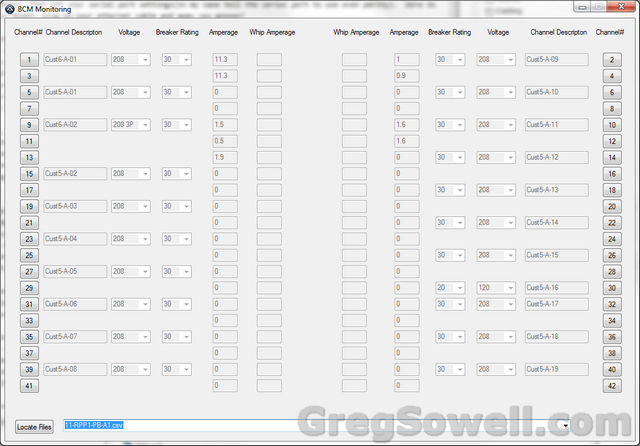
Not the prettiest, but it mirrors the look of a standard breaker panel.
Last there is a program that will process the collected information. It uses the description set on BCMs to coordinated customer information. What it does is calculate the kilowatt hours(kWh) for each circuit, then aggregate them for billing. The idea is that when you create a description on circuits you create a customer ID for each. So add descriptions like Customer1-A-1 or Customer1-A-2. All of Customer1’s info will be aggregated at the end of the month.
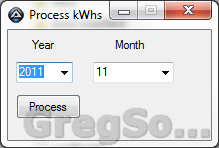
All you have to do is select the year/month and click the process button...how much easier does it get?
I’ve got the code and compiled configs here: BCM Poll FIles (1898 downloads)
Here’s the video of how it operates: