

This video and the included configs/diagrams show how to have failover with VM infrastructure/SAN replication in multiple datacenters. This basically leverages the power of BGP to move our public addressing. BGP is the ONLY choice to have addressing seamlessly migrate from one site to another…it is the protocol that the Internet happens to run on 😉
We use a combination of Cisco equipment with BGP(using prepending and filtering) and VRRP, though the below configs show HSRP instead(the Cisco proprietary version of VRRP). BGP does our public advertising to the internet while VRRP provides us gateway redundancy inside our network.
We also stretch the VM L2 subnets across the datacenters so we can have seamless VM migration from one location to the other.
Here’s the diagrams that go along with the video: VM Failover Diagrams (1883 downloads) .
Here’s the video(only about 10 minutes long):
Here are the router configs:
Internet
1 2 3 4 5 6 7 8 9 10 11 12 13 14 15 16 17 18 19 20 21 22 23 24 25 26 27 28 29 30 31 32 33 34 35 36 | hostname Internet ! interface FastEthernet0/0 description houston ip address 11.11.11.2 255.255.255.252 duplex auto speed auto ! interface FastEthernet0/1 description bryan ip address 12.12.12.2 255.255.255.252 duplex auto speed auto ! interface FastEthernet1/0 ip address 10.0.0.1 255.255.255.0 duplex auto speed auto ! router bgp 1 bgp log-neighbor-changes neighbor 11.11.11.1 remote-as 2 neighbor 11.11.11.1 version 4 neighbor 12.12.12.1 remote-as 2 neighbor 12.12.12.1 version 4 ! address-family ipv4 neighbor 11.11.11.1 activate neighbor 11.11.11.1 default-originate neighbor 12.12.12.1 activate neighbor 12.12.12.1 default-originate no auto-summary no synchronization network 20.0.0.0 mask 255.255.255.0 exit-address-family ! |
Bryan
1 2 3 4 5 6 7 8 9 10 11 12 13 14 15 16 17 18 19 20 21 22 23 24 25 26 27 28 29 30 31 32 33 34 35 36 37 38 39 40 41 42 43 44 45 46 47 48 49 50 51 52 53 54 55 56 57 58 59 60 61 62 63 64 65 66 67 68 69 70 71 72 73 74 75 76 77 78 79 80 81 82 83 84 85 86 87 88 89 90 91 92 93 94 95 96 97 98 99 | ! hostname bryan ! ! ip subnet-zero ip routing ! ! spanning-tree extend system-id ! ! ! interface FastEthernet0/1 switchport trunk encapsulation dot1q switchport mode trunk no ip address ! interface FastEthernet0/2 no switchport ip address 12.12.12.1 255.255.255.252 ! interface FastEthernet0/3 description [failover p2p] switchport trunk encapsulation dot1q switchport mode trunk no ip address ! interface FastEthernet0/47 switchport access vlan 20 switchport mode access no ip address spanning-tree portfast ! interface FastEthernet0/48 switchport access vlan 10 switchport mode access no ip address spanning-tree portfast ! interface Vlan1 no ip address shutdown ! interface Vlan10 description [Houston Primary] ip address 192.168.1.3 255.255.255.0 no ip redirects standby preempt delay minimum 30 standby 10 ip 192.168.1.1 standby 10 preempt standby 10 track FastEthernet0/2 20 ! interface Vlan20 description [Bryan Primary] ip address 192.168.2.2 255.255.255.0 no ip redirects standby preempt delay minimum 30 standby 20 ip 192.168.2.1 standby 20 priority 105 standby 20 preempt standby 20 track FastEthernet0/2 20 ! router bgp 2 no synchronization bgp log-neighbor-changes network 1.1.1.0 mask 255.255.255.0 network 2.2.2.0 mask 255.255.255.0 network 192.168.1.0 network 192.168.2.0 neighbor 12.12.12.2 remote-as 1 neighbor 12.12.12.2 version 4 neighbor 12.12.12.2 soft-reconfiguration inbound neighbor 12.12.12.2 prefix-list in in neighbor 12.12.12.2 route-map out out no auto-summary ! ip classless ip route 1.1.1.0 255.255.255.0 Null0 250 ip route 2.2.2.0 255.255.255.0 Null0 ! ! ! ip prefix-list in seq 5 permit 0.0.0.0/0 ip prefix-list in seq 15 deny 0.0.0.0/0 le 32 ! ip prefix-list out seq 5 permit 192.168.2.0/24 ip prefix-list out seq 10 deny 0.0.0.0/0 le 32 ! ip prefix-list out-prepend seq 5 permit 192.168.1.0/24 ip prefix-list out-prepend seq 10 deny 0.0.0.0/0 le 32 ! route-map out permit 10 match ip address prefix-list out set origin igp ! route-map out permit 20 match ip address prefix-list out-prepend set as-path prepend 2 2 2 2 ! |
Houston
1 2 3 4 5 6 7 8 9 10 11 12 13 14 15 16 17 18 19 20 21 22 23 24 25 26 27 28 29 30 31 32 33 34 35 36 37 38 39 40 41 42 43 44 45 46 47 48 49 50 51 52 53 54 55 56 57 58 59 60 61 62 63 64 65 66 67 68 69 70 71 72 73 74 75 76 77 78 79 80 81 82 83 84 85 86 87 88 89 90 | ! hostname hou ! ! ip subnet-zero ip routing ! ! interface FastEthernet0/1 switchport trunk encapsulation dot1q switchport mode trunk ! interface FastEthernet0/2 no switchport ip address 11.11.11.1 255.255.255.252 ! interface FastEthernet0/3 description [failover p2p] switchport trunk encapsulation dot1q switchport mode trunk ! interface FastEthernet0/47 switchport access vlan 20 switchport mode access spanning-tree portfast ! interface FastEthernet0/48 switchport access vlan 10 switchport mode access spanning-tree portfast ! interface Vlan1 no ip address shutdown ! interface Vlan10 description [Houston Primary] ip address 192.168.1.2 255.255.255.0 standby preempt delay minimum 30 standby 10 ip 192.168.1.1 standby 10 priority 105 standby 10 preempt standby 10 track FastEthernet0/2 20 ! interface Vlan20 description [Bryan Primary] ip address 192.168.2.3 255.255.255.0 standby preempt delay minimum 30 standby 20 ip 192.168.2.1 standby 20 preempt standby 20 track FastEthernet0/2 20 ! router bgp 2 bgp log-neighbor-changes neighbor 11.11.11.2 remote-as 1 neighbor 11.11.11.2 version 4 ! address-family ipv4 neighbor 11.11.11.2 activate neighbor 11.11.11.2 soft-reconfiguration inbound neighbor 11.11.11.2 prefix-list in in neighbor 11.11.11.2 route-map out out no auto-summary no synchronization network 1.1.1.0 mask 255.255.255.0 network 2.2.2.0 mask 255.255.255.0 network 192.168.1.0 network 192.168.2.0 exit-address-family ! ip classless ip route 1.1.1.0 255.255.255.0 Null0 ip route 2.2.2.0 255.255.255.0 Null0 250 ! ip prefix-list in seq 5 permit 0.0.0.0/0 ip prefix-list in seq 15 deny 0.0.0.0/0 le 32 ! ip prefix-list out seq 5 permit 192.168.1.0/24 ip prefix-list out seq 10 deny 0.0.0.0/0 le 32 ! ip prefix-list out-prepend seq 5 permit 192.168.2.0/24 ip prefix-list out-prepend seq 10 deny 0.0.0.0/0 le 32 route-map out permit 10 match ip address prefix-list out set origin igp ! route-map out permit 20 match ip address prefix-list out-prepend set as-path prepend 2 2 2 2 ! |
What’s new in 5.9 (2011-Nov-29 14:32):
*) ssh – fix mempry leak when client uses public key authentication;
*) ppp – added support for new RADIUS attribute MT-Delegated-IPv6-Pool (#22);
*) ntp client – faster initial synchronization;
*) ppp – added support for dhcpv6 pd;
*) wireless – nv2 improvements for 11n cards;
*) hotspot – fixed login page to better handle big load;
*) wireless – change default rate-selection to advanced;
*) snmp – fix simple queue table;
*) webfig – fixed problem were users wihtout sensitive permission could download
senstive files (like backups);
*) webfig – fixed problem were table filters did not work allways as expected;
*) metarouter – fixed problem where local routeros instances did not boot;
*) dhcpv6 – client and server moved to respective /ipv6 dhcp- entry;
*) dhcpv6 server – changed how bindings are defined, users should add
missing static binding information after upgrade;
*) sms – send sms now uses channel from config if it’s not specified in the command;
We have a sump pump in our basement…actually we have two. One is primary and one is backup. Soooo, what is our sump pump for? Well, when you have a bathroom below ground level, you have to help the pooh pooh go up to ground level to hit the sewer line.
Well, what happens when your pumps quit working…hmmm. Not good hehehehe. So, we needed a way to alert us when the redundant pump kicked in. The redundant pump has an extra set of dry contacts, so all I have to do is tie into that.
It wouldn’t be cost effective to run a cable all the way between our NOC and the pump. Nor would it be cost effective to put an ethernet module in place.
I started searching for something wireless and I found the “mailbox alarm”. This guy averages around $35. It’s got a tilt sensor that you mount to the mailbox door. It sounds an alarm on the base station when the mailbox is opened.
I took the sensor apart and wired some cat5 into it to connect the dry contacts. I also mounted a test switch so we can do some weekly tests without having to fire the pumps.
-

- The woman on the cover looks so happy and care free…I’ll take two of these.
-

- The head unit
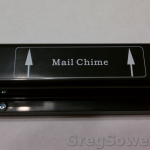
-
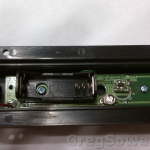
- Inside of the module
-

- Tilt sensor
-
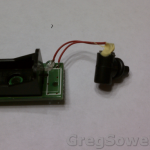
- Dismantled sensor
-

- Drilled new hole for the test switch
-

- Momentary switch to use for testing
-
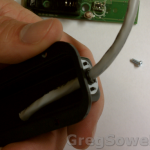
- Insert the cat5 in place of the old sensor
-

- Never hurts to have a couple of helping hands at the ready
-
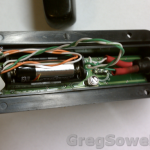
- All the wires jammed inside the enclosure
-
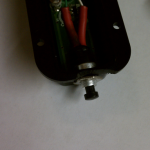
- Switch installed
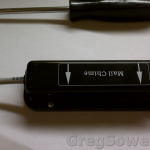
-
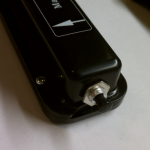
- Test button installed
-
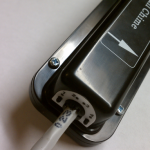
- Replaced sensor with cat5

Here’s a little video of the module in action:
If you need a quick and easy solution to do some remote monitoring, give it a go.
So Jason paid me to write this script so everyone say thanks to his insane self for the script.
What he needed was a way to disable or enable his proxy NAT rules for his caching server depending on whether or not the service appears to be online.

He’s using a simple destination NAT rule that takes traffic destined for port 80 and redirects it to his proxy server(192.168.100.100).
1 2 3 | /ip firewall nat
add action=dst-nat chain=dstnat disabled=no dst-port=80 protocol=tcp \
src-address=192.168.10.0/24 to-addresses=192.168.100.100 to-ports=3120 |
The flow is pretty simple:
– The router attempts to access traffic through the proxy.
– – If successful, enable the proxy nat rule.
– – If unsuccessful, disable the proxy nat rule.
If you check the packet flow diagram you will see that the router’s output chain can’t do destination natting. What you are forced to do is put in a static DNS entry that points traffic towards your proxy. In our case the URL we are going to redirect is www.JasonIsNuts.com.
Static DNS Entry
1 2 | /ip dns static add address=192.168.100.100 disabled=no name=www.jasonisnuts.com |
To check for the proxy function we will use the fetch tool. The fetch tool works great as long as the service is working. As soon as the proxy fails, the fetch command tanks and kills your script. What we have to do to work around this limitation is to break the script into two parts: fetch script and check script.
The fetch script pulls a page through our proxy to the URL that is statically set to go through our proxy. We change the URL’s actual IP address of 192.168.100.10 to be the IP of the proxy server 192.168.100.100.
Fetch Script
1 | /tool fetch url="http://www.JasonIsNuts.com/test.html" mode=http port=3128 |
The check script loops through all of the files looking to see if the test page successfully pulled, then it deletes the file if it exists, getting it ready for the next run.
Check Script
1 2 3 4 5 6 7 8 9 | :local checkpage "test.html";
:local found "0";
:foreach i in=[/file find] do={
:local filename [/file get $i name];
if ( $filename = $checkpage) do={ :set found "1"; :log info "found"; }
}
:log info "$found";
if ( $found = "0" ) do={ :log info "Disable rule, service down"; /ip fire nat dis 0 } else={ :log info "Enable rule, service up"; /ip fire nat en 0; }
/file remove $checkpage; |
The trick is to schedule the fetch script to run at whatever interval you like. You then schedule the check script to run at the same interval, only 10 seconds later. What this does is give the fetch script ample time to actually pull the page. If the fetch scripts pulls the file, the check script will enable the rule. If the fetch script fails and the file doesn’t exist, then the proxy NAT rule gets disabled.
If you enjoy the script, please drop me some feedback.
After attempting to delete users from my callmanager directory I was confronted with a Javascript error stating “Object not found”.
When I compared my MLA Enterprise Parameters to the LDAP configuration I found it was referencing an LDAP entry that didn’t exist!
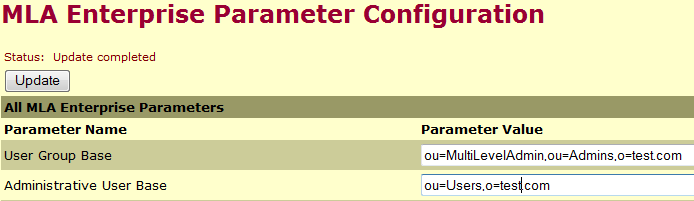
All one must do is compare your base LDAP zone to that listed in your parameters. Reference this article to find the proper values.
While trouble shooting some issues I needed to connect into my callmanager’s LDAP database. To do so, open the LDAP config file.
c:\dcdsrvr\DirectoryConfiguration.ini
[ldap] RETRYDELAY=5000 ldapURL=ldap://CISCOCCM1:8404 dn=cn=Directory Manager, o=cisco.com passwd=0c111104761331001c99 ciscoBase=o=cisco.com dirType=Default dirAccess=true useSSL=true ldapsURL=ldap://CISCOCCM1:8405 |
Note the port in “ldapURL”.
Note also the “dn”.
Connect using your favorite LDAP program(I like LDAP admin).
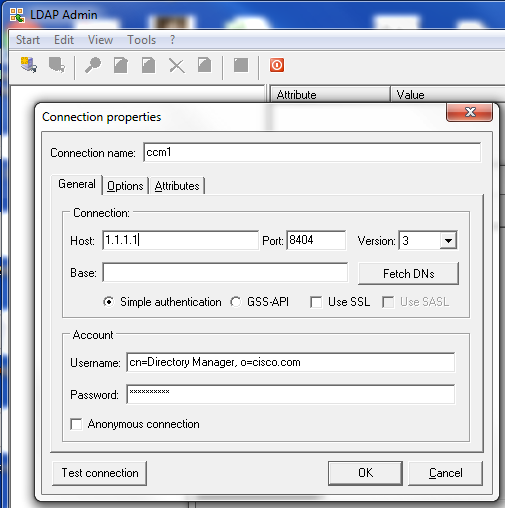
Set security to SASL and change the port to that listed above. Also use the dn listed above. In my case it is “cn=Directory Manager, o=cisco.com”. Your password will be whatever you have setup for your multi user account.
Some Cisco docs.
Connect and be happy.
Rogue Access Point Detection/Mitigation
This is my presentation…yeah? The link goes to my article on it that contains all the files and such. *Watch this…please*
QoS workshop
This was a brilliant presentation my Janis. This was a slower pace presentation that is really an intro to QoS focusing heavily on the packet flow diagram(the most brilliant piece of MTK documentation). My thoughts were “Where was this presentation when I got started.” *Watch this*
Wireless tricks
This was a great presentation by Uldis. This had a lot of great charts and information all aggregated into one place. *Watch this*
Load Balance Workshop
This is just as it is described. Unfortunately there is no video for this one, only audio. Janis does have the slides that you should be able to follow along with. Even though there is no video, it is a Janis presentation, so it will be worth reviewing.
Volume Configuration
Mike over at Duxtel Australia talks about how to bulk configure routers while fighting off kangaroos. Mike is also quite a nice guy…if you guys get a chance, give him a shout.
Wireless in the Jungles of the Congo
John Gorenflo gave a cool presentation of his wireless work in the Congo. I have a feeling that John is a true life MacGyver. It seems that everything being done in the Congo requires duct tape, a ballpoint pen and a baboon. John will hopefully upload some of his videos.
Resolving Wireless Disconnects
Jonathan gave a lot of great tips on “getting the link up so that it can wait until the morning.” I think we all like the sound of that.
Access Point Redundancy
This was an interesting presentation on running double the number of APs at each site. The idea is that if one dies on you, you can crank up the new one.