

First off, I have to say thanks to Justin B, he gave me the quick and dirty on doing the migration…”Try it. The worst that can happen is that it won’t work.” hehehehe. I had some old VMW server 2 guests that were originally built with IDE drives, so migrating to ESXI3.5 was way more trouble than it was worth…soooo I just kept an VMW server 2 machine running for these two VMs. With the introduction of ESXI4, they brought back the ability to create a guest with IDE drives! So, this may not be the most efficient method, but this is how I did it.
I first went to my ESXI4 server and create a new machine. I gave it a 1 gig IDE HD and the rest of the specs matched the original system.
Next I deleted the 1 gig HD and removed it from the system.
I then went to my VMWS2 machine and took a snap shot of my VM.
I then added SSH ability to my ESXI4 box:
1. alt-f1 then type the word unsupported.
2. root pw
3. vi /etc/inetd.conf
4. delete the “#” from ssh
5. services.sh restart
Using FastSCP, which is a freeware tool made by veeam, I created a temp folder under my new ESXI4’s server’s storage folder. I then copied the VMDK file over from the VMWS2 to the temp folder I created on the ESXI4 server. Default folder for VMWS2 under Centos is /var/lib/vmware/Virtual Machines/.
To find your server paths for the vmkfstools command below:
1 2 | cd /vmfs/volumes/VMSTOR ls |
This will show you all of your server’s folders.
Once this completed, I coppied the temp folder’s VMDK file to the main folder with the following syntax:
1 | vmkfstools -i /vmfs/volumes/4a087c30-eb3f8d2c-6e1b-0015174e6340/webserver/temp/webserver.vmdk /vmfs/volumes/4a087c30-eb3f8d2c-6e1b-0015174e6340/webserver/webserver.vmdk |
After you are done with this, you can add a new HD to your ESXI4 machine, which will be the existing vmdk you just vmkfstool’d. Start your VM and then you will need to reconfigure your NIC. That should be it.
Like I said, this isn’t perfect, but it sure worked for me!
The bane of most ISPs is Peer to Peer traffic(p2p). If you run hotels or apartments, especially apartments full of students, p2p will be your main source of issues. In some cases, extreme measure must be taken. So how does one go about taking back their network? The first thing to do is to find the offending traffic.
Mikrotik has some built in matching functionality for p2p traffic. You can use this in mangle rules or firewall rules. In mangle, you can mark the packets and then lower their precedence, or stick them in a smaller queue. In the firewall, you can block them all together.
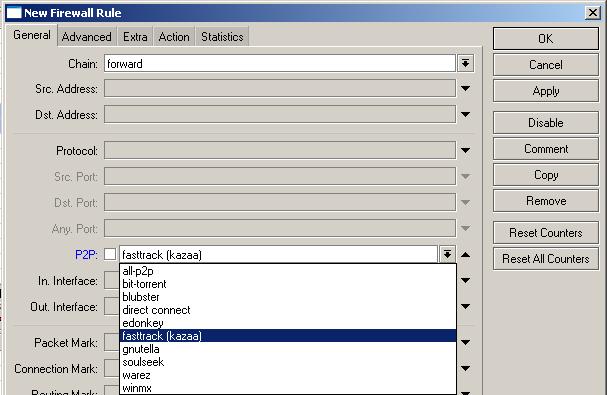
Notice the many matches
Here’s the rub, bit torrent traffic is almost universally encrypted, so these matching methods will generally not do you too much good. These matches must inspect the packets, and when encrypted they look like so much junk. So what do you do now?
You drop it like you are Fox and bit torrent is “Are you smarter than a fifth grader?”, “Do not disturb”, “Don’t forget the lyrics”, “Hole in the wall”, “MADtv”, “osborns reloaded”, “Prison Break”, “Secret millionaire”, “Sit down, shutup” or “Terminator”. So how do we drop it? I do it in the following ways.
First, we block people from finding torrents 🙂 Using MTKs layer 7 inspection(L7), we match http get requests for bit torrent sites and related sites. Here’s my regex:
1 | ^.*(get|GET).+(torrent|thepiratebay|isohunt|entertane|demonoid|btjunkie|mininova|flixflux|torrentz|vertor|h33t|btscene|bitunity|bittoxic|thunderbytes|entertane|zoozle|vcdq|bitnova|bitsoup|meganova|fulldls|btbot|flixflux|seedpeer|fenopy|gpirate|commonbits).*$ |
Here’s the CLI code you can simply paste:
1 2 | /ip firewall layer7-protocol add comment="" name=torrent-wwws regexp="^.*(get|GET).+(torrent|thepiratebay|isohunt|entertane|demonoid|btjunkie|mininova|flixflux|torrentz|vertor|h33t|btscene|bitunity|bittoxic|thunderbytes|entertane|zoozle|vcdq|bitnova|bitsoup|meganova|fulldls|btbot|flixflux|seedpeer|fenopy|gpirate|commonbits).*$" |
This regex matches most of the popular torrent sites. You will notice that the word torrent is also there. If you go to google and type torrent, it will match the get request…what! hehehe. This means that even if they try to google for a torrent it will get matched. So now we put in a firewall rule to block with this L7.
1 2 3 | /ip firewall filter
add action=drop chain=forward comment="block torrent wwws" disabled=no layer7-protocol=\
torrent-wwws |
From the GUI, you set chain to forward and under the advanced you choose the L7:
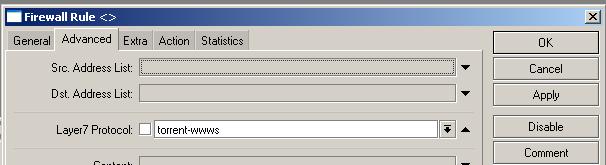
As you can see, on the forward chain, I added the L7 torrent-wwws, which was defined earlier. This means anyone trying to browse to any of our specified bit torrent sites will get blocked. Also if their client tries to hit the tracker with a get request, it gets stopped too. Now, just to put a bow on top, lets be a little more devious! Lets block DNS queries based on the same regex.
Here’s the new regex:
1 | ^.+(torrent|thepiratebay|isohunt|entertane|demonoid|btjunkie|mininova|flixflux|torrentz|vertor|h33t|btscene|bitunity|bittoxic|thunderbytes|entertane|zoozle|vcdq|bitnova|bitsoup|meganova|fulldls|btbot|flixflux|seedpeer|fenopy|gpirate|commonbits).*$ |
Here’s the code to copy and paste in the CLI:
1 2 | /ip firewall layer7-protocol add comment="" name=torrent-dns regexp="^.+(torrent|thepiratebay|isohunt|entertane|demonoid|btjunkie|mininova|flixflux|torrentz|vertor|h33t|btscene|bitunity|bittoxic|thunderbytes|entertane|zoozle|vcdq|bitnova|bitsoup|meganova|fulldls|btbot|flixflux|seedpeer|fenopy|gpirate|commonbits).*\$" |
Here’s the firewall rule to block:
1 2 3 | /ip firewall filter
add action=drop chain=forward comment="block torrent dns" disabled=no dst-port=53 \
layer7-protocol=torrent-dns protocol=udp |
Notice that I’m blocking UDP to port 53, so this will drop all DNS queries to our torrent list above. 🙂 This way, if they are using a web proxy, they will still get blocked! If their client tries to do any resolution matching this good stuff, it will get blocked too.
Using the above method to block along with the standard p2p matching, it looks like you can save around 25% – 50% utilization on traffic. Though, what will the kids do when they can’t download their pornography and movies…I think the internet has no other use?
*Edit* It appears as if Blizzard, makers of WoW, are now only allowing updates via BitTorrent. I’ve written a little exclusion for this that can be found here.
You can find the log here.
I’m just going to do this in one big lump comment:
*) fixed problem – RB450G ethernet did not work if one of the ports was disabled;
*) fixed ethernet of RB433 with switch chip IP175D;
*) fixed route attribute problem;
*) fixed route next-hops falling under multiple connected routes;
Another big round of hardware problems fixed. I’m still waiting to upgrade 🙂
I remember being introduced to subspace right around the time it was released…I must have been 14-15, give or take. My cutty Paul got me hooked. This was the first Massively Multiplayer Online game I’d played. I still remember soliciting for players to join my frequency and attack the little area in the lower right.
You get to pick one of 8 ships, each of which has it’s strengths and weaknesses. It is a 2D overhead view. There are different “zones”. Each zone has different gameplay and even ship attributes. I remember you used to be able to play in the amature areas for free until your character gained too many points…at which point, you would simply make a new character and continue to play for free…hehe.
Good news is, this game continues on as freeware! It’s now called continuum…the name changed, but everything else stayed the same. I generally run around in trenchwars and hangout in whatever the secondary pub is…pub 0 is for chumps 😉 hehe. Trechwars is basically team domination, centered around a small castle shaped fortress. The Terrier(ship 5) is something of the mothership in TW. Players can attach to the terrier and become a turret on it. You then disconnect from being a turret and now you have warped yourself to where the terrier is. Soooo, you try and get your terrier in the base, then everyone attaches and attacks…and a good time is had by all. Look me up, “BuSy_keniff”. I checked my usage and I’ve only logged 120ish hours since early 2000s 😛
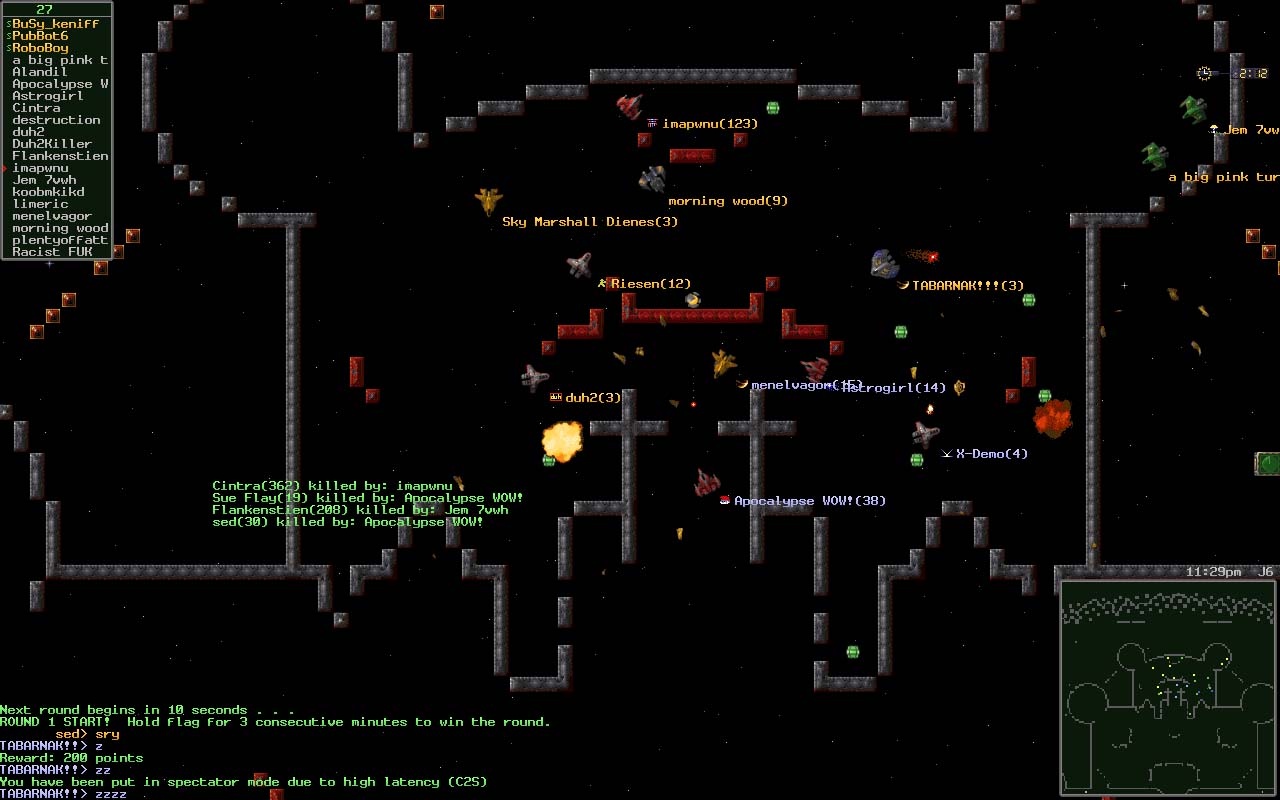
subspace 4 life
Youz guyz go check out the Wiki. They’ve done a pretty good job of reorganizing it. I’ve got a post in there…do you?
Finding time to teach classes is so difficult. I think what I’m going to do is just record class presentations when I get a chance, then edit the video and put it up on the site. I recorded my intro to networking class, and I plan to put that up. Would this be a preferable format? I would be able to segment these guys up into probably 45 minute to 1 hour long chunks. I know I like the class interaction, but this seems the only way I’ll ever get this stuff out…heh.
Next class/video will be either:
- Firewall/security
- IPSec/VPN
- QoS
- A basic config with various options
What do you guys want to see first?
The 4.X change log can be found here.
I’m going to go ahead and say that I wouldn’t recommend upgrading unless you have a specific need…as in 802.11n. I usually try and wait until they get somewhere between .5-.10…unless they introduce a feature I just gotta have 😉
*) fixed problem – RB750 (clocked at 300MHz) Ethernet did not work;
This does seem to be a rather large fix, so for all of you early 750 adopters, myself included, if you took the 4 plunge, be sure to upgrade.
*) fixed problem – routes on some interfaces (like VLAN) were not activated;
Another big fix.
*) dhcp server – added support for dynamic address-list entries;
This sounds like an interesting new feature. I take from this that as users are given DHCP addresses, they are added to an address list. When used in conjunction with a firewall rule, this should keep users from assigning themselves static IPs. I’m sure there are other uses.
*) hotspot – added support for dynamic address-list entries;
Again, sounds like it could be quite useful.