

So I ran into a problem after installing a new Mikrotik back-haul. Reference the diagram below:
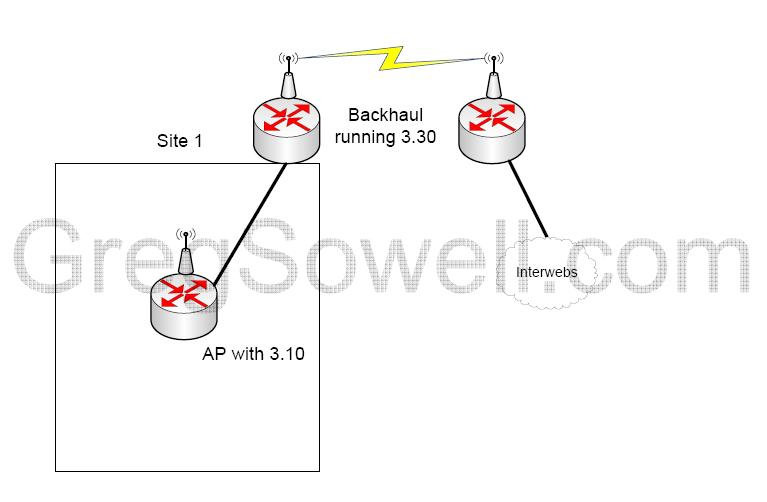
3.10 Bug Diagram
I have a building that I’m serving wireless to, and I was doing the back-haul with some old Redlines…this all worked fine. Well, the Redlines eventually tanked on me, so I swapped them for some 411s. When I got the 411s in, I threw 3.30 on them and installed them. I could pass traffic fine across them, no problems. I then hooked up the building AP and left. I then got a call saying that the wireless was useless…nice.
I went out to investigate and I was getting some interesting results. I connected to the AP just fine. I opened winbox and could ping from the AP to the internet just fine. With the ping still running, I tried to browse to any site other than google, and the pings stopped passing… I rebooted the AP and got the same results…everything was fine until I tried to pull a real page, at which point the ethernet between my AP and the back-haul radio stopped passing traffic.
After futzing with it for several minutes, I noticed that my AP was still on 3.10, so I upgraded the OS to 3.30 which is the same version my back-hauls are running. I started my ping again, and browsed to a site and…it worked perfectly. Nothing dropped and all my pages loaded. There appears to be a bug that when 3.10 tries to communicate with a 3.30ish MTK, the traffic just stops passing.
I hope you guys don’t run into these issues, but if you do, upgrade!
This is a quick and easy one. Generally when you create a hotspot you don’t want to have to log yourself in all the time…at least I don’t 😉 So here is the skinny on adding a MAC address exclusion.
Click the link below for the video!
read more…
Check the right side of the page for a regional server -> pool.ntp.org
The PDF is found here.
There are several interesting things listed in the most recent newsletter…as compared to the last…heh.
The big news is that Router OS 4 is out of beta! This isn’t too surprising, since you had to use beta 4 to get 802.11N support. They are reminding you to update your bootloader and also you have 72 hours to update your license after the upgrade to V4.
It appears that V4 adds some additional switch chip functionality, as in port mirroring. All of you 150, 450, 450G, 750 owners may now rejoice, but only because I’ve given you permission.
They are still saying you can get 200Mb out of N, but I’ve yet to see it in the real world.
On to some RB750 news, and BTW I love these frickin things! It appears that if you want to order a quantity of 1000 or more they will custom print the front sticker…I’m thinking I want mine with puppy dogs and kitty cats.
KVM Virtualization. This is a hardware based virtualization optimization. I don’t pretend to know that much about this, but it looks like it is PC based and must be used with specialized Intel or AMD procs that support the technology.
New BGP implementation. Looks like they have completely rebuilt the BGP engine, which I’m happy to see. Reliablility is supposed to be up, which is great because I’ve seen several BGP bugs in the old versions.
License Structure Changing. It seems the licensing structure is changing.
- In regards to RouterOS upgrades, RouterOS can be Licensed with two types of keys, L3/L4, and also L5/L6
- The difference between these is that L3 and L4 only allow RouterOS upgrades until the last update of the next version. L5 and L6 however, give you the ability to use one more major version
- There are also differences between all License levels (L3-L6) that are unrelated to RouterOS upgrades, see License levels
- If current version would be ROS v4, L5 and L6 will work with v4.1, v4.20, v5.1, v5.20 and also v6beta to v6.99 but NOT v7
- If current version is ROS v3, L5 and L6 will work with v3.1, v3.20, v4.1, v4.20 and also v5beta1 but NOT v6.0 and beyond
- If current version is ROS v3, L3 and L4 will work with v3.1, v3.20, v4,1, v4.20 but NOT v5.0 and beyond
So the math is:
- L3/4 = current version + 1 = can use
- L5/6 = current version + 2 = can use
eg. L5/6 = v3 + 2 = v5.21 you can use
The licensing info can be found here.
| The idea in this scenario is as follows: You have two ISPs. You want all of your user’s web traffic to exit and enter ISP1 and everything else to exit and enter ISP2. You also need the ISP connections to backup each other in the case of a failure of either.
Here’s our lovely diagram for this exercise.
You will notice that I have a firewall in place. This configuration works with or without the firewall. You can ditch the firewall and move the VLAN interfaces to the router. I added the firewall, because the question was asked from someone who has this configuration. So, in this configuration with the firewall, we won’t do any NATing in the firewall, it will all be done in the router. This will allow me to be as granular as possible. We are also assuming that each ISP is giving you a single static public IP. So, what is Policy Based Routing(PBR)? This allows you to put a policy incoming on an interface that will move or manipulate traffic in a variety of ways. Here’s the quick and dirty from Cisco. We are going to:
Router Config:
On line 26, we configure an ACL that specifies which traffic will be grabbed and sent out ISP1. Line 39 begins our route-map. These guys are the heart of our configuration. You name it, specify permit and give it a sequence number. After that we provide a match statement. Here we match the ACL we created on line 26. The action to be performed is specified with set commands. Our set command is setting the next-hop IP address for ISP1 and then secondary ISP2. The idea is if ISP1’s interface is up, the user web traffic will dump out there. If ISP1 goes down, the web traffic will kick to ISP2. On line 35 we have the default route pointing out ISP2. This will send all traffic that direction by…well…default..heh. You will notice that on line 37 we have what appears to be another default route. In reality, we are using a floating static route. We have the metric for the route set to 254. What this does is make the route look undesirable, and so the ISP2 route will normally be used. If ISP2’s interface goes down, then ISP2’s route will go away and ISP1’s route will be used. This gives us failover for both providers. Last, on line 7 we apply the route-map to the inside interface on the router. Route-maps for PBR can only be applied inbound on interfaces. We do this because if we are going to violate the route table, we have to do it before the routing table gets hold of the traffic. Questions and comments are more than just welcome, they are demanded! |

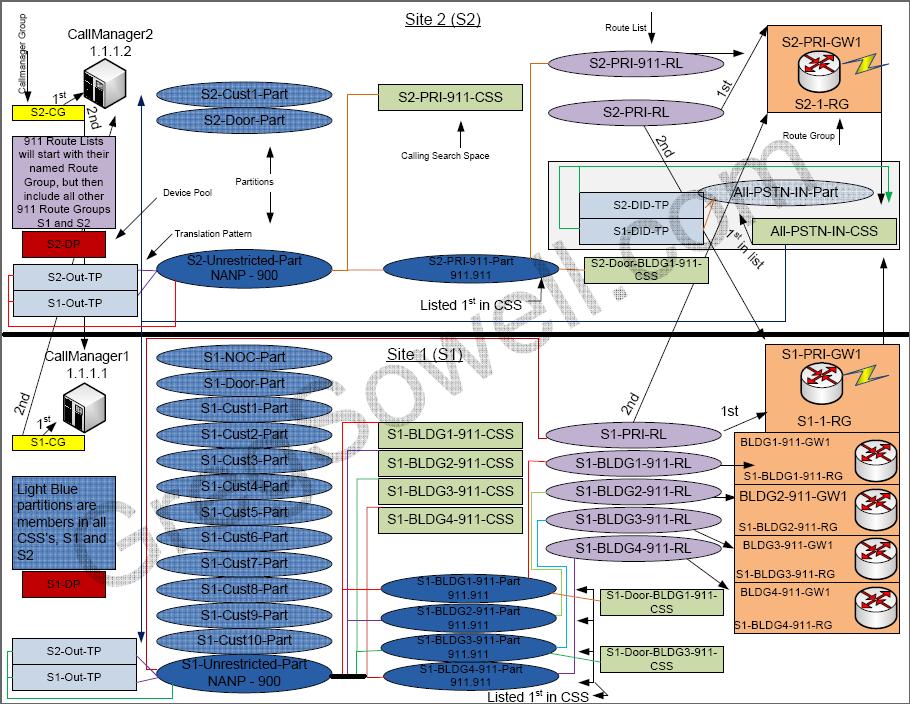
| On the heels of my CIPT test (call manager test), I’ve completely redesigned from the ground up our call manager configuration. I’ve changed the way the system works pretty much completely…hehe. I spent a good bit of time putting together the Visio, so I figured I would share it with you guys, and also explain it in laymen’s terms.Here’s the PDF version that you can download(
CallManager Design (1281 downloads)
), or simply take a peek at the below jpg. Names and places have been changed to protect the innocent.
As you can see, it looks somewhat confusing at first…that’s what I call job security! Actually, if you familiarize yourself with the different components, it will actually make sense. What we have are two separate sites, S1 and S2. This is a single cluster with the publisher at S1. Since callmanager 4 runs on windows using SQL 2000, you are limited to 8 subscribers. The publisher has a writable database and the subscribers replicate that database to themselves. The subscribers maintain a READ-ONLY copy of the database. Since we are limited to only 8 subscribers, this limits the number of servers we can have in a single cluster. There is also a restriction of a round trip time(the time it takes for a packet to hit a remote callmanager and return) of 40ms. Since our sites are only across town, we will be well within this limitation. We are going to have L2 transit between the sites, which also helps the speed So, we have our cluster and within this cluster, we have two callmanager groups. A callmanager group is a prioritized list of callmanager servers within your cluster. This will list the callmanagers your phone will attempt to register with. We have two, one for site 1 and one for site 2. The idea being, site 2 will home off of callmanager 2 first and failover to callman1, and vice-versa; site 1 will home off of callman1 and failover to callman2.
We then create the Device Pools. These allow you to apply like attributes to groups of phones. We are creating two so that we can specify a handful of settings along with specifying the callman group. We are creating two, one for S1 and one for S2. There will be a handful of phones that deviate from these settings, but device level settings override the device pool settings.  Device Pool We create partitions next. Partitions are a method to segregate route patterns, phones and translation patterns. We have a set of SQL queries that bill based on partition, so we have each group in a partition. I also put my route patterns in partitions.
 partitions Our next step is to create some gateways in our system. Gateways are conduits to the PSTN, be it a digital PRI or a good old fashioned FXO pots line. We also add each gateway to a route group. A route group is a prioritized list of gateways. One generally adds gateways that are geographically close into a single route group. I want my route groups as flexible as possible, so I add a single gateway her route group. Another quark about route groups is that you can only use a gateway once. This means you can only assign a single gateway to a single route group OR you can only point a route patter to a gateway once. You can’t have a route patter point directly to a gateway and add that same gateway to a route group. The best course of action is to add each gateway to a route group for later use in a route list. 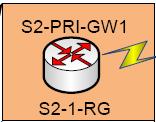 Gateway and Route Group 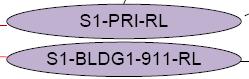 Route Lists  calling search space 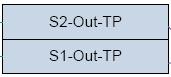 Translation Pattern So, with this blue print, you can build a scalable redundant callmanager. There are more nuts and bolts that are necessary, setting up your resources, voicemail ports, users, blah blah blah…;) Adding users is a snap using the bulk administrative tool. There is another cool tool to use with adding new users called JTAPS. It basically lets you dial a number with an auto registered phone, and it will pull the proper config. SOOOOoooooOOoo, if you guys found this interesting or useful in the least, let me know in the comments section. |

So we have been turning up a new PRI lately and had HUGE amounts of trouble with it. It all came down to the fact that the telco told us to use the wrong PRI type, but that’s the fix…the fun was in the journey. Here are the steps we took to resolve the issue.
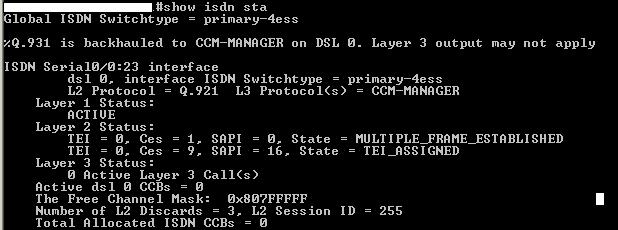
We first do a show isdn status. You want to see MULTIPLE_FRAME_ESTABLISH. This means that everything is hunky dory.
Next we want to check the layer 3 ISDN info, so issue the debug isdn q931 command. Here you can see what would happen when we tried to make inbound calls.
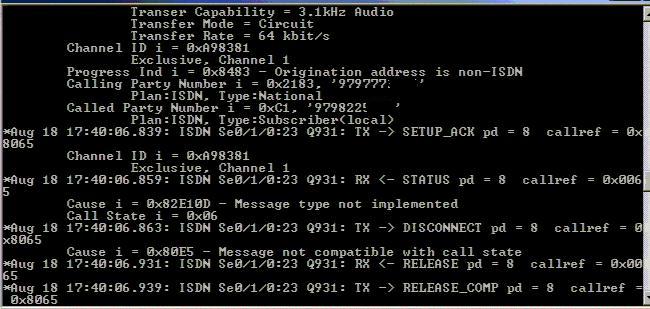
As you can see, we were getting a disconnect message right after we received the status message from the telco. It just looks like the router no likey…but it turns out it was call manager that no likey.
If you issue the debug ccm-manager backhaul packets command, you would notice that the telco would send us status. Then the router would send an MGCP message to the callmanager. The callmanager would promptly reply with the disconnect message. The router would then pass this disconnect message to the telco. The line type was supposed to be NI2, so the router has the configuration set as such:
- network-clock-participate wic 1
- network-clock-select 1 T1 0/0
- voice-card 0
- dspfarm
- isdn switch-type primary-ni
- !
- controller T1 0/0
- framing esf
- linecode b8zs
- pri-group timeslots 1-24 service mgcp
- !
- mgcp
- mgcp call-agent 1.1.1.1 2427 service-type mgcp version 0.1
- mgcp dtmf-relay voip codec all mode out-of-band
- mgcp rtp unreachable timeout 1000 action notify
- mgcp modem passthrough voip mode nse
- mgcp package-capability rtp-package
- no mgcp package-capability res-package
- mgcp package-capability sst-package
- no mgcp package-capability fxr-package
- no mgcp timer receive-rtcp
- mgcp sdp simple
- mgcp fax t38 inhibit
- no mgcp explicit hookstate
- mgcp rtp payload-type g726r16 static
- !
- dial-peer voice 100 pots
- application mgcpapp
- port 0/0:23
- !
- interface Serial0/0:23
- description [CID]
- no ip address
- no logging event link-status
- isdn switch-type primary-ni !**this is for ni or ni2**
- isdn incoming-voice voice
- isdn bind-l3 ccm-manager
- no cdp enable
The fix was to set the pri type to 5E8 in the callmanager. Device -> Gateway -> MYGateway: PRI Type 5E8. Originally we had it set to NI2, as the carrier told us, but it doesn’t work that way. We would receive the status message which meant nothing to callmanager and we would disconnect.