

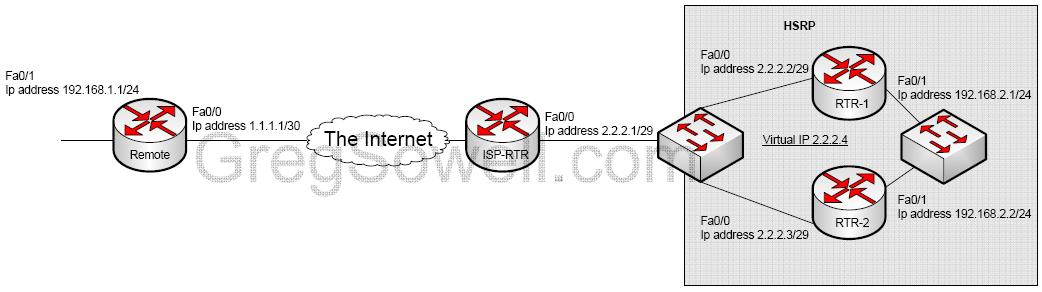
| James ran into this one the other day, and I found it interesting. If you have routers configured for high availability(HA) using hot stand-by routing protocol(HSRP) and you are doing straight IPSec tunnels, how would one go about terminating the tunnel on the virtual HSRP IP address? First, why would you want to do this?
You would most likely want to do this so that you can create a policy at remote sites that won’t break. With straight IPSec tunnels, you can’t specify multiple crypto maps that leverage identical address space in the match ACLs. An easy fix in the scenario is to peer your IPSec tunnel with the HSRP address of your hub site. This way when the routers fail over, your VPN tunnel will failover also. How do we configure all of this goodness? Remote Config:
RTR-1 Config:
RTR-2 Config:
|
It seems like everytime I want to do something funky with an ASA, Cisco says “ASAs are not routers, use them what they are designed for.” This really doesn’t help me…heh. ASAs can’t do PBR(Policy Based Routing – aka route maps)…which would have been useful more than a few times. Back on topic, failover routing.
Route redundancy can be achieved locally using metrics on your routes, as you can in routers. What if you have a point to point link that takes several hops through a provider network, though? If the link dies in the provider, the local link stays up and your bad route stays in the route table…what does one do?
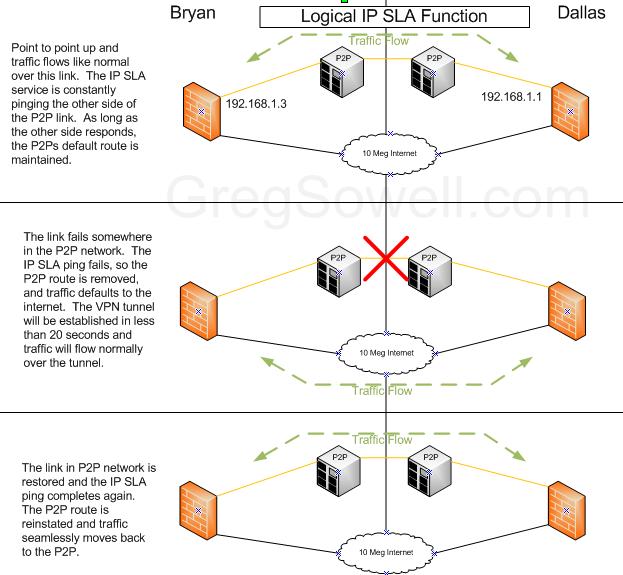
In steps IP SLA. This provides many functions including the ability to ping a remote host. So, we have one ASA ping the other ASA across the point to point link and if the ping fails, we drop the route across the P2P.
Here is a logical diagram of how it all works.
Bryan ASA:
1 2 3 4 5 6 7 8 9 10 11 12 | !ip sla monitor sla monitor 1 type echo protocol ipIcmpEcho 192.168.1.1 interface P2P num-packets 3 frequency 10 !timer for monitor sla monitor schedule 1 life forever start-time now !attach tracker to monitor 11 track 1 rtr 1 reachability !route with ip sla tracker route P2P 10.10.10.0 255.255.255.0 192.168.1.1 track 1 !backup route with a metric of 254 route outside 10.10.10.0 255.255.255.0 1.1.1.1 254 |
Dallas ASA:
1 2 3 4 5 6 7 8 9 10 11 | !ip sla monitor sla monitor 1 type echo protocol ipIcmpEcho 192.168.1.3 interface P2P num-packets 3 05 frequency 10 !timer for monitor 08 sla monitor schedule 1 life forever start-time now !attach tracker to monitor track 1 rtr 1 reachability !route with ip sla tracker route P2P 10.20.20.0 255.255.255.0 192.168.1.3 track 1 !backup route with a metric of 254 route outside 10.20.20.0 255.255.255.0 2.2.2.2 254 |
So in the sample code you can see that our point to point link has the tracker attached. As long as the ping completes, this route is used. If the ping fails, the route with a metric of 254 is used.
In the above example you would need to configure IP SLA in Bryan and in Dallas. This way they will both switch between the P2P and the Internet at the same time. Though, even if one lags behind in switch to the Internet connection, the tunnel will go ahead and establish since one side is attempting the connection.
So Jimmy over at cactiusers.org wrote me a plugin that generates some stuff and FTPs it to another server. My other server was generating some files, but no folders. The files it was generating were 0 byte files…I was scratching my head. I shot Jimmy an message describing the problem. His reponse was “Is your hard drive full?” To which I said…I dunno. I did a quick
1 | df -h |
and discovered that yes, my HD was full….hehehe.
Moral of the story is, if you are creating 0 byte files, check to make sure you have space. Thanks Jim-bo.
This post was born out of a question, so see, I do listen…sometimes. hehe
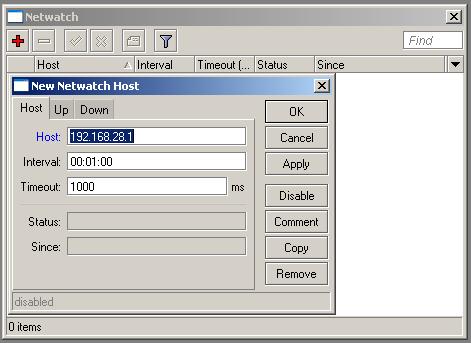
The question was, can I ping a host and then have the Mikrotik email me when it goes down/up. The answer is yes. If you use a little tool called netwatch.
Tools -> Netwatch
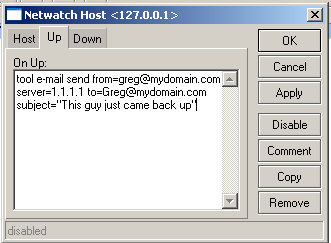
An example script you can run is one that will email you.
tool e-mail send [email protected] server=1.1.1.1 [email protected] subject=This guy just bit the dust
Here’s the code for an up/down email:
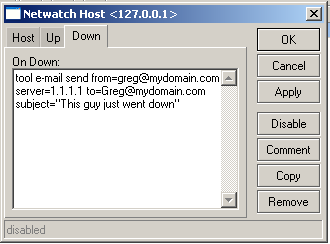
1 2 3 4 5 6 | /tool netwatch add comment="" disabled=no down-script="tool e-mail send [email protected]\ m server=1.1.1.1 [email protected] subject=\"This guy just went down\"" \ host=127.0.0.1 interval=1m timeout=1s up-script="tool e-mail send from=gre\ [email protected] server=1.1.1.1 [email protected] subject=\"This guy just\ \_came back up\"" |
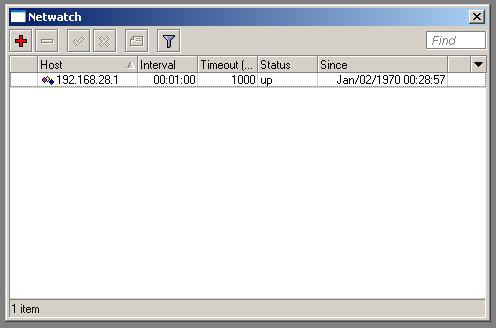
And here’s the winbox version:
I did some speed testing on my RB750 today. The proof is in the pudding…which is strange that Mikrotiks run on pudding.
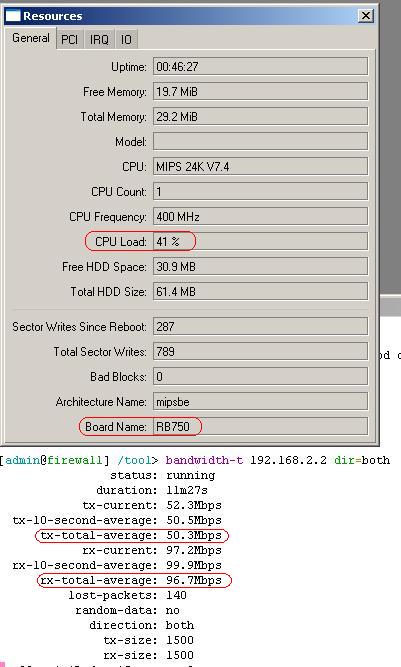
As you can see I averaged between 40-50% CPU on my 750 and I averaged better than 50Mb of throughput!
This test was done with an RB450 and an RB450G on either side of the 750. The 750 has connection tracking on and is routing. Doing a PPTP connection and an IPSec connection didn’t adversely effect my results, either. I’m sure if you loaded the 750 with more services, it is going to bog down, but it was running pretty clean.
You can also see that I still have around 20MB of RAM left, which means I have decent headroom for some BGP routes, a decent amount of connections, or a good chunk of DHCP clients.
I’m dieing to put one of these out at my apartment complexes…hehe…though I may have to switch it from vanilla to chocolate pudding. These guys also come with 3.29…which is interesting
Alrighty! Now that 64 bit windows is getting more prevalent, it is getting harder to get the Cisco IPSec client installed. This is because the IPSec client is 32 bit and also needs to install a 32 bit driver, which won’t work on a 64 bit system. Windows 7 does have an XP compaitibility mode that works around this, but for you XP and Vista folks running 64 bit, this won’t do you any good. So a viable option is to use the anyconnect client with SSL VPN, though a 50 pack of VPN clients will cost you around $3K…no thanks! What you can do is use L2TP on your ASA.
L2TP is built off of PPP and by itself provides no encryption. What the ASA does is to encrypt the transit with IPSec, thus protecting the payload. Windows has conveniently included an L2TP client right in the OS, so there is nothing to install, just a few things to configure. The configuration of the ASA and the client is covered in the video. There are a couple of gotchas in the configuration, namely the group policy needing IPSec checked as well as dropping PFS in the crypto map. Be sure to look out for both.
Click the link below for the video!
read more…
Funny you should ask yourself that, because I’ve been asking myself the same thing ever since I saw that the feature was added. I personally administer a network that includes a chunk of MPLS, but before then, it was just another buzz word. When I say it contains MPLS I mean we actually do MPLS on our equipment, not that we are running on a providers MPLS network…we are the provider! This means that I have become pretty familiar with it…which makes me wonder why Mikrotik bothered with it…:)
So, after hearing me blab, why is Mikrotik pushing MPLS? Simple answer is performance. In a nutshell, what MPLS does is to take the routing table and compile it into a forwarding table. The MPLS packets then get tagged with an MPLS label. Now, your routing decisions more or less are a layer 2 forwarding decision. Now your backbone routes only need to keep track of the MPLS labels and L2 forward based on that. This gives you a performance boost. I saw them present some number that were showing increases of I believe around 25% throughput at the MUM.
This sounds like a great feature, which makes you wonder why say, Cisco, doesn’t push MPLS as an optimizer…that’s because it isn’t an optimizer for them. Sometime before I could drive a car, Cisco came out with fast switching. It was based off of the netflow concept. The idea is route once, switch many. It would take the first packet in a flow and run it across the interface ACLs and the route table. It would then give all the subsequent packets in the same flow the same forwarding procedure. This was more efficient, but was still processor based. They then came out with CEF, Cisco Express forwarding.
CEF takes the route table and compiles it into a binary table so that all routing decisions are handled in hardware! This way the processor doesn’t even get invoked in the normal forwarding process. In Cisco, if you want to run MPLS, you first enable CEF. Soooo, with Cisco, you are running MPLS on top of an already super efficient system! So Cisco’s implementation is in hardware, where as Mikrotik is still all software based.
To me the most interesting part of MPLS is running VRFs (Virtual Routing and Forwarding instances). This is often called MPLS VPNs. What it basically allows you to do is run overlapping addressing on the same routing infrastructure. I can have 100 companies running 10.X.X.X subnets over my routed infrastructre with no problems!
I plan to compare Mikrotik’s MPLS implementation to Cisco pretty soon. I want to see how the VRFs compare…do they support route leaking with filtering? If they do, how well does it interoperate with Cisco?