If you forget your password, there is no recovery procedure for Mirkotiks. You have to go back to factory default! To do this you need to connect your serial cable straight to the Mikrotik and follow the procedures in the below video tutorial.
I have a buddy over in Prague right now at the MUM. I should have more news form him in the near future. For now this is what he has to say:
MikroTik announced today at the Czech MUM that a new product will be release soon, similar to the 450, it will be a wired router complete with case and power supply for $50 US. The case will be plastic.
This news is AWESOME. This power for $50, that’s unbeatable. I’ve personally gotten 95Mb UDP and 40-45Mb TCP through a 450 (with connection tracking). To get a competing product with throughput and feature-set, you are going to pay at least 7 times as much…and that’s grey market.
What is Webmin? It is the greatest Linux admin tool ever invented. It is a web-based admin interface for just about any popular linux product. I’ve heard some other admins say “If you can’t do it command line, you aren’t a real admin.” To that I say, I want to be able to take a vacation occasionally! Sure I can admin all that stuff from the command line, but most of my guys at work can’t. If I can teach them to admin, say BIND, easily then I don’t have to be the guy that does everything. Plus, BIND is so much easier to admin through webmin. 😉 I say do yourself a favor and try it. It will, often times, install packages for you if they aren’t already installed!
I pretty much run CentOS exclusively, and the first thing I do on my servers after installing the OS is put on the Webmin RPM. It is as easy as “rpm –install webmin-package-name”.
I use it for:
IPtables administration (called Linux firewall under networking). It is a simple method to add/update your iptables rules.
Sequoia view – This is an extremely useful tool when you have a full hard drive. What it does is crawl a drive and show how each folder is utilized in an interesting visual way. It uses colored squares. Each color represents a different file type. The size of the square represents how large the file is. It helps you to QUICKLY and easily find space hogs and delete them. This has found use on the C drive of many an exchange server.
Restoration – Another one of your standard undelete programs.
Colasoft Packet Builder – You can use this guy to craft packets and send them at varying intervals on your network. This is great for all sorts of testing.
Colasoft Packet Player – This is another cool prog. You can replay packets captured from wireshark back into your network.
srvany/instsrv – These two programs were put out on a M$ resource kit cd. You can google for them and find a download. What these do is allow you to run any executable program as a service. I’ve run many a program in this fashion. This is for the MacGyver in all of us.
Cain & Able – Many virus scanners will pick this up, though it is clean. The able prog can be used to exploit machines, and I never personally use it. Cain on the other hand is very useful. You can use Cain to decrypt many password types easily.
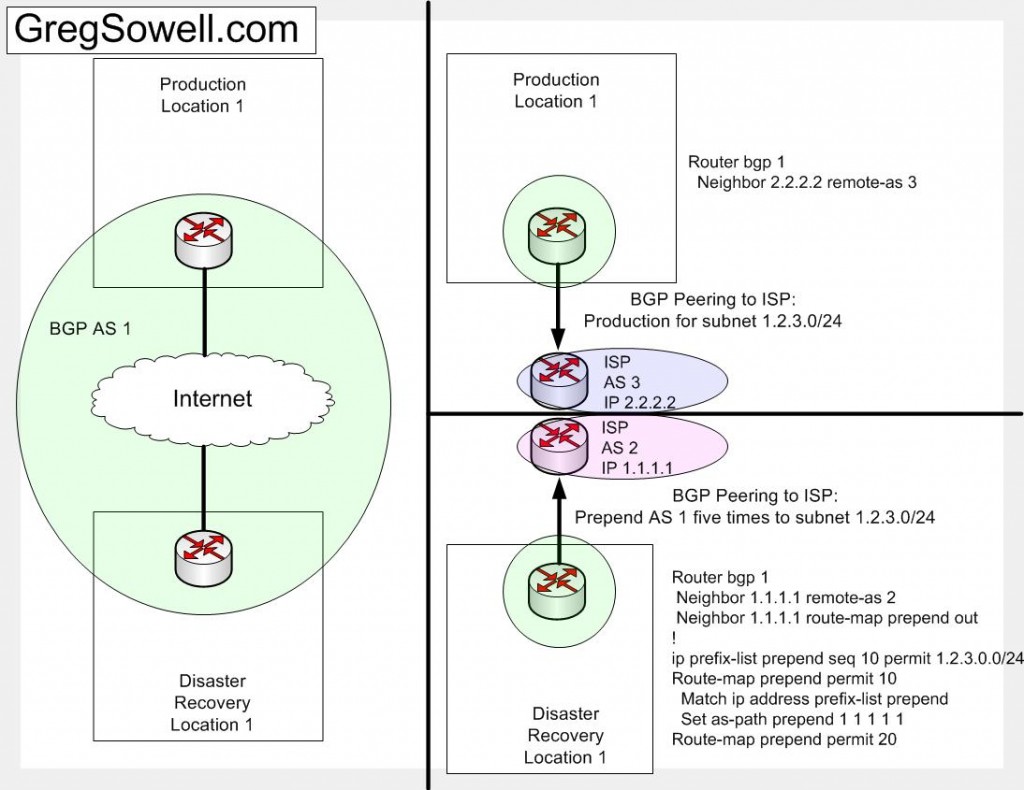
Scenario: You have a production site in Dallas and a backup site in, say, College Station(CS). You want the public subnet 1.2.3.0/24 to failover to CS if the Dallas facility falls off of the earth. What you want to do my friend is prepend.
Prepending is adding your own Autonomous System Number(AS) repeatedly to the beginning of your BGP advertisement to a neighbor. Say if you were to have your addressing hop through three external BGP peers, they would all add their AS number to the as-path attribute. If your AS number is 5 and it goes through AS 10, 20 and then 30 your path would look like “20 10 5” to the routers in AS 30. If you were to prepend 3 times to your as before advertising it to 10, the path would appear as “20 10 5 5 5”. This makes your path for this specific bit of traffic less desirable. Remember that BGP is a path vector protocol, so it prefers the fewest number of AS hops.
So what we will do is make your backup site look so far away with AS prepending that it won’t get used unless the main site is unavailable.
Diagram also available as PDF => [download#5].
bgp prepending
You can see from the configurations that both routers are in AS 1. subnet 1.2.3.0/24 lives in the production location. It is advertised from the DR site with it’s AS 1 prepended five times. I used a prefix list to pick out the specific subnet 1.2.3.0/24 subnet to prepend. I would assume that the DR site would advertise some addressing that isn’t advertised from the production, and thus I don’t want to prepend that addressing. I included the “route-map prepend permit 20” statement in there as a catch-all for the rest of the addressing to be advertised.
I wrote a couple of Autoit scripts to test if a Windows IIS SMTP server is responding properly.
The first is [download#4]. This guy connects to the local mail relay and sends an email. Simple. You supply it with three command line parameters: from address, to address and subject.
The second, called [download#3], checks the mail queue folder (“c:\Inetpub\mailroot\Queue\”) and if it has any files older than 12 minutes, it restarts the relay service. If you have mail to send and your server looses connectivity to the DNS server, it will generally freak out and start leaving mail in the queue. By restarting the service, the mail will then flush out of the queue.
You will want to schedule the testSMTP script to run, say, once a day. It will send you an email letting you know you are still able to send out the server. This is great for critical monitoring servers. You will want to schedule the mailRoot script to repeat every 30 minutes or so.
As you can see throughput from eth1 to eth2 is a gig. They show eth2 to eth3 is only 650Mb. It seems this is a hardware limitation, and they don’t mention ports 4 or 5. I’m going to have to assume the worst, until there is more information. I’ll say port 1 is full gig and that ports 2-5 are on a shared gig bus of some kind.
Having said that…I still want one 😉 hehe
Quick Edit – It looks like they are going to retail for $99; only $20 more than standard 450.