


A man with a 1920s typewriter writes poems for strangers on the spot, and sometimes changes their lives. In this episode of Why Am I, Sean Petrie shares how Typewriter Rodeo turns fleeting moments into something people carry forever. Sean came along right when I need him, and who knows, maybe it’ll be right in time for you.
Don’t forget to like, comment, and subscribe for more conversations that chase the story behind the person.
Please show them some love on their socials here: https://www.typewriterrodeo.com/ https://burlwoodbooks.com/universe/ https://www.instagram.com/typewriterrodeo/
If you want to support the podcast you can do so via https://www.patreon.com/whyamipod (this gives you access to bonus content including their Fantasy Restaurant!)

In the warmup for the Why Am I Podcast, the Fantasy Restaurant, anything goes. Fatal1ty builds his ultimate meal, from a vodka soda lime to a filet with a serious green bean backstory. Help us find the perfect beans LOL.
Please show them some love on their socials here:
www.twitch.tv/fatal1ty https://www.youtube.com/@Fatal1tyTV https://x.com/FATAL1TY https://www.instagram.com/fatal1ty/?hl=en
If you want to support the podcast you can do so via https://www.patreon.com/whyamipod (this gives you access to bonus content including their Fantasy Restaurant!)

What happens when “anything goes” in a fantasy meal? Ken builds a menu of coconut seltzer, calamari, grilled fish, and a perfectly balanced dessert—while casually revealing he’d eat almost anything. This one gets unexpectedly philosophical (and hungry).
Don’t forget to like, comment, and subscribe for more conversations that chase the story behind the person.
Please show them some love on their socials here:
https://kenbutler.squarespace.com/ https://www.instagram.com/hybridluthery/ https://www.facebook.com/ken.butler.52 https://www.youtube.com/@Bricoluthier/videos
If you want to support the podcast you can do so via https://www.patreon.com/whyamipod (this gives you access to bonus content including their Fantasy Restaurant!)
This demo shows the dream. A user goes to SNOW’s service catalog, clicks order on a VM, and the Ansible Automation Platform(AAP) calls Terraform to provision. AAP will then configure the server, add it to monitoring, complete any tickets…essentially anything you want to happen. Again, I can’t stress enough how insanely functional this is for your users…as far as they are concerned everything just works!
Simple Data Flow
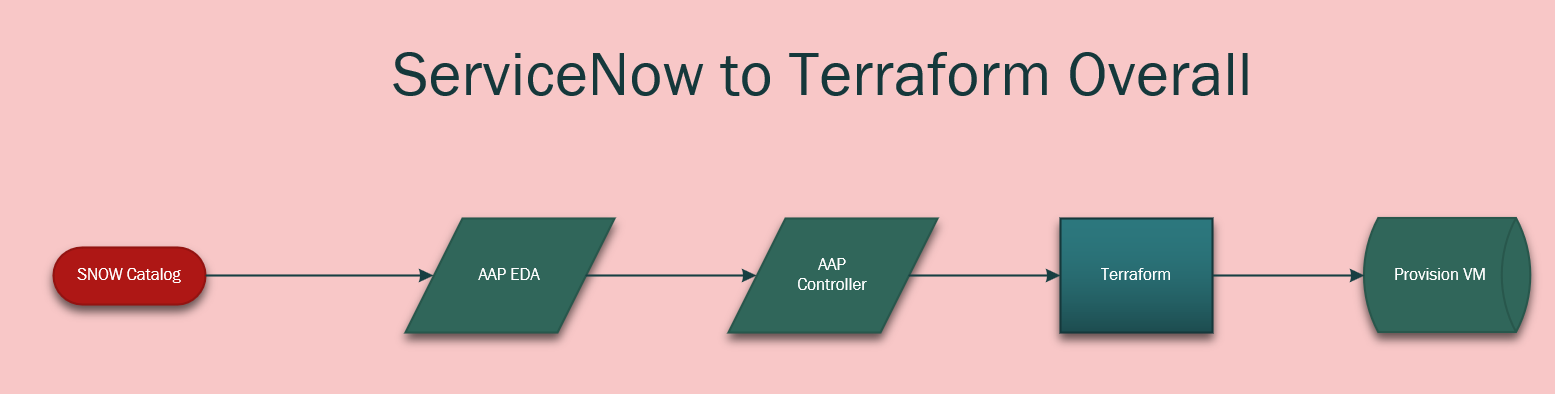
It starts with the SNOW service catalog item being ordered.
It then securely passes all of the service catalog item data(brings it over as variables) to EDA.
EDA then, via a rulebook, passes those variables over to controller as extra-vars.
AAP then clones my terraform repo and provisions the infrastructure!
Demo
SNOW and EDA Configuration
This process looks like the following:
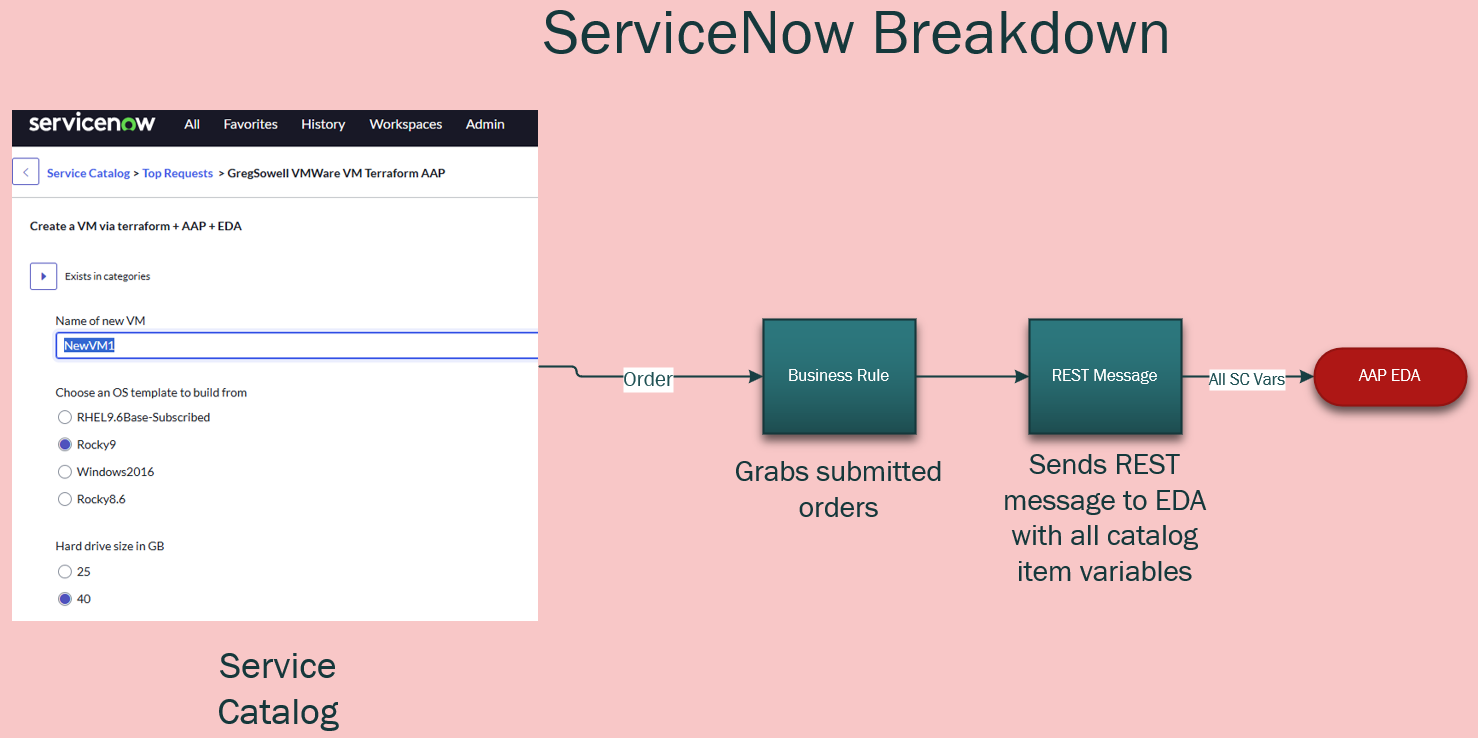
I went into great detail here in another blog post. I detail configuring both ServiceNow and connecting it to EDA in that blog post, so reference that for full config info and a video!
Playbook
All of my playbooks can be found here in my public repo.
I’ve got the Terraform playbook in there right now, which I’ve got posted below(be sure to check the source for any updates):
1 2 3 4 5 6 7 8 9 10 11 12 13 14 15 16 17 18 19 20 21 22 23 24 25 26 27 28 29 30 31 32 33 34 35 36 37 38 39 40 41 42 43 44 45 46 47 48 49 50 51 52 53 54 55 56 57 58 59 60 61 62 63 64 65 66 67 68 69 70 71 72 73 74 75 76 77 78 79 80 81 82 83 84 85 86 87 88 89 90 91 92 93 94 95 96 97 98 99 100 101 102 103 104 105 106 107 108 109 110 111 112 113 114 115 116 117 118 119 120 121 122 123 124 125 126 127 128 129 130 131 132 133 134 135 136 137 138 139 140 141 142 143 144 145 146 147 148 149 150 151 152 153 154 155 156 157 158 159 160 161 162 163 164 165 166 167 168 169 170 171 172 173 174 175 176 177 178 179 180 181 182 183 | ---
- name: Deploy VMware infrastructure using Terraform from EDA
hosts: ee-builder
gather_facts: no
vars:
snow_eda_directory: /root/snow-eda
terraform_directory: "{{ snow_eda_directory }}/vmware-terraform"
terraform_variables_file: "{{ terraform_directory }}/terraform.tfvars"
# test data
catalog_item: "{{ ansible_eda.event.payload.catalog_item | default('GregSowell VMWare VM Terraform AAP')}}"
cpus: "{{ ansible_eda.event.payload.cpus | default('4') }}"
dc_name: "{{ ansible_eda.event.payload.dc_name | default('MNS') }}"
default_gateway: "{{ ansible_eda.event.payload.default_gateway | default('10.0.50.1') }}"
event: "{{ ansible_eda.event.payload.event | default('SERVICE_CATALOG') }}"
hd_size: "{{ ansible_eda.event.payload.hd_size | default('40') }}"
ip_address: "{{ ansible_eda.event.payload.ip_address | default('10.0.50.77') }}"
os_type: "{{ ansible_eda.event.payload.os_type | default('Rocky9') }}"
ram_size: "{{ ansible_eda.event.payload.ram_size | default('4096') }}"
request_name: "{{ ansible_eda.event.payload.request_name | default('1111111111') }}"
requester: "{{ ansible_eda.event.payload.requester | default('[email protected]') }}"
subnet_mask: "{{ ansible_eda.event.payload.subnet_mask | default('255.255.255.0') }}"
vm_folder: "{{ ansible_eda.event.payload.vm_folder | default('/Greg/redhat/terraform') }}"
vm_name: "{{ ansible_eda.event.payload.vm_name | default('NewVM1') }}"
remove_vm: false
# Git settings
backup_repo: [email protected]:gregsowell/snow-eda
git_name: Git Backup
git_email: [email protected]
tasks:
- name: Create the ssh key file based on the supplied cred
become: true
run_once: true
ansible.builtin.copy:
dest: "/tmp/id_rsa"
content: "{{ cert_key }}"
mode: '0600'
- name: Check if snow-eda directory exists
stat:
path: "{{ snow_eda_directory }}"
register: snow_eda_dir
- name: Clone git repo if snow-eda directory does not exist
when: not snow_eda_dir.stat.exists
# ansible.builtin.shell: git clone https://github.com/gregsowell/snow-eda.git
ansible.builtin.shell: "git config --global core.sshCommand 'ssh -o UserKnownHostsFile=/dev/null -o StrictHostKeyChecking=no -i /tmp/id_rsa'; git clone {{ backup_repo }}"
args:
chdir: /root
environment:
GIT_COMMITTER_NAME: "{{ git_name | default(omit) }}"
GIT_COMMITTER_EMAIL: "{{ git_email | default(omit) }}"
GIT_AUTHOR_NAME: "{{ git_name | default(omit) }}"
GIT_AUTHOR_EMAIL: "{{ git_email | default(omit) }}"
- name: Git pull if snow-eda directory exists
when: snow_eda_dir.stat.exists
ansible.builtin.shell: "git config --global core.sshCommand 'ssh -o UserKnownHostsFile=/dev/null -o StrictHostKeyChecking=no -i /tmp/id_rsa'; git -C {{ snow_eda_directory }} pull"
- name: Remove existing VM entry block (reposition safeguard)
blockinfile:
path: "{{ terraform_variables_file }}"
marker: "####{mark}-{{ vm_name }}"
marker_begin: "begin"
marker_end: "end"
state: absent
- name: Insert or update VM entry in terraform.tfvars
when: remove_vm | bool == false
blockinfile:
path: "{{ terraform_variables_file }}"
insertafter: '^\s*####start-vms-here\s*$'
marker: "####{mark}-{{ vm_name }}"
marker_begin: "begin"
marker_end: "end"
block: |
{{ vm_name }} = {
template = "/{{ dc_name }}/vm/Templates/{{ os_type }}"
network = "{{ network | default('Greg') }}"
cpu = {{ cpus | int }}
memory_mb = {{ ram_size | int }}
disk_gb = {{ hd_size | int }}
notes = "{{ request_name }}"
}
- name: Resolve vSphere credentials for Terraform
no_log: true
set_fact:
tf_vsphere_server: "{{ vsphere_server | default(lookup('env', 'TF_VAR_vsphere_server'), true) | default(lookup('env', 'VSPHERE_SERVER'), true) }}"
tf_vsphere_user: "{{ vsphere_user | default(lookup('env', 'TF_VAR_vsphere_user'), true) | default(lookup('env', 'VSPHERE_USER'), true) }}"
tf_vsphere_password: "{{ vsphere_password | default(lookup('env', 'TF_VAR_vsphere_password'), true) | default(lookup('env', 'VSPHERE_PASSWORD'), true) }}"
- name: Ensure required vSphere variables are provided
assert:
that:
- tf_vsphere_server is defined
- tf_vsphere_server | length > 0
- tf_vsphere_user is defined
- tf_vsphere_user | length > 0
- tf_vsphere_password is defined
- tf_vsphere_password | length > 0
fail_msg: "Missing required vSphere credentials. Provide extra vars (vsphere_server, vsphere_user, vsphere_password) or environment vars (TF_VAR_vsphere_*, or VSPHERE_*)."
- name: Initialize Terraform
command:
argv:
- terraform
- init
- -no-color
- -input=false
args:
chdir: "{{ terraform_directory }}"
environment:
TF_VAR_vsphere_server: "{{ tf_vsphere_server }}"
TF_VAR_vsphere_user: "{{ tf_vsphere_user }}"
TF_VAR_vsphere_password: "{{ tf_vsphere_password }}"
- name: Plan Terraform deployment
command:
argv:
- terraform
- plan
- -no-color
- -input=false
- -out=tfplan
args:
chdir: "{{ terraform_directory }}"
environment:
TF_VAR_vsphere_server: "{{ tf_vsphere_server }}"
TF_VAR_vsphere_user: "{{ tf_vsphere_user }}"
TF_VAR_vsphere_password: "{{ tf_vsphere_password }}"
register: terraform_plan
async: 1800
poll: 5
- name: Display Terraform plan output
debug:
var: terraform_plan.stdout
- name: Apply Terraform deployment
command:
argv:
- terraform
- apply
- -no-color
- -input=false
- -auto-approve
- tfplan
args:
chdir: "{{ terraform_directory }}"
environment:
TF_VAR_vsphere_server: "{{ tf_vsphere_server }}"
TF_VAR_vsphere_user: "{{ tf_vsphere_user }}"
TF_VAR_vsphere_password: "{{ tf_vsphere_password }}"
async: 1800
poll: 5
- name: push the repo back with no tags
ansible.builtin.shell: "git add *; git commit -m '{{ vm_name }}-Add'; git config --global core.sshCommand 'ssh -o UserKnownHostsFile=/dev/null -o StrictHostKeyChecking=no -i /tmp/id_rsa'; git push"
args:
chdir: "{{ terraform_directory }}"
environment:
GIT_COMMITTER_NAME: "{{ git_name | default(omit) }}"
GIT_COMMITTER_EMAIL: "{{ git_email | default(omit) }}"
GIT_AUTHOR_NAME: "{{ git_name | default(omit) }}"
GIT_AUTHOR_EMAIL: "{{ git_email | default(omit) }}"
# delegate_to: localhost
changed_when: git_return.stderr != "Everything up-to-date"
run_once: true
# connection: local
register: git_return
# become: True
- name: Remove temporary SSH key file "/tmp/id_rsa"
ansible.builtin.file:
path: /tmp/id_rsa
state: absent
run_once: true
# delegate_to: localhost
# become: true |
For this quick and dirty demo I’m just connecting to a worker machine. If I spent a bit more time I could get it all working purely from an EE, but for the sake of getting it done quick I have a VM that does the work.
If you check the “vars” section you’ll notice I have all of the variables setup so they are ready to accept the variables passed over from EDA.
Have a look at this overview:
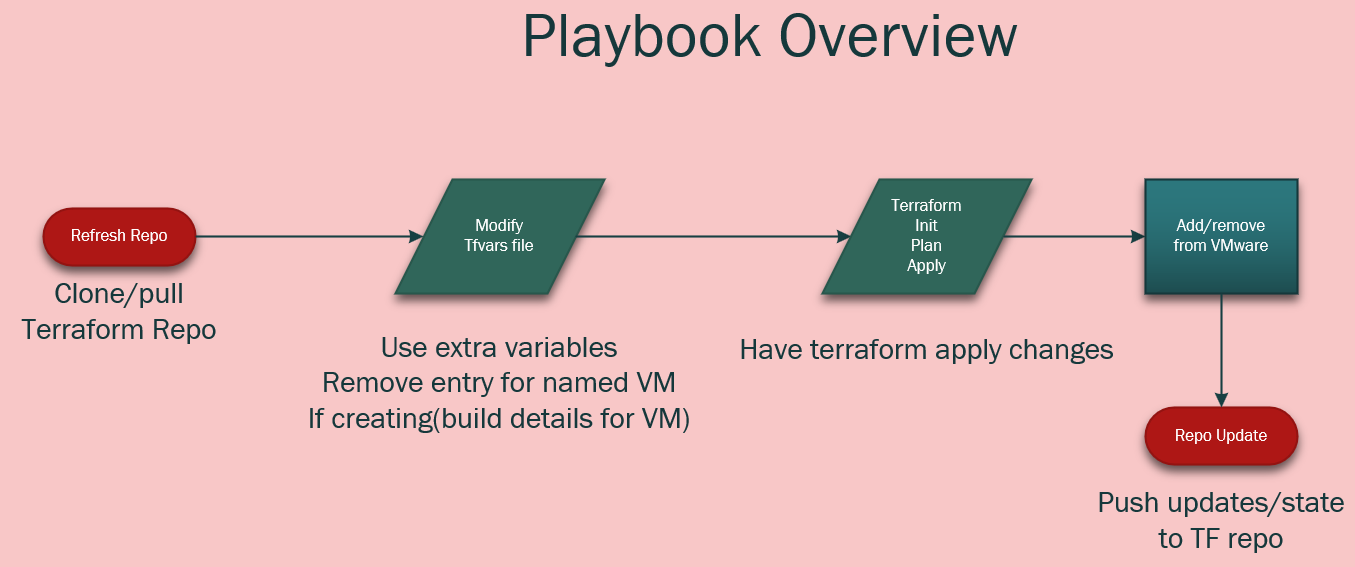
1. You can see that I start by cloning the repository that has all of my terraform files(including state files).
2. I then use the “blockinfile” module to drop in the new VM configuration in my tfvars file. I add a pre and post marker of “####ServerName-begin” and “####ServerName-end”. This makes it easy to review the file as well as have automation go back and remove any infrastructure that should be deprovisioned.
3. I then supply terraform with the init, plan, and last apply commands.
4. Then at the end it will push the file updates(including the state file) back to my git repository for safe keeping.
Keeping the files in the repo give me version control on everything too. An big upgrade to the process could be to use Terraform enterprise to do the provisioning, and in that case I would do very similar things, but instead of having to run the terraform commands directly I would be throwing API commands at TE.
Conclusion
I hope you could see just how easy the process becomes once you use EDA to tie everything together. Keep in mind that ANY tool you have in your environment can call AAP to perform the same process.
If you have any questions or comments, I’d love to hear them.
Good luck, and happy automating!

What happens when a bug cookbook author builds their dream meal? It gets weird in the best way. From camp-style “bug juice” to grasshopper appetizers and a surprisingly relatable lobster debate, this Fantasy Restaurant goes places.
 Don’t forget to like, comment, and subscribe for more conversations that chase the story behind the person.
Please show them some love on their socials here:
http://davidgeorgegordon.com/ https://www.jackstraw.org/sound_clip/diamond-and-quasimodo-and-bellringers-twenty-years/ https://godsfavoritebeefcake.bandcamp.com/album/witches-bones-n-whale-skin
If you want to support the podcast you can do so via https://www.patreon.com/whyamipod (this gives you access to bonus content including their Fantasy Restaurant!)

A sweet tea start, a nerdy old fashioned debate, and a main course straight out of fantasy lore. In this episode of Fantasy Restaurant, Colton builds a meal that somehow goes from Southern comfort to mythical creatures without missing a beat.
Don’t forget to like, comment, and subscribe for more conversations that chase the story behind the person.
Please show them some love on their socials here:
https://www.arrenfest.com/ https://www.instagram.com/arrenfest/?hl=en https://www.facebook.com/p/Arkansas-Renaissance-Festival-61551600574189/ https://www.tiktok.com/@arrenfest
If you want to support the podcast you can do so via https://www.patreon.com/whyamipod (this gives you access to bonus content including their Fantasy Restaurant!)
I first have to say that the technique pioneered here was completely engineered by my brother-from-another-mother Nick Arellano. Connect with this brilliant dude on LinkedIn NOW!
Introduction
There is a traditional method that allowed ServiceNOW(SNOW) to connect to the Ansible Automation Platform’s(AAP) API, but while this worked, it was clunky.
In short it would go from Service Catalog(SC) item => SNOW workflow => REST message => Oauth token.
If you wanted to add a new SC, you would have to duplicate each one of those pieces save for the Oauth token…which becomes quite tedious. A lot of those pieces are often controlled by the “SNOW team”, which means it could take weeks or even months to have additions or changes done.
Imagine if there was a better way(simpler and faster) 🙂
This better way is to have SNOW call Ansible’s Event Driven Automation(EDA).
The process looks like Service Catalog item => business rule => REST message.
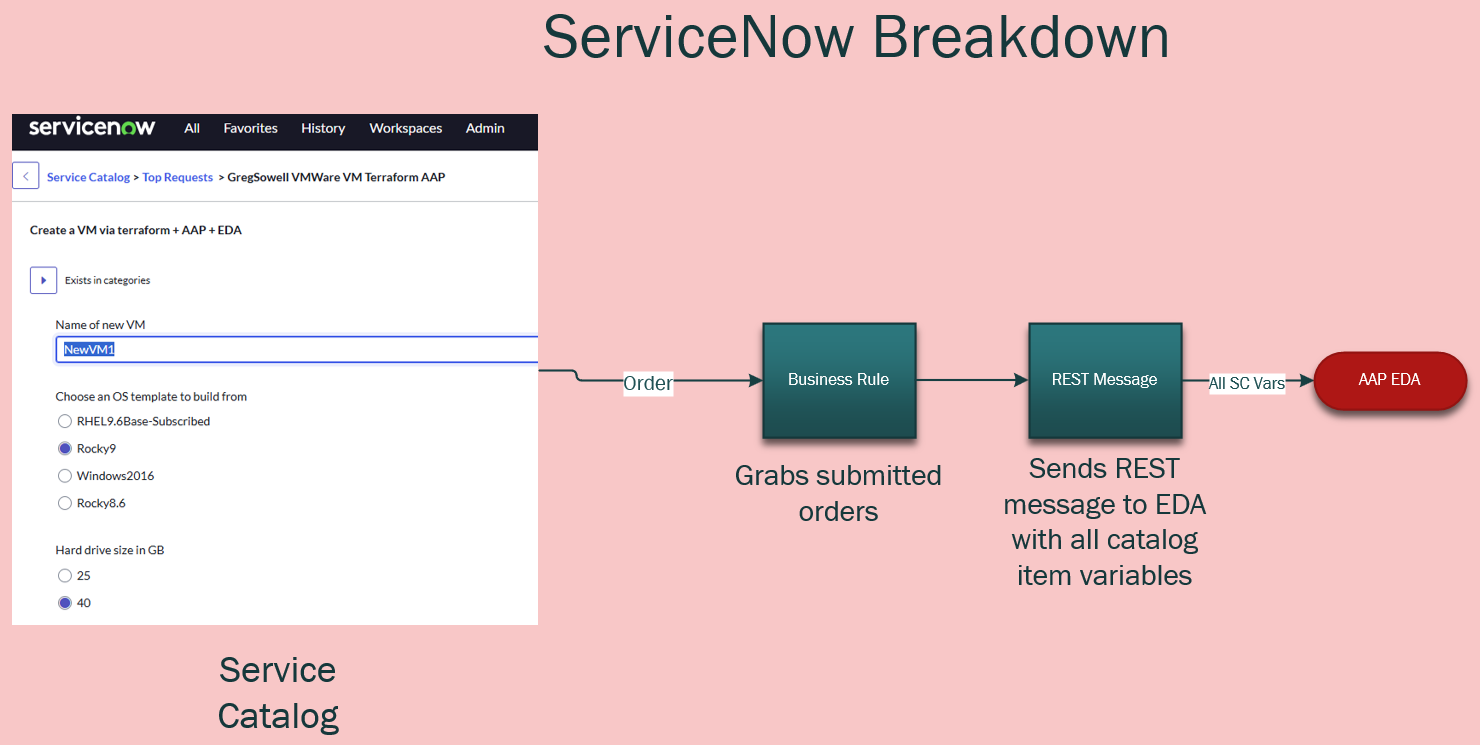
In this configuration the REST message and business rule is created once by the SNOW team, and you don’t have to touch it after that.
The business rule will grab all of the variables from the service catalog and pass them right over to EDA which will then kickoff an Ansible workflow or job template.
This means I can create/update my SNOW service catalog items whenever I want and I will immediately see the update!
Demo
EDA Configuration
I’m starting with the EDA configuration because I have to feed part of this into SNOW’s REST message.
All of my files are here in my git repository.
EDA Credential
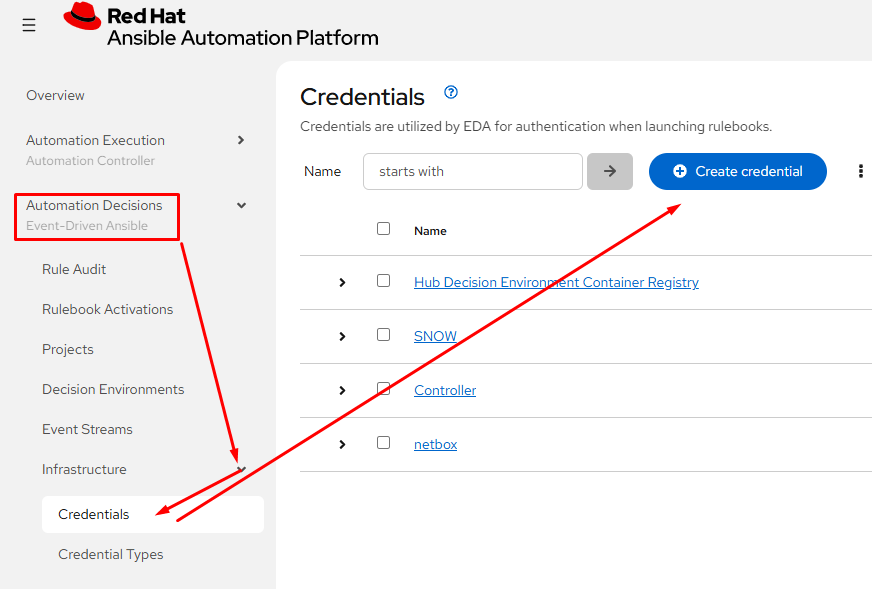
I’ll start by creating a token to be used for protection of the Event Stream(ES). Click on Automation Decisions, then Infrastructure, Credentials, and last Create credential:
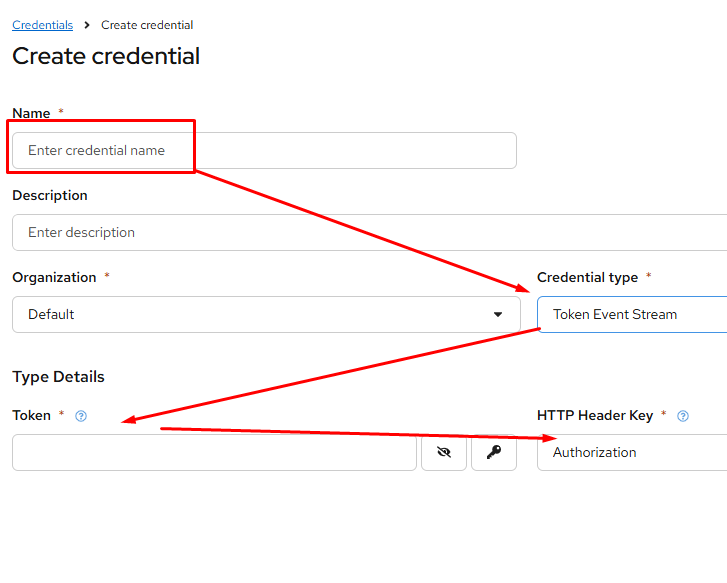
Configure:
Name – something unique
Credential type – Token Event Stream
Token – create a complex password here
Http Header Key – defaults to Authorization
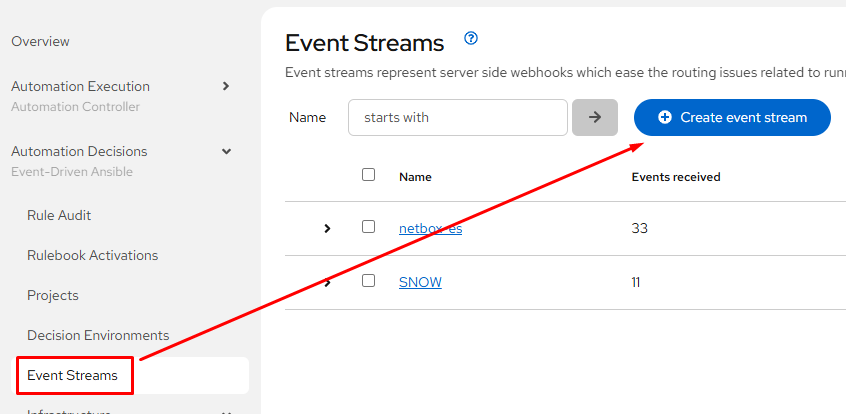
Event Streams
Event streams are what EDA uses to collect messages. In this case we’ll stand up a webhook with a unique URL and authentication. This is what the SNOW REST message points towards.
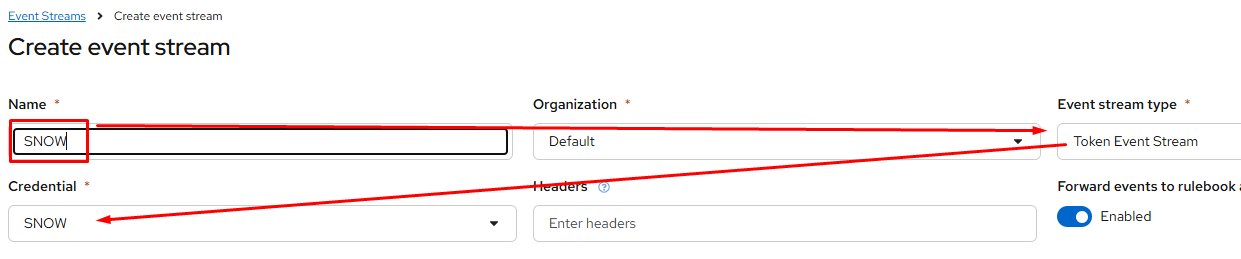
Under Automation Decisions, click on Event Streams and click Create event stream:
Configure:
Name – something unique
Event stream type – Token Event Stream
Credential – the one just created
Create a Rulebook
A rulebook is really just setting the basics for the listener and configuring a decision tree.
The tree is really just a set of conditional statements (if it matches this and that, but not those things) that will run playbooks or workflows in the controller.
You can find my rulebook here in my repo. I’ve got the whole rulebook below:
1 2 3 4 5 6 7 8 9 10 11 12 13 14 15 16 17 18 19 20 21 22 23 24 25 26 27 28 29 30 31 32 33 34 35 36 37 38 39 40 41 42 43 44 45 46 47 48 49 50 51 52 53 54 55 56 57 58 59 60 61 62 63 64 65 66 67 68 69 70 71 72 73 74 75 76 77 78 79 80 81 82 | ---
- name: ServiceNOW Events
hosts: all
execution_strategy: parallel
sources:
- ansible.eda.webhook:
port: "{{ webhook_port | default(5000) }}"
token: "{{ webhook_token | default(omit) }}"
rules:
- name: ServiceNOW | Provision Virtual Machine
condition: |
event.payload.requester == "[email protected]" and
event.payload.catalog_item == "VM Provision" and
event.payload.event == "SERVICE_CATALOG"
action:
run_workflow_template:
name: ServiceNOW | VM Provision
organization: Default
job_args:
extra_vars:
_hosts: "{{ event.payload.hostname }}"
snow_request_name: "{{ event.payload.request_name }}"
virtual_machines:
- name: "{{ event.payload.hostname }}"
cluster: "{{ event.payload.cluster }}"
vm_size: "{{ event.payload.vm_size }}"
custom_fields:
vmware_linked_clone: "{{ event.payload.linked_clone }}"
vmware_template: "{{ event.payload.template }}"
- name: ServiceNOW | Deprovision Virtual Machine
condition: |
event.payload.requester == "[email protected]" and
event.payload.catalog_item == "VM Decomission" and
event.payload.event == "SERVICE_CATALOG"
action:
run_workflow_template:
name: ServiceNOW | VM Deprovision
organization: Default
job_args:
extra_vars:
_hosts: "{{ event.payload.virtual_machine }}"
snow_request_name: "{{ event.payload.request_name }}"
virtual_machines:
- name: "{{ event.payload.virtual_machine }}"
- name: ServiceNOW | Terraform Provision VMware
condition: |
event.payload.requester == "[email protected]" and
event.payload.catalog_item == "GregSowell VMWare VM Terraform AAP" and
event.payload.event == "SERVICE_CATALOG"
action:
run_workflow_template:
name: SNOW Provision VM Via Terraform
organization: Default
# job_args:
# extra_vars:
# _hosts: "{{ event.payload.virtual_machine }}"
# snow_request_name: "{{ event.payload.request_name }}"
# virtual_machines:
# - name: "{{ event.payload.virtual_machine }}"
- name: ServiceNOW | Terraform Remove VMware
condition: |
event.payload.requester == "[email protected]" and
event.payload.catalog_item == "GregSowell Remove VMWare VM Terraform AAP" and
event.payload.event == "SERVICE_CATALOG"
action:
run_workflow_template:
name: SNOW Provision VM Via Terraform
organization: Default
job_args:
extra_vars:
remove_vm: true
# snow_request_name: "{{ event.payload.request_name }}"
# virtual_machines:
# - name: "{{ event.payload.virtual_machine }}"
- name: ServiceNOW | Unhandled Events
condition: event.payload is defined
action:
debug: |
The beginning is fairly standard, setting up EDA webhook settings.
Execution strategy defaults to serial which means it performs one at a time. Here I’m overriding it to perform in parallel.
Down toward the bottom I’m setting up the port and token(if it’s configured).
1 2 3 4 5 6 7 8 | ---
- name: ServiceNOW Events
hosts: all
execution_strategy: parallel
sources:
- ansible.eda.webhook:
port: "{{ webhook_port | default(5000) }}"
token: "{{ webhook_token | default(omit) }}" |
I’ll cover two of the rules in the rulebook section:
1 2 3 4 5 6 7 8 9 10 11 12 13 14 15 16 17 18 19 20 21 | rules:
- name: ServiceNOW | Provision Virtual Machine
condition: |
event.payload.requester == "[email protected]" and
event.payload.catalog_item == "VM Provision" and
event.payload.event == "SERVICE_CATALOG"
action:
run_workflow_template:
name: ServiceNOW | VM Provision
organization: Default
job_args:
extra_vars:
_hosts: "{{ event.payload.hostname }}"
snow_request_name: "{{ event.payload.request_name }}"
virtual_machines:
- name: "{{ event.payload.hostname }}"
cluster: "{{ event.payload.cluster }}"
vm_size: "{{ event.payload.vm_size }}"
custom_fields:
vmware_linked_clone: "{{ event.payload.linked_clone }}"
vmware_template: "{{ event.payload.template }}" |
Note the condition section; this is where all of the matching happens for each rule. This is really just matching values in the variables being passed to the data stream. Here I’m looking for who requested the SNOW item, what the name of the service catalog item is, and if it came from the service catalog. That way you can send all of your SNOW catalog items and for each one all you have to do is add a new entry to the rulebook!
Next you will notice the action section, which is were I point it towards the workflow or job template. The “name” in “run_workflow_template” should match your workflow name exactly.
The job_args where I’m setting up variables is optional as all of the accepted variables will be passed over anyway.
A tip I learned from Nick is to add the following to the end of your rulebooks. If a message comes through and isn’t matched with anything in the list, this rule will print all of the message detail including the attached variables to the “Rule Audit” log. It’s great when adding new catalog items as you quickly get all the information you want to utilize in your playbooks as well as things you can use in your rulebook conditionals.
1 2 3 4 | - name: ServiceNOW | Unhandled Events
condition: event.payload is defined
action:
debug: |
Add Project
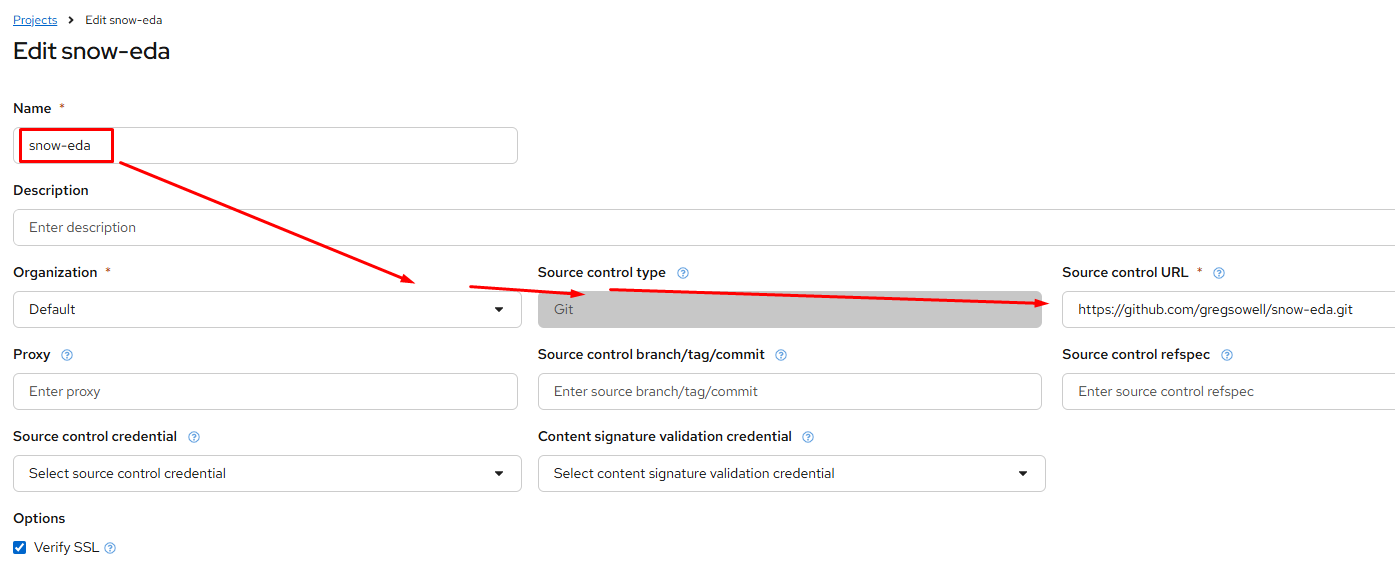
Adding a project in EDA is little different than adding it in controller. It’s simply a way to connect to a git repository to pull in rulebooks.
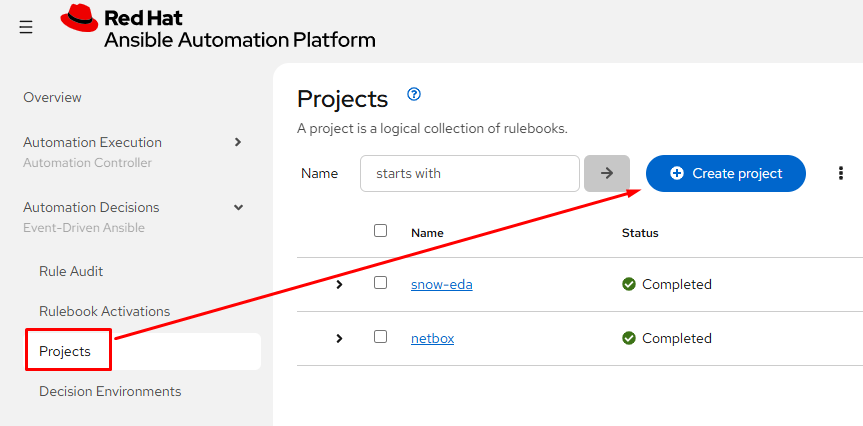
Configure the following:
Name
Organization
Source control type – pretty much always git
Source control URL
Source control credential – I have all my stuff in a public git repo, but you will most likely need to configure a credential to connect to your repo.
Adding Rulebook Activation
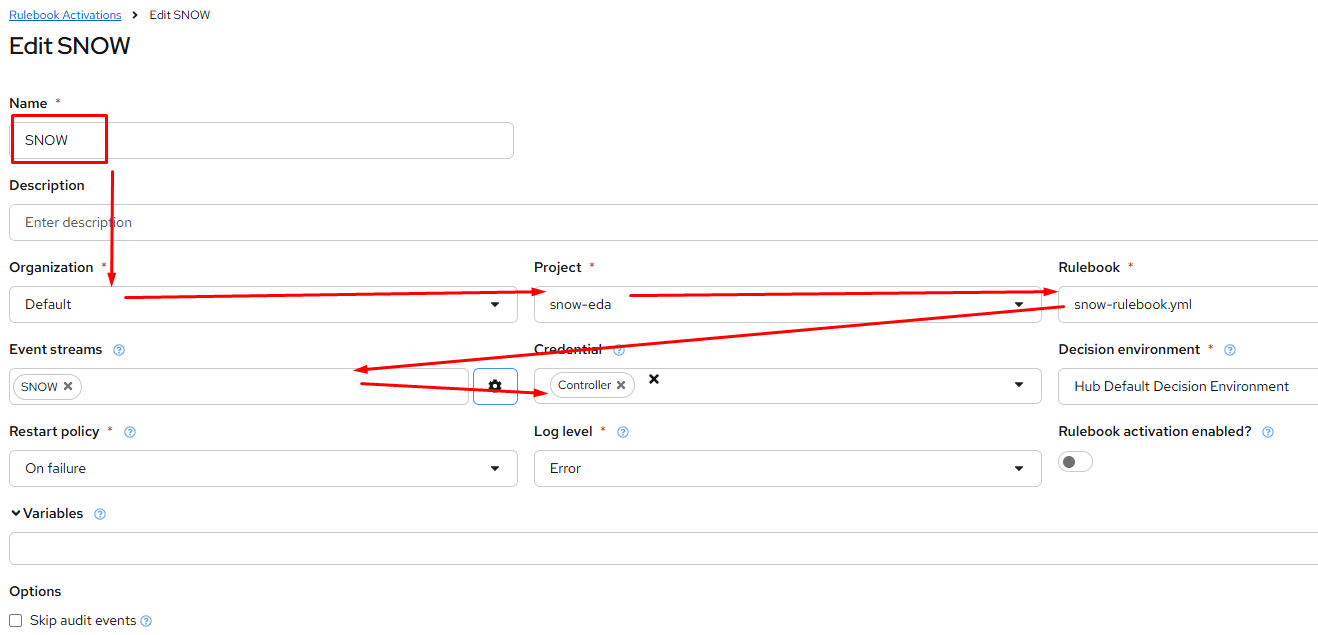
The rulebook activation is where you pull it all together. Start by going to Rulebook Activations and click “Create rulebook activation”:
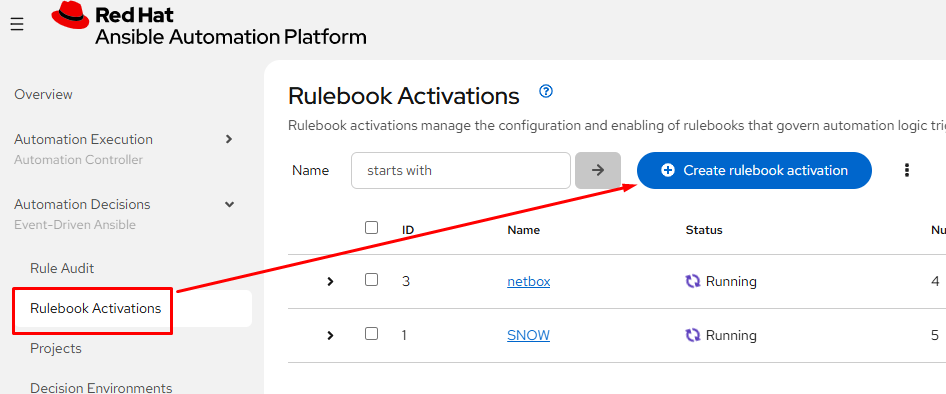
Configure it:
Name
Org
Project – this is the project we just added
Rulebook – this is our newly created rulebook
Event streams – this is our newly created ES.
Credential – this is what we use to authenticate to the controller. Even though we have the gateway system since AAP 2.5 you still have to setup a connection to controller.
Verification
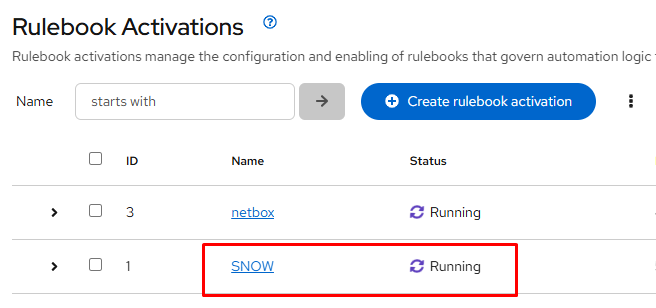
You know you are rocking and rolling when the status shows “Running”:
SNOW Configuration
Create REST Message
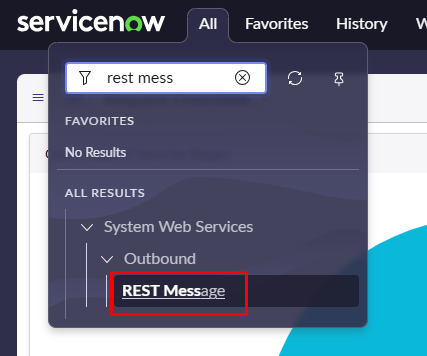
In ServiceNOW, start by creating a REST message. This only has to be done a single time, and it usually has to be done by a SNOW admin. From the menu type “rest message” and then click it from system web services => outbound:
From the top right, click New:

The endpoint is the link supplied when you created the event stream in EDA. You can always go back and reference it if you need.
After that at the bottom you need to create a POST option with method of POST, and the endpoint will be the same as listed above:
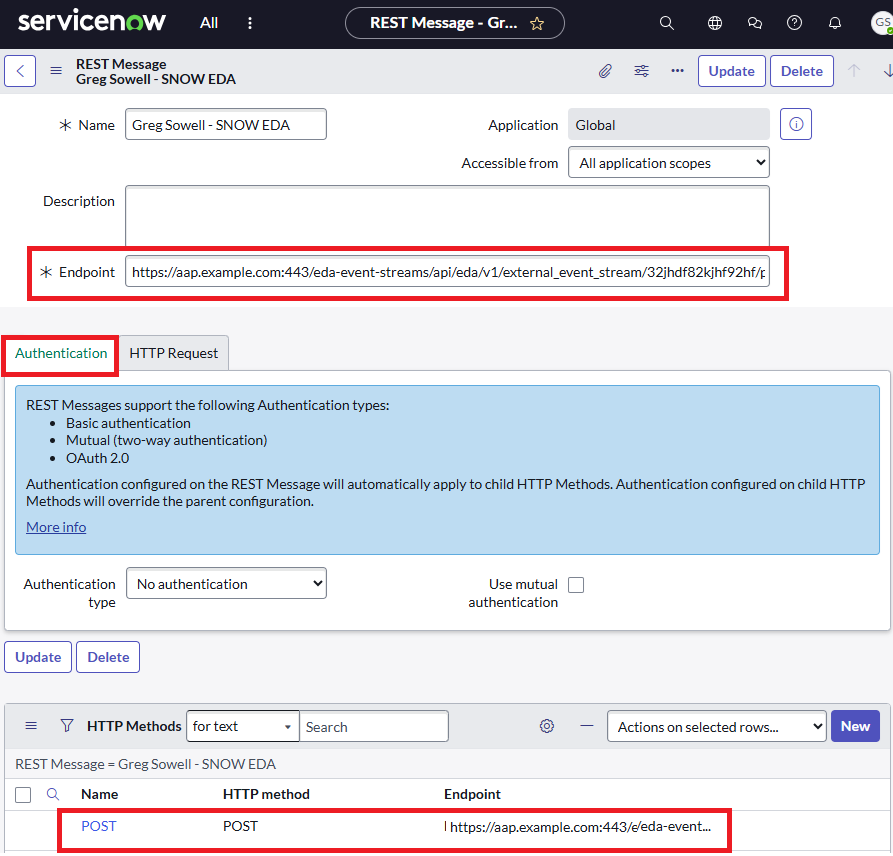
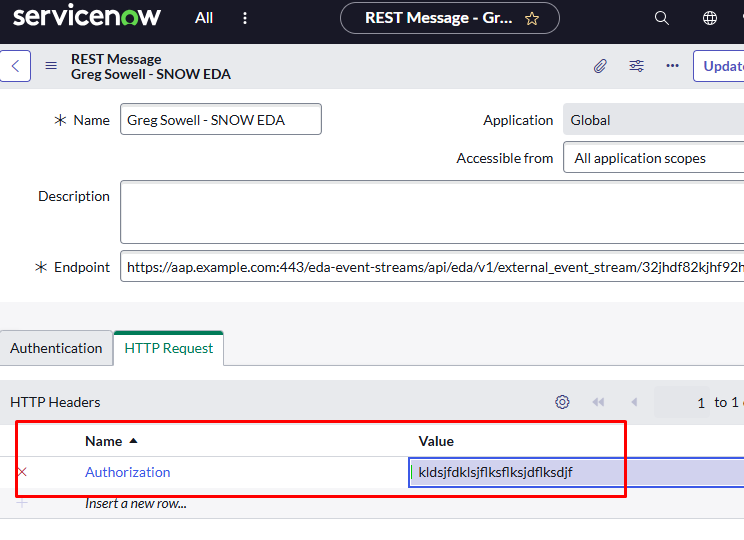
Next click the HTTP Request tab and create a header entry of Authorization and a value of the token you created in EDA:
Create A Business Rule
A business rule is essentially a server-side script in SNOW that is always watching what’s going on in your instance. Below I will configure triggers that will call the REST message created above.
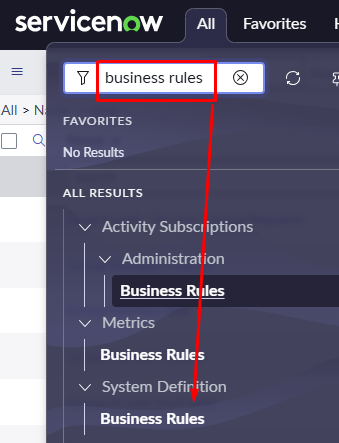
In the menu type “business rules” and click new from the top right menu:
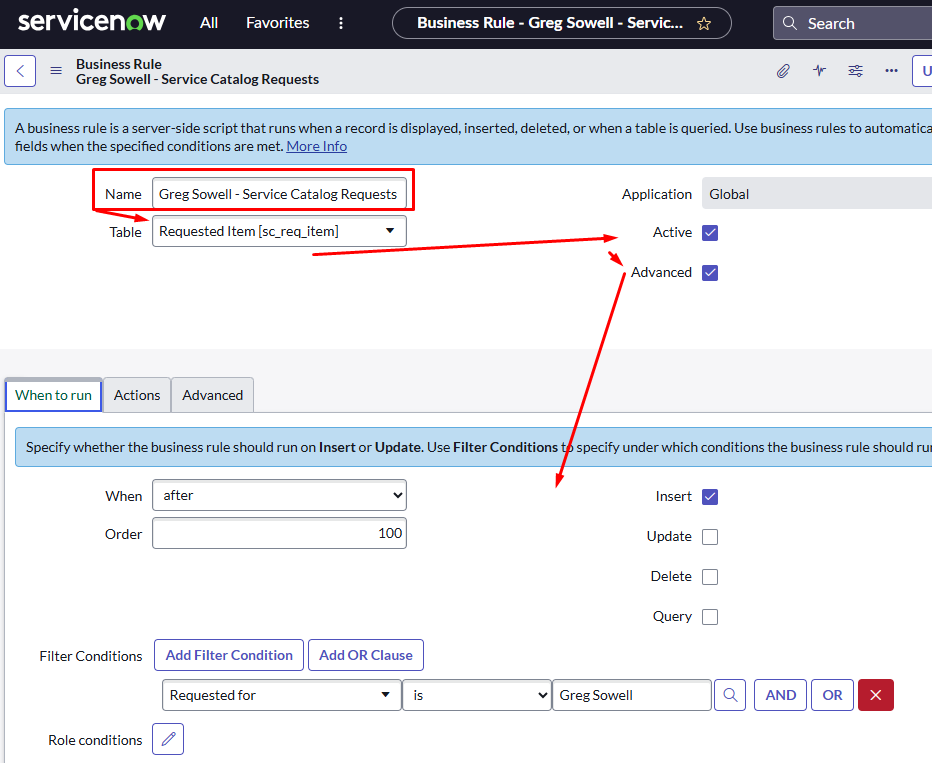
Add a name, place it in the Requested Item table, activate it and make sure you have some advanced options.
From here you want to go to the “when to run” tab and add any conditionals you like. For me I set it to trigger on “insert” and only if it was requested by me. I did this since this is a shared lab and I wanted to trigger my catalog items only for me. Be sure to adjust this to meet your needs:
Now click the “Advanced” tab and paste in the following script:
1 2 3 4 5 6 7 8 9 10 11 12 13 14 15 16 17 18 19 20 21 22 23 24 25 26 27 28 29 30 31 32 33 34 35 36 37 38 | (function executeRule(current, previous) {
var REST_MESSAGE_NAME = "Greg Sowell - SNOW EDA";
var EVENT_NAME = "SERVICE_CATALOG";
var r = new sn_ws.RESTMessageV2(REST_MESSAGE_NAME, "POST");
var json = { event: EVENT_NAME };
if (current.cat_item) {
json["catalog_item"] = current.cat_item.getDisplayValue();
}
if (current.opened_by) {
var requester = current.opened_by.getRefRecord();
if (requester.isValidRecord()) {
json["requester"] = requester.getValue("email");
}
}
if (current.request) {
json["request_name"] = current.request.getValue("short_description");
}
for (var key in current.variables) {
if (current.variables.hasOwnProperty(key)) {
var variable = current.variables[key];
json[key] =
variable.getDisplayValue() != null
? variable.getDisplayValue()
: JSON.parse(String(variable));
}
}
var jsonString = JSON.stringify(json);
r.setRequestBody(jsonString);
r.setTimeout(10000);
r.execute();
})(current, previous); |
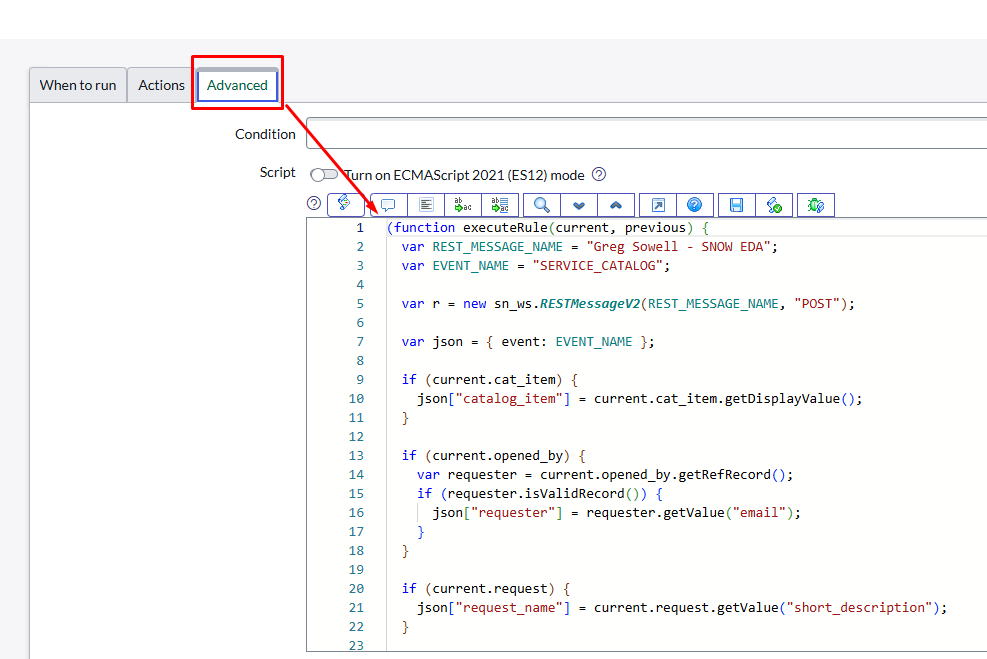
The script points toward the name of the newly created REST message and grabs all of the variables from any triggering service catalog item and pushes it to EDA. Nick was particularly clever with this bit! This is what makes the whole process so simple.
Create Service Catalog Item
This is the easy part…not that any of this should have been too terribly difficult.
Really you create anything in the SC, save, and you are done.
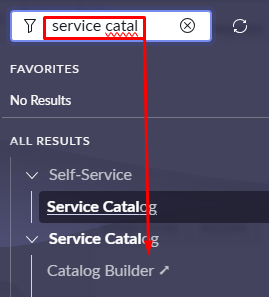
There are two options for configuring a SC item. One is using the “catalog builder”, which will step you through to GUI build one easily:
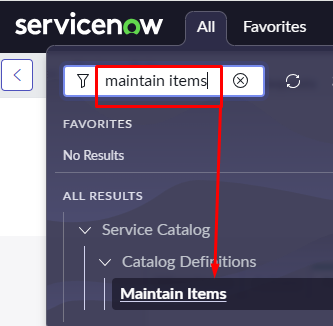
I prefer the manual way as I’m just faster with it since it’s familiar to me. This is found by searching for “maintain items”:
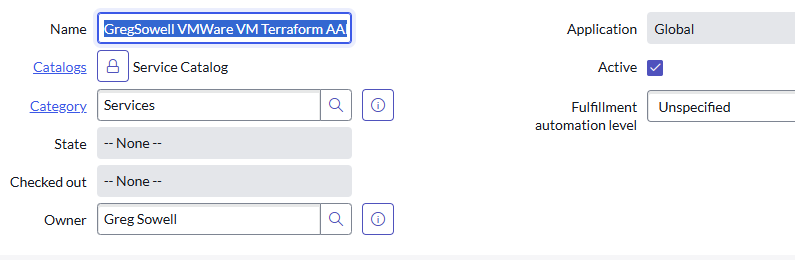
At the top of the SC item, fill out the name, catalog, and category.
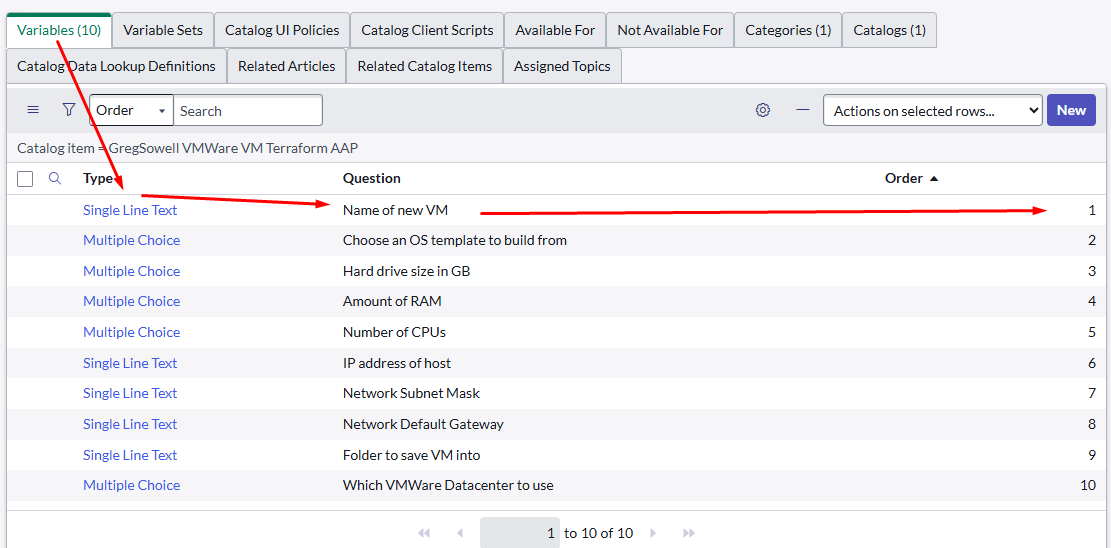
Scroll all the way to the bottom and add any variables you’d like to collect from your clients. Notice here I have a mixture of just single lines and multiple choice single selects. Also note that if you want to change the order of the questions, edit their “order” number:
For a variable you set the type, then fill out the question and the variable name. Remember that the variable name used here will be passed to EDA and ultimately your playbook as an extra-var:
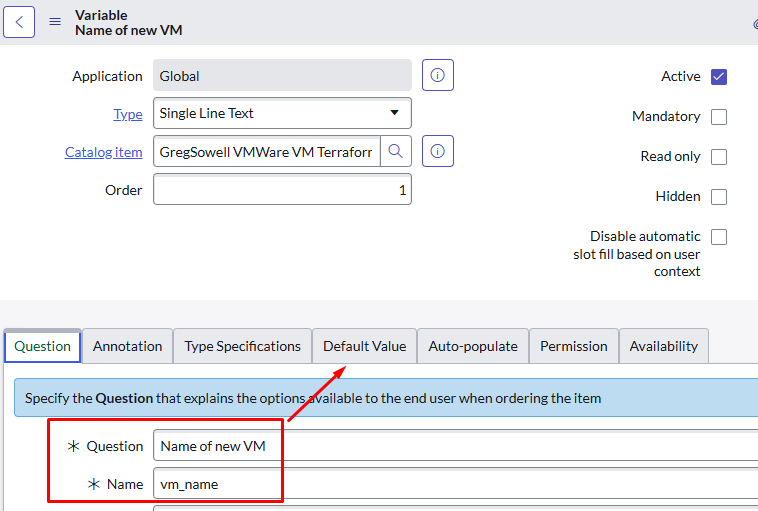
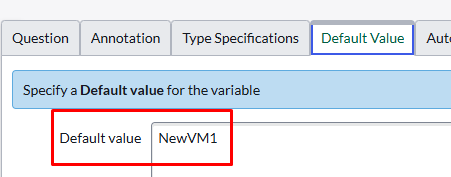
Don’t forget to set a default value whenever you can(helps users make the right selection and also serves as an example:
Operation
Now users can go to the service catalog, and order your item.
Once they do it will be grabbed by the business rule, and sent to EDA via the SNOW rest message.
EDA will then pass it over to controller via the specified playbook.
The playbook will then complete your automation.
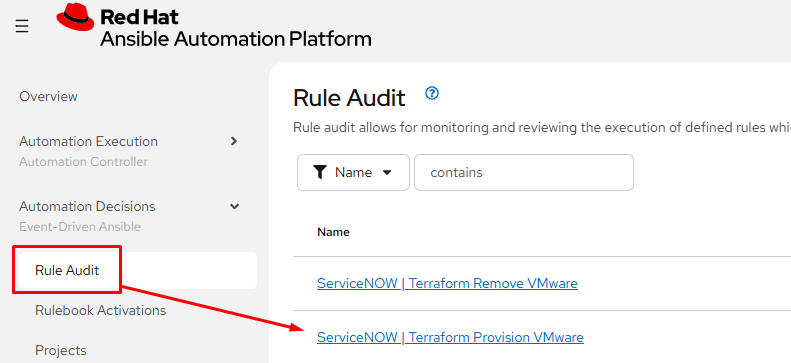
To view the EDA logs from a SNOW message you go to Rule Audit and click the event:
You then click the Events tab and click the listener name:
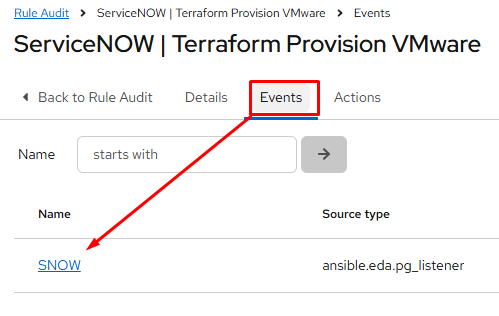
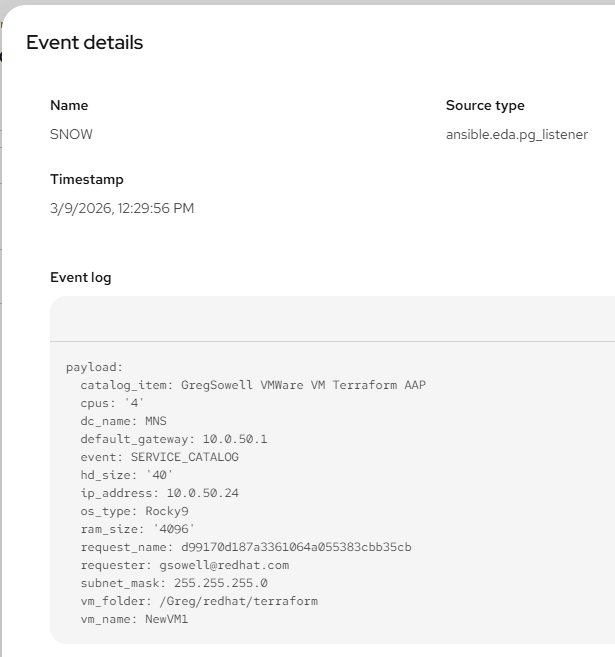
This will then show you all of the variables that came from the SNOW SC item:
Conclusion
To add a new connection we add a new catalog item, update the EDA rulebook, and you are done!
I hope you found this useful and if you give it a go, let me know how it all comes out. If you make changes to the process or come up with something better, please let me know that too!
Good luck and happy automating!