This demo shows the dream. A user goes to SNOW’s service catalog, clicks order on a VM, and the Ansible Automation Platform(AAP) calls Terraform to provision. AAP will then configure the server, add it to monitoring, complete any tickets…essentially anything you want to happen. Again, I can’t stress enough how insanely functional this is for your users…as far as they are concerned everything just works!
Simple Data Flow
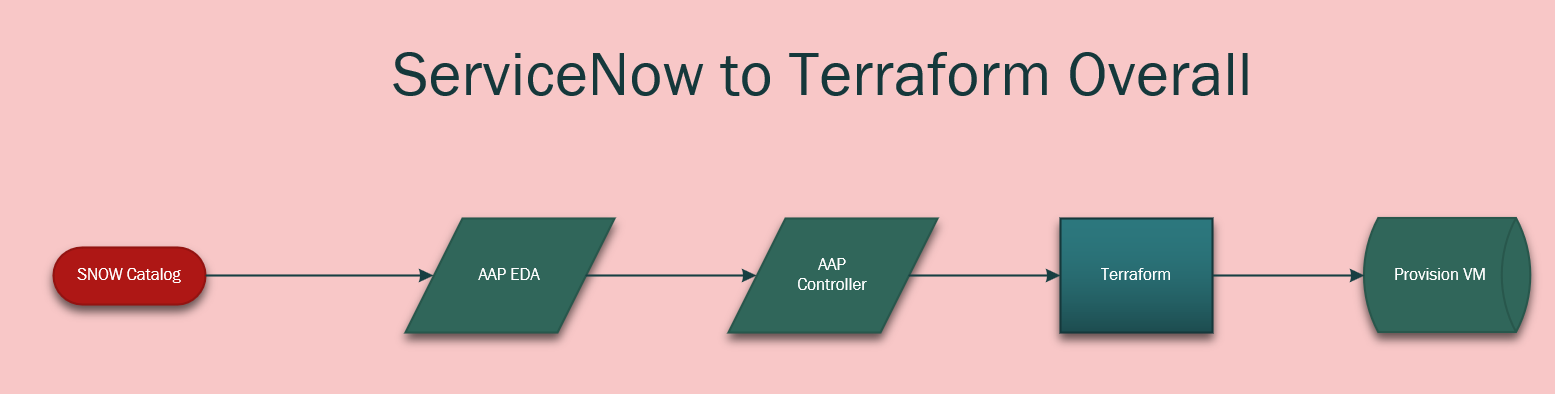
It starts with the SNOW service catalog item being ordered.
It then securely passes all of the service catalog item data(brings it over as variables) to EDA.
EDA then, via a rulebook, passes those variables over to controller as extra-vars.
AAP then clones my terraform repo and provisions the infrastructure!
Demo
SNOW and EDA Configuration
This process looks like the following:
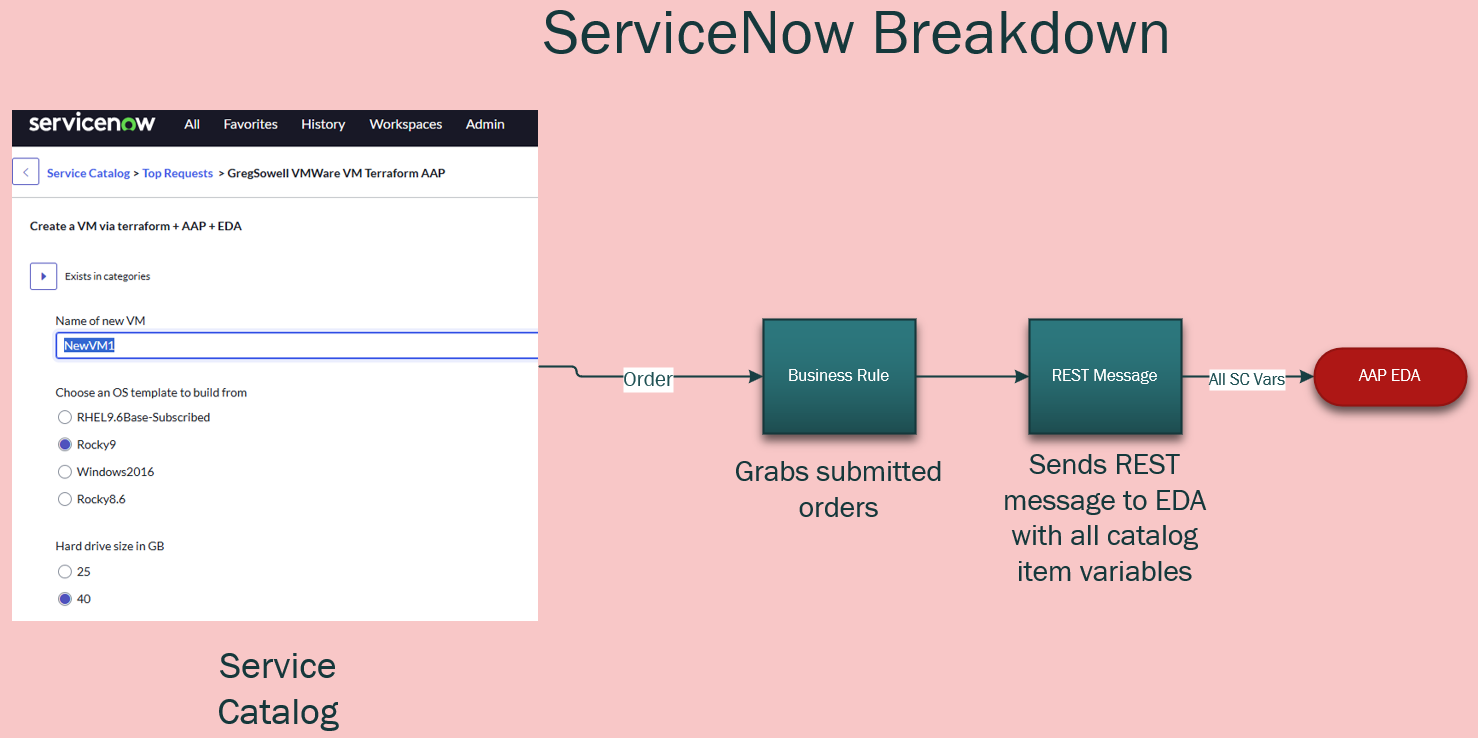
I went into great detail here in another blog post. I detail configuring both ServiceNow and connecting it to EDA in that blog post, so reference that for full config info and a video!
Playbook
All of my playbooks can be found here in my public repo.
I’ve got the Terraform playbook in there right now, which I’ve got posted below(be sure to check the source for any updates):
---
- name: Deploy VMware infrastructure using Terraform from EDA
  hosts: ee-builder
  gather_facts: no
  vars:
    snow_eda_directory: /root/snow-eda
    terraform_directory: "{{ snow_eda_directory }}/vmware-terraform"
    terraform_variables_file: "{{ terraform_directory }}/terraform.tfvars"

    # test data
    catalog_item: "{{ ansible_eda.event.payload.catalog_item | default('GregSowell VMWare VM Terraform AAP')}}"
    cpus: "{{ ansible_eda.event.payload.cpus | default('4') }}"
    dc_name: "{{ ansible_eda.event.payload.dc_name | default('MNS') }}"
    default_gateway: "{{ ansible_eda.event.payload.default_gateway | default('10.0.50.1') }}"
    event: "{{ ansible_eda.event.payload.event | default('SERVICE_CATALOG') }}"
    hd_size: "{{ ansible_eda.event.payload.hd_size | default('40') }}"
    ip_address: "{{ ansible_eda.event.payload.ip_address | default('10.0.50.77') }}"
    os_type: "{{ ansible_eda.event.payload.os_type | default('Rocky9') }}"
    ram_size: "{{ ansible_eda.event.payload.ram_size | default('4096') }}"
    request_name: "{{ ansible_eda.event.payload.request_name | default('1111111111') }}"
    requester: "{{ ansible_eda.event.payload.requester | default('[email protected]') }}"
    subnet_mask: "{{ ansible_eda.event.payload.subnet_mask | default('255.255.255.0') }}"
    vm_folder: "{{ ansible_eda.event.payload.vm_folder | default('/Greg/redhat/terraform') }}"
    vm_name: "{{ ansible_eda.event.payload.vm_name | default('NewVM1') }}"

    remove_vm: false

    # Git settings
    backup_repo: [email protected]:gregsowell/snow-eda
    git_name: Git Backup
    git_email: [email protected]

  tasks:
    - name: Create the ssh key file based on the supplied cred
      become: true
      run_once: true
      ansible.builtin.copy:
        dest: "/tmp/id_rsa"
        content: "{{ cert_key }}"
        mode: '0600'

    - name: Check if snow-eda directory exists
      stat:
        path: "{{ snow_eda_directory }}"
      register: snow_eda_dir

    - name: Clone git repo if snow-eda directory does not exist
      when: not snow_eda_dir.stat.exists
      # ansible.builtin.shell: git clone https://github.com/gregsowell/snow-eda.git
      ansible.builtin.shell: "git config --global core.sshCommand 'ssh -o UserKnownHostsFile=/dev/null -o StrictHostKeyChecking=no -i /tmp/id_rsa'; git clone {{ backup_repo }}"
      args:
        chdir: /root
      environment:
        GIT_COMMITTER_NAME: "{{ git_name | default(omit) }}"
        GIT_COMMITTER_EMAIL: "{{ git_email | default(omit) }}"
        GIT_AUTHOR_NAME: "{{ git_name | default(omit) }}"
        GIT_AUTHOR_EMAIL: "{{ git_email | default(omit) }}"

    - name: Git pull if snow-eda directory exists
      when: snow_eda_dir.stat.exists
      ansible.builtin.shell: "git config --global core.sshCommand 'ssh -o UserKnownHostsFile=/dev/null -o StrictHostKeyChecking=no -i /tmp/id_rsa'; git -C {{ snow_eda_directory }} pull"

    - name: Remove existing VM entry block (reposition safeguard)
      blockinfile:
        path: "{{ terraform_variables_file }}"
        marker: "####{mark}-{{ vm_name }}"
        marker_begin: "begin"
        marker_end: "end"
        state: absent

    - name: Insert or update VM entry in terraform.tfvars
      when: remove_vm | bool == false
      blockinfile:
        path: "{{ terraform_variables_file }}"
        insertafter: '^\s*####start-vms-here\s*$'
        marker: "####{mark}-{{ vm_name }}"
        marker_begin: "begin"
        marker_end: "end"
        block: |
            {{ vm_name }} = {
              template  = "/{{ dc_name }}/vm/Templates/{{ os_type }}"
              network   = "{{ network | default('Greg') }}"
              cpu       = {{ cpus | int }}
              memory_mb = {{ ram_size | int }}
              disk_gb   = {{ hd_size | int }}
              notes     = "{{ request_name }}"
            }

    - name: Resolve vSphere credentials for Terraform
      no_log: true
      set_fact:
        tf_vsphere_server: "{{ vsphere_server | default(lookup('env', 'TF_VAR_vsphere_server'), true) | default(lookup('env', 'VSPHERE_SERVER'), true) }}"
        tf_vsphere_user: "{{ vsphere_user | default(lookup('env', 'TF_VAR_vsphere_user'), true) | default(lookup('env', 'VSPHERE_USER'), true) }}"
        tf_vsphere_password: "{{ vsphere_password | default(lookup('env', 'TF_VAR_vsphere_password'), true) | default(lookup('env', 'VSPHERE_PASSWORD'), true) }}"

    - name: Ensure required vSphere variables are provided
      assert:
        that:
          - tf_vsphere_server is defined
          - tf_vsphere_server | length > 0
          - tf_vsphere_user is defined
          - tf_vsphere_user | length > 0
          - tf_vsphere_password is defined
          - tf_vsphere_password | length > 0
        fail_msg: "Missing required vSphere credentials. Provide extra vars (vsphere_server, vsphere_user, vsphere_password) or environment vars (TF_VAR_vsphere_*, or VSPHERE_*)."

    - name: Initialize Terraform
      command:
        argv:
          - terraform
          - init
          - -no-color
          - -input=false
      args:
        chdir: "{{ terraform_directory }}"
      environment:
        TF_VAR_vsphere_server: "{{ tf_vsphere_server }}"
        TF_VAR_vsphere_user: "{{ tf_vsphere_user }}"
        TF_VAR_vsphere_password: "{{ tf_vsphere_password }}"

    - name: Plan Terraform deployment
      command:
        argv:
          - terraform
          - plan
          - -no-color
          - -input=false
          - -out=tfplan
      args:
        chdir: "{{ terraform_directory }}"
      environment:
        TF_VAR_vsphere_server: "{{ tf_vsphere_server }}"
        TF_VAR_vsphere_user: "{{ tf_vsphere_user }}"
        TF_VAR_vsphere_password: "{{ tf_vsphere_password }}"
      register: terraform_plan
      async: 1800
      poll: 5

    - name: Display Terraform plan output
      debug:
        var: terraform_plan.stdout

    - name: Apply Terraform deployment
      command:
        argv:
          - terraform
          - apply
          - -no-color
          - -input=false
          - -auto-approve
          - tfplan
      args:
        chdir: "{{ terraform_directory }}"
      environment:
        TF_VAR_vsphere_server: "{{ tf_vsphere_server }}"
        TF_VAR_vsphere_user: "{{ tf_vsphere_user }}"
        TF_VAR_vsphere_password: "{{ tf_vsphere_password }}"
      async: 1800
      poll: 5

    - name: push the repo back with no tags
      ansible.builtin.shell: "git add *; git commit -m '{{ vm_name }}-Add'; git config --global core.sshCommand 'ssh -o UserKnownHostsFile=/dev/null -o StrictHostKeyChecking=no -i /tmp/id_rsa'; git push"
      args:
        chdir: "{{ terraform_directory }}"
      environment:
        GIT_COMMITTER_NAME: "{{ git_name | default(omit) }}"
        GIT_COMMITTER_EMAIL: "{{ git_email | default(omit) }}"
        GIT_AUTHOR_NAME: "{{ git_name | default(omit) }}"
        GIT_AUTHOR_EMAIL: "{{ git_email | default(omit) }}"
      # delegate_to: localhost
      changed_when: git_return.stderr != "Everything up-to-date"
      run_once: true
      # connection: local
      register: git_return
      # become: True

    - name: Remove temporary SSH key file "/tmp/id_rsa"
      ansible.builtin.file:
        path: /tmp/id_rsa
        state: absent
      run_once: true
      # delegate_to: localhost
      # become: true
For this quick and dirty demo I’m just connecting to a worker machine. If I spent a bit more time I could get it all working purely from an EE, but for the sake of getting it done quick I have a VM that does the work.
If you check the “vars” section you’ll notice I have all of the variables setup so they are ready to accept the variables passed over from EDA.
Have a look at this overview:
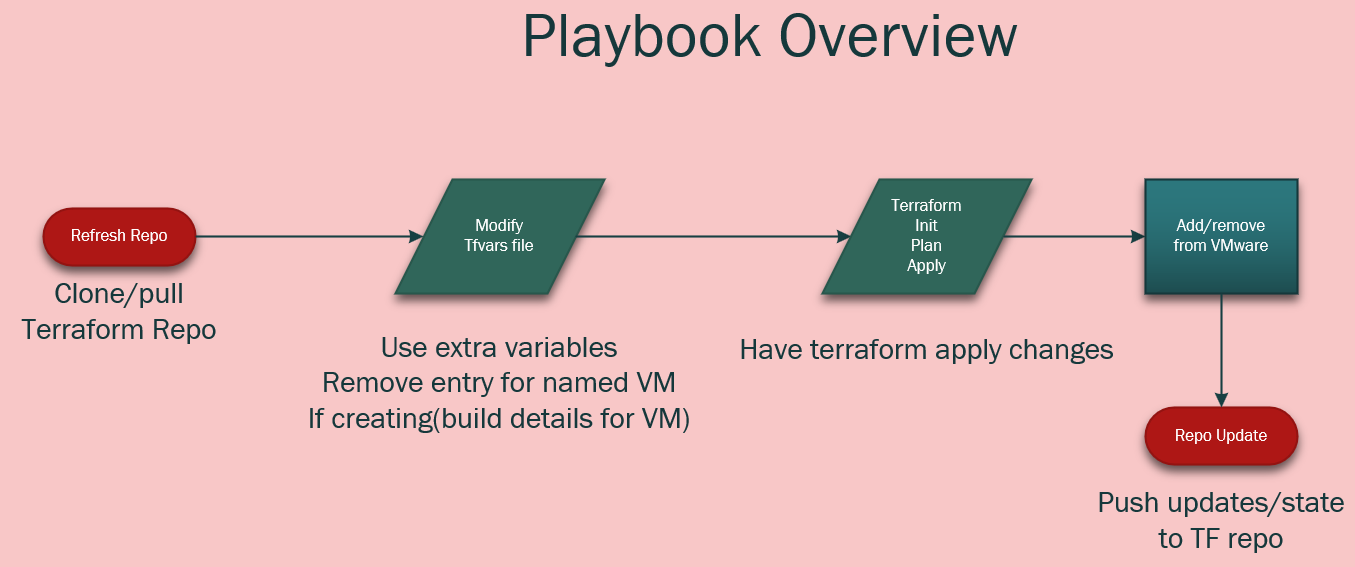
1. You can see that I start by cloning the repository that has all of my terraform files(including state files).
2. I then use the “blockinfile” module to drop in the new VM configuration in my tfvars file. I add a pre and post marker of “####ServerName-begin” and “####ServerName-end”. This makes it easy to review the file as well as have automation go back and remove any infrastructure that should be deprovisioned.
3. I then supply terraform with the init, plan, and last apply commands.
4. Then at the end it will push the file updates(including the state file) back to my git repository for safe keeping.
Keeping the files in the repo give me version control on everything too. An big upgrade to the process could be to use Terraform enterprise to do the provisioning, and in that case I would do very similar things, but instead of having to run the terraform commands directly I would be throwing API commands at TE.
Conclusion
I hope you could see just how easy the process becomes once you use EDA to tie everything together. Keep in mind that ANY tool you have in your environment can call AAP to perform the same process.
If you have any questions or comments, I’d love to hear them.
Good luck, and happy automating!
Leave a Reply