

I’m going to do like always, and pick out my favorites :
*) fixed installation on fresh disks or VMs;
This one was a real problem, you couldn’t install 3.22 on a server…which was super fun hehe.
*) add 802.1ad Service Tag support for VLAN;
This is an exciting option. This is the open standard version of Cisco’s Q-in-Q tunneling. In essence, you run a metro Ethernet solution around town. You make a VLAN that spans from a customer location on one side of town to the other. The customer can plug a switch into your port and trunk across the link, even though you are only using a single access VLAN! Cisco does this by double tagging. In Cisco, you can also use L2protocol tunneling, which allows you to send CDP, STP, and VTP. Though if you do a QnQ tunnel inside of a QnQ tunnel, you can only use l2protocol tunneling on one of the tunnels, not on both. I learned that the hard way 😉 L2protocol tunneling uses a proprietary MAC, so if you are double tunneling, you can’t have that proprietary MAC show up twice. You will also want to adjust your MTU accordingly, since you are adding a VLAN tag onto a VLAN tag.
*) added URL support to fetch tool;
Perhaps we can do nightly config pulls via this method, or one could check if a site is available, and route accordingly.
*) console – removed support for octal numbers, now string of digits with
a leading zero is interpreted as decimal number;
This will be very helpful in scripts…I’m tired of checking for this in date values!..that is…if it works in scripts also.
There are several more updates in there, so take a peek for yourself.
Occasionally, you just have to make an interesting ring tone. My favorite is to take the popular Youtube video and pull out excerpts, make a ring tone, then sneak it on someone’s phone…:) I’m a classy guy, what can I say?
So, I use Audacity Portable to chop up my file. Once I have it the way I want, I save it as a wav. I then use sound recorder, yes the built-in windows sound recorder, to open, then resave in the proper format. You save it as CCITT u-Law.
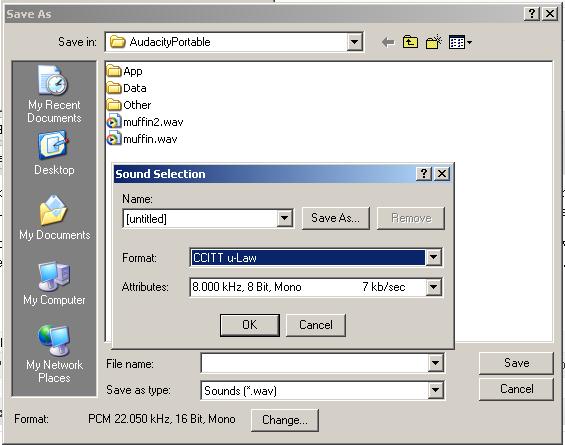
Then rename the file to .raw and upload it to your Callmanager in the c:\Program Files\Cisco\TFTPPath folder.
Edit the Ringlist.xml file and add your new file.
You will probably need to restart the “Cisco TFTP” service, since the tftp service is set to cach by default.
Have fun, and I hope you enjoy the muffins Jacob! :P~
This is super simple, just create a new interface file with a colon and a number.
/etc/sysconfig/network-scripts/ifcfg-eth0:1
DEVICE=eth0:1
BOOTPROTO=static
IPADDR=192.168.0.5
ONBOOT=yes
If you are going to setup an ATA in a network that is non Cisco(sans voice vlan on switches), then you will need to manually configure your ATA to support the Voice VLAN. The easiest way is to let you ATA pull DHCP and configure it via the web interface:
1 | http://192.168.1.100/dev |
If you want to set an alternate VLAN for the voice traffic on the ATA, you need to change the OpFlag value to 0×00000052.
You then have to set the VLAN field to hex representation of what VLAN you want, though the method you have to go about it is somewhat convoluted…or well, really convoluted hehe. I’m not going to explain the complicated process, because someone has already gone through the trouble, here.
What I did, was to write an Autoit script that will do all the work for you! All you have to do is type in the VLAN ID you want to convert and click a button. The prog will display the crazy hex number and also copy it to the clipboard.
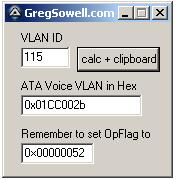
ATA Voice VLAN Prog...oh so pretty.
You can download the compiled program ATA Voice Vlan (2518 downloads) , or use the code below:
1 2 3 4 5 6 7 8 9 10 11 12 13 14 15 16 17 18 19 20 21 22 23 24 25 26 27 28 29 30 31 32 33 34 35 36 37 38 39 40 41 42 43 44 45 46 47 48 49 50 51 52 53 54 55 56 57 58 59 60 61 62 63 64 65 66 67 68 69 70 71 72 73 74 75 76 77 78 79 80 81 82 83 84 85 86 87 88 89 90 91 92 93 94 95 96 97 98 99 100 101 102 103 104 105 106 107 108 109 110 111 112 113 114 115 116 117 118 119 120 121 122 123 124 125 126 127 128 129 130 131 132 133 134 135 136 137 138 139 140 | #include <EditConstants.au3>
#include <GUIConstantsEx.au3>
#include <StaticConstants.au3>
#include <WindowsConstants.au3>
#Region ### START Koda GUI section ### Form=C:\Documents and Settings\gsowell\Desktop\autoit\ata voice vlan\ata voice vlan.kxf
$Form1_1 = GUICreate("GregSowell.com", 165, 152, 193, 115)
$Input1 = GUICtrlCreateInput("", 16, 24, 49, 21)
$Label1 = GUICtrlCreateLabel("VLAN ID", 16, 8, 46, 17)
$Label2 = GUICtrlCreateLabel("ATA Voice VLAN in Hex", 16, 56, 119, 17)
$Input2 = GUICtrlCreateInput("", 16, 72, 121, 21)
$Button1 = GUICtrlCreateButton("calc + clipboard", 72, 24, 83, 25, 0)
$Label3 = GUICtrlCreateLabel("Remember to set OpFlag to", 16, 104, 133, 17)
$Input3 = GUICtrlCreateInput("0×00000052", 16, 120, 73, 21)
GUISetState(@SW_SHOW)
#EndRegion ### END Koda GUI section ###
While 1
$nMsg = GUIGetMsg()
Switch $nMsg
Case $GUI_EVENT_CLOSE
Exit
case $Button1
_rockIt()
EndSwitch
sleep(20)
WEnd
Func _rockIt()
$converted = ""
GUICtrlSetData($Input2,$converted)
if GUICtrlRead($Input1) <> "" Then
;calc it and producte the hex
;0000 0000 0000 0000 0000 0000 0010 1011
;00 [00 0000 0000 00] 00 0000 0000 0010 1011
$converted = _DecToBinary(GUICtrlRead($Input1))
if StringLen($converted) == 4 Then
;need to append 8 zeros first
$converted = "00000000" & $converted
Elseif StringLen($converted) == 8 Then
;need to append 4
$converted = "0000" & $converted
EndIf
;append the proper amount of zeroes
$converted = "00" & $converted & "00"
;ToolTip($converted,0,0)
$converted = "0x" & _BinaryToHexString(StringLeft($converted, 4)) & _BinaryToHexString(StringMid($converted, 5,4)) & _BinaryToHexString(StringMid($converted, 9,4)) & _BinaryToHexString(StringRight($converted, 4)) & "002b"
GUICtrlSetData($Input2,$converted)
ClipPut($converted)
EndIf
EndFunc
; Decimal To Binary
Func _DecToBinary($iDec)
Local $i, $sBinChar = ""
If StringRegExp($iDec,'[[:digit:]]') then
$i = 1
Do
$x = 16^$i
$i +=1
; Determine the Octets
Until $iDec < $x
For $n = 4*($i-1) To 1 Step -1
If BitAND(2 ^ ($n-1), $iDec) Then
$sBinChar &= "1"
Else
$sBinChar &= "0"
EndIf
Next
Return $sBinChar
Else
MsgBox(0,"Error","Wrong input, try again ...")
Return
EndIf
EndFunc
; Binary To Hex
Func _BinaryToHexString($BinaryValue)
Local $test, $Result = '',$numbytes,$nb
If StringRegExp($BinaryValue,'[0-1]') then
if $BinaryValue = '' Then
SetError(-2)
Return
endif
Local $bits = "0000|0001|0010|0011|0100|0101|0110|0111|1000|1001|1010|1011|1100|1101|1110|1111"
$bits = stringsplit($bits,'|')
#region check string is binary
$test = stringreplace($BinaryValue,'1','')
$test = stringreplace($test,'0','')
if $test <> '' Then
SetError(-1);non binary character detected
Return
endif
#endregion check string is binary
#region make binary string an integral multiple of 4 characters
While 1
$nb = Mod(StringLen($BinaryValue),4)
if $nb = 0 then exitloop
$BinaryValue = '0' & $BinaryValue
WEnd
#endregion make binary string an integral multiple of 4 characters
$numbytes = Int(StringLen($BinaryValue)/4);the number of bytes
Dim $bytes[$numbytes],$Deci[$numbytes]
For $j = 0 to $numbytes - 1;for each byte
;extract the next byte
$bytes[$j] = StringMid($BinaryValue,1+4*$j,4)
;find what the dec value of the byte is
for $k = 0 to 15;for all the 16 possible hex values
if $bytes[$j] = $bits[$k+1] Then
$Deci[$j] = $k
ExitLoop
EndIf
next
Next
;now we have the decimal value for each byte, so stitch the string together again
$Result = ''
for $l = 0 to $numbytes - 1
$Result &= Hex($Deci[$l],1)
Next
return $Result
Else
MsgBox(0,"Error","Wrong input, try again ...")
Return
EndIf
EndFunc |
If you need to reset your ATA to default, plug in a handset and hit the button on top. Then type in 322873738#. To check ATA IP, type in 80#. This and more can be found in the ATA Basic Config Guide.
Lets see what we have here…
They announced the RB433UAH. This is the 433 with some additions:
- Two USB 2.0 ports – this can be for external storage. At the last MUM they had an 433 UAH running with an external HD taped to it. Uses, uses…external cach for web traffic, 3G modems and “other” devices. I can only guess what drivers they will include for “other” devices…like fighting plaque.

usb toothbrush
New WoL (Wake on LAN) tool…though I have to admit, I’ve never needed to use a WoL tool.
1 | /tool wol FF:FF:FF:FF:FF:FF |
They talk about the RB450G again, calling it “the most affordable MPLS router in the market.” I have to say that I think they are chasing the wrong market with MPLS. I’ve only seen the necessity for MPLS in larger provider infrastructure. On a side note, I have a 450G in my posession and I have started doing some BGP testing with it. I’m also going to do some BGP testing in METArouter. I’ve got an article in the works for this one, so stay tuned 😉
They also have a method to log to file now. This seems like it would be pretty good for debugging and the like. Perhaps you can use this to pipe some command output to a file, we shall see.
To log everything to file, add new log action:
1 | /system logging action add name=file target=disk disk-file-name=log |
then make everything log using this new action:
1 | /system logging action=file |
you can log only errors there by issuing command:
1 | /system logging topics=error action=file |
If you have accessable usb
flash as usb1 directory under /files, you should issue
following command:
1 | /system logging action add name=usb target=disk disk-file-name=usb1/log |
I use LDAPAdmin whenever I’m going to be doing some backend work. I wanted to get the structure of the user accounts on a Zimbra server, so I did the following:
First, allow connections to TCP 389 to your Zimbra box from your PC or admin subnet.
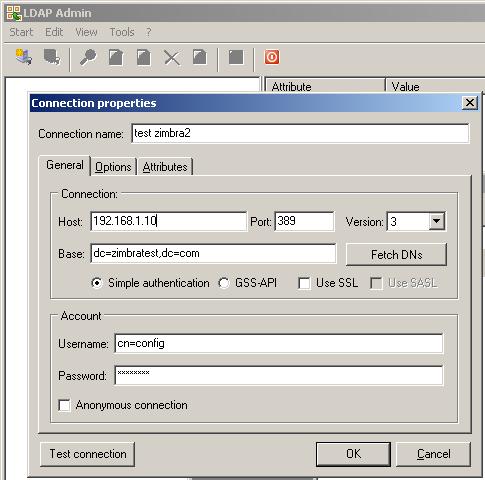
Connection setup, replace zimbratest with your domain:
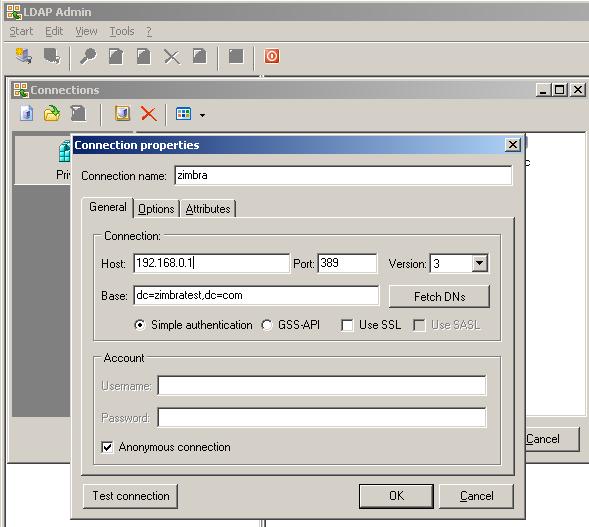
LDAPAdmin connection settings
Next, get your browse on:
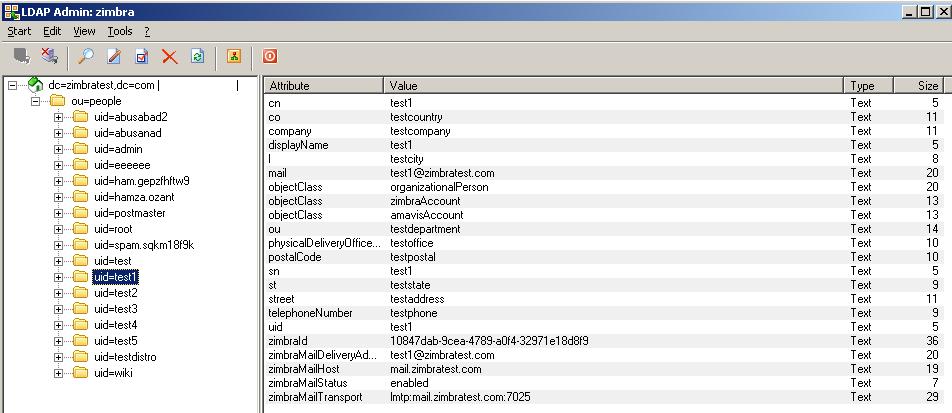
Browsing LDAPAdmin
If you want to connect as the admin user, do the following:
At the command line, su as user zimbra and then type
1 | zmlocalconfig -s ldap_root_password |
Then use user config:
user admin ldap zimbra
Zimbra is a cool closed and opensource email system. I’ve only used the opensource version, but I assume the closed version is twice as nice, but I refuse to pay the price. Bad rhyming aside, the closed version offers you an outlook syncing plugin and live backup options. The opensource version runs postfix/spamassasin/clam, right out of the box. I run it on Centos and install via an RPM, so it is quick and easy to get going. This was produced by Yahoo, so you know the user/admin interface will be flash and friendly. Did I mention that the server package is cross platform capable?
Admin Interface:
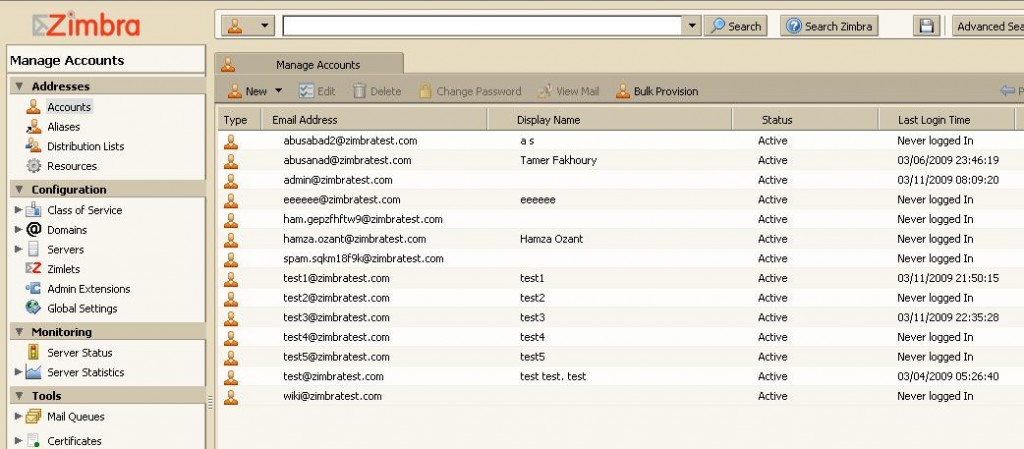
Zimbra Admin
Zimbra User:
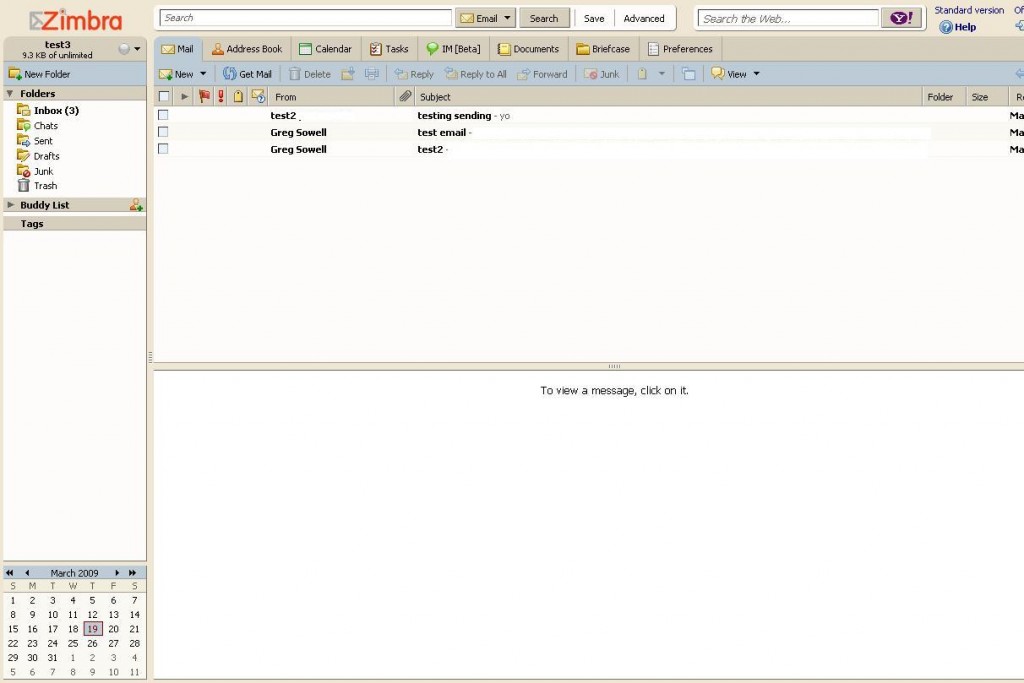
Zimbra User
As you can see, the user interface is sick! It is basically outlook in a browser.
They also have the desktop client, which is a java app that is virtually an outlook replacement.