If you are going to setup an ATA in a network that is non Cisco(sans voice vlan on switches), then you will need to manually configure your ATA to support the Voice VLAN. The easiest way is to let you ATA pull DHCP and configure it via the web interface:
http://192.168.1.100/devIf you want to set an alternate VLAN for the voice traffic on the ATA, you need to change the OpFlag value to 0×00000052.
You then have to set the VLAN field to hex representation of what VLAN you want, though the method you have to go about it is somewhat convoluted…or well, really convoluted hehe. I’m not going to explain the complicated process, because someone has already gone through the trouble, here.
What I did, was to write an Autoit script that will do all the work for you! All you have to do is type in the VLAN ID you want to convert and click a button. The prog will display the crazy hex number and also copy it to the clipboard.
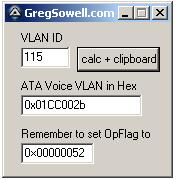
You can download the compiled program
, or use the code below:#include <EditConstants.au3>
#include <GUIConstantsEx.au3>
#include <StaticConstants.au3>
#include <WindowsConstants.au3>
#Region ### START Koda GUI section ### Form=C:\Documents and Settings\gsowell\Desktop\autoit\ata voice vlan\ata voice vlan.kxf
$Form1_1 = GUICreate("GregSowell.com", 165, 152, 193, 115)
$Input1 = GUICtrlCreateInput("", 16, 24, 49, 21)
$Label1 = GUICtrlCreateLabel("VLAN ID", 16, 8, 46, 17)
$Label2 = GUICtrlCreateLabel("ATA Voice VLAN in Hex", 16, 56, 119, 17)
$Input2 = GUICtrlCreateInput("", 16, 72, 121, 21)
$Button1 = GUICtrlCreateButton("calc + clipboard", 72, 24, 83, 25, 0)
$Label3 = GUICtrlCreateLabel("Remember to set OpFlag to", 16, 104, 133, 17)
$Input3 = GUICtrlCreateInput("0×00000052", 16, 120, 73, 21)
GUISetState(@SW_SHOW)
#EndRegion ### END Koda GUI section ###
While 1
$nMsg = GUIGetMsg()
Switch $nMsg
Case $GUI_EVENT_CLOSE
Exit
case $Button1
_rockIt()
EndSwitch
sleep(20)
WEnd
Func _rockIt()
$converted = ""
GUICtrlSetData($Input2,$converted)
if GUICtrlRead($Input1) <> "" Then
;calc it and producte the hex
;0000 0000 0000 0000 0000 0000 0010 1011
;00 [00 0000 0000 00] 00 0000 0000 0010 1011
$converted = _DecToBinary(GUICtrlRead($Input1))
if StringLen($converted) == 4 Then
;need to append 8 zeros first
$converted = "00000000" & $converted
Elseif StringLen($converted) == 8 Then
;need to append 4
$converted = "0000" & $converted
EndIf
;append the proper amount of zeroes
$converted = "00" & $converted & "00"
;ToolTip($converted,0,0)
$converted = "0x" & _BinaryToHexString(StringLeft($converted, 4)) & _BinaryToHexString(StringMid($converted, 5,4)) & _BinaryToHexString(StringMid($converted, 9,4)) & _BinaryToHexString(StringRight($converted, 4)) & "002b"
GUICtrlSetData($Input2,$converted)
ClipPut($converted)
EndIf
EndFunc
; Decimal To Binary
Func _DecToBinary($iDec)
Local $i, $sBinChar = ""
If StringRegExp($iDec,'[[:digit:]]') then
$i = 1
Do
$x = 16^$i
$i +=1
; Determine the Octets
Until $iDec < $x
For $n = 4*($i-1) To 1 Step -1
If BitAND(2 ^ ($n-1), $iDec) Then
$sBinChar &= "1"
Else
$sBinChar &= "0"
EndIf
Next
Return $sBinChar
Else
MsgBox(0,"Error","Wrong input, try again ...")
Return
EndIf
EndFunc
; Binary To Hex
Func _BinaryToHexString($BinaryValue)
Local $test, $Result = '',$numbytes,$nb
If StringRegExp($BinaryValue,'[0-1]') then
if $BinaryValue = '' Then
SetError(-2)
Return
endif
Local $bits = "0000|0001|0010|0011|0100|0101|0110|0111|1000|1001|1010|1011|1100|1101|1110|1111"
$bits = stringsplit($bits,'|')
#region check string is binary
$test = stringreplace($BinaryValue,'1','')
$test = stringreplace($test,'0','')
if $test <> '' Then
SetError(-1);non binary character detected
Return
endif
#endregion check string is binary
#region make binary string an integral multiple of 4 characters
While 1
$nb = Mod(StringLen($BinaryValue),4)
if $nb = 0 then exitloop
$BinaryValue = '0' & $BinaryValue
WEnd
#endregion make binary string an integral multiple of 4 characters
$numbytes = Int(StringLen($BinaryValue)/4);the number of bytes
Dim $bytes[$numbytes],$Deci[$numbytes]
For $j = 0 to $numbytes - 1;for each byte
;extract the next byte
$bytes[$j] = StringMid($BinaryValue,1+4*$j,4)
;find what the dec value of the byte is
for $k = 0 to 15;for all the 16 possible hex values
if $bytes[$j] = $bits[$k+1] Then
$Deci[$j] = $k
ExitLoop
EndIf
next
Next
;now we have the decimal value for each byte, so stitch the string together again
$Result = ''
for $l = 0 to $numbytes - 1
$Result &= Hex($Deci[$l],1)
Next
return $Result
Else
MsgBox(0,"Error","Wrong input, try again ...")
Return
EndIf
EndFuncIf you need to reset your ATA to default, plug in a handset and hit the button on top. Then type in 322873738#. To check ATA IP, type in 80#. This and more can be found in the ATA Basic Config Guide.


Leave a Reply