

I was looking at my analytics and I noticed that France is my #2 traffic source. USA is #1, which I would assume is because my site is over here in the US written in the Englishes. France, I didn’t see coming…you guys totally snuck up on me.
It seems most people are visiting from around Paris. I’m not sure exactly what content you guys are looking at…more Mikrotik or more Cacti. I think more cacti.
Only thing more surprising is my #3, which is Brazil. 🙂 I don’t know why any of this is surprising, I really didn’t know what to expect.
Finally at #4 is the UK. I would have figured they would be #2. Since we sort of speak the same language…just without all that bob’s your uncle, pip pip and cheerio stuff. 😛 Just kidding my limey friends. Any of you guys have a place for me to stay; I would love to come visit?
1. United States
2. France
3. Brazil
4. United Kingdom
5. Germany
6. Australia
7. Poland
8. Indonesia
9. Russia
10. Canada
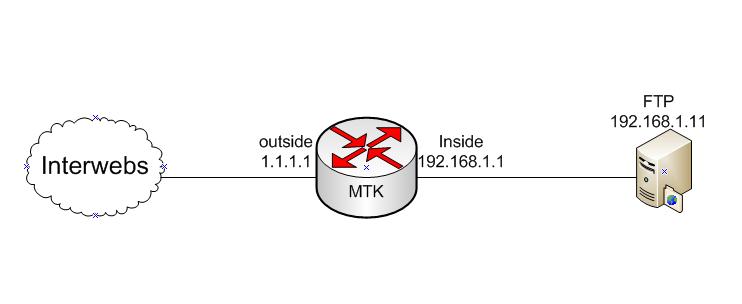
MTK FTP NAT
The first thing you want to do is disable the FTP server on the Mikrotik.
1 | ip service disable ftp |
Next, you need to redirect port 20 and 21 to your internal FTP server. The public facing interface is named “outside”. The public IP bound to the router is 1.1.1.1. The private internal IP of the FTP server is 192.168.1.11.
1 2 | chain=dstnat action=netmap to-addresses=192.168.1.11 to-ports=21 protocol=tcp src-address=0.0.0.0/0 dst-address=1.1.1.1 in-interface=outside dst-port=21 chain=dstnat action=netmap to-addresses=192.168.1.11 to-ports=20 protocol=tcp src-address=0.0.0.0/0 dst-address=1.1.1.1 in-interface=outside dst-port=20 |
As you can see I use chain dstnat and action of netmap. I also specified incoming interface.
I’m currently trying to justify a sweet pair of these…drywall stilts! hehe.
An extra 24-40″, that would make me almost 10′ tall! Plus with some blazin blue stilts I would be kickin some major arse!
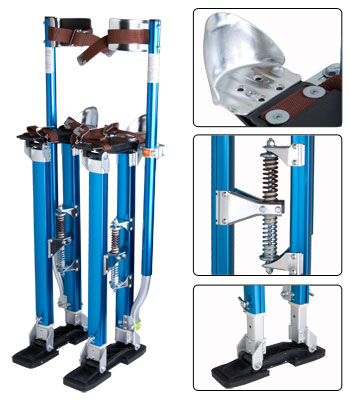
Sweeeeeeeeet 😉
Jimmy has released another great little article on his personal experience with Mikrotik. His cactiEZ cd gets a LOT of downloads, so this is his method with dealing with such problems. He marks connections using a L7 regex statement, then wrangles those packets into a queue. You can find the article HERE.
Alright my peoples. This one will show you how to do a simple PPTP setup on your Mikrotik and even how to configure your Windows machine to connect to said PPTP server. This will allow you to securely access your network remotely by creating a secure tunnel over the internet.
Click the link below for the video!
read more…
Change log can be found HERE.
Thanks to Normunds I was actually able to get a peek at this OS a little early. This was in direct response to my RB450G testing. They fixed a lot of BGP issues with this new release. I’ll post my full results of the retest in the next couple of days. They also fixed METArouter =)
Highlights:
*) added ability to run non RouterOS in MetaROUTER;
I mentioned this last week in the newsletter. To gain more info hit the metarouter wiki page.
*) console – ‘print’ commands have new option ‘follow-only’ that continuously
shows changes like the ‘follow’ option, but does not print all items
at the beginning;
Sounds like a live tail…which is pretty cool.
*) routing-test – speed up BGP route processing;
Indeed they have sped it up.
Upgrading the Mikrotik OS is simple, especially with winbox. You can FTP the updated npk file if you like, but the easiest thing to do is update via Winbox.
Click the link below to see the VIDEO!
read more…