

A friend of mine turned me on to this site the other day. If someone asks you a question that could have simply been answered with a quick google, then browse to Let Me Google That For You. Type in the thing to be googled, and then it will produce a link for you. Email the link to the asking party. When they click the link, a little animation shows the cursor clicking in the google search box and typing your query, then it clicks search…sooo demeaning. I’m assuming most people will get the hint…hehehe.

Step 1, cut a hole in the box

Step 2, put your junk in the box.

Step 3, get her to open the box.
So it’s almost summer…and you can’t stay inside writing about routers allllll the time 😉 So my boys and I are going to build our own water park in the backyard. We started with some supplies. Gavin and I went to the hardware store today and picked up some junk:
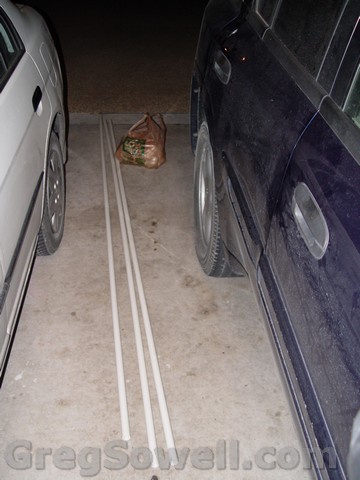
a few sticks of 3/4\

a bag-o-fittings, valves and possibly a sprinkler head!
The plan is to attach all of the piping to the play structure in the back yard…here’s a shot of it.
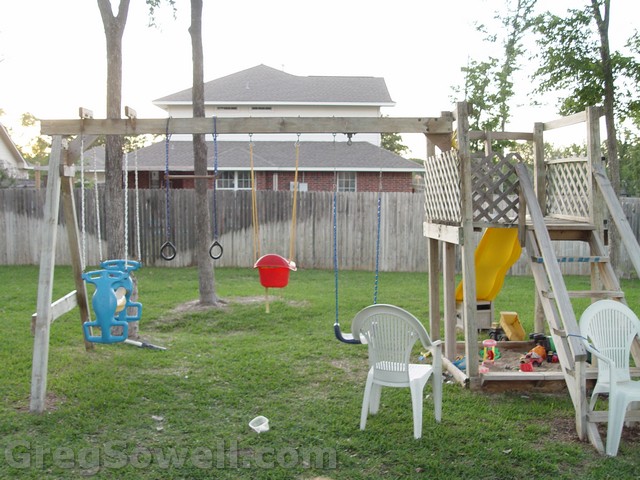
That's right fool, I made those stairs.
Here’s the diagram I used for preplanning:
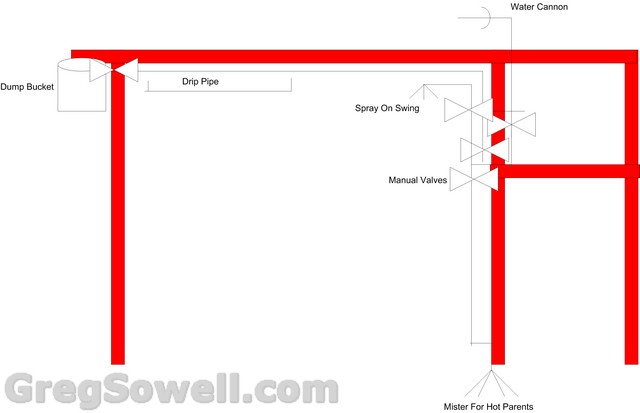
Visio 4 life!
Using the diagram above, we are going to have a dump bucket (fills with water and tips over, rinse and repeat), drip pipe that sprays water down, sprinkler head that sprays down the swing, a water canon on top that can be aimed and last a mister to keep us cool while watching the kiddos. I’ll post updates as we build.
The PDF can be found here.
Highlights:
411AR
Built in B/G card with MMCX connector. Also has a minipci slot for an additional card, which is a nice add.
They are making a strong run at translating their documentation into the wiki. It looks like a great first offering, and I look forward to this growing.
R52n-M
N based card that has the MMCX connectors. Will be out end of May and will MSRP for $49.
RB411UAHR
This would be the 411 “kitchen sink”. High power CPU, the built in wireless, usb port and simslot for 3G.
RB1100 Shipping
Looks like they are shipping second week of May.
Changelog here.
I’ll highlight the interesting bits:
What’s new in 5.0beta2 (2010-Apr-30 11:35):
*) added wireless distance setting, removed ack-timeout;
*) improved 802.11 operation for outdoor distances;
This is terrific. Ubiquiti has had a slider for this in their GUI for a while now. You slide it to your distance and it automatically adjusts ack times and other optimizations. A good bit of recon on this one!
What’s new in 5.0beta2 (2010-Apr-29 12:10):
*) fixed sstp on x86;
*) console – removed ‘delay’ argument from ‘/system scheduler add’ command;
*) console – remove ‘comment=””‘ values from export;
*) console – updated ‘/system script job’:
– also show active login sessions here;
– new read-only property ‘type’ with values “command”, “login”
or “api-login” for running commands and either kind of login sessions;
– new optional read-only property ‘parent’ with id of the job that
has spawned this one;
*) console – changed “started” property of ‘/system script job’ to use
local time;
*) console – new property ‘type’ in ‘/system script job’
*) console – added ‘/port remote-access export’ command;
*) console – fixed bug that caused “cannot set …” error when using
some properties in ‘find’ commands;
*) show old software id in export file header;
*) api – can supply password to ‘/system/upgrade/upgrade-package-source/add’;
*) api – ‘print’ command was not showing values of some properties
such as ‘servers’ in “/ip/dns”;
*) api – fixed api login sessions not dissapearing from ‘/user active’ after
termination;
*) ‘/user active’ now lists type of api connections as ‘api’;
*) added support for hardware watchdog on RB1000 & RB800;
*) added support for ASIX AX88xxx based USB Ethernet Adapters on RB4xx;
*) fixed problem – ipv6 traffic was not bridged if ipv6 package was not enabled;
*) fixed getting interface stats in dude;
*) fixed metarouter stability problem on RB400s & RB750s;
*) fixed metarouter – it didn’t work on RB1000 with 2Gb;
*) fixed metarouter – it locked up on RB800;
*) fixed problem – SFQ queues did not work on interfaces (wireless) if none
of simple or tree queues were added;
*) fixed RB800 temperature;
*) fixed problem – WinBox crashed while opening VAP interface;
*) dhcp server – fixed possible inactive dhcp server in case of many
dhcp leases with address-pool enabled;
*) dhcp server – show non-printable option 82 agent-circuit-id and
agent-remote-id values in hexadecimal notation
(in the same way as client-id is shown);
This is the 3rd version release in what seems as many weeks. Change log is here.
*) fixed problem – some of the bridge ports stayed invalid after reboot;
I assume this is why the update was rushed out 🙂
*) console – added ‘/port remote-access export’ command;
Here’s the change log.
4.7 had some major DHCP bugs and was quickly pulled, so grab your 4.8 while it’s fresh.
*) fixed problem – WinBox crashed while opening VAP interface;
*) dhcp server – fixed possible inactive dhcp server in case of many
dhcp leases with address-pool enabled (broken in v4.7);
*) dhcp server – show non-printable agent-circuit-id and agent-remote-id
values in hexadecimal notation (the same way as client-id is shown);
*) api – can supply password to ‘/system/upgrade/upgrade-package-source/add’;
*) console – fixed bug that caused “cannot set …” error when using
some properties in ‘find’ commands;
*) api – ‘print’ command was not showing values of some properties
such as ‘servers’ in “/ip/dns”;
*) show old software id in export file header;
*) added support for secondary serial port on RB800/RB1100;
Anthony, who accomplished this hack, was kind enough to let me repost it here.
It seems he has found a way to run Debian linux on his RB433AH, and he was kind enough to show us all how it is done.


“Basically the technique is to netboot the router off a vmlinux-initramfs image I constructed which allows you to nfs mount an entire Debian-mips root file system served out by another computer.”
I can personally see this as a nice little home automation server or brains for some centralized control or collection system. Perhaps with the U version you could attach and access an USB HD for additional storage.
What would you guys use it for?
The original article with instructions can be found here.
Here’s an article on loading Openwrt on a 450G.
It seems MTK will send you drivers or patches for the various systems, see here.
Anyway, happy hacking.