

It’s sometimes useful to connect the serial port on your Mikrotik over to another piece of network equipment. I don’t need it very often, but it is quite useful for out of band management. The wiki article is here.
I made a quick video showing how to connect to a Cisco device. I’m using a standard Cisco console cable, which happens to be a null modem cable 🙂
Happy consling…happy consolo-ing…happy whatever it is that you will be doing with it. 😛
Change log is here.
*) added USB power reset feature;
I know several people will be happy to see this feature. It allows you to reboot 3G modems attached to the mikrotik without having to reboot the whole router. Some people were experiencing issues with the initialization of the modem, so this should fix the issue nicely.
*) added support for nv2 in wireless-nv2 package;
It looks like they have ported Nv2 over to the 4.X train…I didn’t expect to see this. I figured Nv2 would be used to push people to version 5.
This is easily accomplished via the grep command.
1 | grep “find text” /home/greg/*.txt |
The same search but will go recursively down the structure.
1 | grep -r “find text” /home/greg/*.txt |
The following is recursion and it will also print the file name that the text was found in.
1 | grep -H -r “find text” /home/greg/*.txt |
I had a customer of mine that a single user inside their office needed an 800 number routed to them…not a big deal. What we did was to order an additional DID from their SIP provider Vitelity. The number was provisioned and I forwarded it from the incoming trunk to the users phone. I made a test call and low and behold, it worked just fine. That was a boring story… Every good story has to have an antagonist, right? Well, when you picked up the phone to dial out, it was screened on caller ID as a number from the old DID block.
I tried just manipulating the Outbound CID section. I set it to what the new DID is, but it still didn’t do the trick.
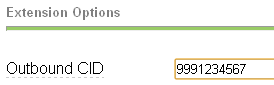
After futzing with that for a while I put in a support ticket. Support told me to put in a subaccount.
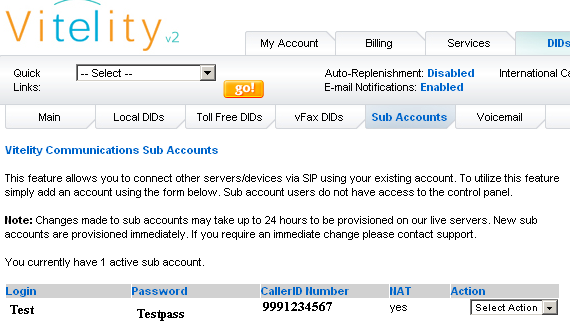
A subaccount creates a new set of trunk credentials for one to use. You also associate a caller ID with the new subaccount, which will, supposedly, screen the number properly.
Since we have a new set of trunk credentials, we have to create a new trunk in our asterisk server. My box is a trixbox ce server.
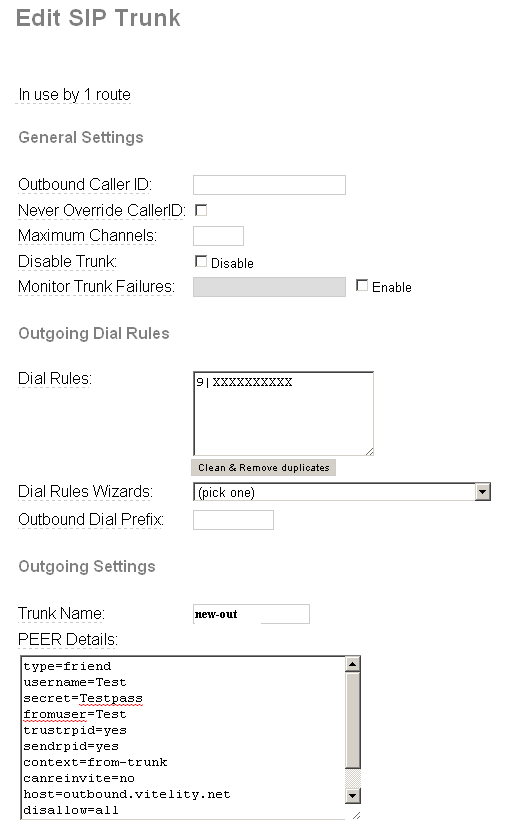
I basically used my existing trunk settings, but with the new username/password.
You then need to create a new outbound route that uses that new trunk.
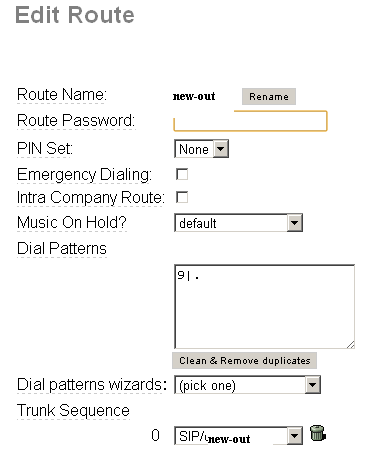
This route is identical to my default route save for the trunk selected at the bottom.
Now I associate my specific user inside with this new outside route…wait…what? In Cisco callmanager, you have partitions. Partitions are logical groupings of extensions. You can put route patterns in specific partitions…which would fix this situation. What does one do in Asterisk? One uses contexts. Contexts are the same construct as partitions. They basically allow you to segregate phones into different groups. When it comes down to it, I’m a GUI guy. I am a GUI guy, because I want other people to be able to use the systems I configure without breaking them. If I change something in config files, I’ll be the only guy from now until forever who can work on those systems. Having said all of that, I’ve found a great little plugin for trixbox/freepbx called custom context. What it allows you to do is EASILY create contexts, add outbound routes to said context and then apply them to users. I’m not going to walk you through that because someone already has in the video below:
I did discover that you have to set “ENTIRE Basic Internal Dialplan” and “All outbound routes” to deny if you want to be able to individually select outbound routes.
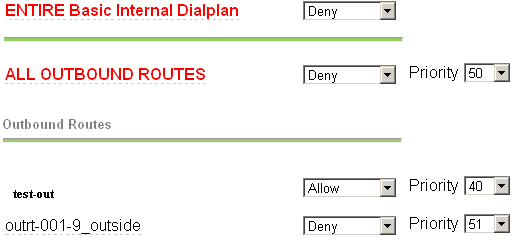
Once everything is verified working, you only need to point your 800 number towards your new DID…yeah!
Looks like a slew of emergency repairs. The change log is here.
*) wireless nv2 – fix stalls on encrypted 11n links using high rates;
*) wireless nv2 – fix encryption related kernel crash;
*) sstp – fixed memory leak;
*) fixed problem – bad boot/kernel crc was reported on powerpc boards when in fact it was good;
Again…beta software…use at your own risk!
Thanks to JJ for posting up an interesting little article about some new UBNT products.
He’s covering:
He’s also got some pretty decent pics up too.


All good stuff. The change log is here.
*) wireless nv2 – encryption support;
*) tool fetch – support ftp STOR;
*) ospf – fixed crash when working with external LSA that contain forwarding addess;
*) ipsec – supports NAT-T drafts;
*) ipsec – added debug logging, to maintain same log verbosity as before with ‘ipsec’ topic now use topics ipsec,debug,!packet’;
*) ipsec – make it work with EoIP, GRE, PPTP and L2TP;
*) support for Atheros AR9271 wireless chip;
*) added support for more Intel 82575/82576 PCI-Express Gigabit Ethernet cards;
*) added support for idle detection on RB1xx/RB5xx in /tool profile;
*) fixed Wireless manual tx power configuration for 11n rates in WinBox;
*) fixed torch;