

If you are on a domain you can simply do this with group policy. If you are doing it on a machine you just log into locally you use the local group policy editor:
1 2 3 4 5 | Start => Run => gpedit.msc Computer Config => Windows Settings => Security Settings => Local Settings => Security Options Interactive logon: Message text for users attempting to log on Interactive logon: Message title for users attempting to log on |
As a consultant I use the dude a lot. I connect to a myriad of dude servers on a regular basis, which can be somewhat cumbersome. Why is this cumbersome…because you don’t have the ability to save multiple sets of connection information in the dude. Sooooo, I wrote a little menu system so you can enter as many dude systems as you want, each with their own sets of credentials and IP information. All you have to do is choose the server from the list you want to connect to and click launch 🙂
Binary is here: Dude-Menu (1929 downloads)
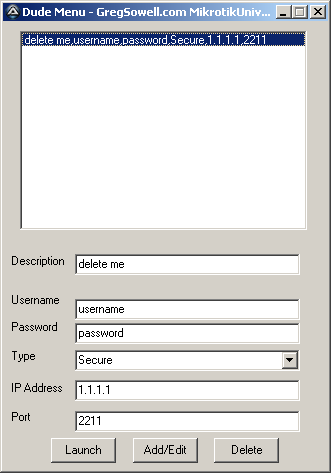
Here’s the code for all of my basement dwelling friends:
1 2 3 4 5 6 7 8 9 10 11 12 13 14 15 16 17 18 19 20 21 22 23 24 25 26 27 28 29 30 31 32 33 34 35 36 37 38 39 40 41 42 43 44 45 46 47 48 49 50 51 52 53 54 55 56 57 58 59 60 61 62 63 64 65 66 67 68 69 70 71 72 73 74 75 76 77 78 79 80 81 82 83 84 85 86 87 88 89 90 91 92 93 94 95 96 97 98 99 100 101 102 103 104 105 106 107 108 109 110 111 112 113 114 115 116 117 118 119 120 121 122 123 124 125 126 127 128 129 130 131 132 133 134 135 136 137 138 139 140 141 142 143 144 145 146 147 148 149 150 151 152 153 154 155 156 157 158 159 160 161 162 163 164 165 166 167 168 169 170 171 172 173 174 175 176 177 178 179 180 181 182 183 184 185 186 187 188 189 190 191 192 193 194 195 196 197 198 199 200 201 202 203 204 205 206 207 208 209 210 211 212 213 214 215 216 217 218 219 220 221 222 223 224 225 226 | #include <Array.au3>
#include <file.au3>
;check for config file's existance
if not FileExists(@ScriptDir & "\config.txt") then
;file isn't here, generate it
$fConfig = FileOpen(@ScriptDir & "\config.txt", 1)
; Check if file opened for writing OK
If $fConfig = -1 Then
MsgBox(0, "Error", "Unable to open file.")
Exit
EndIf
FileWriteLine($fConfig, "C:\Program Files\Dude\dude.exe" & @CRLF)
FileWriteLine($fConfig, "delete me,username,password,Secure,1.1.1.1,2211")
FileClose($fConfig)
EndIf
Dim $aConfig
If Not _FileReadToArray(@ScriptDir & "\config.txt",$aConfig) Then
MsgBox(4096,"Error", " Error reading log to Array error:" & @error)
Exit
EndIf
;#############################
#include <ButtonConstants.au3>
#include <ComboConstants.au3>
#include <EditConstants.au3>
#include <GUIConstantsEx.au3>
#include <GUIListBox.au3>
#include <StaticConstants.au3>
#include <WindowsConstants.au3>
#Region ### START Koda GUI section ### Form=C:\Documents and Settings\greg\Desktop\autoit\dude menu\dudemenu.kxf
$Form1_1 = GUICreate("Dude Menu - GregSowell.com MikrotikUniversity.com", 325, 448, 192, 114)
$InDesc = GUICtrlCreateInput("", 72, 232, 225, 21)
$InUser = GUICtrlCreateInput("", 72, 277, 225, 21)
$InPassword = GUICtrlCreateInput("", 72, 301, 225, 21)
$Combo1 = GUICtrlCreateCombo("Secure", 72, 328, 225, 25)
GUICtrlSetData(-1, "Remote")
$InIP = GUICtrlCreateInput("", 72, 358, 225, 21)
$InPort = GUICtrlCreateInput("", 72, 389, 225, 21)
$List1 = GUICtrlCreateList("", 16, 8, 289, 201)
$Label1 = GUICtrlCreateLabel("Description", 8, 232, 57, 17)
$Label2 = GUICtrlCreateLabel("Username", 8, 271, 52, 17)
$Label3 = GUICtrlCreateLabel("Password", 8, 298, 50, 17)
$Label4 = GUICtrlCreateLabel("Type", 8, 327, 28, 17)
$Label5 = GUICtrlCreateLabel("IP Address", 8, 359, 55, 17)
$Label6 = GUICtrlCreateLabel("Port", 8, 388, 23, 17)
$BtnLaunch = GUICtrlCreateButton("Launch", 48, 416, 65, 25, $WS_GROUP)
$BtnAdd = GUICtrlCreateButton("Add/Edit", 130, 416, 65, 25, $WS_GROUP)
$BtnDelete = GUICtrlCreateButton("Delete", 211, 416, 65, 25, $WS_GROUP)
GUISetState(@SW_SHOW)
#EndRegion ### END Koda GUI section ###
;fill in the listbox
_LoadConfig()
$ListLocation = 1
While 1
$nMsg = GUIGetMsg()
Switch $nMsg
Case $GUI_EVENT_CLOSE
Exit
case $GUI_EVENT_PRIMARYUP
;mouse was pressed, lets check to see if they choose a new item in list
;check which list item is highlighted
$tempList = GUICtrlRead($List1)
;see if this is new item chosen or just a click somewhere on the prog
if $tempList <> $ListLocation and $tempList <> "" Then
;change, update everything
;set list location to the temp value
$ListLocation = $tempList
;set all our gui values
GUICtrlSetData($InDesc,stringleft($ListLocation,StringInStr($ListLocation,",") - 1))
GUICtrlSetData($InUser, StringMid($ListLocation, StringInStr($ListLocation,",") + 1, StringInStr($ListLocation,",", 0, 2) - StringInStr($ListLocation,",") - 1))
GUICtrlSetData($InPassword, StringMid($ListLocation, StringInStr($ListLocation,",", 0, 2) + 1, StringInStr($ListLocation,",", 0, 3) - StringInStr($ListLocation,",", 0, 2) - 1))
GUICtrlSetData($Combo1, StringMid($ListLocation, StringInStr($ListLocation,",", 0, 3) + 1, StringInStr($ListLocation,",", 0, 4) - StringInStr($ListLocation,",", 0, 3) - 1))
GUICtrlSetData($InIP, StringMid($ListLocation, StringInStr($ListLocation,",", 0, 4) + 1, StringInStr($ListLocation,",", 0, 5) - StringInStr($ListLocation,",", 0, 4) - 1))
GUICtrlSetData($InPort, StringMid($ListLocation, StringInStr($ListLocation,",", 0, 5) + 1))
EndIf
Case $BtnAdd
;update existing or commit the new one
;lets rock it
$new = 1
;where in the loop are we
$updateNum = 0
;check to see if it exists
for $y = 2 to $aConfig[0]
;check if the IP exists
if StringInStr($aConfig[$y], GUICtrlRead($InIP)) > 0 Then
;we have a match
$new = 0
$updateNum = $y
EndIf
Next
;ready to rock, save it
if $new = 1 Then
;new one
;add to end of the array
_ArrayAdd($aConfig, GUICtrlRead($InDesc) & "," & GUICtrlRead($InUser) & "," & GUICtrlRead($InPassword) & "," & GUICtrlRead($Combo1) & "," & GUICtrlRead($InIP) & "," & GUICtrlRead($InPort))
;sort our array
_ArraySort($aConfig,0,2)
;write the file
_FileWriteFromArray(@ScriptDir & "\config.txt",$aConfig,1)
;run plink to accept cert
;Run(@ComSpec & " /c " & FileGetShortName(@ScriptDir) & '\plink.exe -ssh ' & GUICtrlRead($IPAddress1))
;load the list again
_LoadConfig()
Else
;update
;set existing value
$aConfig[$updateNum] = GUICtrlRead($InDesc) & "," & GUICtrlRead($InUser) & "," & GUICtrlRead($InPassword) & "," & GUICtrlRead($Combo1) & "," & GUICtrlRead($InIP) & "," & GUICtrlRead($InPort)
;sort array
_ArraySort($aConfig,0,2)
;write the array to file
_FileWriteFromArray(@ScriptDir & "\config.txt",$aConfig,1)
;reload list
_LoadConfig()
EndIf
Case $BtnDelete
;delete an existing entry
$sure = MsgBox(4, "Delete Record?", "Are you sure you want to delete " & GUICtrlRead($InDesc) & "?")
if $sure == 6 Then
;delete it
$updateNum = 0
;find the array #
for $y = 1 to $aConfig[0]
;check if the IP exists
if StringInStr($aConfig[$y], GUICtrlRead($InIP)) > 0 Then
;we have a match
$updateNum = $y
EndIf
Next
;delete the entry
_ArrayDelete($aConfig,$updateNum)
;write it to file
_FileWriteFromArray(@ScriptDir & "\config.txt",$aConfig,1)
;reload list
_LoadConfig()
EndIf
Case $BtnLaunch
;launch it
run($aConfig[1])
;wait for the dude to start
$pie = 1
;loop while waiting for dude to start
while 1 == $pie
If ProcessExists("dude.exe") Then
$pie = 2
EndIf
sleep(1000)
WEnd
;activate the connect screen
$pie = 1
;loop while waiting for dude to start
while 1 == $pie
WinActivate("Connect")
if winactive("Connect") Then
$pie = 2
EndIf
sleep(200)
WEnd
;fill in the blanks and hit enter
Send("{TAB}")
Sleep(200)
Send("{TAB}")
Sleep(200)
if guictrlread($Combo1) == "Secure" Then
Send("s")
Else
Send("r")
EndIf
Sleep(200)
Send("{TAB}")
Sleep(200)
Send(guictrlread($InUser))
Sleep(200)
Send("{TAB}")
Sleep(200)
Send(guictrlread($InPassword))
Sleep(200)
Send("{TAB}")
Sleep(200)
Send("{TAB}")
Sleep(200)
Send("{TAB}")
Sleep(200)
Send(guictrlread($InIP))
Sleep(200)
Send("{TAB}")
Sleep(200)
Send(guictrlread($InPort))
Sleep(200)
Send("{TAB}")
Sleep(200)
Send("{ENTER}")
;Exit
GUISetState(@SW_MINIMIZE)
EndSwitch
WEnd
Func _LoadConfig()
gUICtrlSetData($List1, "")
Dim $aConfig
If Not _FileReadToArray(@ScriptDir & "\config.txt",$aConfig) Then
MsgBox(4096,"Error", " Error reading log to Array error:" & @error)
Exit
EndIf
For $x = 2 to $aConfig[0]
guictrlsetdata($List1,$aConfig[$x])
Next
EndFunc |
Occasionally I’ll have the need to send a block of reverse DNS entries from my BIND9 server over to someone else.
When you create the entries in your reverse zone, be sure to use a DNS name verses an IP address for the alternate name server:
If my subnet is 1.1.1.0/24 and I wanted to send IP 1.1.1.2 over to DNS server 2.2.2.2 to be resolved I would do it as such.
1 | 2.1.1.1.in-addr.arpa. IN NS ns1.newserver.com. |
In the above example, ns1.newserver.com resolves to 2.2.2.2.
If you try and do it like this, it will fail!:
1 | 2.1.1.1.in-addr.arpa. IN NS 2.2.2.2. |
You also can’t have a PTR record and an NS record for the same address.
Happy resolving 🙂
Newsletter is HERE.
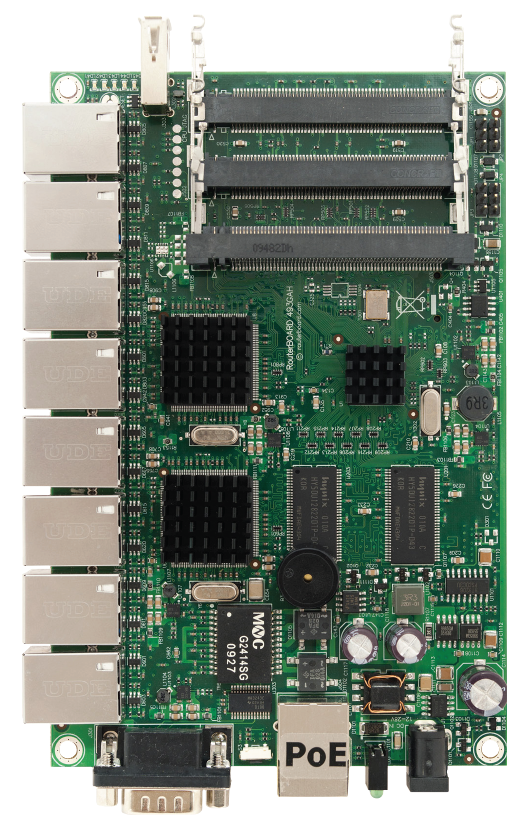
There’s a great shot of the new 493G…thanks Normis 😉
They also mention that as of RouterOS v5rc2 AES 128 bit hardware acceleration is available…though rc2 isn’t in the wild yet. I assume this means we shall see it very shortly.
That’s the bulk of what’s new.

For some ISPs, speed test sites can be their best friend. It shows a user that he is reaching his potential speed. For others it’s a nightmare as it gives ammunition for users. While at MUM this year my lunch table was having a friendly discussion about just this. Some suggestions were offered on various things you can do to speed test sites. One person explained how a WISP was blocking every speed test site they could think of, just to keep users from accessing any solid material to complain with. I then suggested that I could make a fake speed test site and redirect all users to that. Everyone had a good laugh, but…I though it would be fun to do it for real, so here it is!
In a nutshell what happens is this:
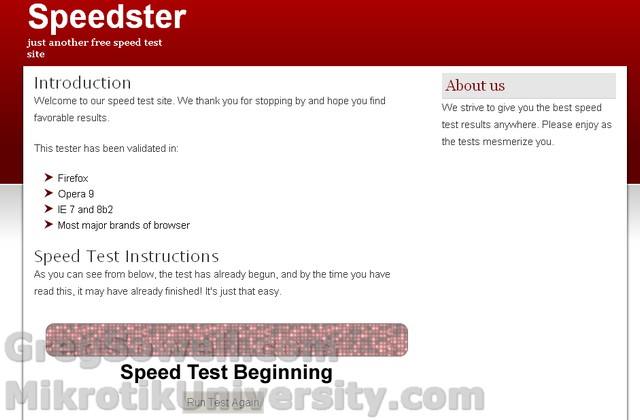
You average user will believe it...hehehe
The webpage is just simple HTML, nothing fancy. The speed test is really just an animated GIF file that plays once and proudly displays “Speed is Broadband” hehehehe.

Broadband is best band
If you hit the “run test again” button, it just refreshes the cached page and replays the GIF.
The files can be downloaded here:
Speedtest-HTML (3789 downloads)
You need to run any webserver that will use this folder at the default page.
Here’s the router code to make it happen
Layer 7 match for an URL that contains speedtest or bandwidthtest.
1 2 3 | /ip firewall layer7-protocol
add comment="" name=speedtest-url regexp=\
"^.*(get|GET).+/(speed|bandwidth).*test.*\$" |
Here’s the mangle rule to add the speed test IP to an address list.
1 2 3 4 5 | /ip firewall mangle
add action=add-dst-to-address-list address-list=speedtest-al \
address-list-timeout=0s chain=prerouting comment=\
"speedtest mark connection" disabled=no dst-port=80 \
layer7-protocol=speedtest-url protocol=tcp |
Here’s the NAT statement to grab the traffic and send it to our webserver.
Our webserver is 1.1.1.1 in this example.
1 2 3 | /ip firewall nat
add action=dst-nat chain=dstnat comment="" disabled=no dst-address-list=\
speedtest-al to-addresses=1.1.1.1 |
Let me close by saying I’m not advocating you lie to your users, I just did this as a proof of concept. If you had an actual internal speed test server, this might be just the sort of rule set you are looking for. The joke has now completed its journey…you can now throw the ring into the lava.
Here’s the official MUM photo gallery.
Here’s Sergejs’ Flicker pool of shots!
I’m the young bald guy hehe
Here’s a couple people wearing my shirts. If you got a shirt and happen to take a pic while wearing it, send it to me so I can add you to my wall of fame/shame…you decide which…hehe.

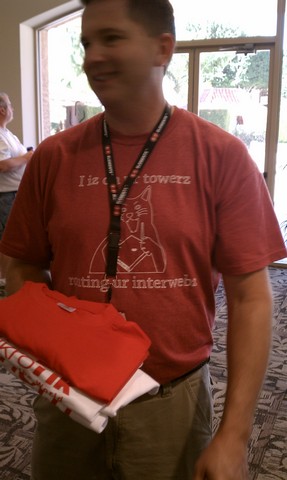
Sergejs fancies himself a bad hombre 😛 hehehe He was actually a lot of fun to talk to 😉

Send me links to your galleries…if you have any up.
I worked with someone yesterday that has an X86 based mikrotik running T1 cards. Since their cards have support no longer available in new versions, they were still running version 2.8.28. I actually ended up finding a copy to play with…just for fun 😉
Feast thine eyes on the icon heavy beauty that is…winbox 2.8.28!

aaaaaaAAAAAAAHHHHHHHHHHH...it's so sparkley and beautiful...