

If you need to verify what certs you have and also when they expire, check the Cert Tracking Center.
I’ve got to hit another one sometime towards the end of this year…I like to recert with at least 6 months to spare 😛
TekRadius is a Windows radius server built on the .net platform. It natively supports IETF/Cisco/Mikrotik which is nifty. I know the first thing that pops into mind is why wouldn’t you just use the Windows radius server (IAS). To this I say because IAS requires you to create windows users to authenticate with the server. What I’m using this for is to integrate radius into standalone management systems.
If you have a hotel system, library system or other, you can use TekRadius to easily integrate those users into your Hotspot authentication system.
I say easily because they have a nice little GUI that you can manually enter information into, but they also have an easy to use CLI interface.


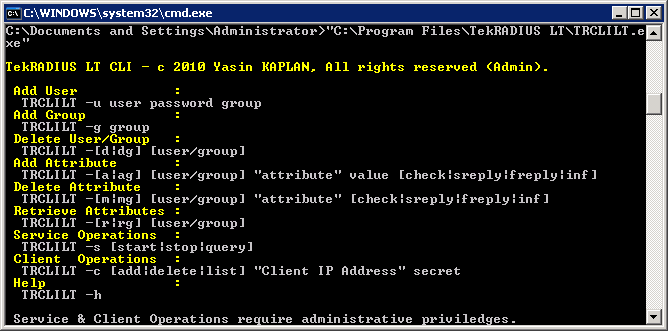
All we need is a little scripting to take the existing management system’s users and convert them over to TekRadius.
The only thing that seems like it should be there is the ability to pull a user list from the CLI. You have to look via the GUI to get a complete list of users. If you wanted to do some programmatic magic, you could work around this by just keeping a list of the users or perhaps hitting the SQlite DB directly.
If anyone has some specific needs for some conversion scripting, let me know, as I would be happy to integrate a solution for you 😉
One of my favorite backup programs, Cobian, has just released a new version. There is supposed to be a slew of new features, but the fact that it runs 200% faster is what caught my eye.

I found this nice little link that gives you the run down.
It is fairly easy to get back to the default configuration…
1. Get into IOS command line mode.
2. Go to ‘enable’ mode(default password is ‘cisco’).
3. Type in ‘show flash:’
Page down toward the bottom of the list.
One of the last file names will look something like … UC520-8U-4FXO-K9-FACTORY…yada…yada….
That is the factory default configuration…never copy TO this file!!
4. Type in ‘copy flash:(default config file name) startup
That will copy your default config file TO the startup-file in NVRAM.
5. Once that is complete and ok…power off and power on the UC520.
You will back to the default….If you would like to reset CUE(voicemail) to factory defaults…here is the procedure. This should probably be done before the IOS factory reset…
To Reset CUE
Step 1: Session into CUE using the command service-module Integrated-Service-Engine 0/0 session. (Hit ‘enter’ twice to get a prompt).
Step 2: Type ‘offline’ to go into the offline mode.
Step 3: Type in ‘y’ when you are prompted with ‘Are you sure you want to go offline[n]?’
Step 4: Type in ‘restore factory default’
Step 5: Type in ‘y’ when you are prompted with ‘Do you wish to continue[n]?’
Step 6: Press the Enter key when prompted to ‘Press any key to reload:’
This reset can take 5-10 minutes. Wait until the CUE message ‘SYSTEM ONLINE’ is displayed before proceeding.
Step 7: Exit the CUE by typing ‘exit’.
Good Luck,
Phil
THANKS PHIL!
I was asked recently for a hotspot config that includes a second redirect page. As in: web-page is pulled by standard hotspot page, once the user authenticates they are sent to a second page. This is a somewhat nonstandard configuration, so I figured I would include a quick how-to.
In this case, we wanted them to simply accept the AUP, then redirect them to an alternate page. I modified this default “Trial access” link.
1 | href="$(link-login-only)?dst=$(link-orig-esc)&username=T-$(mac-esc)" |
Note the dst=$(link-orig-esc) section. This variable is the URL you originally typed in your browser when accessing the hotspot. The router will authenticate you and then redirect you back to your original URL. What we need to do is simply change the variable to be whatever URL you ultimately want your user to go to.
If you were super cool and wanted your authenticated users to be redirected to gregsowell.com, you would modify your code like below.
1 | href="$(link-login-only)?dst=http%3A%2F%2Fgregsowell.com&username=T-$(mac-esc)" |
I asked Jimmy what he thought, then went to sleep. I had a lot of driving to do the next day and my wife had no escape route, so I figured it out on the way. When I got home, I noticed that Jimmy had come to the same conclusion the night before…hehehe.
LINK HERE => Products For Sale <= LINK HERE
*caution, shameless plug*
I plan to put my garage sale items here…starting with some kick rear server based routers. Here’s the router fliers…they are so beautimus.

This will apply mostly to indoor deployments since it really covers 802.11B/G deployments. The idea here is that you only have so much spectrum to work with and you don’t want to trample on in-use space.
In 2.4 you have a total of 3 nonoverlapping channels. Let me say that again…3 nonoverlapping channels. 2400Mhz – 2483Mhz is your available spectrum. 802.11B uses 22Mhz channels. So, that gives us 66Mhz just for the transmissions themselves with ~4 Mhz of seperation = 74Mhz total used.
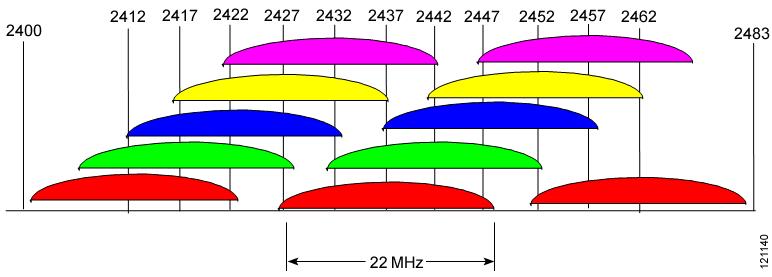
Graphic source here.
The radio propagation across the channels isn’t as precise as 22Mhz…there will be some bleed over into adjacent channels, which is why there is a degree of separation.
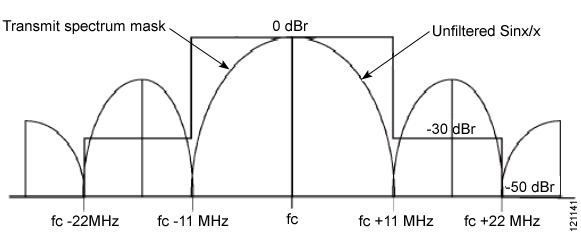
Graphic source here.
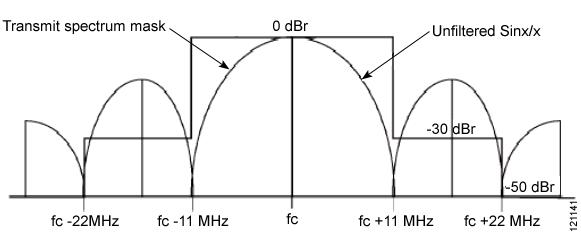
So what does all this mean to us…aka, why do I care? You care because 802.11 traditionally uses carrier sense multiple access(CSMA). What this means is that your client and the AP listen before they send data…if the air is clear, it will send, if it is not, it will wait until it is. If you only have a handful of clients, this doesn’t tend to be a problem. If you have a decent density of users, then this can quickly be an issue. If you have a lot of clients that are running in overlapping channels, then each will hear the other transmitting and can decrease the overall throughput as well as increase the latency. This is no bueno. By separating channels to non overlapping we can cut down on the amount of congestion in the air. See the Cisco graphic below:
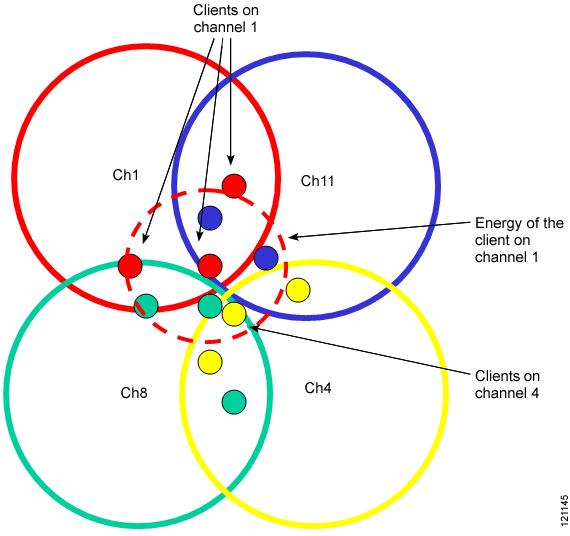
Graphic source here.
As you can see, ill placed clients can create interference for others. I highly recommend you check out the source Cisco article on the subject which can be found here. It contains a plethora of detail and even talks about how 802.11G is even worse in the spectrum…hehe.
I have no doubt that my wireless guys will find plenty of flawed logic and be more than happy to make me look a fool, so fire away my fine feathered friends.