

*) fixed webfig; This is a pretty big one!
*) console – fixed problem with supout file generation and export that
appeared in version 5.1, it was causing console to enter busy loop
on some boards;
*) ssh client – added source address and remote command options;
*) user manager – added /tool usermanager profile;
*) route – fixed problem with missing connected routes;
For all of you brave enough or crazy enough, let me know how it does.
Working in a datacenter power delivery is a big part of what we do. We get regular questions on the subject, and I had a comment from Andrew recently that pushed me to write this post.
Our datacenter provides true A/B power…and what does that mean? What it boils down to is we hand you two power whips that are diversely powered. A power whip is just an electrical outlet built into a flexible conduit. When I say diversely powered I mean separate power substations that connect to separate transformers that connect to separate power rooms/switch gear/UPS/PDU. The idea is that if something happens to any one of these components in the chain, you will still maintain the other whip.
When we offer these to you, we offer them in a pair. These two whips are logically tied together. As per the majority of breaker and PDU manufacturers, you should only run a circuit at 80% of its rated power. Once you get past that 80% mark on a circuit, you never know quite where your PDU or breaker will blow. Also, when a piece of equipment first powers on you get a large in rush of power which can push you up quick enough to blow the circuit. So why sell them in a logical pair?
We sell you the two circuits and you are allowed to only use 80% of a single whip in that pair. You can load a single whip to 80%. You could split the difference and load 40% on each whip…you can get crazy and do 60% and 20% if you like. The idea is that if for some reason anything in that chain of power providing equipment were to fail that the remaining whip will be able to carry the load. This is generally referred to as concurrently maintainable. If you were to load 60% on one whip and 60% on the other whip, then lose power, the remaining whip would have to support 120% of its capacity which I somehow doubt it will. 😉
What can you do in your standard facility? Get some decent PDUs that will allow you to meter power. Tripplite and APC both have decent models, though Tripplite will most likely be your less expensive option. Graph your amperage and give them a quick check once a month. For devices that don’t have dual power supplies, get yourself an in-rack ATS. The above mentioned MFGs make decent ones. I believe Geist also makes some cheap and reliable models.
Visual Example
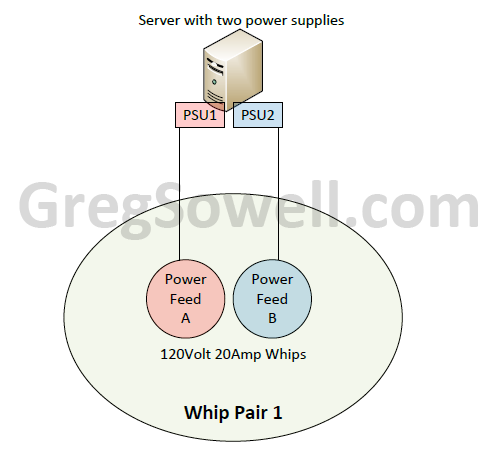
Standard server with two PSUs.
Properly Loaded Whip Pair
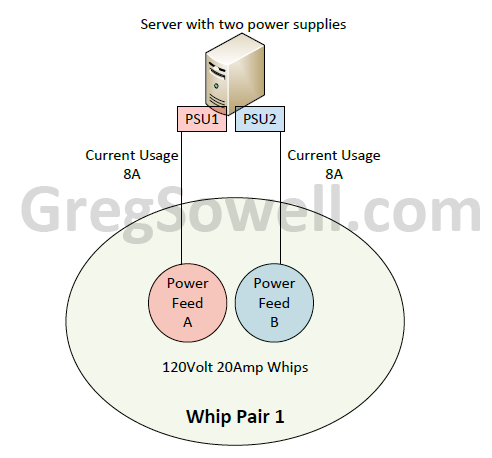
Running 40% on each whip which adds up to our total usable of 80%.
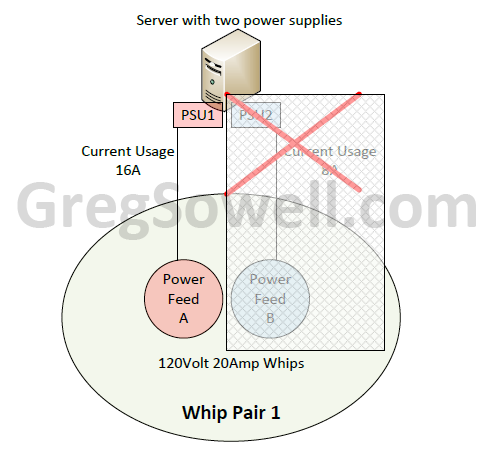
The B power fails and the A side picks up the entire power load of 80%. All is right with the world.
Improperly Loaded Whip Pair
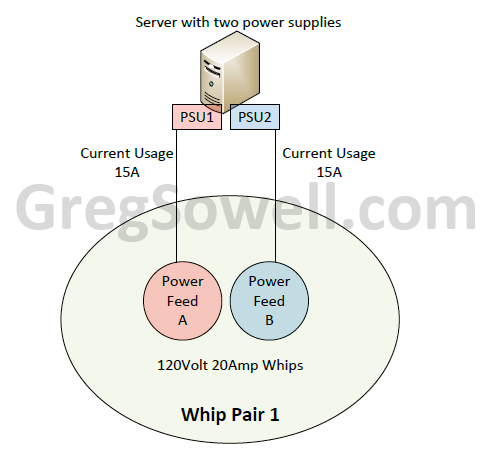
Each whip is being run at 75%...this is a no no.
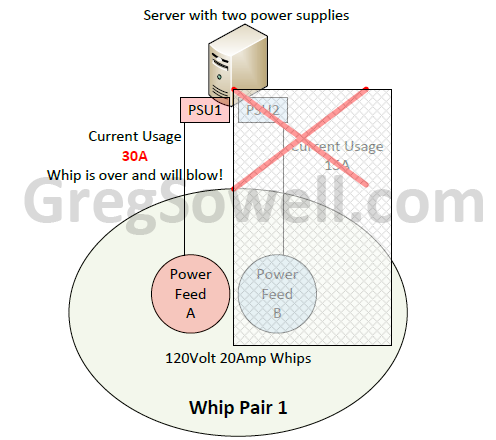
When the B whip fails in this scenario, the A whip tries to take 150% of it's rated amperage...and the breaker blows. Now you have neither whip.
My good friend JJ asked me a question the other day about OSPF path selection. It was something like “I have a redundant network and I want to adjust cost on an individual route…how do I do that?” Seems pretty straight forward, right?…not exactly.
Cost is the metric OSPF uses to judge a path’s feasibility. Normally to adjust cost on a route you would adjust the cost value on an interface itself. This, however, affects all routes learned via this interface. What if you want to adjust an individual route coming in that interface up or down and not affect anything else?
In my brain this seemed like something that would be possible via a route-map(Cisco) or a route-filter(Mikrotik).
Take the below example:
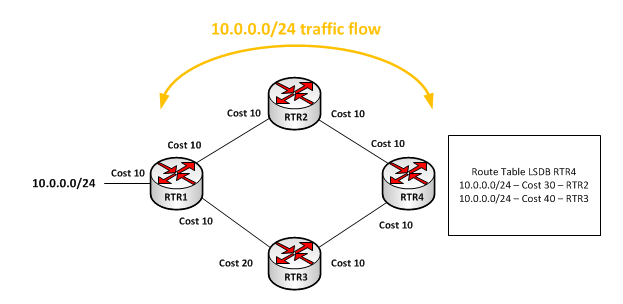
You can see that the cost on RTR3’s interface going towards RTR1 is set to 20. All other interfaces are at their default 10. This means traffic will flow from RTR1 => RTR2 => RTR4, because this route will have a lower cost. So the question is, can we select JUST that single 10.0.0.0/24 route and adjust the cost on it. The answer is no.
You have the ability to do aggregation and adjust cost on those aggregated routes, but you can only do that at an area boundary, so that’s out. Route-maps/route-filters don’t give you the ability to adjust cost…and here’s why.
The way OSPF works in a single area is to collect LSAs(Link State Advertisements) from all other routers in that area. This forms the router’s LDB(Link State Database). The LDB MUST be identical for all routers in a single area. The idea is that if all routers in a single area have an identical picture of the network they can make the optimal routing decision. We, therefore, can’t adjust what this LDB looks like on a single router…we can’t have it both ways.
Adjusting interface cost in Cisco:
1 2 | interface fa0/1 ip ospf cost 100 |
Adjusting interface cost in Mikrotik:
1 2 | /routing ospf interface add comment="" cost=100 disabled=no interface=bridge1 network-type=broadcast passive=no |
Here’s a previous article using adjusted cost for some interesting routing.
You could conceivably use some static routing along with some scripting to create some kind of work around for this contingency, but it would be cumbersome and possibly unpredictable.
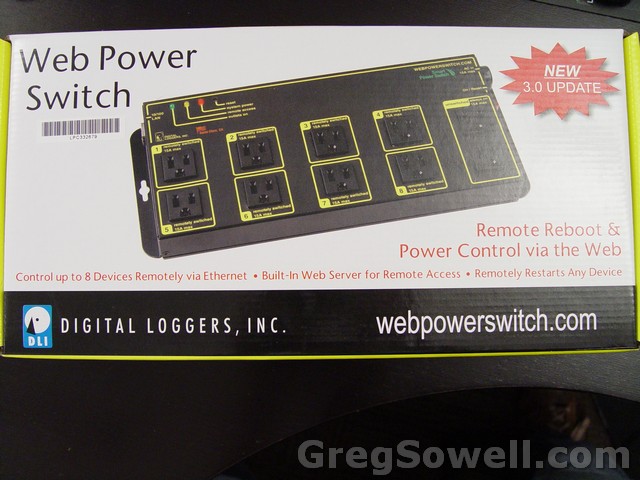
Digital Loggers, Inc. sells the Web Power Switch III.
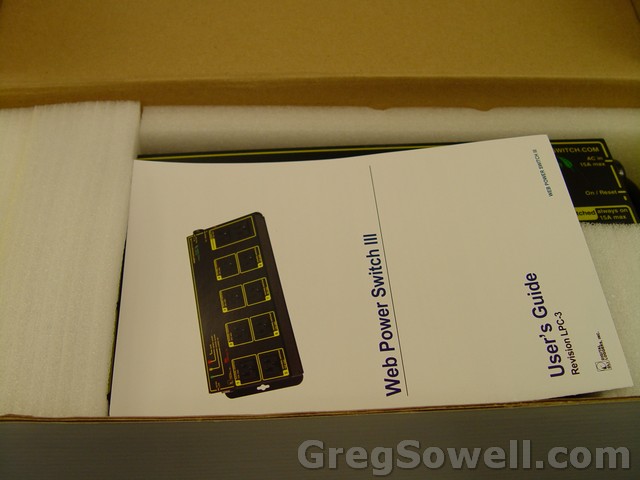
Throw the manual in the trash...who needs that!
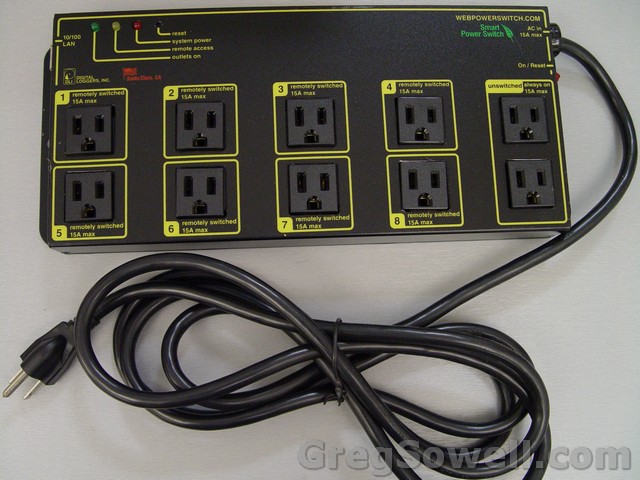
Comes with a monster cord

This is where you stick your fork
So this little guy has 10 outlets and 8 of which are controllable. You can log into it’s web interface and selectively power on or off ports. You can setup multiple user accounts that have access to only specific ports. It has an auto ping setup that allows you to ping devices and then selectively reboot ports. This gives you the ability to have the power switch monitor your radios/routers and reboot them automatically as needed.
Video preview of the device configuration:
So you get all of this functionality for ~$120…sounds well worth the peace of mind to me. How many of you guys use these? How many of you guys are going to start using these? 😉
Mikrotik has, since at least version 2.8, a protocol built into ROS that will allow you to aggregate packets as well as do come compression. I had installed version 5 on a test machine and was poking around when I happened across this.
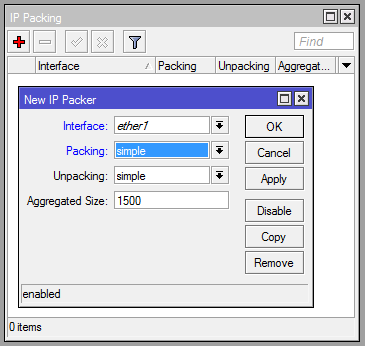
From what I understand this may or may not work across all tunnel types, so buyer beware. This is supposed to work properly with standard ethernet interfaces.
In effect, what you do is specify an aggregate size. The router will then collect packets until it has enough to fill that aggregate size before it will send. I assume that it will send after X amount of time if it hasn’t collected enough packets, though I’m not sure what that time is.
Packing is what you do to packets as they leave and unpacking is what is done to packets as they arrive.
Packing options:
Simple : Just do packet aggregation
Compress-all : Aggregate packets, compress payload and header
Compress-headers : Aggregate packets, compress header only
None : Send packets unchanged
As an interesting side note, ip neighbors is used for communication of this protocol and must be enabled on all participating interfaces. The wiki article also cautions that this will cause latency, which I hope you could have gleaned from the aggregation explination 😉
Looks like a small round of bug fixes. I would expect this to happen for the next month or so =)
*) ipsec – fix SA lifetime display when timezone offset does not equal 0;
*) ipsec – now default DPD interval is 2 min for new configurations;
*) webfig – make bandwidth-test work;
*) fixed problem – wireless package got disabled after upgrading from v4;
*) sstp – fix problems on multicore systems;
What’s new in 5.0 (2011-Mar-31 11:33):
*) route – fixed cause of crashes when handling multipath routes;
*) route – fixed limit on maximum active IPv6 route count,
was causing issues with more than 2000 active routes;
*) ipsec – added command kill-connections under remote-peers;
*) ipsec – fix responder side phase2 negotiation problem
which prevented more than one Windows7 host to initiate SA;
*) fixed vrrp – interface was invalid after undoing remove;
*) winbox – added more detailed /interface ethernet stats;
*) winbox – added ability to send e-mail;
*) winbox – added missing ‘set-metric’ parameter
in ‘Routing/Prefix List’;
*) wireless – 802.11 dynamic distance fix;
*) fixed problem – packages could not be uninstalled if disk was full;
*) fixed problem – some of the RouterBOARDS did not reboot properly sometimes;
*) fixed problem – VLANs on bridge interface did not work;
*) ssh – client supports public key authentication;
I expect a lot of rapid succession V5 updates as they fix issues. I’m the consummate pessimist, so I won’t be using V5 for a few months at least. For all of you braver than I, let me know how it performs!