So working for a datacenter, I hear plenty of buzz words…what good sales guy doesn’t work one in every other sentence? One of those phrases you hear is “concurrently maintainable”. What does this mean? It means you can sustain loss in your infrastructure and still be up. We are talking about hardware redundancy.
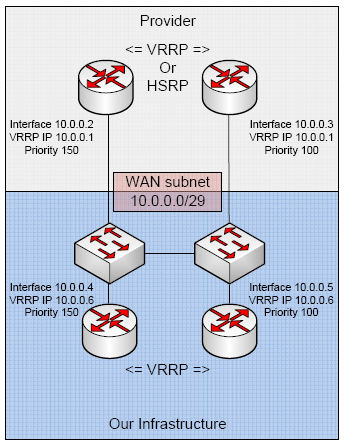
In our DC if you aren’t doing BGP with us, you would do well to use VRRP…what is VRRP? Here’s wikipedia’s definition. In essence it works like such. You have two of your routers connected to the same layer 2 segment. You have a subnet configured that is /29 or larger. You configure a physical IP on the interfaces, then you create a VRRP interface on each router associated with those connected interfaces. You then assign the same VRRP IP address on both routers to the VRRP interface.
The VRRP router that has the higher priority(default is 100) is the master. The master responds to ARP requests for the VRRP IP. If the master router fails, then the backup router takes over and owns the VRRP IP. Soooo, your default gateway points towards the VRRP IP so that if the master fails and the backup takes over your default route is still valid! There is also a concept of premption. By default preemption will migrate the VRRP IP over to the router with the highest priority.
Here are some examples:
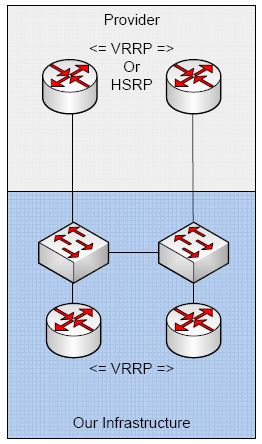
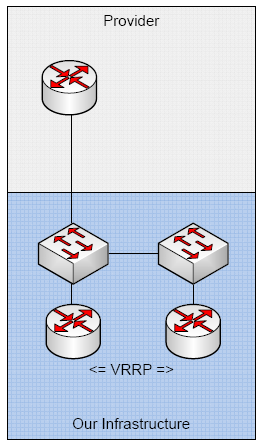
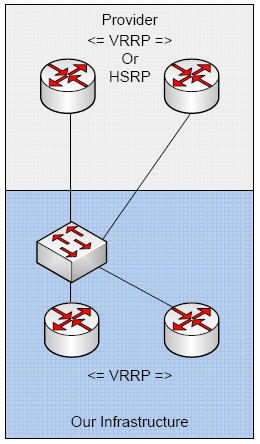
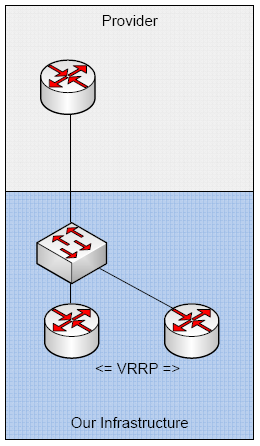
So here’s our demo config:
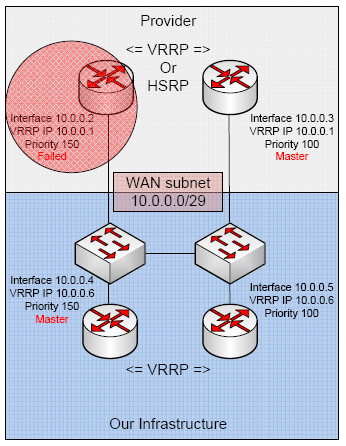
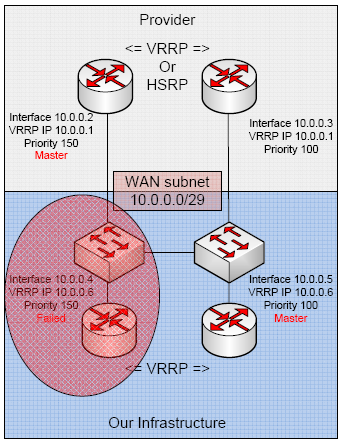
So what happens when one of our providers fail?
Router 10.0.0.4
Create the VRRP interface *assign it higher priority – default is 100*:
/interface vrrp
add arp=enabled authentication=none comment="" disabled=no interface=ether1 \
    interval=1 mtu=1500 name=vrrp1 on-backup="" on-master="" password="" \
    preemption-mode=yes priority=150 vrid=1
Configure our IPs:
/ip address
add address=10.0.0.4/29 broadcast=10.0.0.7 comment="" disabled=no interface=\
    ether1 network=10.0.0.0
add address=10.0.0.6/32 broadcast=10.0.0.6 comment="" disabled=no interface=\
    vrrp1 network=10.0.0.6
Our default route:
/ip route
add comment="" disabled=no distance=1 dst-address=0.0.0.0/0 gateway=10.0.0.1 \
    scope=30 target-scope=10
Router 10.0.0.5
Create the VRRP interface:
/interface vrrp
add arp=enabled authentication=none comment="" disabled=no interface=ether1 \
    interval=1 mtu=1500 name=vrrp1 on-backup="" on-master="" password="" \
    preemption-mode=yes priority=100 vrid=1
Configure our IPs:
/ip address
add address=10.0.0.5/29 broadcast=10.0.0.7 comment="" disabled=no interface=\
    ether1 network=10.0.0.0
add address=10.0.0.6/32 broadcast=10.0.0.6 comment="" disabled=no interface=\
    vrrp1 network=10.0.0.6
Our default route:
/ip route
add comment="" disabled=no distance=1 dst-address=0.0.0.0/0 gateway=10.0.0.1 \
    scope=30 target-scope=10
This is great for the WAN side, but is quite often used for the LAN also!
You can also run two separate VRRP groups on a single interface which will allow you to load balance with redundancy.
Go forth and route my peoples!


Leave a Reply