

Thanks to JM for the update. It looks like just a round of bug fixes. Go get your beta on.
What’s new in 6.0beta1 (2012-Apr-13 15:26):
*) updated drivers and kernel (to linux-2.6.38.2);
*) improved interface management (scales well for up to thousands of interfaces and more);
*) improved queue management (/queue simple and /queue tree) – easily handles tens
of thousands of queues;
*) improved overall router performance when simple queues are used –
at least double the performance of v5, even bigger improvements on multicore systems;
This is going to help those PPPoE folks.
*) very small overhead for packets that miss simple queues,
but simple queues are present in the system;
*) pcq queue is NAT aware (just like “/queue simple” and “/ip traffic-flow”; Excellent.
*) in “/ip firewall mangle” can specify “new-priority=from-dscp-high-3-bits”;
*) new default queue types: pcq-download-default and pcq-upload-default; Will streamline things a LOT
*) simple queues have separate priority setting for download/upload/total;
*) slave flag shows up for interfaces that are in bridge,bonding or switch group; Will help with my memory at 2 AM.
*) global-in, global-out, global-total parent in /queue tree is
replaced with global that is equivalent to global-total in v5; Not quite sure how this will look in practice…too lazy to install it right now…hehehe
*) simple queues happen in different place – at the very end of
postrouting and local-in chains;
*) simple queues target-addresses and interface parameters are joined into one
target parameter, now supports multiple interfaces match for one queue;
*) simple queues dst-address parameter is changed to dst and now supports
destination interface matching;
*) dns cache logs requests to topics “dns” and “packet”; Does this mean that DNS requests hit the log if so desired?
Lots of queue work and apparent streamlining of the OS. Can’t wait to see some post beta versions!
I came up with a method about 2 years ago to use PCQs with PPPoE instead of the traditional simple queue(SQ) method. As you guys know SQs are more resource intensive and as they grow they can delay packet delivery. Using PCQs can help the resources on heavily utilized routers.
Quick video of configuring everything:
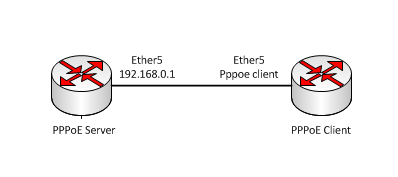
Diagram used in this example
Usermanager
One of the options in usermanager is address-list. If you add something to the address-list entry it will cause a user’s IP address to be added to said list on the PPPoE server when they authenticate.
Usermanager router
First things first, we add the PPPoE server to the router list in user manager.
1 2 3 | /tool user-manager router
add coa-port=1700 customer=admin disabled=no ip-address=192.168.0.1 log=\
auth-fail name=test-pppoe shared-secret=test |
Usermanager profile limit
The limit allows you to specify different additional options. We are adding a limit that dynamically adds a user’s IP address to an address-list upon authentication. In the below example the limit is named 1 and the address-list is named 1.
1 2 3 | /tool user-manager profile limitation
add address-list=1 download-limit=0B group-name="" ip-pool="" name=1 \
transfer-limit=0B upload-limit=0B uptime-limit=0s |
Usermanager profile
We now create a profile for customers to use. We then associate the above limit with this profile.
1 2 3 4 5 6 | /tool user-manager profile
add name=1 name-for-users="" override-shared-users=off price=0 starts-at=\
logon validity=0s
/tool user-manager profile profile-limitation
add from-time=0s limitation=1 profile=1 till-time=23h59m59s weekdays=\
sunday,monday,tuesday,friday,saturday |
Usermanager user
Now create a user that will reference the created profile.
1 2 3 | /tool user-manager user
add customer=admin disabled=no name=1 password=test shared-users=1 \
wireless-enc-algo=none wireless-enc-key="" wireless-psk="" |
Router config
IP address
1 2 | /ip address add address=192.168.0.1/24 interface=ether5 |
IP pool for pppoe server
1 2 | /ip pool add name=pool1 ranges=192.168.0.10-192.168.0.200 |
Setup ppp profile
1 2 | /ppp profile set 1 dns-server=8.8.8.8 local-address=192.168.0.1 remote-address=pool1 |
Configure pppoe server
1 2 3 | /interface pppoe-server server
add authentication=pap,chap default-profile=default-encryption disabled=no \
interface=ether5 service-name=service1 |
Set pppoe to use radius
1 2 | /ppp aaa set use-radius=yes |
Setup radius profile and enable incoming radius.
1 2 3 4 | /radius add address=192.168.0.1 secret=test service=ppp /radius incoming set accept=yes |
Setup mangle rules to mark connections based on address-lists from usermanager. Then packet mark based on connection marks.
1 2 3 4 5 6 7 | /ip firewall mangle
add action=mark-connection chain=prerouting new-connection-mark=1 \
src-address-list=1
add action=mark-packet chain=prerouting connection-mark=1 in-interface=ether5 \
new-packet-mark=1-download passthrough=no
add action=mark-packet chain=prerouting connection-mark=1 new-packet-mark=\
1-upload passthrough=no |
Create in and out PCQs
1 2 3 4 5 | /queue type
add kind=pcq name=1-down-pcq pcq-classifier=dst-address \
pcq-dst-address6-mask=64 pcq-src-address6-mask=64
add kind=pcq name=1-up-pcq pcq-classifier=src-address pcq-dst-address6-mask=\
64 pcq-src-address6-mask=64 |
Add the queues to the queue-tree structure
1 2 3 | /queue tree add name=1-download packet-mark=1-download parent=global-in add name=1-upload packet-mark=1-upload parent=global-in |
As you can see, this isn’t a 100% complete config, but it does give you a good starting place. I just can’t seem to come up with enough time to do anything these days 🙁
I sometimes use 3560Es as edge routers. This means that I no switchport the interfaces and put IPs on them to connect to customers.
Here on the edge is where I rate-limit a user’s connection speed. On a 3550 this is pretty straight forward, but on a 3560, or a variation of it, this is a little trickier.
One thing of interest is the rate-limit interface sub command itself. This would appear to allow you to limit ingress and egress traffic. It will even allow you to configure the commands…however these commands do absolutely nothing. 😛
Due to the change in interface queueing you will need to use two methods: SRR and service policies.
SRR
srr-queue bandwidth limit %
You have to set the bandwidth as a percentage of the link speed. The options are 10-99 percent. This means that if you want a limit less than 10Mb you must set the port’s physical speed to 10 and the duplex to full. You will then have to statically configure the client to 10/full. This, however, only limits the egress traffic.
1 2 | int fa0/1 srr-queue bandwidth limit 10 |
Service Policy
We use this to match and limit our ingress traffic.
First, you must enable mls qos on your switch, otherwise your matching won’t work.
1 | mls qos |
Next we define our class map. We have it set to match ip traffic with DSCP set to 0.
1 2 3 | class-map match-all rate-limit description Bandwidth Control match ip dscp default |
We then create policy maps that have our desired speeds:
1 2 3 | policy-map 8meg class rate-limit police 8192000 192000 exceed-action drop |
Last we apply this to the interface:
1 2 | int fa0/1 service-policy input 8meg |

Justin and JJ went to the Airmax conference in Chicago and they tell us about what they saw:
I’ve started a new podcast series. The idea is to include chats about pretty much whatever seems interesting at the time.
This one was quickly after the PL MUM so Andrew and I talked about some of the hardware that was announced. There are going to be more guys in on things soon, but since they were at a conference without me I hate them all for the moment 😉
Topics include:
Since virtually everyone I know was there while I was sitting at work…I now hate you all. That’s it, no more post.
In actuality JJ spent some time doing a write up about all of the things he saw. Since he is my end-all be-all as far as wireless goes, you might just take his opinion as gospel…seeing as though his speculations to me prior to the conference were pretty much spot on.
The obvious front runner for craziest radio I’ve seen all year goes to the AirFiber product which he has spent a considerable amount of time on.
