

CountryIPBlocks has a method to easily grab the CIDR blocks for various countries. They have methods to put these in formats for Cisco and such…though they don’t have one for Mikrotik.
So, I wrote a lil program that will create address lists with firewall rules or just firewall rules based on these address blocks. What you do is paste in the output from CIDR notation and click the convert button…easy enough!
Download the program and code here: mtkCIDR (3948 downloads)
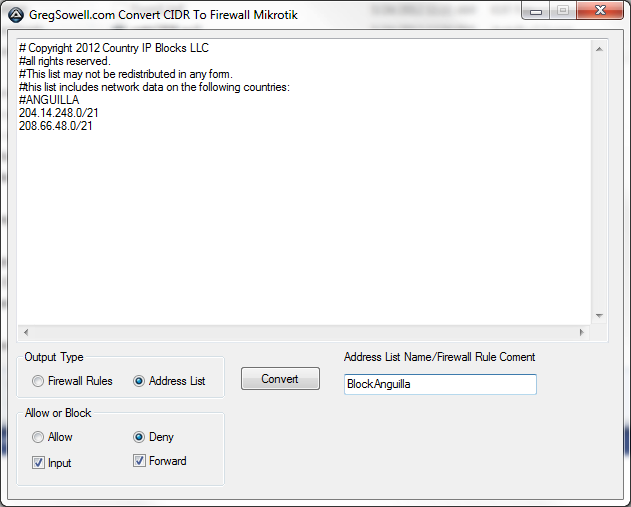

Here’s the pasted results:
1 2 3 4 5 6 | /ip firewall address-list add address=204.14.248.0/21 disabled=no list=BlockAnguilla add address=208.66.48.0/21 disabled=no list=BlockAnguilla /ip firewall filter add action=reject disabled=no chain=forward comment="BlockAnguilla drop" src-address-list=BlockAnguilla add action=reject disabled=no chain=input comment="BlockAnguilla drop" src-address-list=BlockAnguilla |
The default test for most users is to browse over to speedtest.net and run a quick check. If you now want to run that same test from your clients to one of your own internal servers, you can now do it…for FREE! The fine folks over at speedtest.net now allow you to download their mini client to run on your own servers.
If you want, you could couple this with my speedtest redirection to force all users to speed test with your internal server. 😉
RB2011LS-IN

This is the first routerboard that has fiber ports. These are going to make cool little POP routers or tower base routers. How interested are you guys in this RB? Who is dying to get one of these?
SEXTANTG

When you guys have some real world tests please send me some specs…something other than the test bench 😉
I recently had a question about how to simulate the delay presented by a point to point circuit so someone could test their application going from one facility to access a SQL DB in a backup colo. I did a quick google and ended up with several great options.
Netem
One option I found, but didn’t test is Netem. This is a command line linux app that allows you to introduce delay, loss, duplication and re-ordering.
WANbridge
I then found WANbridge. I did test this one and it worked a treat. It is a bootable ISO based on Knoppix. It boots up and immedately bridges all interfaces together. Through it’s simple menu system I was simulating delay in less than 2 minutes. I also successfully tested bandwidth constraints. It also offers the ability to simulate loss. It has a great quick start guide that will have you up and working in no time fast.
Quick WANbridge video
WANem
Last I found WANem. This is similar to wanbridge in that it is built off of a bootable Knoppix ISO, but by default it is configured to route. I did find a quick CLI guide to setting it up for bridged, though.
Bridge setup
Edit /etc/network/interfaces and add the following lines:
1 2 3 4 5 6 7 8 | auto br0
iface br0 inet static
address 192.168.0.20
netmask 255.255.255.0
gateway 192.168.0.1
bridge_ports all
bridge_fd 0
bridge_stp off |
What you gain with WANem is features. First it has a web based GUI that will allow you to configure per interface configurations. This means that you can have different settings for incoming on one interface and outgoing on the other.
Options include bandwidth, delay, packet loss, duplication, packet reordering, corruption, random disconnects. All of these options can also have IP source/destination matchers.
Click image to enlarge.
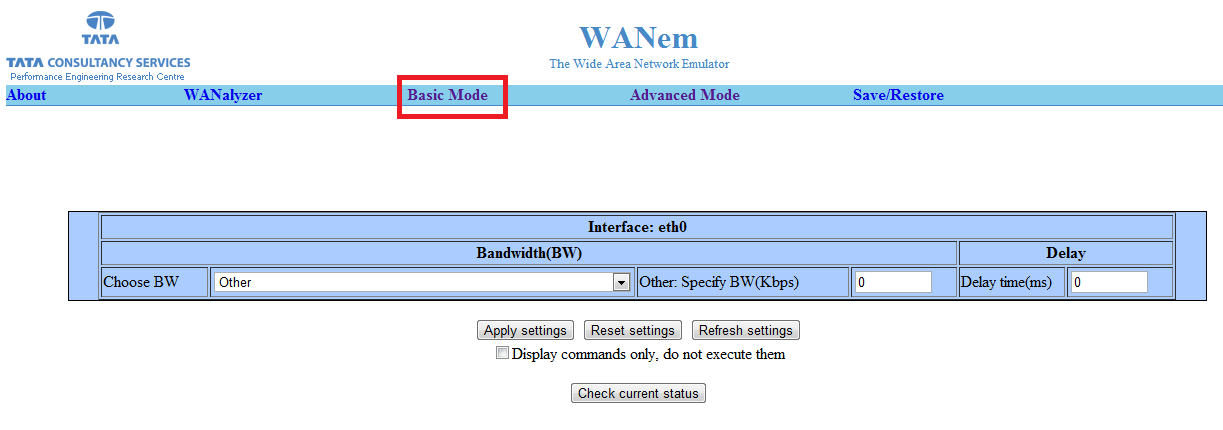
Basic Mode
Click image to enlarge.
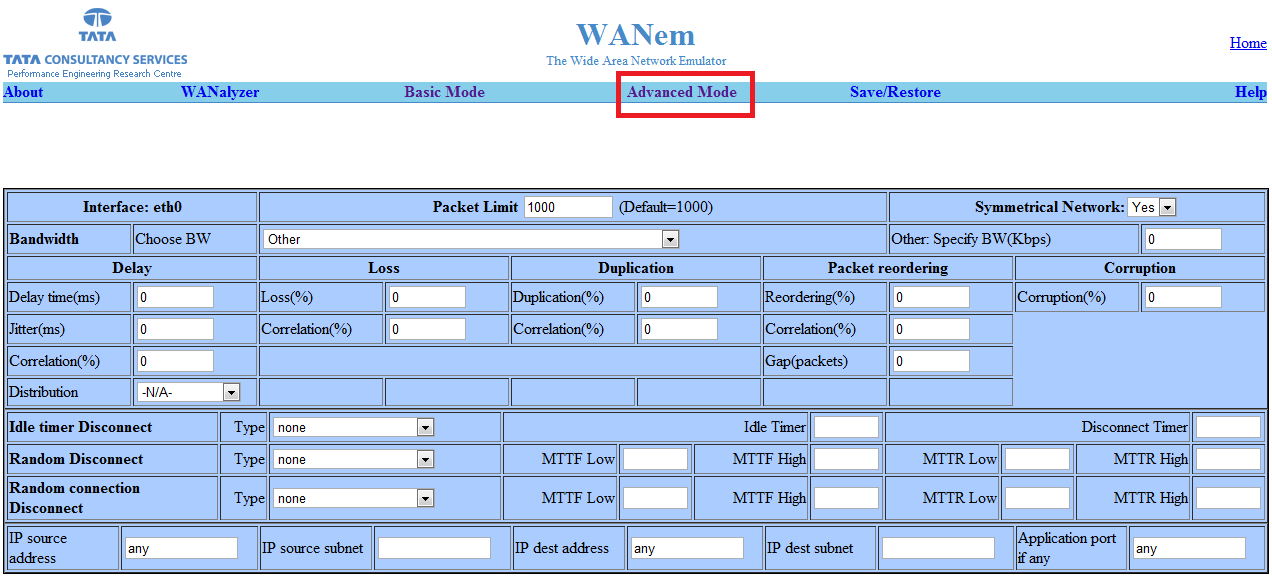
Advanced Mode...this is where you want to be!
My 3 year old wasn’t capable of actuating his can of processed cheese spread. What kind of parent would I be if he missed this piece of Americana?

Bend it baby!

Got bent.

Kristi let me drill a hole in the silverware...it was the cheap stuff.

Before

After
Here’s a video of the Cheese Whizzer in action:
You guys jelly? I’ll make you one for $19.95 with free shipping. 😉
I was just alerted to a winbox exploit that is affecting all MTK versions(Thanks Mike). Here are a few tips to protect yourself.
Add firewall rules to allow access to winbox only from management network.
You really should have your router locked down so management can only come from certain subnets anyway.
1 2 3 4 | /ip firewall filter
add action=drop chain=input comment=\
"Block access to winbox from anyone not on coming from management." \
disabled=no dst-port=8291 protocol=tcp src-address=!1.1.1.0/24 |
Add Portknock to access winbox
Allow access only via VPN
Change default winbox port
Go to IP Services and change the port from default. This isn’t a complete fix, but should help prevent port scanners from exploiting winbox.
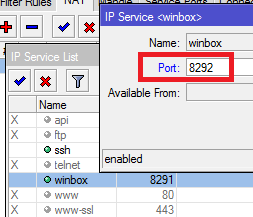
IP Services
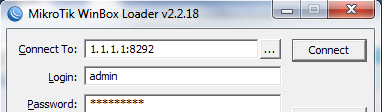
When you want to winbox just add a colon and the new port number.
I just noticed that my good friend Justin Wilson will be doing a presentation about cookies at the MUM. I’m hoping for some oatmeal raisin or peanutbutter.
I’m going to be doing a presentation about Multihomed BGP…far less enticing than cookies…I wonder if he is giving away samples!?!?!
Since there will be several of us here and we obviously like to hear the sound of our own voices, perhaps we should put together some kind of round table discussion? I know we won’t be able to talk about new products coming out(we don’t know anymore than you do), but between us, we should have experience on just about any subject.
I don’t think MTK would officially sanction this(Normands correct me if I’m wrong), though I don’t know why they wouldn’t(other than you will likely leave dumber than when you arrived), so we would most likely have to do this some place other than the MUM. I’m thinking that if you buy the guys beers they will happily answer questions…the only payment I want is for you to tell me that I’m awesome and I look way better without hair and that you want to be just like me and that you are legally changing your name to Greg due to the epicness of the name, etc.
What say you guys?