This runs through all of my Cisco switch ports and ensures they are compliant with my configuration templates. It then builds pretty reports and emails them along with a CSV of the info. I’m building the reporting piece based on my reporting blog post here. The good part about this automation is that it will look at the full interface config, no matter what is added, be it vlans, port security, dot1x, etc., it will catch and compare it all.
The premise here is that all interfaces should contain an identifying description like: adminuser, mfguser, printer, ap. Each one of these description types will have a template they should match. So in the above example there would be four base templates. Of course each site would have a different VLAN, but that’s the good part of using a Jinja2 template, I can do variable replacement on the VLAN portion very easily. The playbook will then do all the comparisons and build the report(I’ll get into further detail down below).
Video Demo
Playbooks And Templates
First, you can find all of my materials here.
Here are my Jinja2 template files. I was lazy and only created a couple for demo purposes, but you’d need one for each interface type.
This is the printer.yml template:
1 2 3 4 5 6 7 | interface {{ port_value.key }}
description printer
no ip address
shutdown
negotiation auto
no mop enabled
no mop sysid |
As you can see above I’m doing variable replacement for the interface name(that way it will match what is physically on the device itself). Now if this was a switchport, which in a real environment it would be, we’d have VLAN info that we would be replacing.
Now for the playbook. I have this one named check-port-main-role.yml:
1 2 3 4 5 6 7 8 9 10 11 12 13 14 15 16 17 18 19 20 21 22 23 24 25 26 27 28 29 30 31 32 33 34 35 36 37 38 39 40 | ---
# uses this role https://github.com/gregsowell/ansible-report
- name: reporting non compliance on interface configs
hosts: csr1000v
gather_facts: false
vars:
int_descs:
- adminuser
- mfguser
- printer
- ap
- uplink
headers: Hostname,reason,config
tasks:
- name: use ios facts to grab interface desc with all interfaces
cisco.ios.ios_facts:
gather_subset:
- interfaces
gather_network_resources:
- l2_interfaces
register: port_info
- name: make the collected info a list for looping over
set_fact:
port_list: "{{ port_info.ansible_facts.ansible_net_interfaces | dict2items }}"
- name: loop through each interface and do the compliance checking. This calls another task file for the work.
include_tasks: check-port-role.yml
loop: "{{ port_list }}"
loop_control:
loop_var: port_value
# when: port_value.value.description == 'printer'
- name: send the compliance email
ansible.builtin.include_role:
name: ansible-report
vars:
action_type: email |
This playbook doesn’t do all of the work, but it gets us started. I’ll break the above playbook down into separate bites so I can talk about each individually.
1 2 3 4 5 6 7 8 9 10 11 12 13 14 | ---
# uses this role https://github.com/gregsowell/ansible-report
- name: reporting non compliance on interface configs
hosts: csr1000v
gather_facts: false
vars:
int_descs:
- adminuser
- mfguser
- printer
- ap
- uplink
headers: Hostname,reason,config |
In the above I setup the variables. int_descs are the interface description types that should be configured on our infrastructure. The switch ports can have additional info on the end, but should start with these basic descriptions to follow corporate policy. These descriptions will directly map to default templates(these are the templates described at the beginning of this section).
You’ll also notice the headers section at the end. These are the headers for the CSV file being created for the report.
1 2 3 4 5 6 7 8 9 10 11 12 | tasks:
- name: use ios facts to grab interface desc with all interfaces
cisco.ios.ios_facts:
gather_subset:
- interfaces
gather_network_resources:
- l2_interfaces
register: port_info
- name: make the collected info a list for looping over
set_fact:
port_list: "{{ port_info.ansible_facts.ansible_net_interfaces | dict2items }}" |
Here I’m starting the first two tasks. I’m using the ios_facts module to pull all of the interfaces on the device along with their associated descriptions. This works well if it is a single switch or a large stack of switches. Keep in mind that a switch stack has one management IP, and when I query that single device it will tell me about all interfaces across the stack.
Next I convert the port info into a list so that I’m able to loop over it.
1 2 3 4 5 6 7 8 9 10 11 12 | - name: loop through each interface and do the compliance checking. This calls another task file for the work.
include_tasks: check-port-role.yml
loop: "{{ port_list }}"
loop_control:
loop_var: port_value
# when: port_value.value.description == 'printer'
- name: send the compliance email
ansible.builtin.include_role:
name: ansible-report
vars:
action_type: email |
This is the final couple of tasks. I’ll start with the very last; it sends the report email attaching the CSV. This is using my report role.
The second to last task is what is really doing the work in this playbook. For each host I connect to this task will loop over each port. Each port it loops over it will run them through the task file named check-port-role.yml. This task file is what does the bulk of the processing.
check-port-role.yml
1 2 3 4 5 6 7 8 9 10 11 12 13 14 15 16 17 18 19 20 21 22 23 24 25 26 27 28 29 30 31 32 33 34 35 36 | ---
- name: grab the port config and save to variable
cisco.ios.command:
commands: "show run int {{ port_value.key }} | b interface"
register: port_config_1
- name: variable clean up. It has some undesirable stuff in.
set_fact:
port_config_1: "{{ port_config_1 | regex_replace('end') | trim}}"
- name: pre populate the port config 2 variable
set_fact:
port_config_2: notfound
- name: loop through description types and once found, set the port config 2 via the template of that name.
when: port_value.value.description is search(item)
set_fact:
port_config_2: "{{ lookup('template', item + '.yml') }}"
# ignore_errors: true
loop: "{{ int_descs }}"
- name: if desc not matched (it's not set properly) add line to report
when: port_config_2 == 'notfound'
ansible.builtin.include_role:
name: ansible-report
vars:
action_type: write
write_line: "{{ inventory_hostname }},int desc mismatch,{{ port_config_1.stdout[0] | trim }}"
- name: if the desc is correct, but the config doesn't match the template, add a line to report
when: port_config_1.stdout[0] | trim != port_config_2 | default('none') | trim and port_config_2 != 'notfound'
ansible.builtin.include_role:
name: ansible-report
vars:
action_type: write
write_line: "{{ inventory_hostname }},config mismatch,{{ port_config_1.stdout[0] | trim }}" |
I’ll break this one into chunks again and explain what each does.
1 2 3 4 5 6 7 8 | - name: grab the port config and save to variable
cisco.ios.command:
commands: "show run int {{ port_value.key }} | b interface"
register: port_config_1
- name: variable clean up. It has some undesirable stuff in.
set_fact:
port_config_1: "{{ port_config_1 | regex_replace('end') | trim}}" |
First things first I connect to the interface and pull it’s config. This will give me the “show run” version, so full CLI.
Next I do a little cleanup on the variable so that it’s the raw config itself.
1 2 3 4 5 6 7 8 9 10 | - name: pre populate the port config 2 variable
set_fact:
port_config_2: notfound
- name: loop through description types and once found, set the port config 2 via the template of that name.
when: port_value.value.description is search(item)
set_fact:
port_config_2: "{{ lookup('template', item + '.yml') }}"
# ignore_errors: true
loop: "{{ int_descs }}" |
Next I’ll prepopulate the second variable so that I can easily tell if the description was found.
Now I’ll loop through all of the known good interface descriptions and compare those to what is configured on the interface itself. Once it matches it will pull the correct jinja2 template file and save it in the variable.
1 2 3 4 5 6 7 8 9 10 11 12 13 14 15 | - name: if desc not matched (it's not set properly) add line to report
when: port_config_2 == 'notfound'
ansible.builtin.include_role:
name: ansible-report
vars:
action_type: write
write_line: "{{ inventory_hostname }},int desc mismatch,{{ port_config_1.stdout[0] | trim }}"
- name: if the desc is correct, but the config doesn't match the template, add a line to report
when: port_config_1.stdout[0] | trim != port_config_2 | default('none') | trim and port_config_2 != 'notfound'
ansible.builtin.include_role:
name: ansible-report
vars:
action_type: write
write_line: "{{ inventory_hostname }},config mismatch,{{ port_config_1.stdout[0] | trim }}" |
These are the final two tasks. The first checks to see if the second port_config_2 variable says ‘notfound’. If it does that means that the interface description is wrong, so go ahead and write a line to the CSV saying as such.
The last task will also write a line in the CSV saying config mismatch IF the show run doesn’t match its corresponding template.
Here’s a sample report run from my test router:

Conclusion
This can easily be run against a small group of switches…or against thousands. It will allow you to quickly determine what devices are out of compliance for one reason or another so you can then do mitigation. In fact, I’m going to have a sister playbook that will allow you to modify the generated CSV here and use it for remediation.
If you have any questions or comments…ways you’d modify this to meet your needs, please let me know; I’d be happy to hear from you.




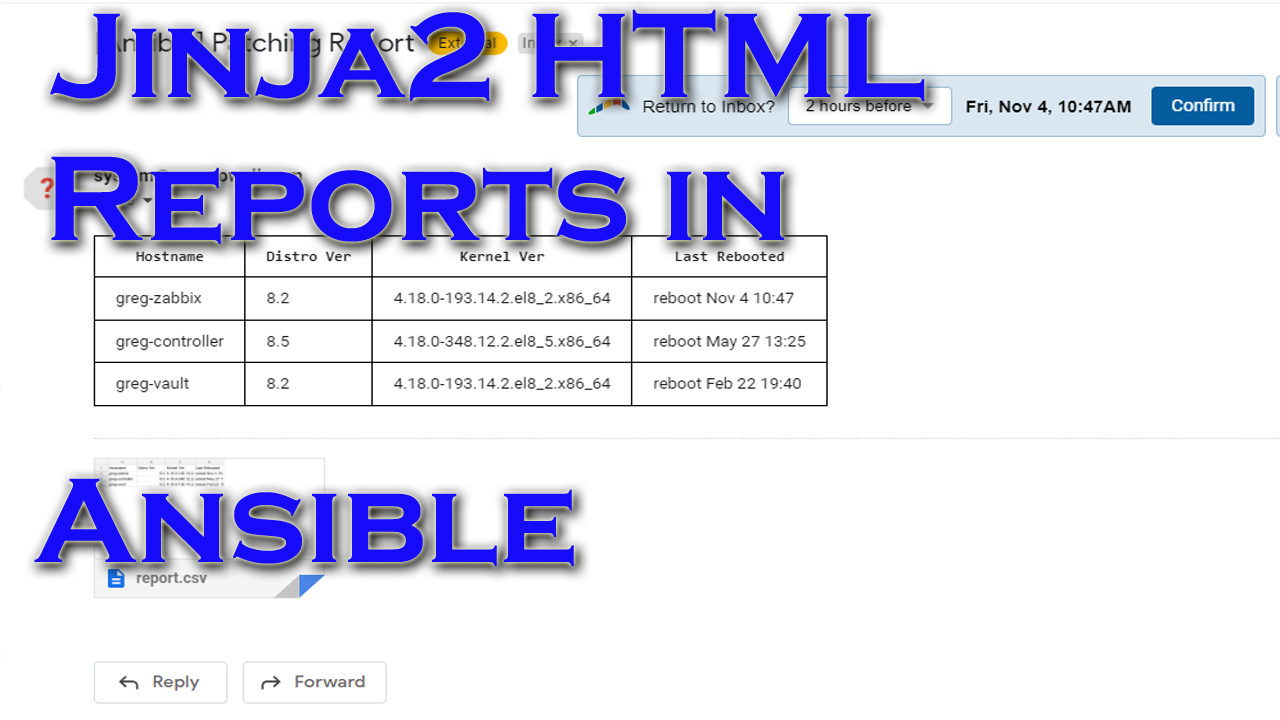
One of the really awesome uses for ansible is to perform an action and be able to develop a pretty report…for you or, let’s face it…management likes pretty graphs and spreadsheets.
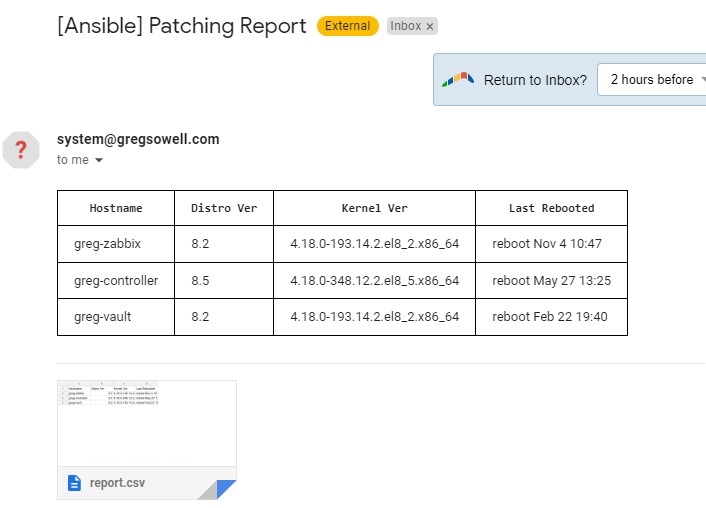
I worked in tandem with the talented tiger Nick Arellano at a recent hackaton, and he cleaned up a tidy little jinja2 template to create pretty reports for both websites as well as emails. Let’s be honest, he did most of the work, so thank him 😉 This piece of automation will create a CSV file and then put it into a table for easy insertion into a web page or (as shown below) use in an email.
Video Demo
Playbook And Template
First, all of the materials can be found HERE IN THIS GIT REPOSITORY.
The playbook, as it stands at the time of this writing, is below:
1 2 3 4 5 6 7 8 9 10 11 12 13 14 15 16 17 18 19 20 21 22 23 24 25 26 27 28 29 30 31 32 33 34 35 36 37 38 39 40 41 42 43 44 45 46 47 48 49 50 51 52 53 54 55 56 57 58 59 60 61 62 | ---
- name: Generate an HTML report from jinja template
hosts: all
gather_facts: true
vars:
#email settings
email_subject: Patching Report
email_host: 10.1.5.25
email_from: [email protected]
email_to: [email protected]
#random settings
csv_path: /tmp
csv_filename: report.csv
headers: Hostname,Distro Ver,Kernel Ver,Last Rebooted
tasks:
- name: Gather last reboot
ansible.builtin.shell: last reboot | grep -m1 "" | awk '{ print $1, $6, $7, $8 }'
register: rebooted
- name: Save CSV headers
ansible.builtin.lineinfile:
dest: "{{ csv_path }}/{{ csv_filename }}"
line: "{{ headers }}"
create: true
state: present
delegate_to: localhost
run_once: true
- name: Build out CSV file
ansible.builtin.lineinfile:
dest: "{{ csv_path }}/{{ csv_filename }}"
line: "{{ inventory_hostname }},{{ ansible_distribution_version }},{{ ansible_kernel }},{{ rebooted.stdout }}"
create: true
state: present
delegate_to: localhost
- name: Read in CSV to variable
community.general.read_csv:
path: "{{ csv_path }}/{{ csv_filename }}"
register: csv_file
delegate_to: localhost
run_once: true
# - name: debug csv_file
# debug:
# var: csv_file
# run_once: true
- name: Send Email
community.general.mail:
host: "{{ email_host }}"
from: "{{ email_from }}"
port: 25
to: "{{ email_to }}"
subject: "[Ansible] {{ email_subject }}"
body: "{{ lookup('template', 'report.html.j2') }}"
attach: "{{ csv_path }}/{{ csv_filename }}"
subtype: html
delegate_to: localhost
run_once: true |
Let me break down some of the pieces of the playbook.
1 2 3 4 5 6 7 8 9 10 11 12 13 14 15 | ---
- name: Generate an HTML report from jinja template
hosts: all
gather_facts: true
vars:
#email settings
email_subject: Patching Report
email_host: 10.1.5.25
email_from: [email protected]
email_to: [email protected]
#random settings
csv_path: /tmp
csv_filename: report.csv
headers: Hostname,Distro Ver,Kernel Ver,Last Rebooted |
The vars section isn’t very interesting save for the “headers” variable. This is the variable that will not only create the CSV header, but also used in the Jinja2 template for building out the HTML.
1 2 3 4 5 6 7 8 9 10 11 12 13 14 15 16 17 18 19 20 21 | tasks:
- name: Gather last reboot
ansible.builtin.shell: last reboot | grep -m1 "" | awk '{ print $1, $6, $7, $8 }'
register: rebooted
- name: Save CSV headers
ansible.builtin.lineinfile:
dest: "{{ csv_path }}/{{ csv_filename }}"
line: "{{ headers }}"
create: true
state: present
delegate_to: localhost
run_once: true
- name: Build out CSV file
ansible.builtin.lineinfile:
dest: "{{ csv_path }}/{{ csv_filename }}"
line: "{{ inventory_hostname }},{{ ansible_distribution_version }},{{ ansible_kernel }},{{ rebooted.stdout }}"
create: true
state: present
delegate_to: localhost |
This section starts by finding out when this host was last rebooted. You’ll notice the shell command does some grepping and awking. I’m a big fan of formatting as much of the data before it’s brought into Ansible as possible.
After that the CSV headers are inserted into the CSV, then the remainder of the CSV is built out for each host.
1 2 3 4 5 6 7 8 9 10 11 12 13 14 15 16 17 18 19 20 21 22 23 24 | - name: Read in CSV to variable
community.general.read_csv:
path: "{{ csv_path }}/{{ csv_filename }}"
register: csv_file
delegate_to: localhost
run_once: true
# - name: debug csv_file
# debug:
# var: csv_file
# run_once: true
- name: Send Email
community.general.mail:
host: "{{ email_host }}"
from: "{{ email_from }}"
port: 25
to: "{{ email_to }}"
subject: "[Ansible] {{ email_subject }}"
body: "{{ lookup('template', 'report.html.j2') }}"
attach: "{{ csv_path }}/{{ csv_filename }}"
subtype: html
delegate_to: localhost
run_once: true |
Next is where the cool stuff happens. I use the read_csv module to read in the newly created CSV file and register it to a variable. This means complicated variables can be created quite simply.
Last is the email generation. In here I not only attach the newly created CSV, but I also use the template lookup plugin to call the Jinja2 template in the “body” section.
The way this playbook is written, virtually all of it is written flexibly in such a way that the only changes to generate a completely different report would be to change the CSV build tasks.
Now for the Jinja2 template(report.html.j2):
1 2 3 4 5 6 7 8 9 10 11 12 13 14 | <table style="border: 1px solid black; border-collapse: collapse;">
<tr>
{% for header in headers.split(",") %}
<th style="border: 1px solid black; padding: 8px 16px;">{{ header }}</th>
{% endfor %}
</tr>
{% for host in csv_file.list %}
<tr>
{% for header in headers.split(",") %}
<td style="border: 1px solid black; padding: 8px 16px;">{{ host[header] }}</td>
{% endfor %}
</tr>
{% endfor %}
</table> |
This is a pretty small template, but it is mighty!
I’m not going to cover HTML tables; W3schools has a nice little doc on it here.
Let me try and break it down into smaller pieces so that it makes a little more sense.
1 2 3 | {% for header in headers.split(",") %}
<th style="border: 1px solid black; padding: 8px 16px;">{{ header }}</th>
{% endfor %} |
The very first table row is going to setup the column headers. If you recall the “headers” variable was created to setup a method for initial creation, but ultimately so we could use it here in this first jinja loop. Whenever you see {% %} this is breaking into jinja saying that “there’s something to evaluate here.” In the for section I’m setting up a for loop. A for loop will iterate over a list of things one by one, until I’ve covered all of the contents. Here I’m taking the headers variable and “split”ing it into a list of values. This list is saved into a new variable named “header”. I then move down and create a row entry for each {{ header }} variable that exists. Now there is a lot more information here than just the result of the variable. This little bit of Nick Magic® does formatting on the cell itself so that it will have a nice border along with padding around the value(it makes it look pretty and easily readable). The formatting has to be done inline like this because different email clients interpret HTML differently and this seems to have the most support.
Next I fill out the actual data:
1 2 3 4 5 6 7 | {% for host in csv_file.list %}
<tr>
{% for header in headers.split(",") %}
<td style="border: 1px solid black; padding: 8px 16px;">{{ host[header] }}</td>
{% endfor %}
</tr>
{% endfor %} |
Here I’m doing nested loops(super easy to do inside of Jinja). The outter loop is built off of the csv_file.list variable that was created by importing my CSV file. This populates the for variable of host.
On the inner loop I’m taking the headers section and splitting it in the exact same way…in fact it looks almost identical to the above safe for one change. The table data variable is different “{{ host[header] }}”. Notice that it is take the first host and plucking each header’s information from it and applying it to the cell one by one. So if the host entries are “Hostname,Distro Ver,Kernel Ver,Last Rebooted”, then it will loop through those one at a time and apply those entries to the cell.
Sample Output
Conclusion
I hope you can see how easy it would be to adapt this simple reporting technique to fit almost any scenario. Just a few quick tweaks and it covers routers, switches, security devices, AWS resources…whatever you can imagine.
If you would change it to adapt to your environment, what would that look like?
Good luck and happy reporting!