

Scenario: You have a production site in Dallas and a backup site in, say, College Station(CS). You want the public subnet 1.2.3.0/24 to failover to CS if the Dallas facility falls off of the earth. What you want to do my friend is prepend.
Prepending is adding your own Autonomous System Number(AS) repeatedly to the beginning of your BGP advertisement to a neighbor. Say if you were to have your addressing hop through three external BGP peers, they would all add their AS number to the as-path attribute. If your AS number is 5 and it goes through AS 10, 20 and then 30 your path would look like “20 10 5” to the routers in AS 30. If you were to prepend 3 times to your as before advertising it to 10, the path would appear as “20 10 5 5 5”. This makes your path for this specific bit of traffic less desirable. Remember that BGP is a path vector protocol, so it prefers the fewest number of AS hops.
So what we will do is make your backup site look so far away with AS prepending that it won’t get used unless the main site is unavailable.
Diagram also available as PDF => [download#5].
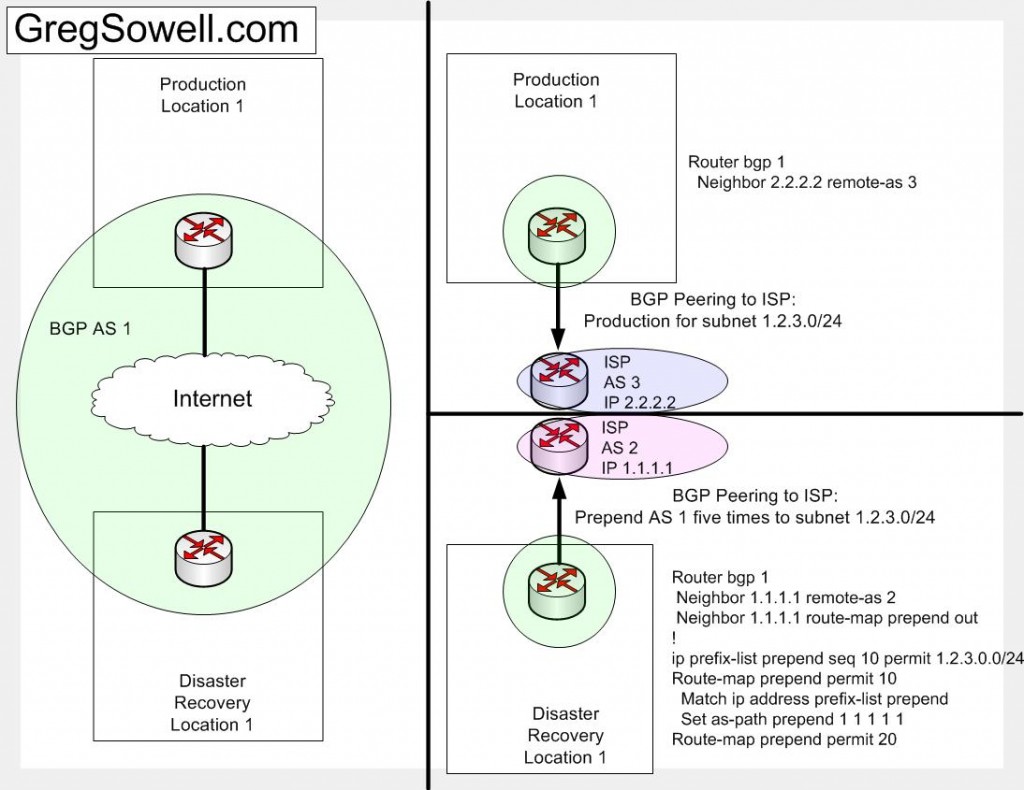
bgp prepending
You can see from the configurations that both routers are in AS 1. subnet 1.2.3.0/24 lives in the production location. It is advertised from the DR site with it’s AS 1 prepended five times. I used a prefix list to pick out the specific subnet 1.2.3.0/24 subnet to prepend. I would assume that the DR site would advertise some addressing that isn’t advertised from the production, and thus I don’t want to prepend that addressing. I included the “route-map prepend permit 20” statement in there as a catch-all for the rest of the addressing to be advertised.
I wrote a couple of Autoit scripts to test if a Windows IIS SMTP server is responding properly.
The first is [download#4]. This guy connects to the local mail relay and sends an email. Simple. You supply it with three command line parameters: from address, to address and subject.
The second, called [download#3], checks the mail queue folder (“c:\Inetpub\mailroot\Queue\”) and if it has any files older than 12 minutes, it restarts the relay service. If you have mail to send and your server looses connectivity to the DNS server, it will generally freak out and start leaving mail in the queue. By restarting the service, the mail will then flush out of the queue.
You will want to schedule the testSMTP script to run, say, once a day. It will send you an email letting you know you are still able to send out the server. This is great for critical monitoring servers. You will want to schedule the mailRoot script to repeat every 30 minutes or so.
Click below to view the code!
read more…
Some of the Specs seem a little odd.
Ether1 <-> Ether2 = 1Gbps
Ether2 <-> Ether3 = 650Mbps
As you can see throughput from eth1 to eth2 is a gig. They show eth2 to eth3 is only 650Mb. It seems this is a hardware limitation, and they don’t mention ports 4 or 5. I’m going to have to assume the worst, until there is more information. I’ll say port 1 is full gig and that ports 2-5 are on a shared gig bus of some kind.
Having said that…I still want one 😉 hehe
Quick Edit – It looks like they are going to retail for $99; only $20 more than standard 450.
More tools.
HFS(HTTP FIle Server)– A quick program that hosts files via http. Even if most common ports are blocked, you can almost always hit port 80. So just fire this guy up, add a folder or individual files and boom. It has soooo many options beyond just that, but that’s all I ever use it for. I use it most often when dealing with unity express. To transfer most files you have to use http, and this does the job perfectly.
Filemon– Another Sysinternals special. Monitor what files are in use by which applications.
Omziff – This is a file encryption tool, file splitter, file shredder and hash generator.
Depends.exe – M$ dependency walker. You can specify a DLL and it will tell you all other DLLs that it references. It also gives you insight into these files.
Autologon– Sysinternals prog that sets one of the windows accounts to autologon on boot.
WinXP Virtual CD – This is a little prog that was released by M$. It allows you to mount an ISO as a virtual cd-rom.
Tftpd32 – This is one of my favorite apps. This is a great tftp server, dhcp server, tftp client, syslog server and sntp server. I’ve used this little app countless times! This is a must have for every USB drive.
Text Crawler – This is another great prog. Whenever you have a pile of files and you are looking for specific words, this is invaluable. You can match using standard find strings or regex expressions. I’ve used it to crawl database exports. I’ve used it to crawl countless opensource packages. It also has a regex tester, which is really convenient.
I use Wink! It basically does screen shots and allows you to add buttons and text boxes. They also allow you to record audio to go along with the presentation, but I haven’t tested it yet. I’ve been using Wink for years. As is most of the software I use, it is free!
I was adding a new slave DNS server the other day on bind 9.3 and I was getting this error “refused notify from non-master”. It seems that if you are using bind 9.3 it tries to send a notify to itself even if it is a slave. In the options section of named.conf you need to add an allow-notify for it’s own IP. Substitute 192.168.0.1 for your server’s IP.
options {
//otherstuff
allow-notify {192.168.0.1;};
};
Here’s the scenario: You have a main site(MS), and a DR site(DR). You have addressing 1.1.1.0/24 at the MS and addressing 2.2.2.0/24 at the DR site. You have several web-servers at the MS that replicate regularly over to the DR site. You want to fail over to the DR servers in the event of a meltdown at the MS.
- You could peer via BGP at the DR site and use prepending or conditional BGP to advertise the 1.1.1.0 subnet. The customer says this isn’t an option.
- You could use a load-balancer such as an F5, Barracuda or a Cisco LocalDirector. This in undesirable because the DR site has higher bandwidth costs so the numbers won’t add up.
- You could set the TTL on your DNS records to 60 seconds and in the event of a failure, change the A records over to your DR subnet. This would require human intervention, though it would work perfectly well.
- Distributed Director. Wes, a friend of mine turned me onto this. Cisco put out a small IOS app a good while back called Distributed Director. What this allows you to do is be authoritative for a DNS zone or record. You in essence turn your router into a DNS server. Why would you want to do this? Because it allows you to add multiple servers to the pool for a single DNS record. You can set the percentage of requests to go to one server or another. You can also do tracking of a sort. You can say, attempt to establish a connection to port 80 on a server to ensure the web server is running. You can also give it a url and see if it responds. This is a a pretty solid method, but the client doesn’t want to configure and maintain equipment.
- You could use a tracked DNS service. A tracked DNS service is one that uses UDP, TCP, ICMP, HTTP individually or in combination to track server status. For example: at my MS I track my webserver by issuing an HTTP request every two minutes. I parse this HTTP request looking for specific keywords like “Company X”. If I find those key words I do nothing. If my server doesn’t respond properly, I start checking a list of alternate servers, namely my DR site server. My DR server responds properly, so I change the A record over to the DR IP. Within 60 seconds, all requests will start pointing over to my DR site, and I didn’t have to do anything, it was all automatic.
As you can tell, The 5th option was the suggestion to the customer. The feature seems like it would be a popular one, though there only seem to be a handful of providers out there. Two in particular seemed interesting: dnsmadeeasy and ultradns.
DNSMadeEasyis the cheaper of the two. They offer a business package that includes 25 domains and 3 free “trackers.” Tracker is the service that monitors the servers for failover. You can add additional trackers for $5 and additional domains for $.75.
UltraDNSis the pricey option, but for a reason. They have far more bells and whistles: load-balancing by region, better server density throughout the world. These are the guys that do DNS for facebook and amazon.
I’m thinking of working on an Open-Source version, and here it is!