

The PDF can be found here.
PCQ Rewrite:
I’m trying to think of how the masks would be useful. I can envision connections to a group of web servers all sharing a rate limit. Though you could just do that with a mangle rule.
SwOS 1.3
*) added ability to specify ethernet ports from
which it is allowed to connect to the switch;
*) fixed problem – reboot sometimes made switch unresponsive;
*) fixed problem – Hosts table were not shown sometimes;
*) fixed problem – sometimes it didn’t respond to ARP requests
or responded with big packets;
*) fixed problem – remote web interface didn’t work well over VLANs;
USB LCD Support
UPS
Software made for Mikrotik
Right now there is just a couple of crummy iPhone apps 😛
Tips
It looks like they are now starting a new section in the newsletter “Hidden Features”. They will be showcasing lesser known features. This time around they are doing SNMP write. A cool tip they show you is how to run a script via a SNMP write command.
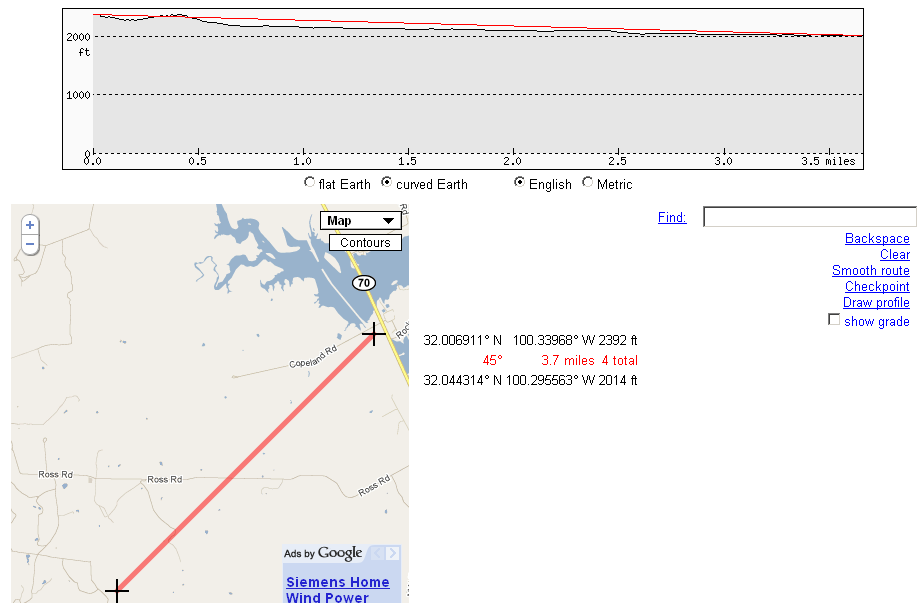
Here’s a cool little terrain profiler. You set a couple of points on google earth and it will give you the terrain profile inbetween.
Blizzard used to attempt BitTorrent first, and if that failed, they would do direct download. As of their newer updates, the only method to download updates is now via BitTorrent. If you happen to be using my draconian torrent filter here, then your WoW users can no longer download updates! I’ve created a little exception that can be placed before the block rules to allow your updates to go through.
I first did a packet capture to see what the files being requested look like:

Oh wire shark...how I love thee.
Here’s the exact text:
1 | GET /wow-pod-retail/NA/12911.streaming/wow-13329-4C85CAC41ABFB84BD78371122F2090A9.torrent HTTP/1.1\\r\\n |
Using this I just added an L7 that matches a get request containing wow.
1 | /ip firewall layer7-protocol add comment="" name=torrent-wwws-exclusion regexp="^.*(get|GET).*(wow).*\$" |
I then create a filter rule that accepts get requests using the above L7.
1 | /ip firewall filter add action=accept chain=forward comment="torrent wwws exclusion" disabled=no dst-port=80 layer7-protocol=torrent-wwws-exclusion protocol=tcp |
This is a topic I’m increasingly receiving questions on, so it seems time for a quick post about it 🙂 *EDIT – turns out it is not such a quick post :P*
I say Layer 3 in the heading because I’m talking about load balacing at the network layer, not at layer 2 (bonding).
The traditional method was to use ECMP (Equal Cost Multiple Path) routing. ECMP is adding a route and then adding multiple gateways for that route. This can be done either statically or dynamically via routing protocols.
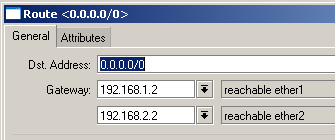
ECMP would do a hash based on source/destination IP and send traffic out one gateway or another. With ECMP you can add multiple gateways as well as add a single gateway multiple times to give it preference in the selection process. This would generally work really well until about ROS V3.11.
After ROS v3.10 the linux kernal was updated. This update caused the connection table to be rebuilt every 10 minutes. When this occured, the hash algorithm that ran earlier to determine the traffic’s gateway might actually change results! This means that after 10 minutes your traffic might just use a different gateway. What are the possible repercussions? If you are doing standard routing and are not doing any natting in the mikrotik, then you are fine. The routing should be able to shift with no ill effects. However, if you are natting to multiple DSL or cable modem connections the results will be dramatic. If you have a TCP session established, then all of a sudden the traffic appears to be source from a new public IP, the connection will be severed. Now imagine this happening every ten minutes! You can read more about it in this forum post.
After this change happened, you can imagine there were quite a few upset people. There were some work arounds that arose to bridge the gap until a real solution was created. Mikrotik doesn’t alter the linux kernal, so adding an option to disable the feature wasn’t going to happen. So, they came up with Per Connection Classifier.
PCC is a mechanism they built in to do hashing for gateway balancing…or really balancing of any kind. PCC is used in conjunction with mangle rules to hash traffic into different groups that can then be applied with a connection mark. Once you have a connection mark on the traffic, you can do just about anything with it, including setting special route marks on it.
PCC Options
1 2 3 4 5 6 | per-connection-classifier= PerConnectionClassifier ::= [!]ValuesToHash:Denominator/Remainder Remainder ::= 0..4294967295 (integer number) Denominator ::= 1..4294967295 (integer number) ValuesToHash ::= both-addresses|both-ports|dst-address-and-port| src-address|src-port|both-addresses-and-ports|dst-address|dst-port|src-address-and-port |
Step one is to figure out what values we want our hash to use…we have quite a collection of options. The above linked wiki article does a good job on explaining what each option entails. My default option will be both-addresses. I want all traffic moving from one host to another to always follow the same path, devoid of port or protocol.
Then we will choose our denominator. The denominator will generally be the number of gateways you have. So if you have 3 DSL modems, the denominator will be 3. An exception to this may be if you want to weight a specific gateway more heavily than the others. Say for example two of your modems have 4Mb rate limits, while the third has a 10Mb rate limit. You can set the denominator to be 4 and thus mark the 10Mb router twice while the other guys only get marked once.
The remainder is the outcome of the hash. It will return 0 through denominator -1. As in if we have a denominator of 3 it will return 0,1 or 2. If the denominator is 4 it will return 0,1,2 or 3.
Lets put it all together…assuming we have 3 gateways.
1 2 3 4 5 6 | /ip firewall mangle add chain=prerouting action=mark-connection \ new-connection-mark=CM-GW1 per-connection-classifier=src-address-and-port:3/0 /ip firewall mangle add chain=prerouting action=mark-connection \ new-connection-mark=CM-GW2 per-connection-classifier=src-address-and-port:3/1 /ip firewall mangle add chain=prerouting action=mark-connection \ new-connection-mark=CM-GW3 per-connection-classifier=src-address-and-port:3/2 |
Same thing, only we want to weight GW3 higher.
1 2 3 4 5 6 7 8 | /ip firewall mangle add chain=prerouting action=mark-connection \ new-connection-mark=CM-GW1 per-connection-classifier=src-address-and-port:4/0 /ip firewall mangle add chain=prerouting action=mark-connection \ new-connection-mark=CM-GW2 per-connection-classifier=src-address-and-port:4/1 /ip firewall mangle add chain=prerouting action=mark-connection \ new-connection-mark=CM-GW3 per-connection-classifier=src-address-and-port:4/2 /ip firewall mangle add chain=prerouting action=mark-connection \ new-connection-mark=CM-GW3 per-connection-classifier=src-address-and-port:4/3 |
After we mark the connections, we need to add the mangle rules for route marks, and add the routes.
Here’s a complete example.
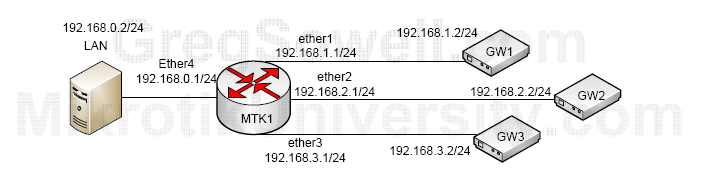
IP addressing:
1 2 3 4 5 6 7 8 9 | /ip address
add address=192.168.1.1/24 broadcast=192.168.1.255 comment="" disabled=no \
interface=ether1 network=192.168.1.0
add address=192.168.2.1/24 broadcast=192.168.2.255 comment="" disabled=no \
interface=ether2 network=192.168.2.0
add address=192.168.0.1/24 broadcast=192.168.0.255 comment="" disabled=no \
interface=ether4 network=192.168.0.0
add address=192.168.3.1/24 broadcast=192.168.3.255 comment="" disabled=no \
interface=ether3 network=192.168.3.0 |
In the above you see that we just added the IP addresses to our interfaces…simple enough.
Masquerade rules
1 2 3 4 5 6 7 | /ip firewall nat
add action=masquerade chain=srcnat comment="Masq for GW1" disabled=no \
out-interface=ether1
add action=masquerade chain=srcnat comment="Masq for GW2" disabled=no \
out-interface=ether2
add action=masquerade chain=srcnat comment="Masq for GW3" disabled=no \
out-interface=ether3 |
Since these are just standard DSL modems, we are doing PAT on these guys, AKA masquerade.
Static routes:
1 2 3 4 5 6 7 8 9 10 11 12 13 | /ip route
add check-gateway=ping comment="" disabled=no distance=1 dst-address=\
0.0.0.0/0 gateway=192.168.1.2 routing-mark=GW1 scope=30 target-scope=10
add comment="" disabled=no distance=10 dst-address=0.0.0.0/0 gateway=\
192.168.2.2 routing-mark=GW1 scope=30 target-scope=10
add check-gateway=ping comment="" disabled=no distance=1 dst-address=\
0.0.0.0/0 gateway=192.168.2.2 routing-mark=GW2 scope=30 target-scope=10
add comment="" disabled=no distance=10 dst-address=0.0.0.0/0 gateway=\
192.168.3.2 routing-mark=GW2 scope=30 target-scope=10
add check-gateway=ping comment="" disabled=no distance=1 dst-address=\
0.0.0.0/0 gateway=192.168.3.2 routing-mark=GW3 scope=30 target-scope=10
add comment="" disabled=no distance=10 dst-address=0.0.0.0/0 gateway=\
192.168.1.2 routing-mark=GW3 scope=30 target-scope=10 |
Here you see that we added our static routes. Notice that we added a routing-mark to all of them. What this essentially does is to create multiple routing tables. We will later tell specific portions of traffic which specific routing table to use based on this routing-mark. You will also notice that in every routing table, there are two routes. First there is the standard gateway specified, but there is also a backup route that will pick the next sequential gateway should the main gateway fail. This is generally referred to a floating static route. It will technically be in the route table, but since I set the distance to 10 on the backup route it is not used unless the main route is considered invalid. On the main route I’ve got check gateway enabled to make sure the main gateway is up, and if it fails, the backup route will be used. You can better see this in the below picture:

Mangle that does our user traffic PCC connection mark
1 2 3 4 5 6 7 8 9 10 | /ip firewall mangle
add action=mark-connection chain=prerouting comment="CM for GW1" disabled=no \
in-interface=ether4 new-connection-mark=GW1 passthrough=yes \
per-connection-classifier=both-addresses:3/0
add action=mark-connection chain=prerouting comment="CM for GW2" disabled=no \
in-interface=ether4 new-connection-mark=GW2 passthrough=yes \
per-connection-classifier=both-addresses:3/1
add action=mark-connection chain=prerouting comment="CM for GW3" disabled=no \
in-interface=ether4 new-connection-mark=GW3 passthrough=yes \
per-connection-classifier=both-addresses:3/2 |
This is the meat of our article. Here you see we are doing our PCC connection marking for the user traffic. This basically runs the PCC algorithm and divides the traffic into three pieces. It will mark the connections GW1, GW2 or GW3. We will later mark routing based on these values.
Mangle that does our output chain PCC connection mark
1 2 3 4 5 6 7 8 9 10 | /ip firewall mangle
add action=mark-connection chain=output comment="CM for GW1 - output" \
connection-mark=no-mark disabled=no new-connection-mark=GW1 passthrough=\
yes per-connection-classifier=both-addresses:3/0
add action=mark-connection chain=output comment="CM for GW2 - output" \
connection-mark=no-mark disabled=no new-connection-mark=GW2 passthrough=\
yes per-connection-classifier=both-addresses:3/1
add action=mark-connection chain=output comment="CM for GW3 - output" \
connection-mark=no-mark disabled=no new-connection-mark=GW3 passthrough=\
yes per-connection-classifier=both-addresses:3/2 |
We are also running the PCC algorithm for the traffic leaving the router. This isn’t necessary, unless you are say running hotspot and proxying all traffic through the router. In the hotspot case all traffic will be sourced from the router and thus will use the output/input chain.
Mangle that does our input connection mark
1 2 3 4 5 6 7 8 9 10 | /ip firewall mangle
add action=mark-connection chain=input comment="CM input GW1" \
connection-mark=no-mark disabled=no in-interface=ether1 \
new-connection-mark=GW1 passthrough=yes
add action=mark-connection chain=input comment="CM input GW2" \
connection-mark=no-mark disabled=no in-interface=ether2 \
new-connection-mark=GW2 passthrough=yes
add action=mark-connection chain=input comment="CM input GW3" \
connection-mark=no-mark disabled=no in-interface=ether3 \
new-connection-mark=GW3 passthrough=yes |
This basically marks traffic entering a specific GW as that gateway’s. This will ensure that internet sourced traffic will return via the proper interface.
Mangle that does our actual route marking
1 2 3 4 5 6 7 8 9 | add action=mark-routing chain=prerouting comment="RM for GW1" \
connection-mark=GW1 disabled=no in-interface=ether4 new-routing-mark=GW1 \
passthrough=yes
add action=mark-routing chain=prerouting comment="RM for GW2" \
connection-mark=GW2 disabled=no in-interface=ether4 new-routing-mark=GW2 \
passthrough=yes
add action=mark-routing chain=prerouting comment="RM for GW3" \
connection-mark=GW3 disabled=no in-interface=ether4 new-routing-mark=GW3 \
passthrough=yes |
Now that we have all of our traffic, user and router sourced, connection marked, it’s time to apply our routing marks. This basically says that if we have a connection mark of GWX then route the traffic via the GWX route table.
This completes our load-balancing example.
QoS with load balancing
I would now like to discuss doing QoS based on these configurations. You guys can stop reading if you don’t care about any of that QoS junk.
If you ask me one of the truly core components of writing a QoS policy is using connection marking in mangles. This allows you to identify traffic going in one direction and all subsequent traffic associated with that connection moving in both directions is marked. You can then do packet marks based off of these connection marks. I love it because it makes life easier, but from what I understand it really drops the CPU load on marking traffic…a win win 😉 My real issue comes into play when you realize that if you are using PCC, you can no longer use any other connection marks.
You can only have a single connection mark on traffic. If you connection mark a subset of traffic and then subsequently apply a new connection mark, the original is overwritten. In our PCC example, if I was to packet mark GW1, then route-mark the traffic, everything will be working fine. You mark PCC in the prerouting chain for obvious reasons…it happens BEFORE the routing decision…hence the pre. If I remark the connection in the prerouting chain, then the routing marks are no longer applied and the traffic hits the floor because it isn’t making it into the proper route table any longer. “But why not just use connection mark in the forward chain?” Oh you guys are so clever! However, if you try and remark the connection, even in the forward chain it will completely overwrite from that point forward. Connection mark mangles only check the first packet in the connection, so subsequent packets are no longer checked!
As for QoS, you will also need a set of queues (in and out) for EACH gateway. Each gateway will have it’s own rate-limit and it will also have varying levels of congestion, so each requires its own set of queues.
So, lets add this all up: I can’t use connection marks anymore + I have to create a set of queues for each gateway will all of my precedences in each one + I have mangles that are virtual duplicates of each other just to filter traffic levels for the varying gateways/queues per gateway = Angry Greg.
What’s my ultimate solution to the issue? In my mind, the best option in reference to our configuration example is one of two things.
1. Add an additional router for each GW with standard QoS applied to each one using my beloved connection marking. Then add a single router that all of these GW routers connect to…lets call it a backbone router. This BB router will run the PCC load balancing and not worry about QoS. It’s a win win…other than the fact that you have to buy several routers…hehe.
2. Since we are going to be doing some hairy stuff on the routers with heavy QoS, we need some equipment that has good processing power or “needs more pow-a”. If there was a real processing giant in the routerboard line we could use meta router and just run the GW routers virtually and let the physical box be the BB. Alas, there is no RB with high power, so we will use an X86. I’m not a big advocate of the off the Mikrotik branded X86 boxes that are on the market right now, so I would suggest building your own. X86 has “KVM”, which is a virtualization mechanism designed for X86. The only catch is that you have to have virtualization support in the CPU. This has gotten far too long of a rant. In essence, we do it with virtual GW routers and use the core as the BB. Again, this is a win win, only in this case we require a single box instead of multiple routers.
I know this is a somewhat complex topic to explain, but I hope you guys made it out alive. Any thoughts or suggestions, please leave me some feedback. Despite my fancified airs I put on, I still really like to hear what you guys think.
This will graph most of the important bits about your tripplite UPS via the optional SNMPWEBCARD. I put thresholds in for temperature and output source.
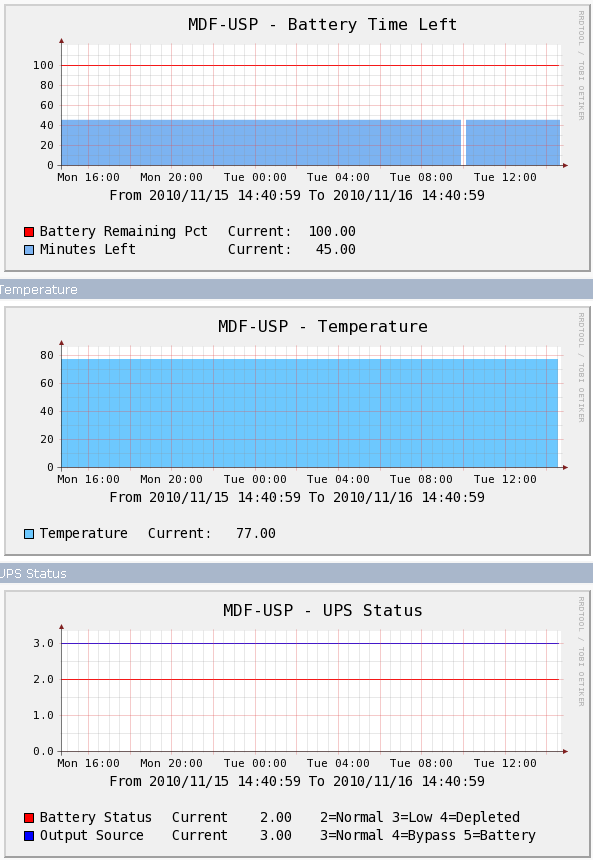
Not pretty, but it works...much like everything I make.
The file is here: cacti_host_template_tripplite-ups (2469 downloads)
It’s been ages since I’ve had to do this, but for those of you in need, check out this bootable iso. You pop it in and follow the on screen prompts which will quickly allow you to clear or change any local windows account. Use at your own risk, though 🙂
Well, RC4 dropped yesterday and here is what they have to say about it:
*) radius – fixed Disconnect and CoA response signature generation;
*) winbox – make double click work in text fields again;
*) winbox – allow to drag windows outside of main one to the left;
*) winbox – make some settings look more consistent;
*) winbox – allot to specify IPv6 address in routing filter prefix;
*) winbox – make possible to open IPv6 routes without crashing;
*) winbox – improved item reordering in long lists;
*) winbox – improved SNMP configuration support;
*) winbox – added support for KVM configuration;
*) winbox – added support for Traffic Engineering configuration;
*) ovpn – make ovpn client work with OpenVPN v2.1.3;
*) lcd – support Crystalfontz 631,633
also support for Crystalfontz lcd contrast setting is added;
*) console – fixed missing return value of the ping command when executed
from a scheduler entry;
*) console – ‘ping’ command with specified value of ‘interface’ always forced
“arp-ping=yes”, fixed;
*) routing – fixed problem with ‘check-gateway’ status update that could get
triggered when multiple routes with different values of ‘target-scope’
and ‘check-gateway’ referenced the same gateway IP address;
*) store – allow to use external disks;
*) modem firmware directory can be specified in /port firmware
Gobi users should change this setting or directory name;
*) ups – support USB UPS on RB4xx as well;
*) snmp – fix BER encoding for some INTEGER based values;
*) snmp – provide proxy stats using SQUID-MIB;
*) snmp – provide ups info using UPS-MIB;
*) snmp – provide external storage information;
*) wireless nv2 – add missing statistics fields;
*) wireless – add per-chain signal strength fields;
*) added hotspot html variable “host-ip”;
*) fixed pcq queue type;
*) fixed leds on RB750;
I was under the impression there was a firewall issue, and I don’t see a fix noted in here…not to say they didn’t.