NTOP is a netflow collector, or it can be used to promiscuously sniff on a port.
I do prefer flow viewer, but for those of you that prefer an easier, friendlier interface, here’s how you install NTOP.
Set your repository up for dag:
rpm -Uhv http://apt.sw.be/redhat/el4/en/i386/rpmforge/RPMS/rpmforge-release-0.3.6-1.el4.rf.i386.rpmThen install ntop:
yum install ntopYou will need to setup an admin password:
/usr/bin/ntopIt will prompt you for the admin password, go ahead and assign it.
Then make an allowance in your firewall for port 3000:
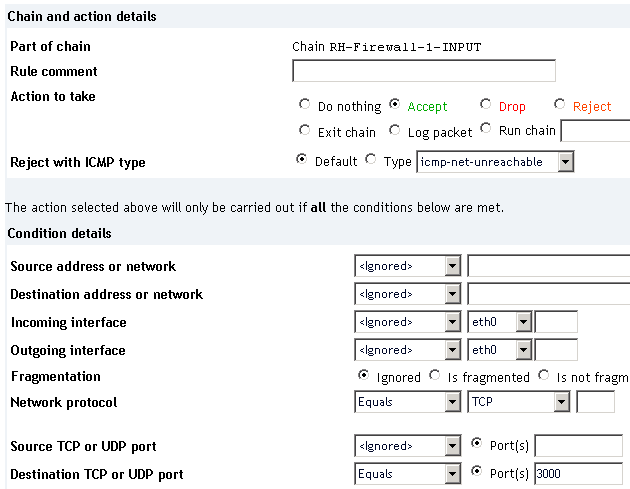
Be sure to apply those firewall changes.
Edit /etc/init.d/ntop as follows:
Change
daemon $prog -d -L @/etc/ntop.confto
daemon $prog @/etc/ntop.conf -d -LIssue the below to start ntop:
service ntop startBrowse to http://cactiIP:3000. Then configure your startup settings using username admin and whatever password you set above.
I’m dumping netflow, so I went to plugins -> netflow and enabled it.
I then configured a netflow interface.
I then switched the listening NIC to that netflow interface.
Following this I set my router to dump the netflow to my server:
router-(config)#interface FastEthernet 0/1
router-(config-if)#ip route-cache flow
router-(config-if)#exit
router-(config)#ip flow-export destination 192.168.0.2 2055
router-(config)#ip flow-export source FastEthernet 0/1
router-(config)#ip flow-export version 5
router-(config)#ip flow-cache timeout active 5
router-(config)#ip flow-cache timeout inactive 300
Be sure to add the cache flow command to all interfaces that data moves in and out on. The netflow info is only generated incoming into the interface.
Done.


Leave a Reply