If you are connecting your Internet routers to your providers via BGP, you will quickly notice that it is difficult to view the route table…and when a normal feed is 510K+ routes, I’m sure you can imagine why. A single full feed consumes somewhere around 256MB of RAM…so don’t try this with an RB750! As Tom would say, “Get bigger rooters B*****s!”
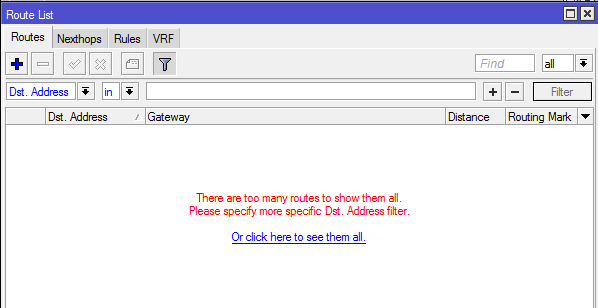
At any rate, when you open winbox, go to ip route, you see this:
What you want to do is use some filtering. You will find this just above the list of routes…or lack there of:
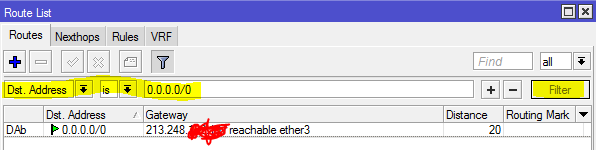
Notice that I used the “is” condition. This means it will look for this EXACT route.
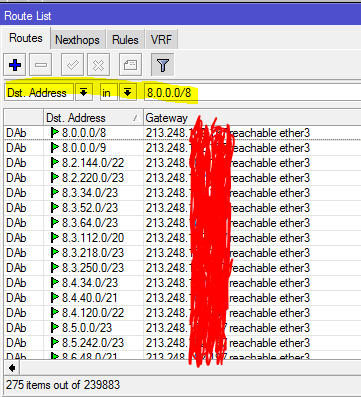
If we want to put in a subnet and find all routes that are contained within it we would switch to the “in” keyword:
We can accomplish the same via CLI…with even more functionality actually, but we will keep it simple.
Exact match:
/ip route print where dst-address=0.0.0.0/0
Match subordinate routes:
/ip route print where dst-address in 8.0.0.0/8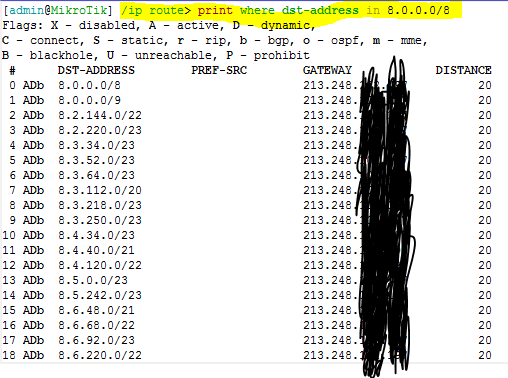
On the CLI we can add some additional keywords…like detail!
/ip route print detail where dst-address=0.0.0.0/0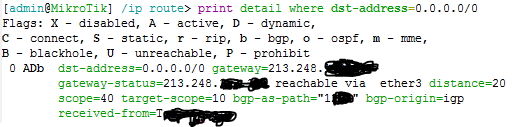
As you can see, adding the detail option gives us the BGP peer that we learned it from, their AS#, and gateway information. All extremely useful information.
Let me know about your route table tricks in the comments, and as always, happy routing!


Leave a Reply