Networking • Automation • Occasional Podcasting

Mikrotik Winbox DOS Exploit Protection

I was just alerted to a winbox exploit that is affecting all MTK versions(Thanks Mike). Here are a few tips to protect yourself.

Add firewall rules to allow access to winbox only from management network.

You really should have your router locked down so management can only come from certain subnets anyway.

/ip firewall filter
add action=drop chain=input comment=\
    "Block access to winbox from anyone not on coming from management." \
    disabled=no dst-port=8291 protocol=tcp src-address=!1.1.1.0/24

Add Portknock to access winbox

Portknock app and link here.

Allow access only via VPN

Link to my VPN videos here.

Change default winbox port

Go to IP Services and change the port from default. This isn’t a complete fix, but should help prevent port scanners from exploiting winbox.
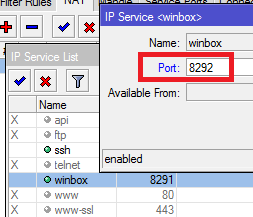
IP Services

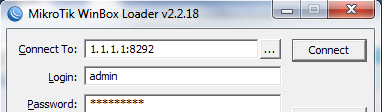
When you want to winbox just add a colon and the new port number.
Comments

7 responses to “Mikrotik Winbox DOS Exploit Protection”

  1. O! Avatar
    O!

    Do you know if ROS 5.16 released yesterday also is affected?

  2. Greg Avatar

    @O
    From the description of the exploit I would say yes.

  3. iam8up Avatar
    iam8up

    Just allow a certain number of new connections to 8291 per a /32

  4. Greg Avatar

    @8up
    Great tip!

    I was thinking of adding that, but I wanted people to use something more proactive rather than reactive. Don’t even allow the opportunity for connection.

  5. Justin Wilson Avatar

    The port knock thing can be a PITA.

  6. Boban Acimovic Avatar
    Boban Acimovic

    Isn’t it Winbox client exploit? So, servers (routerboards) are not affected. I am not saying we should not protect them, on the contrary, but this exploit can’t hurt them, it can hurt just your Windows PC.

  7. Greg Avatar

    @Boban
    There was an exploit for both. I’m less concerned with the client exploit and more concerned with the DoS attack you can perform against the MTK.

Leave a Reply

Your email address will not be published. Required fields are marked *