So what this little autoit script does is SSH(using plink) into your Mikrotiks and issue the export command. It has a GUI to add all of your routers, and you use the windows scheduler to run the program to do automated backups.
It creates a sub folder in the script directory. It then creates a text file in the format
SCRIPT-DIRECTORY\YEAR\DESCRIPTION-IP ADDRESS-MONTH-DAY.TXT
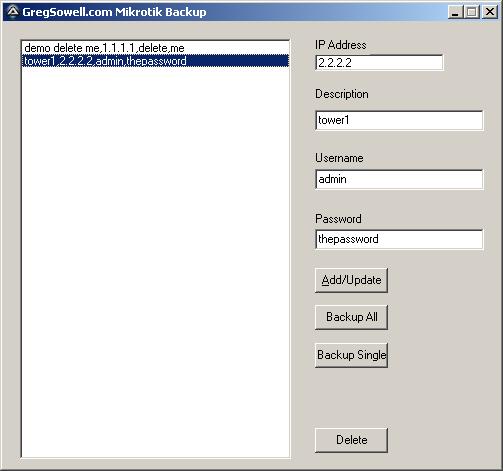
Everything is pretty straight forward. IP/Description/Username/Password. If you want to add a new device, just fill in the blanks and hit add/update. If you click a device over in the list, it will populate the text fields with its information. If you want to update the entry, make any changes and then click the add/update button.
To back them all up, click the backup all button. To backup a single entry, highlight it in the list, and then click the backup single button.
If you want to delete an entry, highlight it and click delete.
There is a caveat with plink. When hitting a device via ssh for the first time it requires you to accept the host key…and this has to be done manually. So, when you add a new device for the first time, it will connect and ask you to accept the key. After you accept and close, everything will be automatic.
Schedule it to run automatically
*NOTE* Whatever user account on the windows machine you accept the host keys with, is the account you need to run the scheduled task as!
Schedule a windows task to run the MikrotikBackup.exe program, and then add anything after the program name like the following:
c:\scripts\MikrotikBackup.exe -GregRocks
Adding anything after the executable makes it run silently and backup all routers.
You can download the executable from here:
.Here’s the autoit code:
#include <ButtonConstants.au3>
#include <EditConstants.au3>
#include <GUIConstantsEx.au3>
#include <GuiIPAddress.au3>
#include <GUIListBox.au3>
#include <StaticConstants.au3>
#include <WindowsConstants.au3>
#include <File.au3>
#include <Array.au3>

FileInstall("C:\Documents and Settings\greg\Desktop\autoit\mikrotikBackup\plink.exe", @ScriptDir & "\plink.exe")

Dim $aConfig

;check if they are running backup version
if $CmdLine[0] > 0 Then
	;they are running it from the command line
	;pull config file
	_BackupAll()
	;exit once done
	Exit
EndIf

;gui goodness
#Region ### START Koda GUI section ### Form=C:\Documents and Settings\greg\Desktop\autoit\mikrotikBackup\MikrotikBackup.kxf
$Form1 = GUICreate("GregSowell.com Mikrotik Backup", 497, 446, 192, 114)
$List1 = GUICtrlCreateList("", 16, 16, 273, 422)
$BtnDelete = GUICtrlCreateButton("Delete", 312, 406, 73, 25, $WS_GROUP)
$BtnAll = GUICtrlCreateButton("Backup All", 312, 283, 73, 25, $WS_GROUP)
$BtnSingle = GUICtrlCreateButton("Backup Single", 312, 321, 73, 25, $WS_GROUP)
$IPAddress1 = GUICtrlCreateInput("0.0.0.0", 312, 32, 129, 17)
$InDescription = GUICtrlCreateInput("", 312, 88, 169, 21)
$Label1 = GUICtrlCreateLabel("IP Address", 312, 16, 55, 17)
$Label2 = GUICtrlCreateLabel("Description", 312, 65, 57, 17)
$Label3 = GUICtrlCreateLabel("Username", 312, 129, 52, 17)
$Label4 = GUICtrlCreateLabel("Password", 312, 190, 50, 17)
$InUsername = GUICtrlCreateInput("admin", 312, 147, 169, 21)
$InPassword = GUICtrlCreateInput("", 312, 207, 169, 21);, BitOR($ES_PASSWORD,$ES_AUTOHSCROLL))
$BtnUpdate = GUICtrlCreateButton("&Add/Update", 312, 246, 73, 25, $WS_GROUP)
GUISetState(@SW_SHOW)
#EndRegion ### END Koda GUI section ###

$ListLocation = 1

;check for config file
if not FileExists(@ScriptDir & "\backupconfig.txt") Then
	;doesn't exist, so create our dummy file
	$fConfig = FileOpen(@ScriptDir & "\backupconfig.txt", 1)
	FileWriteLine($fConfig, "demo delete me,1.1.1.1,delete,me" & @CRLF)
	FileClose($fConfig)
EndIf

	$fCommand = FileOpen(@ScriptDir & "\commands.txt", 2)
	FileWriteLine($fCommand, "export" & @CRLF)
	FileClose($fCommand)

;load in the config file
_LoadConfig()

;main running loop
While 1
	$nMsg = GUIGetMsg()
	Switch $nMsg
		Case $BtnAll
			;backup all of them
			_BackupAll()
		Case $BtnSingle
			;backup single guy
			_BackupSingle()
		case $GUI_EVENT_PRIMARYUP
			;mouse was pressed, lets check to see if they choose a new item in list
			;check which list item is highlighted
			$tempList = GUICtrlRead($List1)
			;see if this is new item chosen or just a click somewhere on the prog
			if $tempList <> $ListLocation Then
				;change, update everything
				;set list location to the temp value
				$ListLocation = $tempList
				;set all our gui values
				GUICtrlSetData($InDescription,stringleft($ListLocation,StringInStr($ListLocation,",") - 1))
				GUICtrlSetData($IPAddress1, StringMid($ListLocation, StringInStr($ListLocation,",") + 1, StringInStr($ListLocation,",", 0, 2) - StringInStr($ListLocation,",") - 1))
				GUICtrlSetData($InUsername, StringMid($ListLocation, StringInStr($ListLocation,",", 0, 2) + 1, StringInStr($ListLocation,",", 0, 3) - StringInStr($ListLocation,",", 0, 2) - 1))
				GUICtrlSetData($InPassword, StringMid($ListLocation, StringInStr($ListLocation,",", 0, 3) + 1))
			EndIf
		Case $GUI_EVENT_CLOSE
			Exit
		Case $BtnUpdate
			;update existing or commit the new one
			if $IPAddress1 == "0.0.0.0" Then
				MsgBox(0,"nope", "Must enter an IP address")
			elseif $InUsername == "" Then
				MsgBox(0,"nope", "Must enter a username")
			Else
				;lets rock it
				$new = 1
				;where in the loop are we
				$updateNum = 0
				;check to see if it exists
				for $y = 1 to $aConfig[0]
					;check if the IP exists
					if StringInStr($aConfig[$y], GUICtrlRead($IPAddress1)) > 0 Then
						;we have a match
						$new = 0
						$updateNum = $y
					EndIf
				Next
				;ready to rock, save it
				if $new = 1 Then
					;new one
					;add to end of the array
					_ArrayAdd($aConfig, GUICtrlRead($InDescription) & "," & GUICtrlRead($IPAddress1) & "," & GUICtrlRead($InUsername) & "," & GUICtrlRead($InPassword))
					;sort our array
					_ArraySort($aConfig,0,1)
					;write the file
					_FileWriteFromArray(@ScriptDir & "\backupconfig.txt",$aConfig,1)
					;run plink to accept cert
					Run(@ComSpec & " /c " & FileGetShortName(@ScriptDir) & '\plink.exe -ssh ' & GUICtrlRead($IPAddress1))
					;load the list again
					_LoadConfig()
				Else
					;update
					;set existing value
					$aConfig[$updateNum] = GUICtrlRead($InDescription) & "," & GUICtrlRead($IPAddress1) & "," & GUICtrlRead($InUsername) & "," & GUICtrlRead($InPassword)
					;sort array
					_ArraySort($aConfig,0,1)
					;write the array to file
					_FileWriteFromArray(@ScriptDir & "\backupconfig.txt",$aConfig,1)
					;reload list
					_LoadConfig()
				EndIf
			EndIf
		Case $BtnDelete
			;delete an existing entry
			$sure = MsgBox(4, "Delete Record?", "Are you sure you want to delete " & GUICtrlRead($InDescription) & "?")
			if $sure == 6 Then
				;delete it
				$updateNum = 0
				;find the array #
				for $y = 1 to $aConfig[0]
					;check if the IP exists
					if StringInStr($aConfig[$y], GUICtrlRead($IPAddress1)) > 0 Then
						;we have a match
						$updateNum = $y
					EndIf
				Next
				;delete the entry
				_ArrayDelete($aConfig,$updateNum)
				;write it to file
				_FileWriteFromArray(@ScriptDir & "\backupconfig.txt",$aConfig,1)
				;reload list
				_LoadConfig()
			EndIf
		Case $Form1
	EndSwitch
	;little sleep to lower CPU
	sleep(30)
WEnd

Func _LoadConfig()
GUICtrlSetData($List1, "")
If Not _FileReadToArray(@ScriptDir & "\backupconfig.txt",$aConfig) Then
Else
	;sorty array
	_ArraySort($aConfig,0,1)
	;load list
	For $x = 1 to $aConfig[0]
		GUICtrlSetData($List1, $aConfig[$x])
	Next
EndIf
EndFunc


Func _BackupAll()
	;pull config file
	If Not _FileReadToArray(@ScriptDir & "\backupconfig.txt",$aConfig) Then
		Exit
	EndIf
	;create store folder
	DirCreate(@ScriptDir & "\" & @YEAR)
	DirCreate(@ScriptDir & "\" & @YEAR & "\" & @MON)
	;walk the list and call plink
	for $x = 1 to $aConfig[0]
		;backup the config
		$CLIusername = StringMid($aConfig[$x], StringInStr($aConfig[$x],",", 0, 2) + 1, StringInStr($aConfig[$x],",", 0, 3) - StringInStr($aConfig[$x],",", 0, 2) - 1)
		$CLIpassword = StringMid($aConfig[$x], StringInStr($aConfig[$x],",", 0, 3) + 1)
		$CLIip = StringMid($aConfig[$x], StringInStr($aConfig[$x],",") + 1, StringInStr($aConfig[$x],",", 0, 2) - StringInStr($aConfig[$x],",") - 1)
		$CLIfile = FileGetShortName(@ScriptDir) & "\" & @YEAR & "\" & @MON & "\" & StringReplace(stringleft($aConfig[$x],StringInStr($aConfig[$x],",") - 1), " ", "-") & "-" & StringReplace($CLIip, ".", "-") & "-" & @MON & "-" & @MDAY & ".txt"
		;call plink
		Run(@ComSpec & " /c " & FileGetShortName(@ScriptDir) & '\plink.exe -ssh -l ' & $CLIusername & ' -pw ' & $CLIpassword & ' -m ' & FileGetShortName(@ScriptDir) & '\commands.txt ' & $CLIip & ' > ' & $CLIfile, "", @SW_HIDE)
	Next
EndFunc

Func _BackupSingle()
	;create backup dir
	DirCreate(@ScriptDir & "\" & @YEAR)
	DirCreate(@ScriptDir & "\" & @YEAR & "\" & @MON)
	$CLIusername = GUICtrlRead($InUsername)
	$CLIpassword = GUICtrlRead($InPassword)
	$CLIip = GUICtrlRead($IPAddress1)
	$CLIfile = FileGetShortName(@ScriptDir) & "\" & @YEAR & "\" & @MON & "\" & StringReplace(GUICtrlRead($InDescription), " ", "-") & "-" & StringReplace($CLIip, ".", "-") & "-" & @MON & "-" & @MDAY & ".txt"
	;run plink
	Run(@ComSpec & " /c " & FileGetShortName(@ScriptDir) & '\plink.exe -ssh -l ' & $CLIusername & ' -pw ' & $CLIpassword & ' -m ' & FileGetShortName(@ScriptDir) & '\commands.txt ' & $CLIip & ' > ' & $CLIfile, "", @SW_HIDE)
EndFunc
Another note, the config file is in plain text. The config files are pulled in plain text, so it is a bit of a moot point 😉
This was written and tested on Windows XP, and I’m working on testing other versions. I’ve also tested on 64 bit Windows Vista, and it works a treat. Be sure you make an allowance in your firewall for plink to access TCP 22 outbound.
Anyway, I just finished this guy, so give it a go and let me know of any bugs or updates you guys want.
**I just updated the code to create a YEARFOLDER/MONTHFOLDER, so the backups will be separated by months.**
If you like the program, let me know in the comments section!


Leave a Reply