


Alex, Tomas, and Greg join today’s cast…Mike showed up to say bye.
We go down the rabbit hole like always, but mostly we talk about:
We talk about:
Unimus 0.2.0 release
Google fiber going wireless
Mikrotik link calculator
International hAPs in US
DFS – dynamic frequency selection – mandatory in ROS 6.37
Education – college(to go or not), continued education
To see the video please visit the link below!!!
Believe it or not, I’m just now having to create entries in ARIN’s RRs…and I’ve been doing this thing for ages hehehe. A RR is a searchable database of route policy information. There are some that are easy to use with web interfaces, but these are generally pay to play. If you stick with ARIN, it’s free…which means I’m going with ARIN.
Ultimately, what’s the point? When you are peering with other BGP ASNs, they will often seek to verify what information they will allow you to advertise to them. One easy way for them to lookup what to expect from you is to connect to an RR. I can also dictate some more advanced policies inside of special records.
Getting started, ARIN has a very complete list of information on how/what you should submit to them. The problem is, it’s pretty complex. I did a lot of googling, but I eventually happened on Theodore’s blog entry on the subject. This guy is kind enough to explain the basics which will guide you through most of the process. It looks like his page is dead for now(hopefully it will be back).
The most important part for me were the AS-SET entries. In simple terms, this is a list of autonomous systems that peer with you. Since I’m a service provider, this will be all of my customers(not my upstream ISPs) that I’ll be sending traffic sourced from. More and more upstream ISPs have started requiring an AS-SET entry that contains your downstream customer AS’s. I’ve noticed that just because you have this entry, doesn’t mean you don’t need to also tell them all of the subnets to expect as well as the source AS’, because they will. I’ve also noticed that I don’t have to create an RR record including customer subnets, I just need their AS# in my AS-SET list.
Here’s an example of my AS-SET:
as-set: AS-MNS-1
password: MyPassword
descr: Managed Network Solutions AS-SET-1
members: AS19366, AS13701, AS16903, AS29808, AS46724, AS32768, AS55291
mbrs-by-ref: ANY
notify: [email protected]
admin-c: SOWEL6-ARIN
tech-c: SOWEL6-ARIN
mnt-by: MNT-MNSL
changed: [email protected] 20160519
source: ARINaut-num: AS19366
password: MyPassword
as-name: MNS-AS19366
descr: Managed Network Solutions AUT-NUM-1
member-of: AS-MNS-1
notify: [email protected]
admin-c: SOWEL6-ARIN
tech-c: SOWEL6-ARIN
mnt-by: MNT-MNSL
changed: [email protected] 20160519
source: ARIN
As you can see my AS-SET simply lists all of my downstream customers. Keeps it pretty simple.
If you plan to simply update an entry, just submit the same information with the modification, and the entry will be overridden in the IRR entry.
Once you have it submitted and would like to verify it, use the IRRExplorer online portal!
**Line wrap warning**
If you get errors described as:
members: AS19366, AS13701, AS16903, AS29808, AS46724, AS32768, AS55291, AS12345
***Error: Syntax error in “”
:
***Error: Attribute missing colon, ‘:’
You likely have a line that is too long.
Break the errored line into two like this:
members: AS19366, AS13701, AS16903, AS29808
members: AS46724, AS32768, AS55291, AS12345
**End of warning**
I know there is a lot more you can do with it, and I’m sure some of you kind fellows will be happy to leave me comments on best practices 🙂
This go around we have Greg, Mike, Cox, Tomas, and a little Miller.
We go down the rabbit hole like always, but mostly we talk about:
Ubiquiti EdgeSwitch 16 XG
UBNT hiring PF Sense engineer
FAA Tower Regulations 50′-200′
New Mimosa Firmware
WISPA Elections
Fail2Ban
To see the video please visit the link below!!!
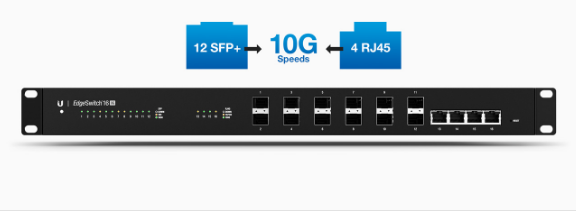
The Ubiquiti EdgeSwitch 16 XG is UBNT’s new 16 port 10Gb switch.
It boasts:
I’ve heard nothing but good things about the existing edgeswitches, and this one is shaping up to be no different.
It looks like all ports are line rate, which is really expected from any switch manufactured these days.
Oddly enough they mention some routing capabilities: Static routing(up to 16 routes), Policy Based Routing, 15 routed interfaces. I don’t believe they have any numbers for routing, so just pretend like this isn’t an option. Looking at the rest of the features, this is truly a switch, and should be treated as such.
They also mention this can act as a DHCP server…which is also very strange to me. I’m sure there is a use case somewhere for it. Specs show 128 pools with a max of 2048 leases, which would be a fair sized property.
It also has:
I’m excited to see these guys hit the market. This will, by a WIDE margin, be the cheapest 10Gb switch I’ve seen hit the market. I can’t wait to get my hands on one to test with. At this price point, I won’t be surprised to see it hit the core of some enterprise, not just provider networks.
At some point in the future I’d love to see multichassis link aggregation(MLAG). This gives you the ability to do a LAG from a single device(like a router) to two different switches. The router has no idea that he is connecting to multiple chassis, yet allows for failure of either switch to be absorbed.
Let me know your thoughts in the comments…will you guys be putting these to work?
***Warning*** Greg has mic issues, so please forgive the quality. It will be repaired for the next show
Greg, Alex, Tomas, Mike(only for a moment unfortunately), and guest Quincy talk today about:
Purchasing old towers
Mikrotik changes(the good and the bad)
Mikrotik CapsMan
To see the video please visit the link below!!!
I had the opportunity to play with a Siemon LC connector recently and found it quite clever.
Not only does it have an innovative way to remove a connector by pulling on the connector body, but it also allows you to simply and quickly swap transmit and receive on the connector without having to break it apart. Have a quick look at the following video.
Greg, Mike, Tomas, and Tom talk about Unimus, Tomas’ new backup application for Network equipment. It’s dead simple, so you no longer have an excuse NOT to have proper backups for your infrastructure. It’s the “up and running in less than 10 minutes” system!
To see the video please visit the link below!!!