

This week we have Greg, Justin Miller, Mike talk with special guest Scott Brown from Pixel Factory. Scott has been involved in peering and internet exchanges for years now and shares a little of his knowledge on the subject.
*We had an odd video issue, so enjoy the video slide show(we’ll have it licked before the next recording)*
**Sponsors**
Sonar.software
Cambium ePMP Bundle
Kwikbit.com
Towercoverage.com
**/Sponsors**
This week we talk about:
NG911 Pains
60 GHz\Terragraph
Mikrotik BGP Notification Script Correction
Mikrotik Proxmox CHR Script
Mikrotik REST API in V7
Solarwinds breach
pixel factory Scott Brown
DE-CIX Chicago\Richmond
Hollow fiber
Small vs large DC experiences
Photo collection management
Here’s the video:(if you don’t see it, hit refresh)

This week we have Greg, Justin Miller, Mike talk with special guest Scott Brown from Pixel Factory. Scott has been involved in peering and internet exchanges for years now and shares a little of his knowledge on the subject.
*We had an odd video issue, so enjoy the video slide show(we’ll have it licked before the next recording)*
**Sponsors**
Sonar.software
Cambium ePMP Bundle
Kwikbit.com
Towercoverage.com
**/Sponsors**
This week we talk about:
NG911 Pains
60 GHz\Terragraph
Mikrotik BGP Notification Script Correction
Mikrotik Proxmox CHR Script
Mikrotik REST API in V7
Solarwinds breach
pixel factory Scott Brown
DE-CIX Chicago\Richmond
Hollow fiber
Small vs large DC experiences
Photo collection management
Here’s the video:(if you don’t see it, hit refresh)

Clustering the AAP is a good idea for multiple reasons: it allows some HA(a node can die and you can keep operating), you are able to distribute the load across multiple control nodes, and you can connect to any of them via the standard GUI.
A cluster setup follows the standard install process, but with a couple of tweaks.
The standard install process has you download the latest AAP files, but in my case I’m sticking with 3.7.4.
Here’s the standard cluster install documentation, but it leaves out a couple of key points.
Install Process
I’ve spun up 4 updated Centos7 boxes for my quick lab demo. 10.1.12.81, 82, and 83 are my clustered user interface servers(Tower), and 84 is my standalone database server.
Here’s my modified inventory file for this setup:
1 2 3 4 5 6 7 8 9 10 11 12 13 14 15 16 17 18 | [tower] # localhost ansible_connection=local 10.1.12.81 ansible_user=root ansible_password=MyPassword 10.1.12.82 ansible_user=root ansible_password=MyPassword 10.1.12.83 ansible_user=root ansible_password=MyPassword [database] 10.1.12.84 ansible_user=root ansible_password=MyPassword [all:vars] admin_password='redhat' pg_host='10.1.12.84' pg_port='5432' pg_database='awx' pg_username='awx' pg_password='redhat' |
I’m actually running this via the 10.1.12.81 server, which begs the question, why did I comment out the localhost entry and instead put it in just like the other hosts? Well, the answer is because it threw an error when I did that LOL. So even if you are doing the install from one of the servers, add it to the list just like the others.
Notice that I also specified a user and password for the process to SSH to the hosts with. If I run the script now it will fail with the following message:
1 2 3 4 | TASK [awx_install : Fail play when grabbing SECRET_KEY fails] ******************************************************************************************
fatal: [10.1.12.81]: FAILED! => {"changed": false, "msg": "Failed to read /etc/tower/SECRET_KEY from primary tower node"}
fatal: [10.1.12.82]: FAILED! => {"changed": false, "msg": "Failed to read /etc/tower/SECRET_KEY from primary tower node"}
fatal: [10.1.12.83]: FAILED! => {"changed": false, "msg": "Failed to read /etc/tower/SECRET_KEY from primary tower node"} |
The quick fix for this is to type “ssh 10.1.12.81”, then accept the SSH key. Then ssh to 82, 83, and 84.
Now once I run the ./setup.sh script it completes juuuuust fine.
1 2 3 4 5 | PLAY RECAP ********************************************************************************************************************************************* 10.1.12.81 : ok=136 changed=77 unreachable=0 failed=0 skipped=66 rescued=0 ignored=2 10.1.12.82 : ok=124 changed=69 unreachable=0 failed=0 skipped=63 rescued=0 ignored=1 10.1.12.83 : ok=124 changed=69 unreachable=0 failed=0 skipped=63 rescued=0 ignored=1 10.1.12.84 : ok=55 changed=23 unreachable=0 failed=0 skipped=35 rescued=0 ignored=0 |
Conclusion
Setting up a cluster really isn’t that bad, and it can profit you a lot of resiliency and additional flexibility in your environment. Let me know if you have any questions or comments.
Thanks and happy clustering.
This week we have Greg, and Mike cozying up for a fireside chat.
**Sponsors**
Sonar.software
Cambium ePMP Bundle
Kwikbit.com
Towercoverage.com
**/Sponsors**
This week we talk about:
MTK 6.47.8 – *) arm – improved system stability;
MTK beta 7.1b3
!) added new experimental wireless package “wifiwave2” for ARM devices with more than 256 MB of RAM (CLI only);
*) chr – added support for SR-IOV
!) added support for “Cake” and “FQ_Codel” type queues;
*) routing – added “route”, “routing table”, “route rules” and BGP configuration migration from RouterOS v6 after upgrade;
How are you alerting on MikroTik BGP session status changes?
Big Mikrotik throughput? Hardware to support it?
Fortinet sd-wan orchestration – if thrift is here
DC move: no access, interfaces not provisioned, routing not working, servers full of brick dust, BCM not functioning…but we got there in the end LOL. What would I have thought if I wasn’t a former employee?
Mike’s DC with pricing listed
What methods are you using to ensure your customers are being good Netizens?
pickleballs for xmas
shure mic or xmas
robot vacuum
Here’s the video:(if you don’t see it, hit refresh)
This week we have Greg, and Mike cozying up for a fireside chat.
**Sponsors**
Sonar.software
Cambium ePMP Bundle
Kwikbit.com
Towercoverage.com
**/Sponsors**
This week we talk about:
MTK 6.47.8 – *) arm – improved system stability;
MTK beta 7.1b3
!) added new experimental wireless package “wifiwave2” for ARM devices with more than 256 MB of RAM (CLI only);
*) chr – added support for SR-IOV
!) added support for “Cake” and “FQ_Codel” type queues;
*) routing – added “route”, “routing table”, “route rules” and BGP configuration migration from RouterOS v6 after upgrade;
How are you alerting on MikroTik BGP session status changes?
Big Mikrotik throughput? Hardware to support it?
Fortinet sd-wan orchestration – if thrift is here
DC move: no access, interfaces not provisioned, routing not working, servers full of brick dust, BCM not functioning…but we got there in the end LOL. What would I have thought if I wasn’t a former employee?
Mike’s DC with pricing listed
What methods are you using to ensure your customers are being good Netizens?
pickleballs for xmas
shure mic or xmas
robot vacuum
Here’s the video:(if you don’t see it, hit refresh)
Infoblox DDI is a very powerful/popular DHCP, DNS, and IPAM system used by enterprises world wide. I’ve heard customer after customer talk about it, so I thought I would take a look at adding it to my demos. Fortunately it’s super simple to sign up for a demo copy that will give you a repeatable 60 day trial. I grabbed the VMWare OVA file, told it to boot, gave it an IP, and then I was up and running.
Demo Video
Github Repo
Building My Lab
My first playbook connects to the DDI server and builds the simple environment:
First things first; you are going to see this section in use with all of the nios modules and plugins:
1 2 3 4 5 | vars:
nios_provider:
host: "{{ ddi_host }}"
username: "{{ ddi_username }}"
password: "{{ ddi_password }}" |
This is the connection information used to access the DDI server. I’m passing the info into the playbook at runtime via a custom credential in Tower(my favorite way to store and use special credentials).
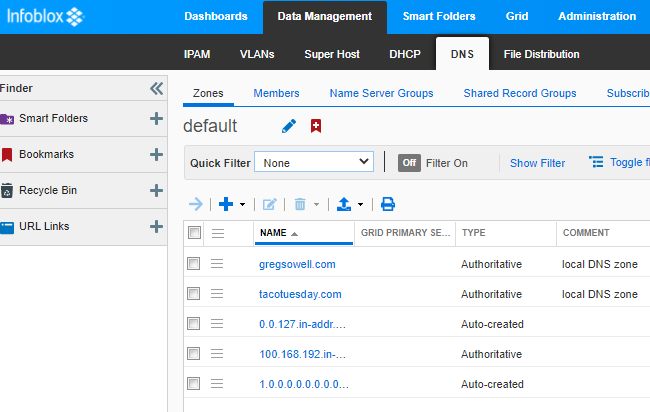
The first task utilizes a loop to create two forward zones, gregsowell.com and tacotuesday.com.
I then loop again and using the zone type of IPv4 create a couple of reverse IPv4 zones.
Both of these were dead simple to use.
Add Hosts And Next IPs
This playbook will take a hostname, and in this case the variable name for it is test_host and add it to DDI.
The second important variable is the subnet_range; this is the subnet the host’s IP address will be sourced from.
The first task will use the lookup host record plugin and check to see if the host entry already exists.
If it does exist, it will print out a message that says as much.
If the host entry doesn’t exist, the following tasks will use the “nios_next_ip” lookup plugin and create a host entry. The lookup plugin is really clever; it will query the subnet and return the next available IP in the range for use in your automation. You can then take that IP and assign it to your host.
Provision VMs Utilizing DDI Next IP
This playbook utilizes VMWare templates to provision new hosts. I’ve coupled the following playbook with surveys in my tower instance to clone VMWare templates to create new hosts, then use DDI to assign an IP to the host, and finally add the host entry which goes into the IPAM and DNS forward and reverse entries.
This playbook checks to see if the IP address is set to “ddi”; if it is, then it indicates DDI should do the lookup/creation of the IP.
It will first delete any old host entries for the specified host name, then it does a lookup for a new IP, it applies that IP to the VMWare template, and last it will register the host entry in DDI.
Conclusion
This brought a lot of pieces together for me(how automating server creation could tie all of the IP/DNS pieces together). I like the interface, it’s power, and it’s simplicity. Please leave me any questions or comments.
Thanks and happy automating.
This week we have Greg, Nick A, Justin Miller, and Mike for a rather chill conversation.
**Sponsors**
Sonar.software
Cambium ePMP Bundle
Kwikbit.com
Towercoverage.com
**/Sponsors**
This week we talk about:
Valve Index VR Rig
ubnt 60ghz air fiber
Netonix 14 port PoE with 2 SFP+ ports
Posed by anonomous in the Slack; why does MTK stick with the 2.5 dBi antennas wen everyone 4-6 on their AC kit?
Hitting VirusTotals API with automation
Downdector wants ~$24k a year for access to their API…yeah, nope!
What happened on Youtubes Nov 11th global outage…I can’t find the answer? Nanog list had post of “blocked by CORs policy.”
DDoS with Fastnetmon mitigation.
wiki.js.org
My first outage since leaving the old job(fiber cut at my MDU).
Incident response
Here’s the video:(if you don’t see it, hit refresh)