


This week we have Greg and Mike doing their Starsky and Hutch impression…or maybe it’s Thelma and Louise 
**Sponsors**
Sonar.software
Kwikbit.com
Towercoverage.com
**/Sponsors**
This week we talk about:
Linktech cloud mikrotik control
ROSv7 stable for the Chateau products. Sounds like routing is the show stopper right now
How to tell if a remote switch loses power
It is so refreshing to work with a vendor that cares/helps.
Mike ranting about vendors treating beta as production, abandonware, incomplete products\services, etc.
Here’s the video:(if you don’t see it, hit refresh)

I was recently asking my teammate Jimmy(who’s brilliant BTW) what he shows as a compelling demo with Ansible and Windows, and he he had a more complicated version of what I’m about to show(most of his stuff is over the top(with Stallone)).
Video Demo
Playbook
Playbooks for Windows found here.
In this simple demo I’ll connect to my VMWare Vcenter and perform a snapshot with memory.
I have a next step of putting the system in maintenance mode in monitoring to stop notifications.
I’ll then perform a simple Windows update in a Windows server using WinRM. I do this from inside of a block. I do this because a block has some special functionality as in “rescue” and “always”.
I use a rescue block which is called if anything inside of the block fails. So, if my Windows host fails to update for any reason, it will call this rescue block which will rollback the snapshot to undue any potential damage caused.
My following step is to delete the snapshot(at this point I’m done with it). Take note that since I did a memory snapshot also, the machine will cleanly keep running. If you fail to add the memory option and restore the VM will restore in a stopped state.
The last step would be to remove the host from maintenance mode.
Conclusion
This isn’t something that’s relegated to just updates. Any potentially failure inducing operation could be protected against using this. This simple method could be used to protect anything, often even appliances could take advantage.
Let me know if you have any questions or comments.
Thanks and happy automating.
This week we have Greg, Chad Wachs, and new face Colin Zapalac talking about talking.
**Sponsors**
Sonar.software
Kwikbit.com
Towercoverage.com
**/Sponsors**
This week we talk about:
Active vs PON deployment – why am I seeing so much active fiber being deployed? What am I missing?
Brownfield deployment options when you don’t have aerial ability
It’s getting HOT. Anyone protecting gear from heat? Routers hitting 220F internal temps
Colin: DDB enclosures with Pentair AC, mini-splits in MDF’s
Preview Siklu Terragraph test?
Peltier cooling
MTK newsletter 100
Colin’s automated edgeswitch update script
batfish
Mikrotik Knots tracking
Here’s the video:(if you don’t see it, hit refresh)
This week we have Greg, Chad Wachs, and new face Colin Zapalac talking about talking.
**Sponsors**
Sonar.software
Kwikbit.com
Towercoverage.com
**/Sponsors**
This week we talk about:
Active vs PON deployment – why am I seeing so much active fiber being deployed? What am I missing?
Brownfield deployment options when you don’t have aerial ability
It’s getting HOT. Anyone protecting gear from heat? Routers hitting 220F internal temps
Colin: DDB enclosures with Pentair AC, mini-splits in MDF’s
Preview Siklu Terragraph test?
Peltier cooling
MTK newsletter 100
Colin’s automated edgeswitch update script
batfish
Mikrotik Knots tracking
Here’s the video:(if you don’t see it, hit refresh)
This week we have Greg and Nick A. catching up after skipping an episode…did anyone notice?
**Sponsors**
Sonar.software
Kwikbit.com
Towercoverage.com
**/Sponsors**
This week we talk about:
L2 isolation addition – Mikrotik introduced Local Proxy Arp – MTK responds to all ARP requests on an interface.
Using a switch to connect border/core services – eases transition, can be complicated with direct BGP peer flaps.
UBNT 60LR? Carrier Ethernet Drop
Cisco EEM for flapping a port
AutoIT for scripting
GPEN21 as FTTH CPE
OEO kit
FS switches for FTTH project
Here’s the video:(if you don’t see it, hit refresh)
This week we have Greg and Nick A. catching up after skipping an episode…did anyone notice?
**Sponsors**
Sonar.software
Kwikbit.com
Towercoverage.com
**/Sponsors**
This week we talk about:
L2 isolation addition – Mikrotik introduced Local Proxy Arp – MTK responds to all ARP requests on an interface.
Using a switch to connect border/core services – eases transition, can be complicated with direct BGP peer flaps.
UBNT 60LR? Carrier Ethernet Drop
Cisco EEM for flapping a port
AutoIT for scripting
GPEN21 as FTTH CPE
OEO kit
FS switches for FTTH project
Here’s the video:(if you don’t see it, hit refresh)
Cyberark Central Credential provider has some killer features with one of particular interest(for this article that is) which is the ability to have a different password per host. It seems pretty bonkers to think you can maintain separate passwords for 100 different devices, but CA does it, and not only that, it has facilities that can change the password each time it’s used *galaxy brain*.
This post demonstrates how to do a per-host lookup inside the Tower/Control environment.
Demo Video
Cyberark Setup
In my CA environment I have a safe named “test” that I’m using.
In the root folder of test I’ve created three password objects, each for the switches I plan to connect to. Each object is named the same as the inventory hostname from ansible: sw1, sw2, sw3.
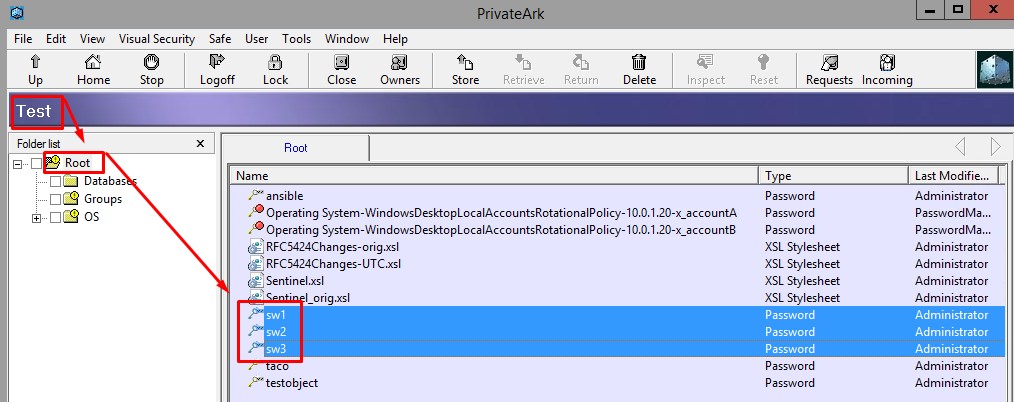
All of the connection info along with the walkthrough is in my CA AIM blog post.
Playbook
I’m first going to say that given my drothers I would have used the Cyberark lookup plugin, but you have to have the Central Credential software installed on your server, and I’ve yet to get a copy of it. The playbook to make that work is here:
I instead used the cyberark collection that contains the cyberark_credential module, which can be found here.
Looking at the playbook above I have a variable that I’ve setup(and I’m replacing at runtime from my tower environment) named ca_base_url.
The other cyberark info is just presented plain text, but notice that I had to supply my cert and key. This is why I wanted to use the lookup plugin, so I wouldn’t have to put a link to the cert/key anytime I wanted to use it…but I digress.
The real magic happens in the query section of the first task:
1 | query: "Safe=test;Object={{ inventory_hostname }}" |
I’m connecting to the safe named “test” and for each host in the current run I’m pulling the password object that is named the same as their “inventory_name”. Having these two match is how I key the two items together(the host to their respective password).
I next set the ansible_password variable for each host based on the password I just looked up. Now, when ansible subsequently attempts to connect to any inventory host it will do so via the password that was just pulled.
Make note that any task that either did the lookup or set the variables also had the no_log option set to true so that the passwords are never exposed in the logging.
Conclusion
The Cyberark per-host lookup process isn’t too difficult, it’s just a slight mind-shift from what we are used to. If you have any questions or comments, please let me know. Thanks and happy automating!