

This week we have Greg, Greg, and a little more Greg. It’s a solo cast due to time constraints…wasn’t my idea, file it with the complaint department.
**Sponsors**
Sonar.Software
Towercoverage.com
**/Sponsors**
This week we talk about:
Datacenter xconnects; what I’ve learned over the years.
Troubleshooting issues on CRS3XX sucks
^^^Not to mention lack of switch config exporting
What are your travel essentials
Here’s the video:(if you don’t see it, hit refresh)

This week we have Greg, Tommy C, and Nick A. just over here feeling the love LOL.
**Sponsors**
Sonar.Software
Towercoverage.com
**/Sponsors**
This week we talk about:
WISPAPalooza,
Mike got an award for TBW’s contribution to the WISP industry.
big note, No Ubiquiti
Mimosa A6x & C6x
Tarana – Several people say it’s good stuff
Everyone has 60GHz gear, even Adtran…
Mikrotik netfiber9 – 5 SFP and 4 SFP+. Barrel jack and poe in for power
Finally stable(ish) v7?
Here’s the video:(if you don’t see it, hit refresh)

So not only will I be provisioning Windows and Linux VMs, but I’ll also be adding them to my inventory, doing post provision hardening, and doing a system scan.
Having said that, I’m going to be doing “art of the possible” on hardening and scanning as those will absolutely vary based on your needs, so it’s more fill in the blank for those.
Video Demo
Playbooks
All of my playbooks can be found here.
I’m going to start with the main provisioning playbook(found here):
1 2 3 4 5 6 7 8 9 10 11 12 13 14 15 16 17 18 19 20 21 22 23 24 25 26 27 28 29 30 31 32 33 34 35 36 37 38 39 40 41 42 43 44 45 46 47 48 49 50 51 52 53 54 55 56 57 58 59 60 61 62 63 64 65 66 67 68 69 70 71 72 73 74 75 76 77 78 79 80 81 82 83 84 85 86 87 88 89 90 91 | ---
- name: Create Azure VM
hosts: localhost
gather_facts: false
vars:
os_type: windows
# os_type: linux
inventory_name: Azure Manual
vm_name: ZZZTestDeploy1
# inject this at run time via custom credential
vm_password: "{{ gen1_pword }}"
vm_username: "{{ gen1_user }}"
RG_name: cloud-shell-storage-eastus
virtual_network: testvn001
sec_group: secgroup001
subnet_name: subnet001
tasks:
- name: Create resource group
azure_rm_resourcegroup:
name: "{{ RG_name }}"
location: eastus
tags:
- never
- setup
- name: Create virtual network
azure_rm_virtualnetwork:
resource_group: "{{ RG_name }}"
name: "{{ virtual_network }}"
address_prefixes: "172.29.0.0/16"
tags:
- never
- setup
- name: Add subnet
azure_rm_subnet:
resource_group: "{{ RG_name }}"
name: "{{ subnet_name }}"
address_prefix: "172.29.0.0/24"
virtual_network: "{{ virtual_network }}"
tags:
- never
- setup
# - name: Create public IP address
# azure_rm_publicipaddress:
# resource_group: myResourceGroup
# allocation_method: Static
# name: "{{ vm_name }}_PublicIP"
# register: output_ip_address
# - name: Public IP of VM
# debug:
# msg: "The public IP is {{ output_ip_address.state.ip_address }}."
- name: Create security group that allows SSH/HTTP/HTTPS
azure_rm_securitygroup:
resource_group: "{{ RG_name }}"
name: "{{ sec_group }}"
rules:
- name: SSH
protocol: Tcp
destination_port_range: 22
access: Allow
priority: 101
direction: Inbound
- name: HTTP
protocol: Tcp
destination_port_range: 80
access: Allow
priority: 102
direction: Inbound
- name: HTTPS
protocol: Tcp
destination_port_range: 443
access: Allow
priority: 103
direction: Inbound
- name: WINRM
protocol: Tcp
destination_port_range: 5986
access: Allow
priority: 104
direction: Inbound
- name: WINRMUN
protocol: Tcp
destination_port_range: 5985
access: Allow
priority: 105
direction: Inbound
tags:
- never
- setup |
^^above is the first half of the playbook. You’ll notice that I setup some variables that will be used in the following section. I already have an azure environment setup, so I’m just duplicating those configs here. There’s also a vm_username and vm_password that are important. These are the admin credentials that will be added to the VM once it’s stood up. These I’m injecting in at run time via a custom credential, that way they are never stored plaintext in my repo…which is particularly important since it’s all public.
Once I reach the tasks section I do all of the azure setup, but again I’ve already got this in place. The good part of these modules is that they are idempotent, which means these can run and they will see that the state exists as expected, so no changes are made; they will simply show “ok”. It does, however, take a little bit of additional time to perform these steps, so I choose to add tags of “never” and “setup”. The never tag is a special one that says “don’t run this task unless the never tag or another tag on this task is invoked at run time.”
The completion of the play book is as follows:
1 2 3 4 5 6 7 8 9 10 11 12 13 14 15 16 17 18 19 20 21 22 23 24 25 26 27 28 29 30 31 32 33 34 35 36 37 38 39 40 41 42 43 44 45 46 47 48 49 50 51 52 53 54 55 56 57 58 59 60 61 62 63 64 65 66 67 68 69 70 71 72 73 74 75 76 77 78 79 80 81 82 83 | - name: Create virtual network interface card
azure_rm_networkinterface:
resource_group: "{{ RG_name }}"
name: "{{ vm_name }}_NIC"
virtual_network: "{{ virtual_network }}"
subnet: "{{ subnet_name }}"
# public_ip_name: "{{ vm_name }}_PublicIP"
security_group: "{{ sec_group }}"
register: vm_nic
# - name: debug vm_nic
# debug:
# var: vm_nic
- name: Create Linux VM
when: os_type != "windows"
azure_rm_virtualmachine:
resource_group: "{{ RG_name }}"
name: "{{ vm_name }}"
vm_size: Standard_DS1_v2
admin_username: "{{ vm_username }}"
admin_password: "{{ vm_password }}"
# ssh_password_enabled: false
# ssh_public_keys:
# - path: /home/azureuser/.ssh/authorized_keys
# key_data: "<key_data>"
network_interfaces: "{{ vm_name }}_NIC"
# os_type defaults to linux, so specify windows if needed
image:
offer: CentOS
publisher: OpenLogic
sku: '7.5'
version: latest
- name: windows provision block
when: "os_type == 'windows'"
block:
- name: Create Windows VM
azure_rm_virtualmachine:
resource_group: "{{ RG_name }}"
name: "{{ vm_name }}"
vm_size: Standard_DS1_v2
admin_username: "{{ vm_username }}"
admin_password: "{{ vm_password }}"
# ssh_password_enabled: false
# ssh_public_keys:
# - path: /home/azureuser/.ssh/authorized_keys
# key_data: "<key_data>"
network_interfaces: "{{ vm_name }}_NIC"
# os_type defaults to linux, so specify windows if needed
os_type: Windows
open_ports:
- 3389
- 5986
- 5985
- 22
image:
offer: WindowsServer
publisher: MicrosoftWindowsServer
sku: 2019-Datacenter
version: latest
- name: Create VM script extension to enable HTTPS WinRM listener
azure_rm_virtualmachineextension:
name: winrm-extension
resource_group: "{{ RG_name }}"
virtual_machine_name: "{{ vm_name }}"
publisher: Microsoft.Compute
virtual_machine_extension_type: CustomScriptExtension
type_handler_version: '1.9'
settings: '{"fileUris": ["https://raw.githubusercontent.com/ansible/ansible/devel/examples/scripts/ConfigureRemotingForAnsible.ps1"],"commandToExecute": "powershell -ExecutionPolicy Unrestricted -File ConfigureRemotingForAnsible.ps1"}'
# settings: '{"fileUris": ["https://raw.githubusercontent.com/gregsowell/ansible-windows/main/install-ssh.ps1"],"commandToExecute": "powershell -ExecutionPolicy Unrestricted -File install-ssh.ps1"}'
auto_upgrade_minor_version: true
tags:
- winrm
- name: Add the host to AAP inventory
awx.awx.host:
name: "{{ vm_name }}"
description: "Added via ansible"
inventory: "{{ inventory_name }}"
state: present
variables:
ansible_host: "{{ vm_nic.state.ip_configuration.private_ip_address }}" |
^^There’s a bit to unpack here, but it’s mostly straight forward.
First I “create virtual network interface card” that shares a name with the VM being created. This will ensure all of the VMs NICs follow a naming convention that matches with the VM itself.
Next is the “Create Linux VM” task. I have a conditional statement in place that checks to see that I’m not provisioning a “windows” machine, and if this is the case it will spin up a CentOS box real quick like.
After that, and most interesting, is provisioning a Windows machine. Here I’m using a block along with a conditional. This means that when the os_type is set to “windows” it will attempt to perform all options within the block. First it cranks up a 2019-datacenter windows server. Note that in this task I have to add the os_type: windows variable; that’s because by default Azure assumes you want to provision a Linux VM(I found this telling). I also specify a few additional ports that should be opened in the devices firewall; all of them allowing remote admin access.
Next in the block is a custom script that will enable winRM so that AAP is able to remote into the device. Using the virtualmachineextension module, AAP will connect to Azure and instruct it to run this script on the server, which causes it to download and execute the winRM script.
Last it connects to the local AAP server and adds the newly created host to the Azure inventory using the IP reported from the creation of the VM NIC.
Since I’m really trying to deploy windows VMs(linux is easy LOL), I’ll add some additional playbooks for hardening and scanning. Here’s my hardening playbook, which is really just art of the possible:
1 2 3 4 5 6 7 8 9 10 11 12 13 14 15 16 17 18 19 20 | ---
- name: Harden windows hosts in Azure
hosts: "{{ vm_name }}"
gather_facts: false
vars:
tasks:
- name: block for windows hardening
when: os_type == "windows"
block:
- name: win shell to ping self
win_shell: ping 127.0.0.1
register: ping_res
- name: print ping results
debug:
var: ping_res.stdout_lines
- name: import task 1
debug:
msg: windows block 1 for hardening |
I’m running this as part of a workflow in AAP, so I’ve already supplied vm_name to the system, which is why it uses that as the hosts entry. If you recall from the previous playbook, the very last task was to add the host to my inventory for this very purpose.
Next, I’m doublechecking that this is a Windows machine being provisioned and if it is I’ll do my hardening. Again, in this I’m just showing that configuration is possible as I wanted to keep it as generic as possible. I suspect there would be firewall updates and password complexity requirements set; really whatever the corporate policy dictates. I’m simply using the win_shell module to execute a ping to the local host, and then displaying the results.
Last in my workflow will be performing some compliance checking actions like running a system scan. Again, fill in the blanks based on your local policies.
AAP Configuration
I make good use of custom credentials by supplying various username/password combos directly into my playbook. I won’t rehash that as I’ve written about it here.
I also added a lot of good Azure connection info here in a previous post about Satellite/Azure/AAP.
Here’s a quick shot of my workflow:

When the workflow above is run it will first, configure the VM, then split and run win/linux hardening. The hardening guides check for OS version and only run when the proper OS is detected. Last they converge in a system scan.
I could hardcode the VM name and type to provision, but I figured it made more sense to add a survey to the workflow to allow the user to be prompted at runtime for that information:

I suppose something else of interest is when I put the host into an inventory AAP won’t know how to connect unless I help it out. I could add the windows devices to a windows group and linux hosts to a linux group, and then specify settings accordingly to those groups. Version 2 of this will likely add some group work, but for now I just placed it directly on the inventory itself:
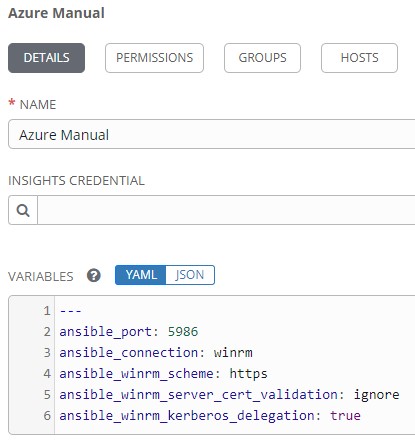
1 2 3 4 5 6 | --- ansible_port: 5986 ansible_connection: winrm ansible_winrm_scheme: https ansible_winrm_server_cert_validation: ignore ansible_winrm_kerberos_delegation: true |
^^These settings tell AAP how to connect to the windows VMs via WinRM.
Conclusion
None of this is earth shattering, but rather the boring foundation upon which infrastructure is built. While the topic can seem lofty, when you boil it all down, there really isn’t that many moving pieces, so I feel like the barrier to entry is actually pretty low. I’d love to see how you would modify the workflow to suit your needs, so leave me any feedback that you have.
This week we have Greg, Greg L(https://www.linkedin.com/in/glipschitz/), Chad Wachs, and Mike Hammett…and yes, Pepperidge Farm remembers.
PS: Mike’s audio is bad for a few minutes, but we fix it up pretty quick.
**Sponsors**
Sonar.Software
Towercoverage.com
**/Sponsors**
This week we talk about:
WISPAPALOOZA – Swag, LTE products
Selling phone service
Facebook outage, I didn’t get a single support call…and yes my phones are working again.
OOB mgmt methods
work from home during covid
Mtk newsletter 102
DPSK on Ruckus h500s
I had to replace more FS SFP+s in my MDU, and this time went with industrial SFPs
Got to eat lunch with Doug Eames, Colin Z. and Grumpy Old Matt in Dallas.
Here’s the video:(if you don’t see it, hit refresh)
This week we have Greg, Greg L(https://www.linkedin.com/in/glipschitz/), Chad Wachs, and Mike Hammett…and yes, Pepperidge Farm remembers.
PS: Mike’s audio is bad for a few minutes, but we fix it up pretty quick.
**Sponsors**
Sonar.Software
Towercoverage.com
**/Sponsors**
This week we talk about:
WISPAPALOOZA – Swag, LTE products
Selling phone service
Facebook outage, I didn’t get a single support call…and yes my phones are working again.
OOB mgmt methods
work from home during covid
Mtk newsletter 102
DPSK on Ruckus h500s
I had to replace more FS SFP+s in my MDU, and this time went with industrial SFPs
Got to eat lunch with Doug Eames, Colin Z. and Grumpy Old Matt in Dallas.
Here’s the video:(if you don’t see it, hit refresh)
This week we have Greg and Nick A. with this week’s after school special.
**Sponsors**
Sonar.Software
Towercoverage.com
**/Sponsors**
This week we talk about:
Equipment lead times – seems slow, but moving.
voip.ms ddos
voip.ms ddos possibly extortion attack
bandwidth.com saw hours of outage today too…another victim?
Cloud based mitigation on services
Is your Mikrotik part of Meris botnet
Meris breakdown
Zach made a meric check playbook for ansible
Thrift reports some instability in the beta MLAG, but expects it to be sorted
6.49.rc1 *) winbox – added “interface-speed-100G” LED type to “System/LEDs” menu;
Here’s the video:(if you don’t see it, hit refresh)
This week we have Greg and Nick A. with this week’s after school special.
**Sponsors**
Sonar.Software
Towercoverage.com
**/Sponsors**
This week we talk about:
Equipment lead times – seems slow, but moving.
voip.ms ddos
voip.ms ddos possibly extortion attack
bandwidth.com saw hours of outage today too…another victim?
Cloud based mitigation on services
Is your Mikrotik part of Meris botnet
Meris breakdown
Zach made a meric check playbook for ansible
Thrift reports some instability in the beta MLAG, but expects it to be sorted
6.49.rc1 *) winbox – added “interface-speed-100G” LED type to “System/LEDs” menu;
Here’s the video:(if you don’t see it, hit refresh)