

This is the article relating to my 2011 MUM presentation.
I was trying to think of something fun and different for this year’s MUM, so I came up with rogue access point detection/mitigation. The project surrounds having a Mikrotik probe connect to any open access points it can find. It then trys to access a resource that exists only inside your LAN. In this case the resource is a special web page. It then alerts you and allows you to track them down. Watch the video below for the full presentation: This is an iframe from the tiktube page.
Config Files
ignore-list.txt
1 2 | #MAC address~SSID #00:12:17:DA:09:2G~linksys |
This file lists the MAC address followed by the ~ symbol and finally the SSID.
This holds any APs that should be ignored from processing.
probes.txt
1 | #192.168.88.1~user1~user1 |
This file holds the connection information for our Mikrotik probes we will be testing with.
IP address of probe, then ~, then username, then ~ and finally password.
settings.txt
1 2 3 4 5 6 7 8 9 10 11 12 | #duraction to run the scan for in seconds 15 #IP of server to pull the rogue page from 192.168.1.2 #path to the rogue file /index.html /rogue.html #email address to send alerts to. Some smtp servers require <> around email addresses. [email protected] #IP of mail server to relay through 127.0.0.1 #port of smtp server 25 |
This file holds the general settings for the program.
Duration is how long the probe will scan for open APs.
“IP of server to pull” is the IP address of the “internal only” web server we will be trying to get the HML page from.
“path” will be the full http path to append to the IP address listed above.
[email protected] should be replaced by your email address.
Relay server IP should be that of your mail relay.
Port is the SMTP port to use.
Binary
Here’s the download of the compiled exe, source, and config files: MTKRogue.zip (1690 downloads)
Source
Current Source code:
1 2 3 4 5 6 7 8 9 10 11 12 13 14 15 16 17 18 19 20 21 22 23 24 25 26 27 28 29 30 31 32 33 34 35 36 37 38 39 40 41 42 43 44 45 46 47 48 49 50 51 52 53 54 55 56 57 58 59 60 61 62 63 64 65 66 67 68 69 70 71 72 73 74 75 76 77 78 79 80 81 82 83 84 85 86 87 88 89 90 91 92 93 94 95 96 97 98 99 100 101 102 103 104 105 106 107 108 109 110 111 112 113 114 115 116 117 118 119 120 121 122 123 124 125 126 127 128 129 130 131 132 133 134 135 136 137 138 139 140 141 142 143 144 145 146 147 148 149 150 151 152 153 154 155 156 157 158 159 160 161 162 163 164 165 166 167 168 169 170 171 172 173 174 175 176 177 178 179 180 181 182 183 184 185 186 187 188 189 190 191 192 193 194 195 196 197 198 199 200 201 202 203 204 205 206 207 208 209 210 211 212 213 214 215 216 217 218 219 220 221 222 223 224 225 226 227 228 229 230 231 232 233 234 235 236 237 238 239 240 241 242 243 244 245 246 247 248 249 250 251 252 253 254 255 256 257 258 259 260 261 262 263 264 265 266 267 268 269 270 271 272 273 274 275 276 277 278 279 280 281 282 283 284 285 286 287 288 289 290 291 292 293 | #Region ;**** Directives created by AutoIt3Wrapper_GUI ****
#AutoIt3Wrapper_UseX64=n
#EndRegion ;**** Directives created by AutoIt3Wrapper_GUI ****
#cs ----------------------------------------------------------------------------
AutoIt Version: 3.3.6.1
Author: Greg Sowell
Script Function:
This script controls putty to connect to mikrotik APs and check for rogues on your network.
#ce ----------------------------------------------------------------------------
; Script Start - Add your code below here
;autioit includes
#include <file.au3>
#include <Array.au3>
;open the settings file
Dim $aSettings
If Not _FileReadToArray(@ScriptDir & "\settings.txt",$aSettings) Then
MsgBox(4096,"Error", " Error reading log to Array error:" & @error)
Exit
EndIf
;set variables
$Duration = $aSettings[2];duration to do the scan
$serverIP = $aSettings[4];ip address of the webserver
$serverPathFile = $aSettings[6] & """";path to check file
$EmailAddress = $aSettings[8];email address variable
$szIPADDRESS = $aSettings[10];;email server IP address
$nPORT = $aSettings[12];25 ;email server port
$ClipContents = "" ;setup clipboard variable
$waiting = 0 ;variable for time checking
$HostIP = ""
$userN = ""
$passW = ""
$ssid = ""
$mac = ""
$puttyPID = ""
;#cs ----------------------------------------------------------------------------
;open hosts file
Dim $aHosts
If Not _FileReadToArray(@ScriptDir & "\probes.txt",$aHosts) Then
MsgBox(4096,"Error", " Error reading log to Array error:" & @error)
Exit
EndIf
;main program loop. Loop through each host.
for $h = 1 to $aHosts[0]
if StringInStr("---" & $aHosts[$h],"#") < 1 Then
;not a comment, lets go!!!
;run the host processing function
_RunHost()
EndIf
Next
;host processing function
Func _RunHost()
$HostIP = StringLeft($aHosts[$h],StringInStr($aHosts[$h],"~") - 1);pull host IP
$userN = StringMid($aHosts[$h],StringInStr($aHosts[$h],"~") + 1,StringInStr($aHosts[$h],"~",0,2) - StringInStr($aHosts[$h],"~") - 1);Host username
$passW =StringMid($aHosts[$h],StringInStr($aHosts[$h],"~",0,2) + 1);host password
$puttyPID = run(@ScriptDir & "\putty.exe -ssh -l " & $userN & " -pw " & $passW & " " & $HostIP);open putty
;do a check cycle of 10 seconds for putty to start
while $waiting <> 10
If ProcessExists("putty.exe") Then
$waiting = 100
ExitLoop
EndIf
sleep(1000)
WEnd
;check if putty process was found
if $waiting = 10 Then
MsgBox(0,"putty didn't run", "Sorry, but putty didn't open")
Exit
EndIf
_SleepTime(5,"putty");wait 5 seconds for putty to connect and settle
;activate putty
WinActivate($HostIP & " - PuTTY")
WinWaitActive($HostIP & " - PuTTY")
;send the command to start the scan
Send("/int wire scan wlan1 duration=" & $Duration & @CRLF)
_SleepTime($Duration + 2,"scan command") ;sleep for 2 seconds longer than duration
_CopyAll() ;copy everything to clipboard
;delete the existing temp file
FileDelete(@ScriptDir & "\cliptemp.txt")
;write clip contents to a temp file
$AClip = FileOpen(@ScriptDir & "\cliptemp.txt", 1)
; Check if file opened for writing OK
If $AClip = -1 Then
MsgBox(0, "Error", "Unable to open file.")
Exit
EndIf
FileWriteLine($AClip, $ClipContents)
FileClose($AClip)
;#ce ----------------------------------------------------------------------------
;read contents of temp file into an array
Dim $AClipCont
If Not _FileReadToArray(@ScriptDir & "\cliptemp.txt",$AClipCont) Then
MsgBox(4096,"Error", " Error reading log to Array error:" & @error)
Exit
EndIf
local $aSSIDs[1];setup ssid array
$aSSIDs[0] = 0;set the counter to 0
$StartProc = 0 ;processing variable
;start processing the array
For $x = 1 to $AClipCont[0] - 2
;check if the ssid section has been found
if $StartProc == 1 Then
; we need to process the lines here
$BldStrng = StringLeft($AClipCont[$x],3) & "~"
$BldStrng = $BldStrng & stringmid($AClipCont[$x],7,17) & "~"
$BldStrng = $BldStrng & stringmid($AClipCont[$x],25,10)
_ArrayAdd($aSSIDs,$BldStrng)
$aSSIDs[0] = $aSSIDs[0] + 1
EndIf
;find the line just before scan starts
if StringInStr($AClipCont[$x],"address") > 0 Then
if StringInStr($AClipCont[$x],"ssid") > 0 Then
;we have found the start - start processing after this
$StartProc = 1
EndIf
EndIf
Next
;pull ignore list
Dim $aIgnores
If Not _FileReadToArray(@ScriptDir & "\ignore-list.txt",$aIgnores) Then
MsgBox(4096,"Error", " Error reading log to Array error:" & @error)
Exit
EndIf
;start of ssid checking
for $x = 1 to $aSSIDs[0]
$mode = StringLeft($aSSIDs[$x],4);section that has the AP mode
$ssid = stringstripws(StringRight($aSSIDs[$x],10),2);sets ssid
$mac = StringMid($aSSIDs[$x],5,17);sets mac
$ignoreIt = 0;sets ignore variable
for $y = 1 to $aIgnores[0];loops through ignore file seeinf if we have a match
$Imac = StringLeft($aIgnores[$y],17);sets ignore mac
$Issid = stringstripws(StringMid($aIgnores[$y],StringInStr($aIgnores[$y],"~") + 1),2);sets ignore ssid
if $mac == $Imac and $ssid == $Issid Then;checks for ignore
;this is an ignore match, set it to ignore
$ignoreIt = 1
EndIf
Next
if StringInStr($mode,"p") > 0 Then ;check if AP is protected
;this is protected
Elseif $ignoreIt == 0 Then
;not protected and not ignored, try it out
_ConnectToAP();connect to ap and test
EndIf
Next
;kill putty process we started
ProcessClose($puttyPID)
EndFunc
;--------------------------begin functions
func _ConnectToAP()
;connect to AP
;activate putty
WinActivate($HostIP & " - PuTTY")
WinWaitActive($HostIP & " - PuTTY")
send("/int wire set 0 ssid=" & StringStripWS($ssid,2) & @CRLF);set the ssid
_SleepTime(15,"ssid command")
Send("/ip dhcp-client release 0" & @CRLF);reset client dhcp
_SleepTime(10,"dhcp client to pull ip")
send('/tool fetch url="http://' & $serverIP & $serverPathFile & @CRLF);attempt to pull the rogue file
_SleepTime(10,"rogue file to download")
;check status of download
send("q" & @CRLF);send a q for quit just in case the DL needs to be cancled
sleep(1000)
_CopyAll()
if StringInStr($ClipContents,"status: finished") > 0 then
;OMG, we found a rogue...PANIC!
;send email and then ping
ToolTip("Rogue detected and email/ping started",0,0)
_SendEmail()
Send("/ping " & $serverIP & @CRLF);start pinging our rogue server
Exit;kill the program
EndIf
EndFunc
Func _SendEmail()
Local $ConnectedSocket, $szData
; Start The TCP Services
;==============================================
TCPStartup()
; Initialize a variable to represent a connection
;==============================================
$ConnectedSocket = -1
;Attempt to connect to SERVER at its IP and PORT 33891
;=======================================================
$ConnectedSocket = TCPConnect($szIPADDRESS, $nPORT)
; If there is an error... show it
If @error Then
MsgBox(4112, "Error", "TCPConnect failed with WSA error: " & @error)
; If there is no error loop an inputbox for data
; to send to the SERVER.
Else
TCPSend($ConnectedSocket, "ehlo rogue-check.com" & @crlf)
sleep(1500)
TCPSend($ConnectedSocket, "helo rogue-check.com" & @crlf)
sleep(1500)
TCPSend($ConnectedSocket, "mail from:[email protected]" & @crlf)
sleep(1500)
TCPSend($ConnectedSocket, "rcpt to:" & $EmailAddress & @crlf)
sleep(1500)
TCPSend($ConnectedSocket, "data" & @crlf)
sleep(1500)
TCPSend($ConnectedSocket, "Subject:Rogue Detected on " & $HostIP & @crlf & @crlf)
sleep(1500)
TCPSend($ConnectedSocket, "Rogue detected from "& $HostIP & ", SSID is " & $ssid & "and MAC of AP is " & $mac & ". Getem!" & @crlf)
sleep(1500)
TCPSend($ConnectedSocket, "." & @crlf)
sleep(1000)
TCPCloseSocket($ConnectedSocket)
EndIf
EndFunc
Func _CopyAll()
$ClipContents = "";clear our variable
;activate putty
WinActivate($HostIP & " - PuTTY")
WinWaitActive($HostIP & " - PuTTY")
$PuttyPos = WinGetPos($HostIP & " - PuTTY") ;get current position of putty window
;start the copy process
MouseClick("left",$PuttyPos[0] + 15, $PuttyPos[1] + 15,1,0)
Send("{DOWN}")
Sleep(150)
Send("{DOWN}")
Sleep(150)
Send("{DOWN}")
Sleep(150)
Send("{DOWN}")
Sleep(150)
Send("{DOWN}")
Sleep(150)
Send("{DOWN}")
Sleep(150)
Send("{DOWN}")
Sleep(150)
Send("{DOWN}")
Sleep(150)
Send("{DOWN}")
Sleep(150)
Send("{DOWN}")
Sleep(150)
Send("{DOWN}")
Sleep(150)
Send("{DOWN}")
Sleep(150)
Send("{DOWN}")
Sleep(150)
Send("{ENTER}")
$ClipContents = clipget();populate our clip variable
EndFunc
Func _SleepTime($SleepTime,$DescMsg)
;this function just does the sleep timer
while $SleepTime <> 0
ToolTip("Sleeping " & $SleepTime & " more seconds for " & $DescMsg,0,0)
$SleepTime = $SleepTime - 1
Sleep(1000)
WEnd
EndFunc |
*********************************************************
UPDATE
*********************************************************
I’ve always wanted to be on wikipedia…so I took this opportunity to add myself.

The meet and greet was great! I saw a lot of the same faces, and plenty of new. Janis (not sales) is doing well and hopefully we get some more time to bullchive later. Normands is also doing well, aparently Oliver is almost 3, congrats 😉 Tons of my non Latvian peeps are here and thriving.
ROS is simple with Sergejs.
How to do some standard configuration.
Some CPE configs.
Demo of webfig.
Ability to edit skin.
The skin can be coppied and pasted.(be sure to also copy/paste your user groups).
Works via browser on any device.
You can change any menu’s description.(instead of saying wireless you can have the tab say “click this dummy”).
ROS Wireless with Uldis
Some great quick reference slides of bridging options and settings. I’ll post the link to the slides as soon as I find them.
802.11n frame aggregation can’t be used with WDS.
Throughput drops from 220Mb to 160Mb with WDS.
Dual pol 2 chain implementation recommended 25db of separation.
Use AES instead of TKIP encryption as it will give you increased throughput.
I’ll be the guy wearing (and giving out) these snazzy RBNYAN shirts 😉

It’s well known that Cisco wants to sell you a 512MB compact flash card for $150. So, what’s so special about the Cisco branded ones? They have a Cisco sticker on them.

One fancy sticker there
I just bought a couple of 2GB compact flash cards, formatted them in my router, and they work like a champ!
No flash card inserted:
Router#show flash
%Error show flash: (No device available)
Router#
Insert new 2GB flash:
Flash card inserted in flash. Reading filesystem on the device…
Wait for the completion message before accessing device
Filesystem read completed in flash.
Device in flash available for use
*Oct 6 19:59:18.411: %FILESYS-5-CF: CompactFlash inserted
Router#show flash
%Error show flash: (Invalid DOS media or no media in slot)
Time to format the drive with the good old format command:
Router#format ?
flash: Filesystem to be formatted
Router#format flash:
Format operation may take a while. Continue? [confirm]
Format operation will destroy all data in “flash:”. Continue? [confirm]
Format: Drive communication & 1st Sector Write OK…
Writing Monlib sectors.
…………………………………………………………………………………………………………
Monlib write complete
….
Format: All system sectors written. OK…
Format: Total sectors in formatted partition: 3905809
Format: Total bytes in formatted partition: 1999774208
Format: Operation completed successfully.
Format of flash complete
Now to check the drive:
Router#show flash
No files on device
1999437824 bytes available (0 bytes used)
It takes a whole 2 minutes to take a standard off the shelf compact flash drive and prepare it for use with your routers. Now you can super size your order with all the money you will save!
Normally when you try and update your wordpress it will prompt you for “connection information”. It wants FTP or FTPS information.
If you make the /wp-content folder writable by the webserver, it won’t prompt you anymore and will pull updates directly.
Generally the apache service is run by user apache. You can change ownership of the folder to apache and then add writability.
1 2 | chown -R apache wp-content chmod -R 751 wp-content |
Back to being lazy, your welcome.
In actuality this is syncing one zimbra to another. You can do this for replication, not just disaster recovery. This is on a centos box.
1 2 3 4 5 6 7 8 9 10 11 | #install rsync if you don't have it yum install rsync #sync our local files from a remote server 1.1.1.1 rsync -avzr -e ssh [email protected]:/opt/zimbra /opt/ #change ownership of the new files chown –R zimbra:zimbra /opt/zimbra #have zimbra fix all permissions on the files. /opt/zimbra/libexec/zmfixperms --extended |
If you want a line to ring X amount of time before it rolls elsewhere you need to edit two things.
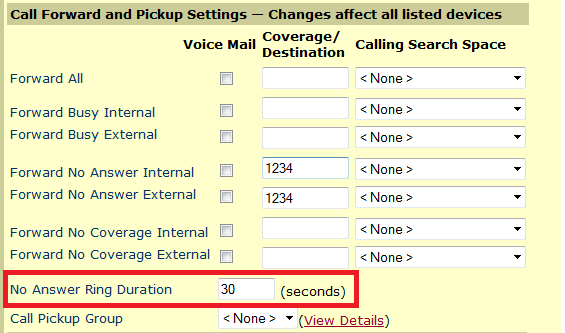
Add the extension to send the caller to in “Forward no Answer” section.
You then need to edit the “No Answer Ring Duration” section. This entry sets the number of seconds to wait before transferring. This defaults to 12 seconds which almost gets you 3 rings. I usually want right at 6 rings, so I set the timer for 30 seconds.