

The Brothers WISP 122 – Automation Platform Vs Scripts, Edge-core Heavy Iron, Expensive But Worth It
This week we have Greg and Miller have some real talk LOL.
**Sponsors**
Sonar.software
Cambium ePMP Bundle
Kwikbit.com
Towercoverage.com
**/Sponsors**
This week we talk about:
Our very own Simon Green on a wirelive podcast.
ServiceNow uses Ansible to create VMs in VMWare
Ansible creates certificates and applies them to F5 load balancers
Zach created a remote poller install via Ansible
Edge-core AS5916-54XKS; 48 SFP/SFP+ and 6 QSFP28 ports for around $20K
Ubiquiti selling direct in Mexico
Business wise: what do you want to be known for “Expensive, but worth it”.
Here’s the video:(if you don’t see it, hit refresh)

The Brothers WISP 122 – Automation Platform Vs Scripts, Edge-core Heavy Iron, Expensive But Worth It
This week we have Greg and Miller have some real talk LOL.
**Sponsors**
Sonar.software
Cambium ePMP Bundle
Kwikbit.com
Towercoverage.com
**/Sponsors**
This week we talk about:
Our very own Simon Green on a wirelive podcast.
ServiceNow uses Ansible to create VMs in VMWare
Ansible creates certificates and applies them to F5 load balancers
Zach created a remote poller install via Ansible
Edge-core AS5916-54XKS; 48 SFP/SFP+ and 6 QSFP28 ports for around $20K
Ubiquiti selling direct in Mexico
Business wise: what do you want to be known for “Expensive, but worth it”.
Here’s the video:(if you don’t see it, hit refresh)
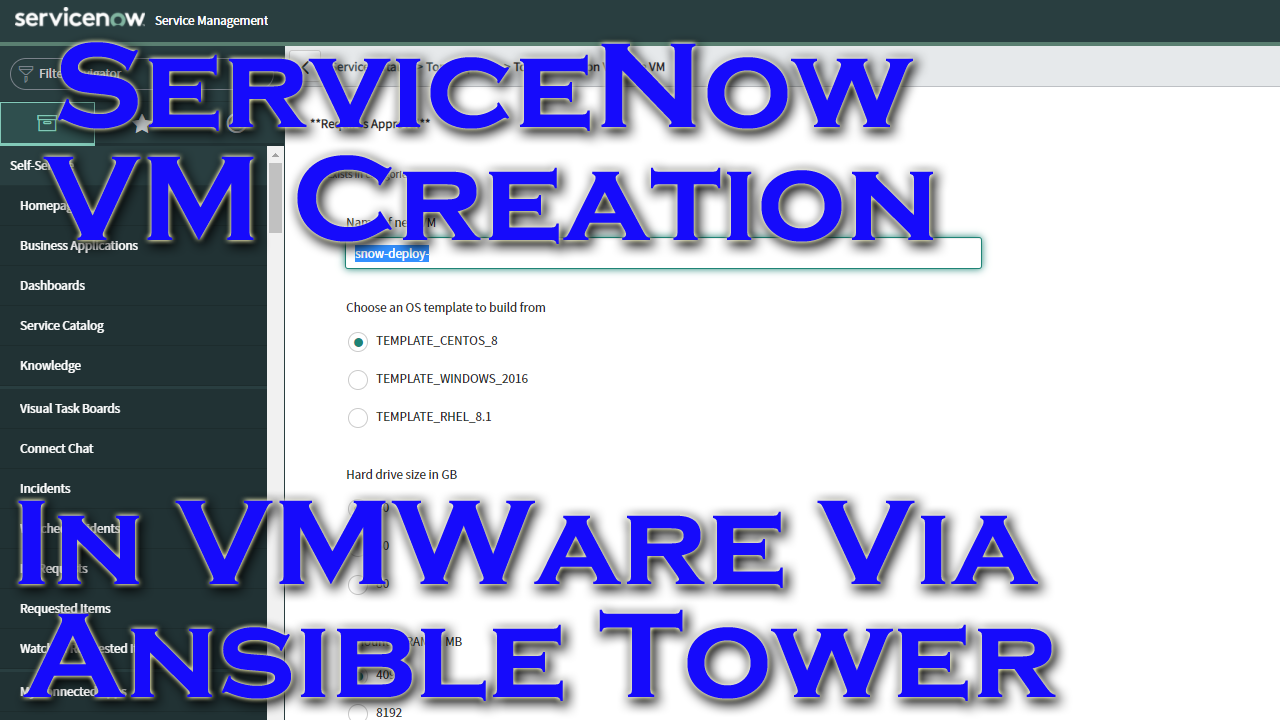
This is a quick demo that orders a server in ServiceNow, then once approved it calls Ansible Tower which then provisions VMs in VMWare.
This is built using this ansible blog post that shows how to tie together ServiceNow and Ansible Tower.
Video Demo
ServiceNow
First thing to do is create the OAuth connection between tower and SNOW. I’ve spoken about this in a previous post and it is outlined in the blog post linked above, so I won’t rehash that. Once OAuth is solid I create an outbound rest message:
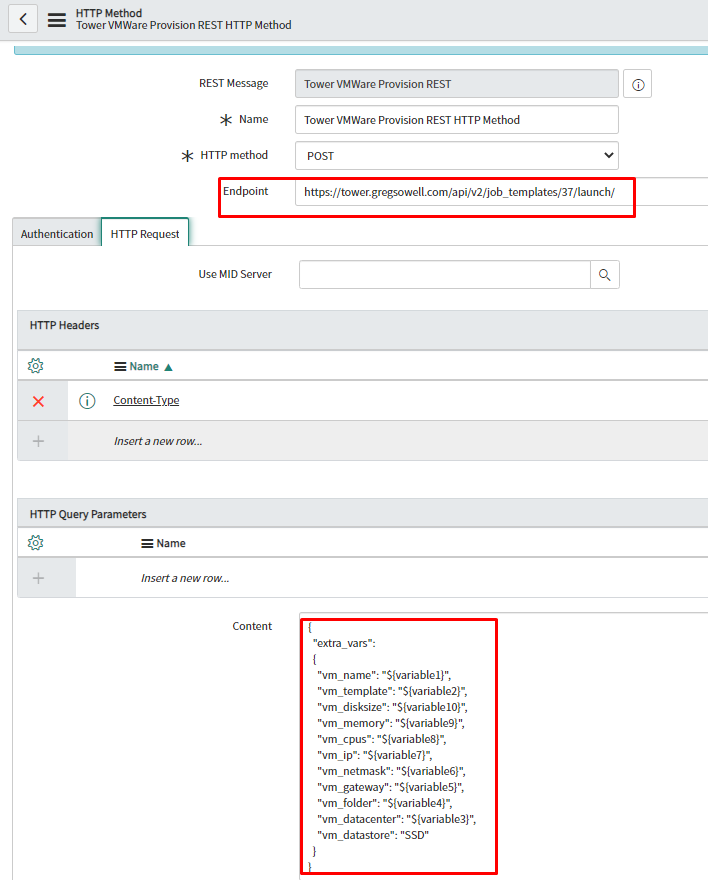
Two things of note are the endpoint I’m calling which is the launch URL for my tower job and the HTTP query parameters(HQP). The HQP is where I map variables learned in SNOW to variables I will pass to tower. So variable1 is passed to tower as vm_name.
1 2 3 4 5 6 7 8 9 10 11 12 13 14 15 16 | {
"extra_vars":
{
"vm_name": "${variable1}",
"vm_template": "${variable2}",
"vm_disksize": "${variable10}",
"vm_memory": "${variable9}",
"vm_cpus": "${variable8}",
"vm_ip": "${variable7}",
"vm_netmask": "${variable6}",
"vm_gateway": "${variable5}",
"vm_folder": "${variable4}",
"vm_datacenter": "${variable3}",
"vm_datastore": "SSD"
}
} |
I’ll now create a workflow that ties an approval and my custom script together:
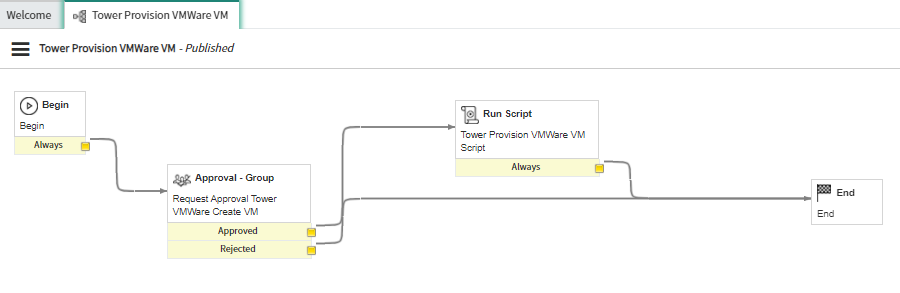
Here’s a peek at my approval workflow item:
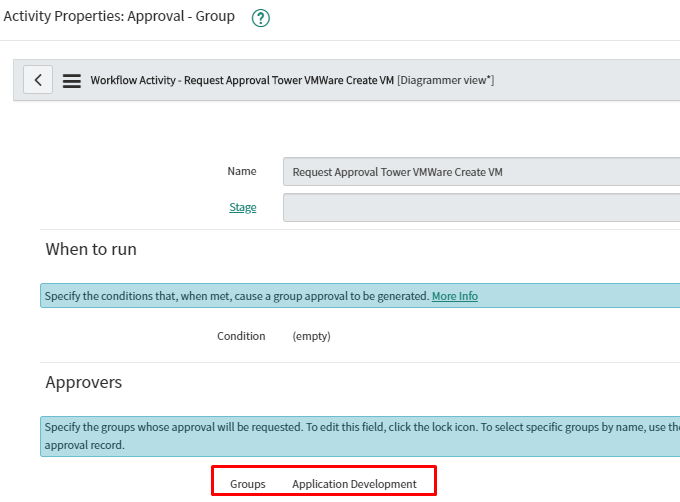
As you can see I selected a group to approve these requests through.
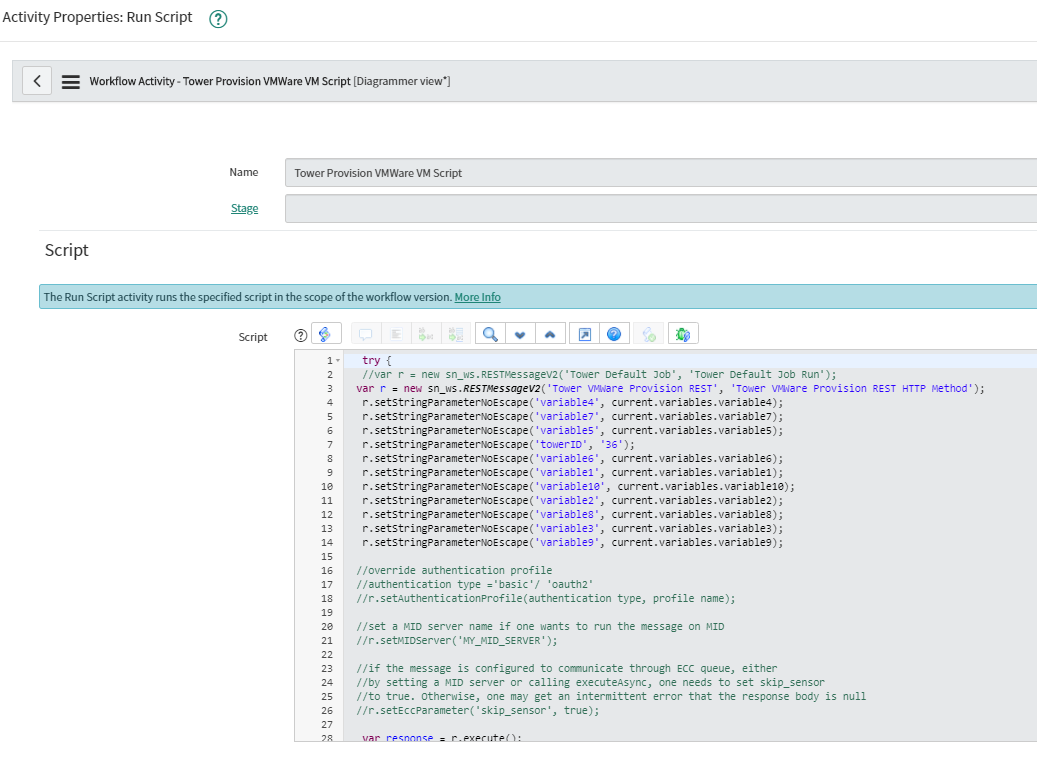
My custom script looks like the following:
1 2 3 4 5 6 7 8 9 10 11 12 13 14 15 16 17 18 19 20 21 22 23 24 25 26 27 28 29 30 31 32 33 | try {
//var r = new sn_ws.RESTMessageV2('Tower Default Job', 'Tower Default Job Run');
var r = new sn_ws.RESTMessageV2('Tower VMWare Provision REST', 'Tower VMWare Provision REST HTTP Method');
r.setStringParameterNoEscape('variable4', current.variables.variable4);
r.setStringParameterNoEscape('variable7', current.variables.variable7);
r.setStringParameterNoEscape('variable5', current.variables.variable5);
r.setStringParameterNoEscape('variable6', current.variables.variable6);
r.setStringParameterNoEscape('variable1', current.variables.variable1);
r.setStringParameterNoEscape('variable10', current.variables.variable10);
r.setStringParameterNoEscape('variable2', current.variables.variable2);
r.setStringParameterNoEscape('variable8', current.variables.variable8);
r.setStringParameterNoEscape('variable3', current.variables.variable3);
r.setStringParameterNoEscape('variable9', current.variables.variable9);
//override authentication profile
//authentication type ='basic'/ 'oauth2'
//r.setAuthenticationProfile(authentication type, profile name);
//set a MID server name if one wants to run the message on MID
//r.setMIDServer('MY_MID_SERVER');
//if the message is configured to communicate through ECC queue, either
//by setting a MID server or calling executeAsync, one needs to set skip_sensor
//to true. Otherwise, one may get an intermittent error that the response body is null
//r.setEccParameter('skip_sensor', true);
var response = r.execute();
var responseBody = response.getBody();
var httpStatus = response.getStatusCode();
}
catch(ex) {
var message = ex.message;
} |
I just went with generic variable names and mapped them from the self service item over.
My service item points towards the workflow:
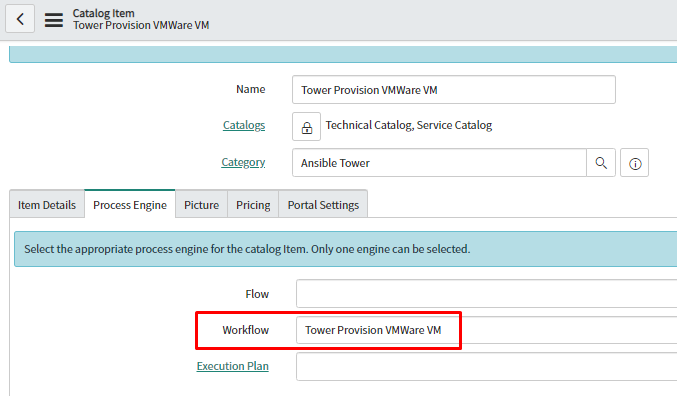
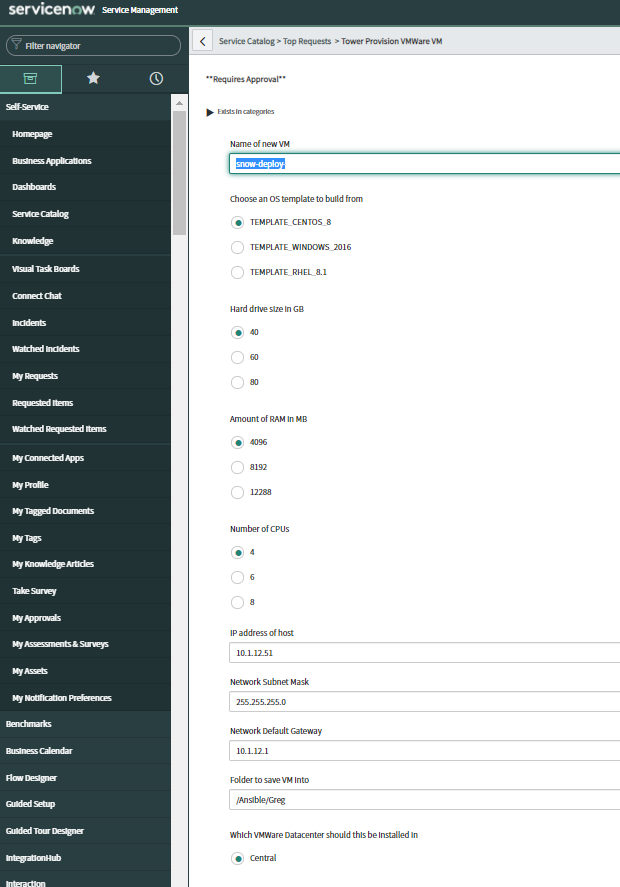
I then created simple input and multiple choice variables with all of my options:
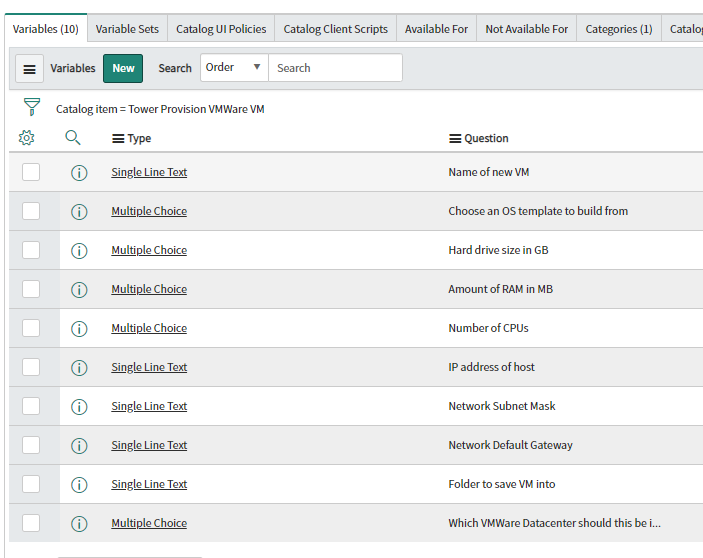
Once I choose the item from the service catalog I’m presented with a simple form to complete:
Ansible Tower
My VMWare github repo is here.
The playbook in use here is this one:
Taking a look at the playbook, you can see that I’m using the vmware_guest module.
This module is surprisingly easy to use. This module requires the connection info for the VCenter server(IP, username, password). I use a custom credential to supply this at run time(this way I can keep the info secure.
After that I pass the template I want the VM created from, then standard info like HD size, how much RAM, how many CPUs, etc.
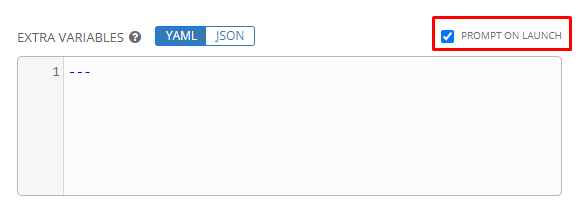
When you add the playbook to your tower, be sure to add “prompt on launch” for extra variables to that SNOW is allowed to pass variables in:
Conclusion
Once SNOW launches the job it only really takes about 1.5 minutes for Linux and about 2 minutes for Windows. The VMWare module is actually really easy to work with and is quite functional. SNOW can be a bit more finicky, but once it is working it’s not usually so bad.
Something I learned is that while you can have a tower job template use a survey and be called by SNOW, it’s likely better(at least while testing) to not use surveys. If there is a survey, then tower will only launch the job if the survey variables are all passed in at launch(which can cause you issues when trying to troubleshoot why your SNOW service orders aren’t lunching your tower jobs).
If you have any questions or comments, please let me know.
Thanks and happy automating.
This **sponsored** podcast has us talking to Vladimir Kelman(CTO Kwikbit), Travis Carter(CEO US Internet), and Justin Miller about Kwikbit’s new 60Ghz radios!
This cast we talk about:
Outdoor – 90 horizontal/40 vertical beam
128 antenna elements
1500 foot range
Adaptive resource allocation?
RSTP
Why RESTful API
Kwikbit tools?
k60x $499 2x 2.5Gb and 1Gb
k60 $299 2 Gb
LACP?
Indoor
k60i $209 3x 1Gb
500 foot range at full throughput
64 antenna array
Kwikbit Edge GUI management/link planning
non-technical install
zero touch install
GUI design tool?
Certificate based management protection
Qualcom chipsets
Up to 8 clients
Single antenna tile
Mesh-like capabilities
Manufactured in USA
Full monitoring access via SNMP and API
Kwikbit.com for more info!
Here’s the video:(if you don’t see it, hit refresh)
This **sponsored** podcast has us talking to Vladimir Kelman(CTO Kwikbit), Travis Carter(CEO US Internet), and Justin Miller about Kwikbit’s new 60Ghz radios!
This cast we talk about:
Outdoor – 90 horizontal/40 vertical beam
128 antenna elements
1500 foot range
Adaptive resource allocation?
RSTP
Why RESTful API
Kwikbit tools?
k60x $499 2x 2.5Gb and 1Gb
k60 $299 2 Gb
LACP?
Indoor
k60i $209 3x 1Gb
500 foot range at full throughput
64 antenna array
Kwikbit Edge GUI management/link planning
non-technical install
zero touch install
GUI design tool?
Certificate based management protection
Qualcom chipsets
Up to 8 clients
Single antenna tile
Mesh-like capabilities
Manufactured in USA
Full monitoring access via SNMP and API
Kwikbit.com for more info!
Here’s the video:(if you don’t see it, hit refresh)
This week we have Greg, Mike, Tommy C., and Thrift getting down with the get down.
**Sponsors**
Sonar.software
Cambium ePMP Bundle
**/Sponsors**
This week we talk about:
Ansiblefest coming this week
About RB3011 port speed mismatch on same switch and flapping with v 6.46+.
Thrift will do news corrections
CCR2004 tentatively stable on 6.48beta40 – Chad and Joe both report good stuff so far.
fq_codel & cake rumors
Netpower Lite 7R & CSS610 – A new switch chipset appears
Synology DS920+ SAN – about to plug it in LOL
Backblaze
Datacenter Tips and tricks – a newbie guide
Here’s the video:(if you don’t see it, hit refresh)
This week we have Greg, Mike, Tommy C., and Thrift getting down with the get down.
**Sponsors**
Sonar.software
Cambium ePMP Bundle
**/Sponsors**
This week we talk about:
Ansiblefest coming this week
About RB3011 port speed mismatch on same switch and flapping with v 6.46+.
Thrift will do news corrections
CCR2004 tentatively stable on 6.48beta40 – Chad and Joe both report good stuff so far.
fq_codel & cake rumors
Netpower Lite 7R & CSS610 – A new switch chipset appears
Synology DS920+ SAN – about to plug it in LOL
Backblaze
Datacenter Tips and tricks – a newbie guide
Here’s the video:(if you don’t see it, hit refresh)